

Accessing reports
Reports can be downloaded from Insights and Reports > Reports. For instance, theInvoice Items Export Only report covers most revenue and billing data.
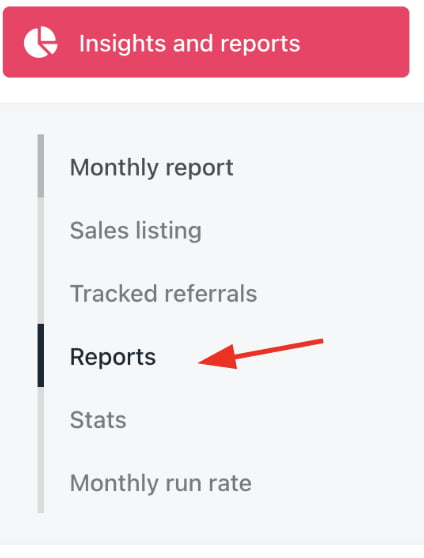
Insights and reports > Reports
Automated report delivery
You can automate daily report delivery to Amazon S3 or similar in Settings > Accounting and Reports. This will send updated database rows for integration with data lake tools like Snowflake. You can follow this guide to set up export to Amazon S3 in Upmind.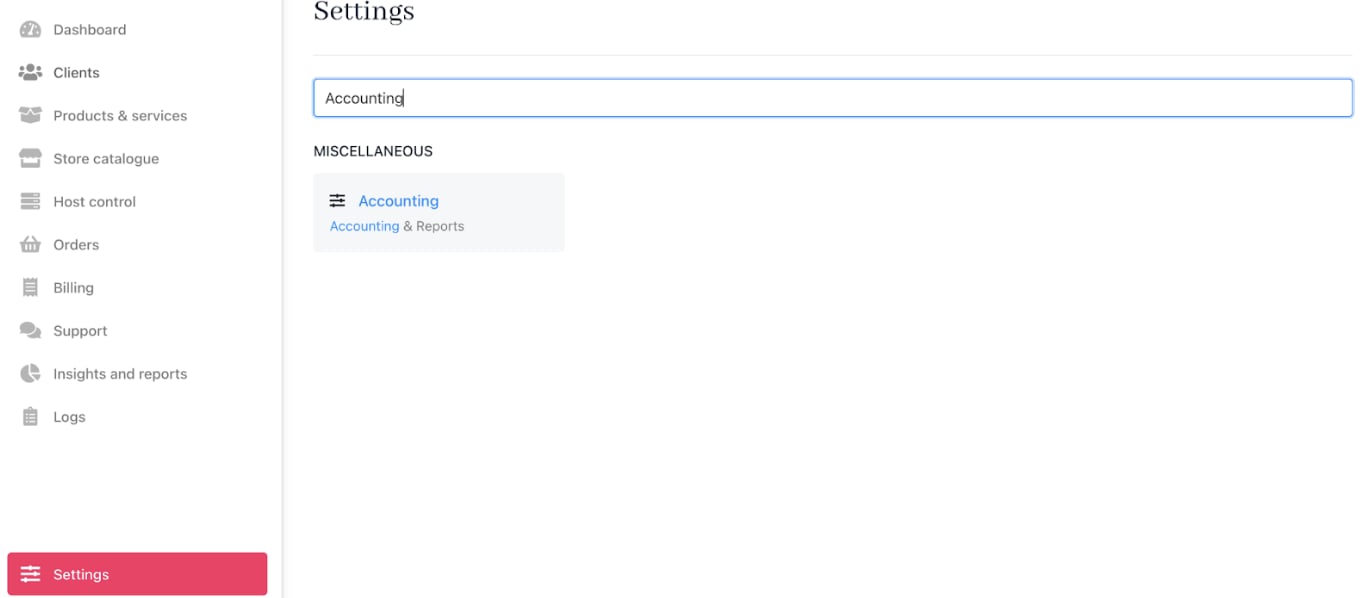
Settings > Miscellaneous > Accounting
Real-time data access for enterprise users
Enterprise customers have full API access and can also export raw data into S3 buckets for their own analysis. If they need database-level access or encounter issues, they can contact support for assistance.Key data concepts
-
Relations: Upmind stores IDs as UUID strings. Relations in tables (for example,
company idin Invoice Items Export) link to related records in other exports, such as companies. -
Currencies: Each brand has a fixed
base currencyin which all amounts are stored. Invoices or payments in other currencies include the exchange rate to the base currency. Multiple brands can have different base currencies. - Invoices and Credits: Cancelled invoices always generate credit notes, ensuring no leakage. The sum of all invoice totals equals payments received + accounts receivable + wallet balance.
- Service Periods: Contract products always have consistent service date periods. Changing due dates or adding contract products with past or future start dates may include (0) zero-value items.
- Tax: Upmind’s tax rules are flexible, summing tax per invoice item, with tax reports provided separately.
-
Product Codes: Product codes (
product code 1 and 2) are defined on individual projects per product for reporting and mapping purposes. (See How to Create Products). - Billings vs. Revenue: Billings track invoice creation dates, while revenue is apportioned over the service lifetime. Typically, the invoice creation date is used as the billing date.
Constructing revenue data
Upmind invoices are divided intoInvoice Items, with each item representing a row on the invoice containing detailed information.
Service start and end dates
Service start and end dates may be reversed in credit notes where due dates roll back.
- When start_date and end_date are null and billing cycle months = 0, replace with the invoice creation date.
-
When start_date and end_date are null and billing cycle months > 0:
- In the billings model, use the invoice create date as both start and end dates.
- In the revenue model, keep dates null as the product is unprovisioned.
Status inclusion
Invoice statuses typically include:- Paid
- Unpaid
- Allocated (credited against a paid invoice)
Currency conversions
You can report in Upmind’s base currency or convert from brand to document currency, then apply your own spot rate (example, from openexchangerates.com) to convert to your reporting currency.
Examples of currency conversions
Calculating Billings:- Convert the native net or total amount from brand currency back to the document currency using the Currency Exchange Rate.
- Convert to the reporting currency at either a spot or constant exchange rate.
- If invoice_paid_amount = 0, Payment Amount is zero.
- If Document Currency Code equals Payment Currency Code, Reported Payment Amount equals the USD (Total/Net) Amount.
-
If Payment Currency Exchange Rate = 1:
- Use invoice_paid_amount
- Payment Currency Code to convert to USD using your own exchange rates.
-
If Payment Currency Exchange Rate ≠ 1 (and not null):
- Convert the total amount from brand to document currency using the Currency Exchange Rate.
- Multiply this by the Payment Currency Exchange Rate to calculate the local amount paid.
- Convert this amount to USD using your own exchange rate.
-
If Payment Currency Exchange Rate is null:
- USD Payment Amount equals USD (Total) Amount.
Building revenue
We distinguish two revenue types:- Commercial revenue: Provides accurate periodic representation and may adjust past periods if a service is credited or unpaid.
- Accounting revenue: Does not backdate revenue.
Examples of building revenue
Commercial Revenue Calculate commercial revenue by multiplying the days in the revenue period by the day value.- Days in Month is the number of days within the month falling on or after the service start date and up to the earlier of the service end date or the month-end.
- Multiply Days in Month by Day Value for each month in the service period.
- Repeat for net and total amounts and for spot and constant exchange rate conversions.
- Calculate total earned revenue since the beginning of the service period as the product of cumulative days and Day Value.
- Subtract this from the total invoice line value to find the remaining liability yet to be delivered.
- If earlier than the invoice date month, accounting revenue is zero.
- If equal to the invoice date month, multiply cumulative days by Day Value.
- If after the invoice date month (within service period), multiply Days in Month by Day Value.
- For months on or after the invoice date, calculate earned revenue since the beginning of the service period as cumulative days times Day Value.
- Subtract this value from the invoice line total to find the remaining deferred revenue.
- For months before the invoice date, deferred revenue is zero.
- Repeat for net, total, spot, and constant conversions.
Payments
The Payments table aggregates daily data from the Payments export, with rows representing each month a customer has a new transaction type, product, and date combination. ForKPIs, convert the Payment Amount using the Currency Exchange Rate from the Payments Export to get the local transaction amount. Then, multiply this local amount by the local exchange rate associated with the Currency Code to convert it to the reporting currency:
- For spot rates, use the transaction date from the table.
- For constant rates, use today’s date.
Tracking customer status
Customer status can be tracked using the invoice items table based on active invoice presence and timing.Accounting in transition
When importing to Upmind, only invoices generated within Upmind are reported, so historic invoices can be imported as legacy data but serve only as customer metadata. For accounting, it’s essential to clear any unpaid historical invoices from old systems. Upmind allows mapping of contract products and clients to external services using both animport ID and an external ID for reporting integration.