

- Time — 45 minutes
- Difficulty — Advanced
- An active Upmind account with API access.
- An existing frontend application or a defined plan for your UI shell.
- Solid working knowledge of Vue 3 and the Composition API.
- Familiarity with state management concepts (XState knowledge is helpful but not required).
- A read-through of Understanding the Cart Architecture to understand how the headless layer fits into the broader stack.
- A read-through of Using the Decision Guide to confirm that headless is the right approach for your team.
- Access to Upmind API Documentation for reference during integration.
- Sandbox credentials for testing payments and order flows.
When to choose this approach
You should consider a headless checkout when:- You already operate an established frontend or application UI that you want to extend, not replace.
- Checkout needs to be deeply embedded into an existing product or onboarding flow.
- Maintaining UX consistency across your app, marketing surfaces, and billing experience is critical.
- Your purchase flow requires custom steps, branching logic, or non-standard sequencing.
- You want to reuse the same commerce logic across web, mobile apps, or internal tools.
Architecture overview
A headless checkout combines Upmind’s logic layer with your own UI, optionally supported by Client Vue as an application shell. This separation allows teams to iterate on experience without touching core commerce behaviour. At a high level:- Your frontend defines layout, styling, and user interaction.
- Headless Upmind composables manage commerce state and business logic.
- XState orchestrates complex flows in a deterministic way.
- Upmind APIs persist products, pricing, baskets, payments, and orders.
Simplified architecture diagram
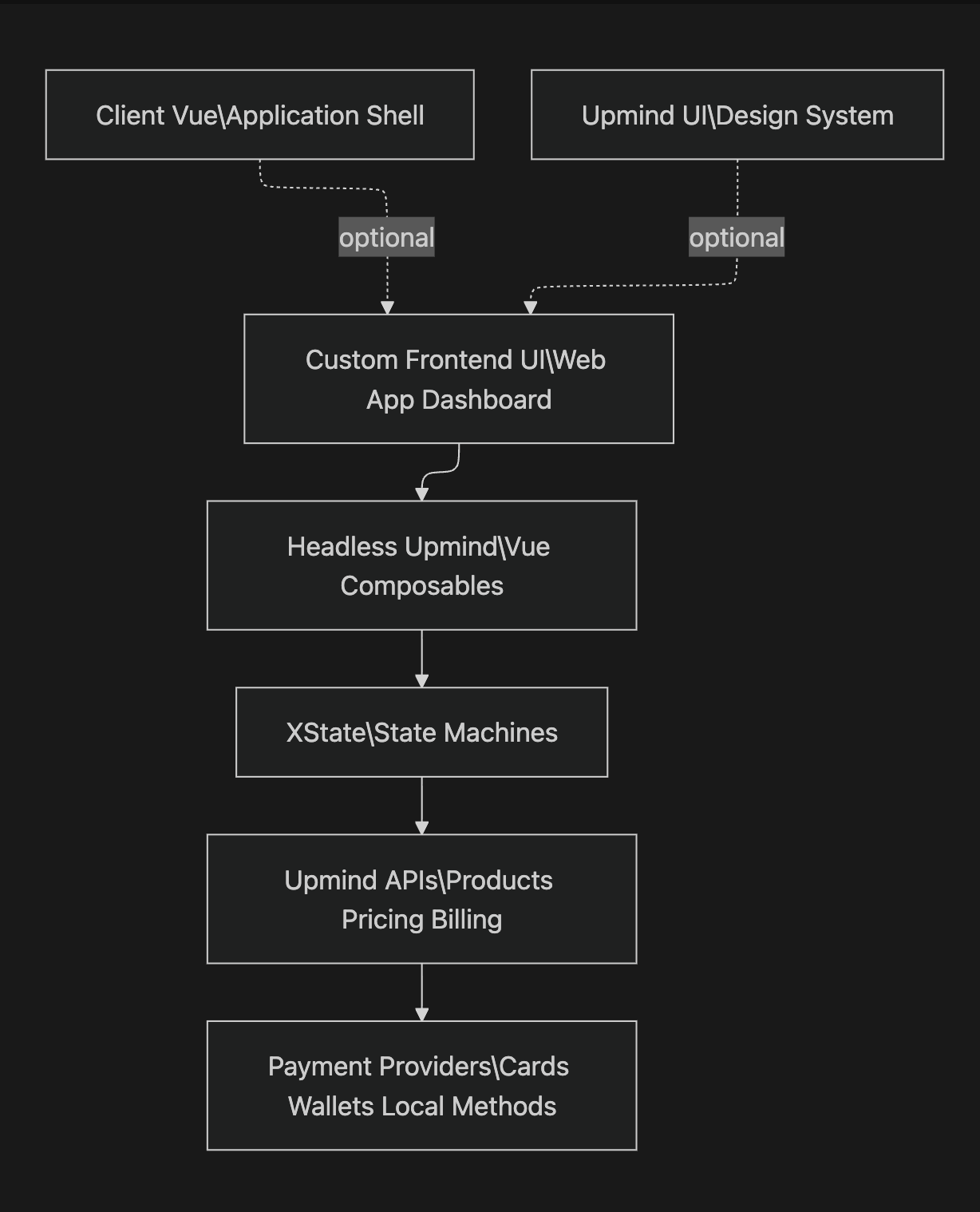
How Headless, UI, and Client Vue relate
These three layers are often confused, so it’s important to separate their roles clearly. These layers are often confused, but they serve very different purposes. Headless defines what happens, your UI defines how it feels, and Client Vue optionally provides structure to accelerate development. Separating these concerns keeps systems maintainable as complexity grows, especially when multiple teams or platforms are involved.Headless Upmind (Logic layer)
Headless Upmind is a collection of Vue 3 composables that encapsulate commerce behaviour and state management. These composables act as the primary interface between your UI and the Upmind platform. It handles:- Basket lifecycle management.
- Pricing and discount application.
- Subscription rules and renewals.
- Tax calculation.
- Payment sequencing.
- Error handling and retries.
JavaScript Example: A single user action may trigger multiple coordinated API calls behind the scenes, all executed safely and consistently.
XState (Orchestration engine)
XState operates beneath the composables and enforces deterministic flow control. It ensures that checkout behaviour progresses through valid, predictable states. It manages transitions such as:- Empty > Configuring
- Configuring > Validating
- Validating > Processing Payment
- Processing > Converting
- Converting > Success or Error
- Fewer edge-case bugs caused by race conditions or invalid state.
- Predictable flow behaviour across environments.
- Clear extension points for analytics, logging, or custom side effects.
Client Vue (Application shell)
Client Vue is a collection of complex, pre-built UI organisms and layout templates commonly required by cart and checkout experiences. It provides reusable structure and interaction patterns without enforcing pages, routing, or flows. Client Vue is optional, but especially valuable for teams building larger SPAs. It provides:- A clear separation where authentication, guards, and flow control are defined by headless flows and implemented in your app.
- Shared layout structure, such as headers, footers, and persistent UI regions.
- Dependency wiring that connects UI components cleanly to headless logic.
- Use Client Vue end-to-end as your application shell.
- Adopt only selected organisms or layouts.
- Ignore it entirely and bring your own custom shell.
Upmind UI (Design system)
Upmind UI is a lightweight design system composed of atomic and molecular components that form the foundation for more complex UI organisms. It is designed to balance consistency with flexibility. Upmind UI is the internal component library used by the Cart and Portal, and reflects established interaction patterns across the Upmind ecosystem. While not required for headless implementations, it can accelerate development and alignment. It provides:- Accessible, production-ready components.
- Token-based theming for colours, spacing, and typography.
- Consistent interaction patterns across commerce surfaces.
High-level setup steps
A typical headless implementation follows a clear, phased path that separates application structure, commerce logic, and user experience. This allows teams to move methodically from foundation to launch while keeping responsibilities cleanly divided:- Decide your shell: Start by choosing where and how the checkout UI will live. This decision defines how headless commerce integrates into your product.
- If you already have an existing frontend, headless checkout is added directly into your current application, preserving established navigation, branding, and UX patterns.
- If you use the Client Vue starter, you gain a pre-wired application shell with reusable layouts and organisms, accelerating development while still allowing full customisation.
- For mobile or embedded apps, the headless layer integrates into native or hybrid environments, enabling shared commerce logic across platforms.
- Install Headless Upmind: Once the shell is defined, install the headless logic layer that powers commerce behavior.
- Add the Headless Upmind composables package to your project.
- This Vue.js composables package encapsulates shared logic, state access, and API interactions, making it usable across Client Vue and fully custom components.
- Configure API credentials, select the appropriate environment (sandbox or live), and verify connectivity to Upmind services.
- Define your flow: Next, model the buyer journey your checkout will follow.
- Define how users discover and select products.
- Specify any configuration steps required before purchase.
- Design the basket review and validation experience.
- Determine when and how payment is triggered.
- Define confirmation, success, and error handling behaviour.
- Bind UI to state: With flows defined, connect your UI to headless state and actions.
- Use composables to read data and trigger actions from the UI.
- State transitions are handled internally through composables, abstracting XState machines so applications never interact with them directly.
- Loading, error, and success states are handled in a standardised way, including surfacing API messages and informational notes consistently across the UI.
- Integrate payments: Payments are integrated once the checkout flow is complete.
- Rely on Upmind-managed payment gateways for orchestration, security, and compliance.
- Implement redirects or embedded payment flows as required by your UX and provider configuration.
- Test edge cases: Before launch, validate behavior beyond the happy path.
- Test failed and interrupted payment scenarios.
- Validate promotional rules and discount edge cases.
- Confirm tax recalculations when regions or inputs change.
- Ensure session recovery works correctly after refreshes or interruptions.
- Go live: When ready, transition to production confidently.
- Monitor state transitions and system events during live usage.
- Track conversion events and key checkout metrics.
- Iterate on UI, messaging, or layout without rewriting underlying logic.
Links to deeper documentation
For teams building headless experiences, the following resources provide essential depth and reference material:- Upmind API Documentation Detailed API documentation covering products, pricing, subscriptions, billing, and order management for advanced or custom integrations.
Parts of the Headless package are actively evolving. If you encounter any errors after completing the setup, reach out to our support team, and we’ll be happy to review them further.