

- Time — 10 minutes
- Difficulty — Intermediate
- An active Upmind account.
- Basic familiarity with Cart 2.0.
- A general understanding of how storefronts and checkout flows work.
- Some awareness of frontend concepts (helpful but not required for Beginner readers).
The modular adoption philosophy
Cart 2.0 is designed to be flexible and modular. You don’t have to commit to a fully hosted or fully custom setup all at once. Instead, you can adopt Upmind’s commerce stack in layers, at your own pace.What this means in practice
- Use the hosted Cart and Portal when you want a complete, production-ready storefront and client area with fast launch and built-in payments, taxes, and scaling.
- Adopt Client Vue and Upmind UI when you want to reuse Upmind’s app shell and component set for a custom branded portal while still relying on Upmind logic.
- Move to Headless with Vue composables and XState when you need full control over UI and flow but still want Upmind’s commerce rules and orchestration.
- Use the raw REST API if you need to integrate Upmind into an existing enterprise platform or centralised multi-brand system and are prepared to manage sequencing and state yourself.
Why this matters
- Early-stage users can launch quickly.
- Growing users can customise safely.
- Mature teams can fully control UX
- No migration is wasted work
The Upmind modular stack
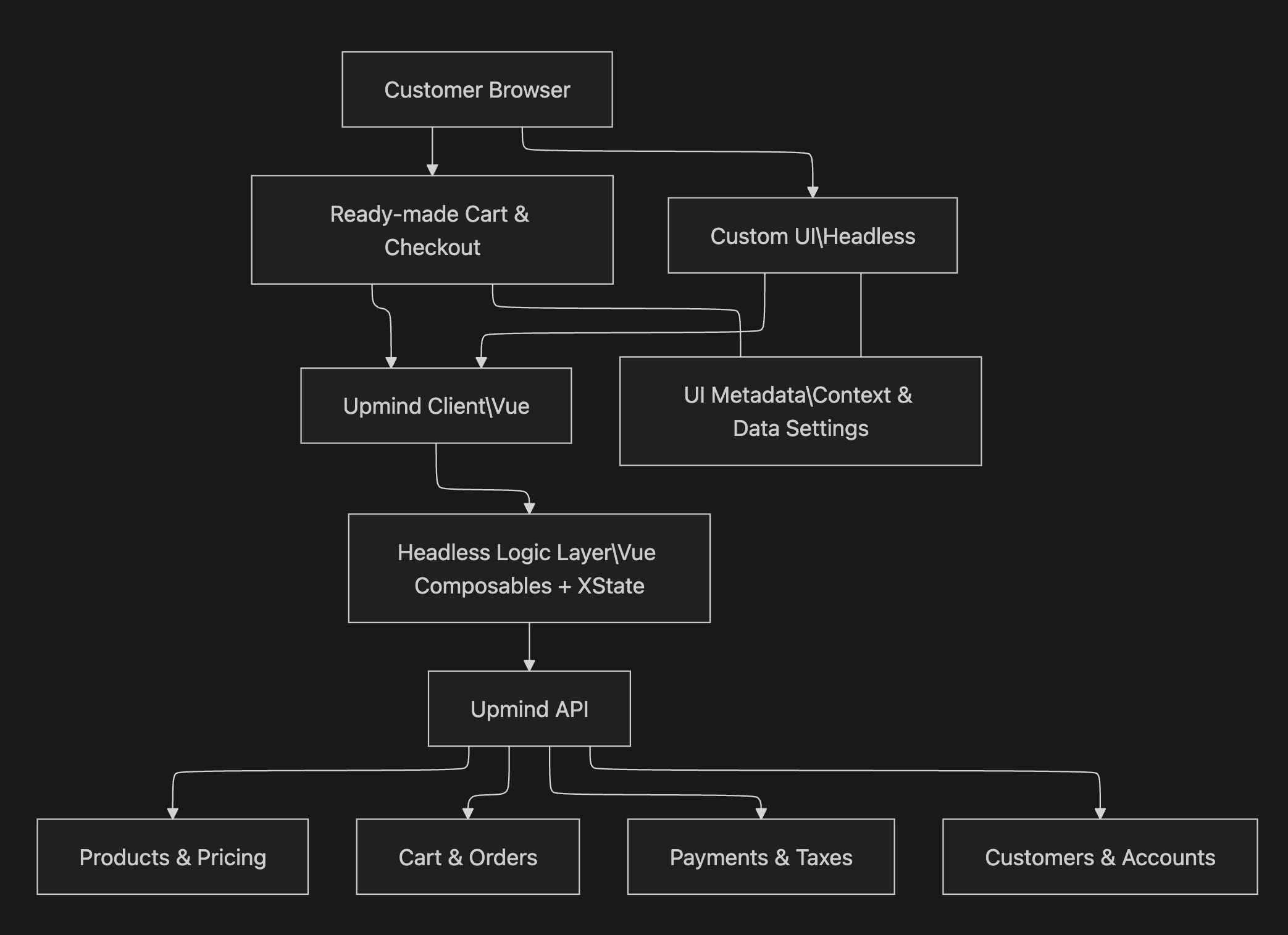
- Top layer (Customer Browser): This is where buyers interact with your store and complete their purchase. Depending on your setup, this can be through the ready-made cart and checkout, or a fully custom user interface (UI). Regardless of approach, customers experience a consistent and guided buying journey.
- Experience layer: This layer defines how the cart and checkout are presented to customers, allowing teams to choose the level of control that best fits their needs.
- Ready-made Cart & Checkout provides a complete, out-of-the-box storefront and checkout flow with minimal setup.
- Custom UI (Headless) enables full control over the user experience while reusing Upmind’s commerce logic.
- Upmind Client (Vue): UI foundation that is used by the cart. It provides consistent components, styling patterns, and interaction behaviour, ensuring a unified experience across all customer-facing surfaces.
- Headless Logic Layer: This layer handles core checkout orchestration using Vue composables and XState. It manages state, flow progression, validation, and transitions independently of how the UI is rendered.
- Upmind API: The central source of truth for products, pricing, cart state, orders, payments, taxes, and customer data. All UI layers interact with the same APIs to ensure consistent and reliable commerce behaviour.
- UI Metadata: Configuration that controls layout, visibility, copy, and behaviour across all UI surfaces. This allows teams to adjust and evolve the user experience without making code changes.