

- Automate control of that third party service based on stuff that happens in Upmind. For example, you can create something when an order is placed, or terminate something when an order is cancelled. The scope is as wide as you can imagine it: register a domain when an order is paid, renew a domain when a contract is renewed, brew a coffee when an invoice is paid, connect to a drop shipper and transparently place an order. Essentially this lets you run a ‘hands-off’ business day to day without having to manually step in and do things.
- Allow your clients and staff to control that third party service from their Upmind client area. These are then client-driven and staff-driven on-demand events. This can be as simple as a single sign on (SSO) function, or a complete interface within their Upmind client area.
- Integrate other business processes like support and reporting much more deeply with your third party systems.
Terminology
Upmind provisioning is a series of integration categories (“blueprints”). made up of possible integrations (“provision providers”) which you then implement by adding your credentials (a “provision configuraiton”). We use distinct terminology for Upmind provisioning so as not to confuse with other areas of product management in Upmind.- Blueprint - a framework for type of product or service, where different providers will all have some basis in that blueprint. Essentially this is just a category of product - e.g. Coffee, Web Hosting, Domain Names, Software licences. We use blueprints because it standardises the integrations; for instance even if we had integrations for 20 different types of coffee machine, they would all be roughly based on the same formula with the same options (Do you take sugar?)
- Provision Provider - A third party that is integrated with. E.g. cPanel, Enom, Hexonet. In Upmind terms, this is an implementation of a blueprint for a specific provider.
- Provision Configuration - the unique system you are interfacing wth (e.g. a particular cPanel server, a domain provider). This provision configuration will usually have API credentials that are provided to you.
- Contact Product - an individual product or service you have sold that belongs to a client. E.g. a cup of coffee.
- Service Identifier - the unique label that identifies an individual contract product on the provision configuration. May be a username, or a domain name, or ‘Joe’s coffee’. You would be unlikely (though it is possible) to have two contract products on the same provision configuration with the same service identifier.
- Deployment - How a new product or service is assigned to a specific Provision Configuration. This can be ‘Dynamic’ or ‘Static’. We will come onto this later.
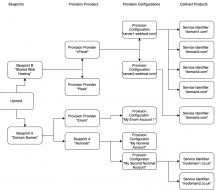
Examples
To be completely clear, here are example provisioning setups:- In web hosting, control panel software Plesk and cPanel are both provision providers on the blueprint Shared Web Hosting. Every server I add is a provision configuration.
- With domain names, any domain registrar like Enom or Nominet is provision provider of the blueprint Domain Names. When I add my credentials that is a provision configuration. The service identifier is the actual domain that is registered.
- In a coffee shop, the coffee machine brand is the provision provider of the blueprint coffee. Each coffee machine I have is a provision configuration, and Joe’s coffee is the service identifier.
Managing Provision Configurations
You can manage all of your provision configurations underSettings -> Provision Configurations. Please note that in some industries we provide a more bespoke frontend which transparently manages these provision configurations (e.g. Host Control for the web hosting industry).
On this page you will see a list of your provision configurations. You can click Add new configuration and choose your chosen Provision Blueprint then Provision Provider to add a configuration.
Setting Product Provisioning Options
When you create or manage a product or service you have an option to set ‘Provisioning’ options. Under your provisioning options you choose:- The blueprint the product should choose to
- Whether you want to automatically choose a provision provider, or which explicit provider to use.
- You can then set a setup function
- You can then set Provision fields.