> ## Documentation Index
> Fetch the complete documentation index at: https://docs.upmind.com/llms.txt
> Use this file to discover all available pages before exploring further.

# How to Set Up Google Analytics with Upmind

> Instructions for connecting Google Analytics for tracking

Google Analytics 4 (GA4) offers comprehensive tracking of website and e-commerce activity. Connecting GA4 with Upmind requires the Google Measurement ID and an API Secret.

## Obtain Google Measurement ID and API Secret

1. Log in to your Google Analytics account at [<u>https://analytics.google.com</u>](https://analytics.google.com).

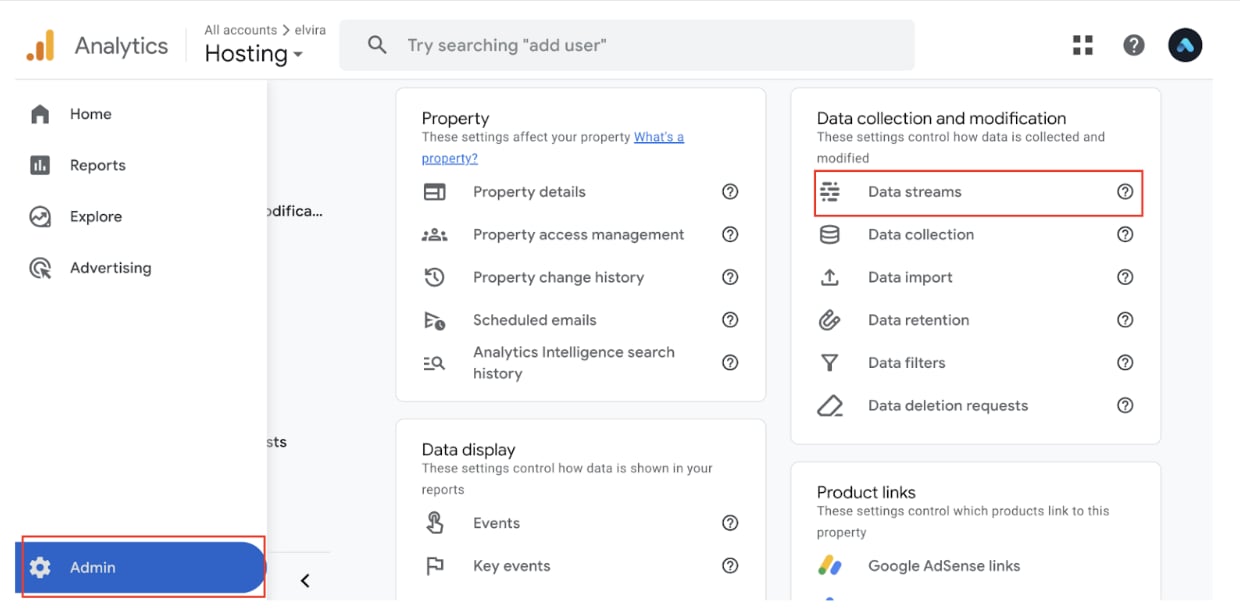
2. Go to Admin and under the Property column, select Data Streams.
<Frame caption="Admin > Data streams">
  <img src="https://mintcdn.com/upmind/wRuKrNY12tQZY8Rr/images/fb/36ba0b5d0b4fc8dd.png?fit=max&auto=format&n=wRuKrNY12tQZY8Rr&q=85&s=1f4201818b48e9d8dc79f150703af8ff" alt="Admin > Data streams" data-og-width="1240" width="1240" data-og-height="612" height="612" data-path="images/fb/36ba0b5d0b4fc8dd.png" data-optimize="true" data-opv="3" srcset="https://mintcdn.com/upmind/wRuKrNY12tQZY8Rr/images/fb/36ba0b5d0b4fc8dd.png?w=280&fit=max&auto=format&n=wRuKrNY12tQZY8Rr&q=85&s=422abde70876eecfd159e206e7b0a8bc 280w, https://mintcdn.com/upmind/wRuKrNY12tQZY8Rr/images/fb/36ba0b5d0b4fc8dd.png?w=560&fit=max&auto=format&n=wRuKrNY12tQZY8Rr&q=85&s=e2177a882c9ea479991c63a179dd8473 560w, https://mintcdn.com/upmind/wRuKrNY12tQZY8Rr/images/fb/36ba0b5d0b4fc8dd.png?w=840&fit=max&auto=format&n=wRuKrNY12tQZY8Rr&q=85&s=e094ae6702d070cfbddf51470a826086 840w, https://mintcdn.com/upmind/wRuKrNY12tQZY8Rr/images/fb/36ba0b5d0b4fc8dd.png?w=1100&fit=max&auto=format&n=wRuKrNY12tQZY8Rr&q=85&s=1840fb19bfbccba2adcfa2661f357425 1100w, https://mintcdn.com/upmind/wRuKrNY12tQZY8Rr/images/fb/36ba0b5d0b4fc8dd.png?w=1650&fit=max&auto=format&n=wRuKrNY12tQZY8Rr&q=85&s=2186058d00c7ad1f0ba8395dbce923de 1650w, https://mintcdn.com/upmind/wRuKrNY12tQZY8Rr/images/fb/36ba0b5d0b4fc8dd.png?w=2500&fit=max&auto=format&n=wRuKrNY12tQZY8Rr&q=85&s=6b410dc180f68d1a4c8d3798e2ed00f2 2500w" />
</Frame>

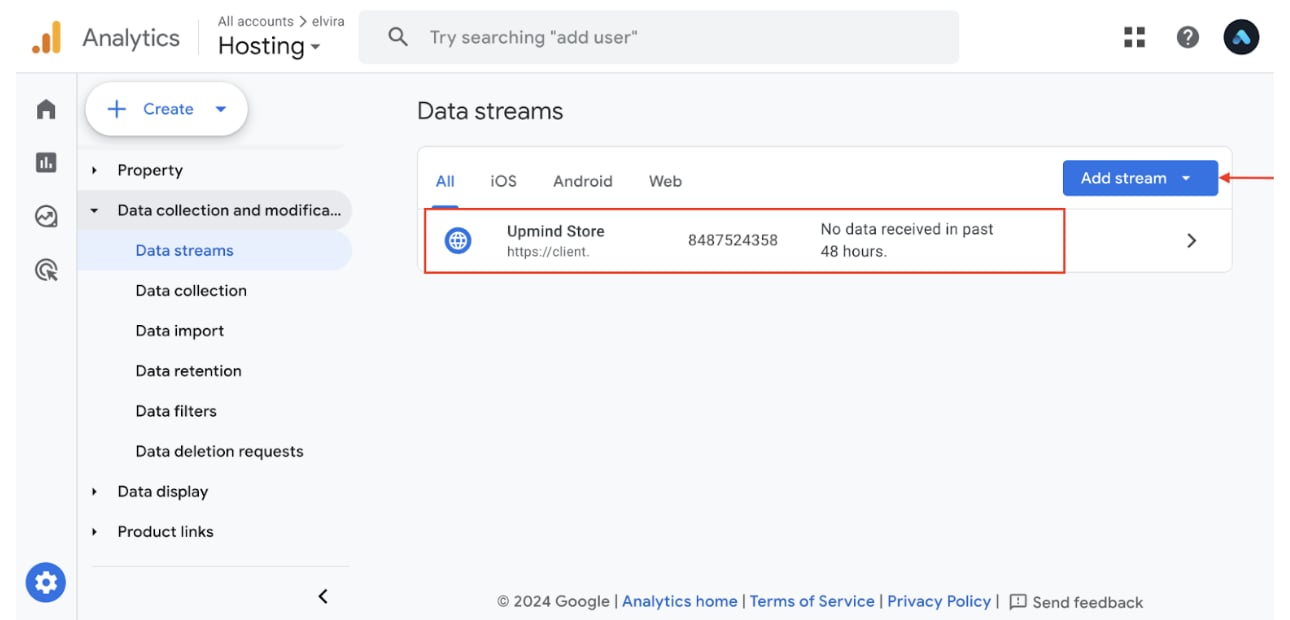
3. Choose an existing web data stream or create one by clicking **Add Stream**, entering your website URL, and naming the stream.
<Frame caption="Add stream">
  <img src="https://mintcdn.com/upmind/pcUdSuxUJ6LgBXnd/images/fb/a3731384cdd2f621.png?fit=max&auto=format&n=pcUdSuxUJ6LgBXnd&q=85&s=39a835b04e6cdc16124f568dc1a64655" alt="Add stream" width="1290" height="620" data-path="images/fb/a3731384cdd2f621.png" />
</Frame>

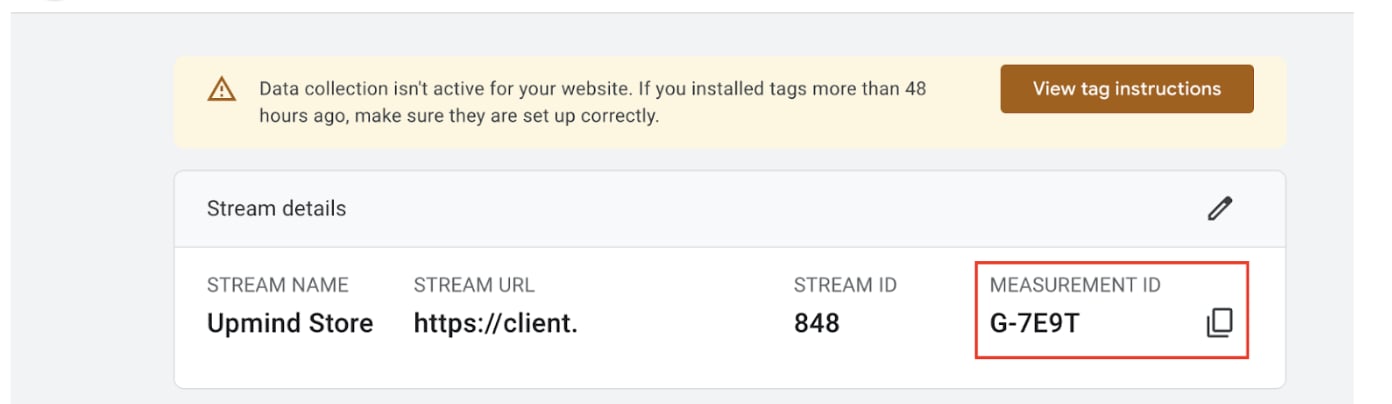
4. Locate the **Measurement ID** (formatted like G-XXXXXXXXXX) under stream details.
<Frame caption="Copy measurement ID">
  <img src="https://mintcdn.com/upmind/FQ1NhxALxjSHvvWW/images/fb/acbceb51f3405485.png?fit=max&auto=format&n=FQ1NhxALxjSHvvWW&q=85&s=0d9c328f3dd47370ef145e4c2e5c7a59" alt="Copy measurement ID" width="1392" height="404" data-path="images/fb/acbceb51f3405485.png" />
</Frame>

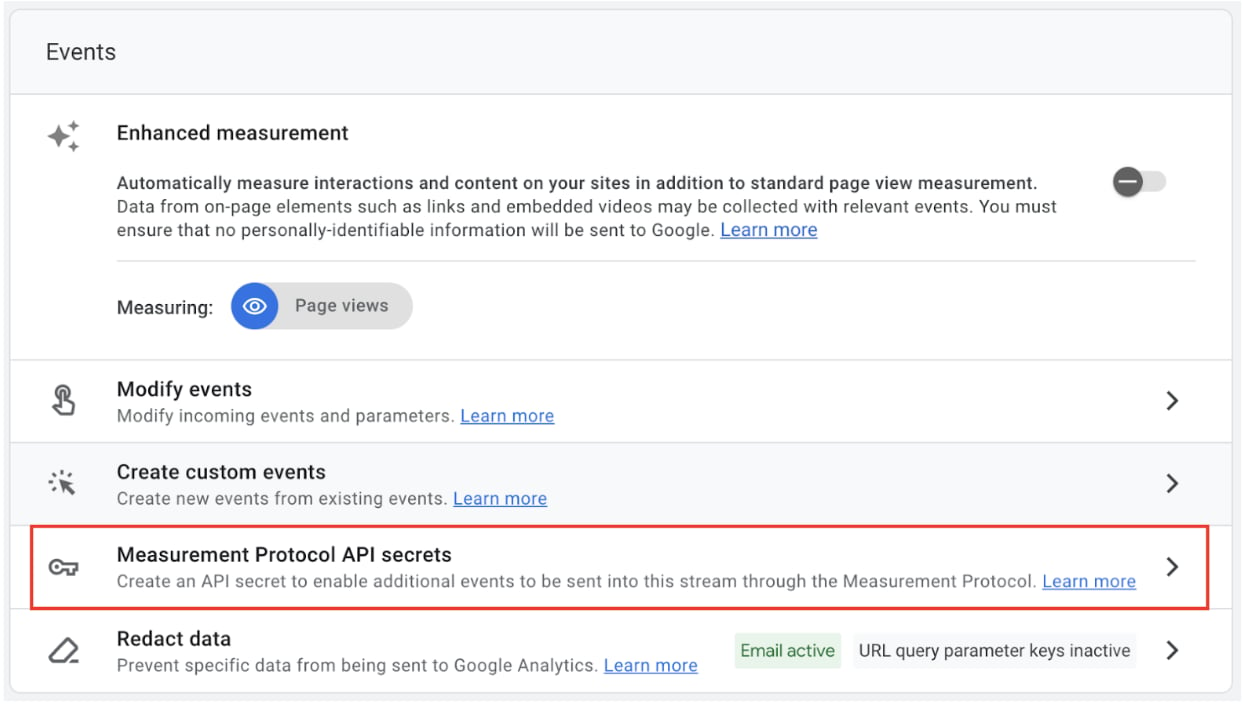
5. In the Events section of the stream detail page, click **Measurement Protocol API Secrets**.
<Frame caption="Measurement Protocol API Secrets">
  <img src="https://mintcdn.com/upmind/kAlrCUxI2nwYz4_i/images/fb/235f14854db0f4a3.png?fit=max&auto=format&n=kAlrCUxI2nwYz4_i&q=85&s=f311506c22b9fb24b1cd2abe9c7c7abb" alt="Measurement Protocol API Secrets" width="1242" height="704" data-path="images/fb/235f14854db0f4a3.png" />
</Frame>

6. Create a new **API Secret** and copy the generated key.
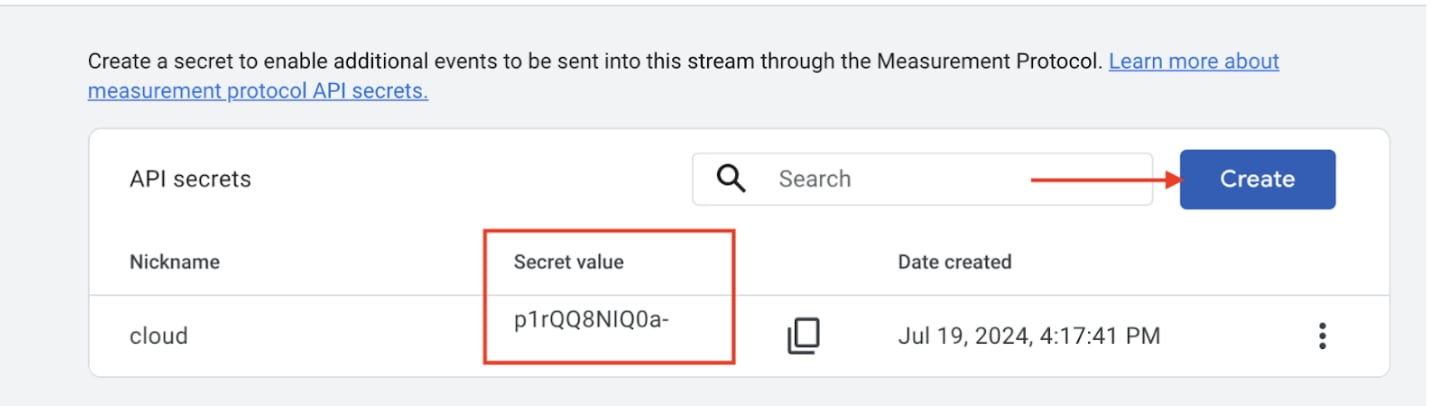
<Frame caption="Copy API secret">
  <img src="https://mintcdn.com/upmind/Dgjmf3QWYVBR40cE/images/fb/6232053a76f32137.png?fit=max&auto=format&n=Dgjmf3QWYVBR40cE&q=85&s=4d2dc62acc7e37d2bdcc44a3df8550fa" alt="Copy API secret" width="1436" height="406" data-path="images/fb/6232053a76f32137.png" />
</Frame>

## Connect GA4 with Upmind

1. Access your Upmind dashboard.

2. Go to **Settings** > **Analytics & Tracking**.

3. Paste the **Google Measurement ID** and **API Secret** into their respective input fields.

4. **Save** your changes.
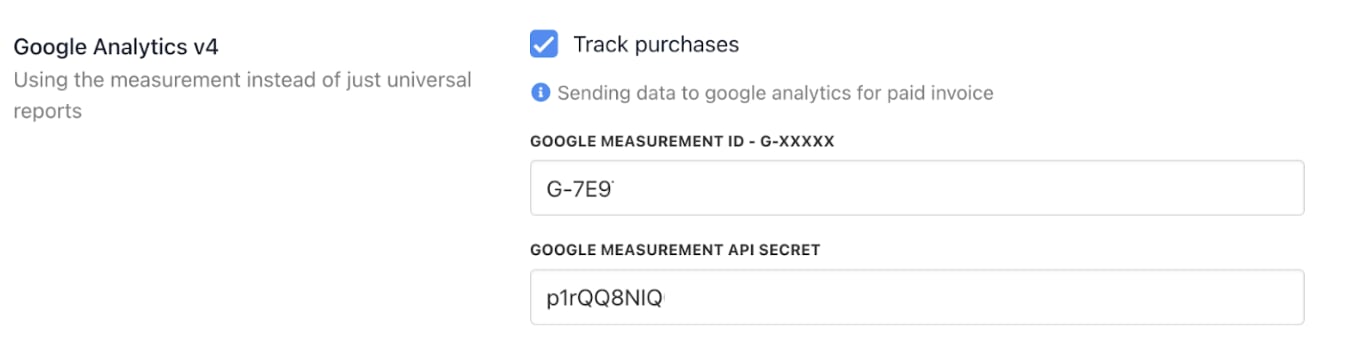
<Frame caption="Paste the Google Measurement ID and API Secret">
  <img src="https://mintcdn.com/upmind/bPO2bBzOxYQR4tYr/images/fb/fd24dc7c8b6e57ac.png?fit=max&auto=format&n=bPO2bBzOxYQR4tYr&q=85&s=25d5fd95cc2fd21f8bb6af351635edc6" alt="Paste the Google Measurement ID and API Secret" width="1364" height="358" data-path="images/fb/fd24dc7c8b6e57ac.png" />
</Frame>

This enables Upmind to send purchase and event data directly to Google Analytics, improving your e-commerce reporting and marketing analysis capabilities.
