> ## Documentation Index
> Fetch the complete documentation index at: https://docs.upmind.com/llms.txt
> Use this file to discover all available pages before exploring further.

# Provisioning Settings

> General provisioning automation settings

Provision automation settings in Upmind let you control how your products and services are automatically managed. One key feature is **Automatic Termination**, which you can enable to have services automatically cancelled or deleted when an order is closed or expires.

You can enable or disable it with the following steps:

1. From `Settings`, go to **Provisioning** under **Miscellaneous**.
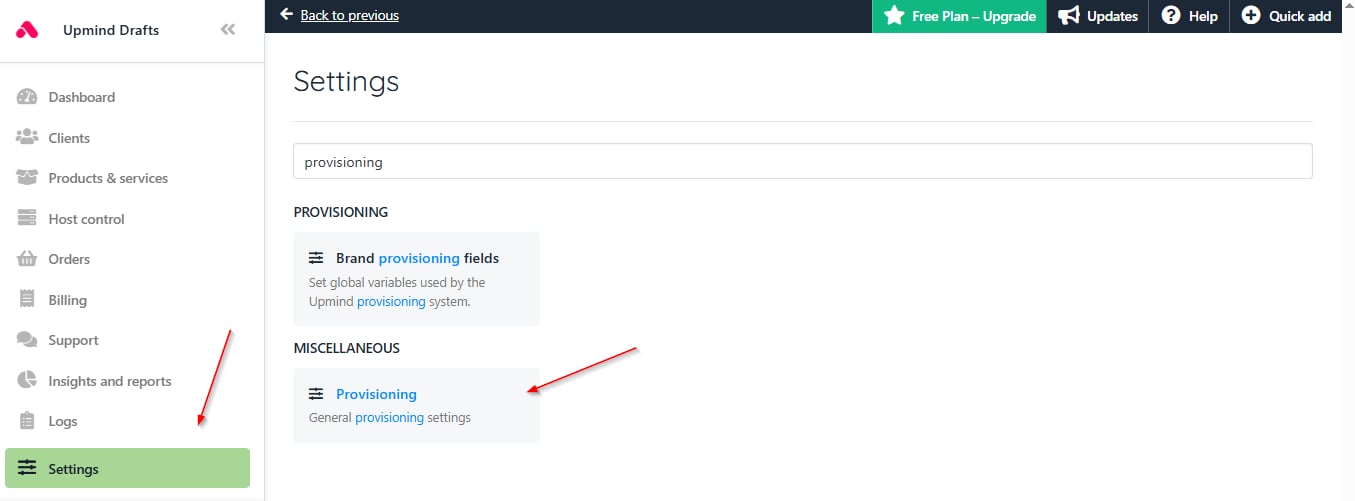
<Frame caption="Settings > Provisioning">
  <img src="https://mintcdn.com/upmind/FQ1NhxALxjSHvvWW/images/fb/aa24cd1aa3b6394b.png?fit=max&auto=format&n=FQ1NhxALxjSHvvWW&q=85&s=52f847e72a9d98808b011922c5803071" alt="Settings > Provisioning" data-og-width="1355" width="1355" data-og-height="501" height="501" data-path="images/fb/aa24cd1aa3b6394b.png" data-optimize="true" data-opv="3" srcset="https://mintcdn.com/upmind/FQ1NhxALxjSHvvWW/images/fb/aa24cd1aa3b6394b.png?w=280&fit=max&auto=format&n=FQ1NhxALxjSHvvWW&q=85&s=134b54a6cb3ebc1a5e42293522349c8b 280w, https://mintcdn.com/upmind/FQ1NhxALxjSHvvWW/images/fb/aa24cd1aa3b6394b.png?w=560&fit=max&auto=format&n=FQ1NhxALxjSHvvWW&q=85&s=93b13030a5a1a88ca2e75f82eed47e2c 560w, https://mintcdn.com/upmind/FQ1NhxALxjSHvvWW/images/fb/aa24cd1aa3b6394b.png?w=840&fit=max&auto=format&n=FQ1NhxALxjSHvvWW&q=85&s=be1717ef6bc2f8335fb213f8ee77ca78 840w, https://mintcdn.com/upmind/FQ1NhxALxjSHvvWW/images/fb/aa24cd1aa3b6394b.png?w=1100&fit=max&auto=format&n=FQ1NhxALxjSHvvWW&q=85&s=8c47d29a680dc438326f7a39416f6238 1100w, https://mintcdn.com/upmind/FQ1NhxALxjSHvvWW/images/fb/aa24cd1aa3b6394b.png?w=1650&fit=max&auto=format&n=FQ1NhxALxjSHvvWW&q=85&s=c2b860ffb081f4c233d4d68a3b61050f 1650w, https://mintcdn.com/upmind/FQ1NhxALxjSHvvWW/images/fb/aa24cd1aa3b6394b.png?w=2500&fit=max&auto=format&n=FQ1NhxALxjSHvvWW&q=85&s=9b1869ddc1c3f6adfbc69b5cdb040ddc 2500w" />
</Frame>

2. Here, you can choose the configuration for **Automatic Termination**.

<Frame caption="Enable/disable automatic termination">
  <img src="https://mintcdn.com/upmind/uxzVUXAKtJ2bRWCI/images/fb/673068065560534b.png?fit=max&auto=format&n=uxzVUXAKtJ2bRWCI&q=85&s=260298d56511ac17ddebc3b55db700b9" alt="Enable/disable automatic termination" width="1068" height="205" data-path="images/fb/673068065560534b.png" />
</Frame>

This helps keep your system clean and avoids unnecessary charges or inactive accounts, automatically making your provisioning process smoother and more efficient.
