> ## Documentation Index
> Fetch the complete documentation index at: https://docs.upmind.com/llms.txt
> Use this file to discover all available pages before exploring further.
# Provision Configurations in Upmind
> Choose from several categories
Provisioning configurations in Upmind lets you connect external products and systems with the API.
You can automate how products and services are set up and managed across different providers. You can also create multiple provisioning setups and dynamically choose the right one based on customer orders.
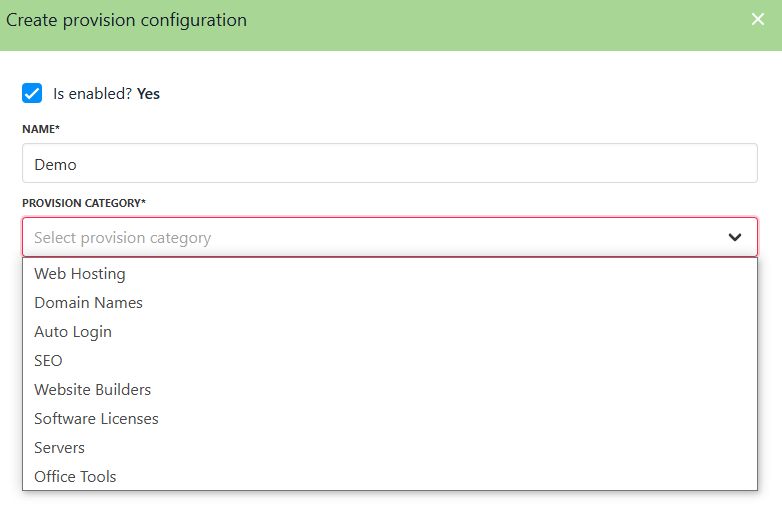
Upmind currently offers **8 different provisioning categories**:
1. Web Hosting
2. Domain Names
3. Auto Login
4. SEO
5. Website Builders
6. Software Licenses
7. Servers
8. Office Tools
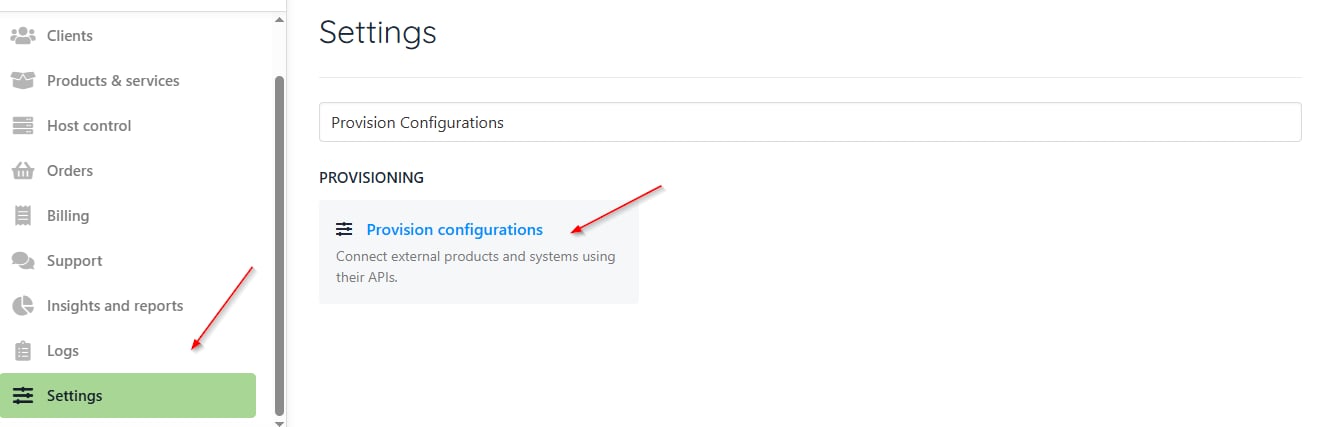
You can check all the categories with the following steps:
1. From `Settings`, go to the `Provision Configurations`.
 2. Click **Add New Configuration**.
 3. Click on the **Provision Category** dropdown.
 ## **Configuration attributes**
Configuration attributes in Upmind are **optional metadata fields** you can add to a provisioning setup to help better organise, classify, or customise your configurations.
These attributes might include details like server location, product type, or customer-specific preferences, making it easier to filter, manage, and deploy resources dynamically across different providers or environments.
You can offer more customised options to your customers, such as letting them choose a server location at checkout, and simplifying your management by grouping or identifying configurations based on key criteria.
This flexibility supports more efficient automation and deployment, especially when working with dynamic or multi-region setups.
## **Configuration attributes**
Configuration attributes in Upmind are **optional metadata fields** you can add to a provisioning setup to help better organise, classify, or customise your configurations.
These attributes might include details like server location, product type, or customer-specific preferences, making it easier to filter, manage, and deploy resources dynamically across different providers or environments.
You can offer more customised options to your customers, such as letting them choose a server location at checkout, and simplifying your management by grouping or identifying configurations based on key criteria.
This flexibility supports more efficient automation and deployment, especially when working with dynamic or multi-region setups.