> ## Documentation Index
> Fetch the complete documentation index at: https://docs.upmind.com/llms.txt
> Use this file to discover all available pages before exploring further.
# How to Remove a Provisioning Configuration
> Remove any provision configuration to organise your services
Removing a provisioning configuration in Upmind is a simple process that helps keep your service integrations organised and up to date. Following the correct steps, whether retiring an outdated provider, switching to a new integration, or clearing unused configurations, ensures your system remains efficient and free of errors.
## Why remove a provisioning configuration?
Provisioning configurations connect your products to third-party services, automating tasks like account creation, domain registration, or server deployment.
Over time, some configurations may become obsolete or redundant. Removing them helps avoid confusion, prevents accidental use, and maintains optimal system performance.
For example, you might need to:
* Switch to a new provider (e.g., moving from GoDaddy to Cloudflare).
* Retire outdated services (e.g., phasing out legacy hosting packages).
* Clean up test setups.
Step-by-Step Process to Remove a Provisioning Configuration:
1. Go to `Settings`, then `Provision Configurations`.
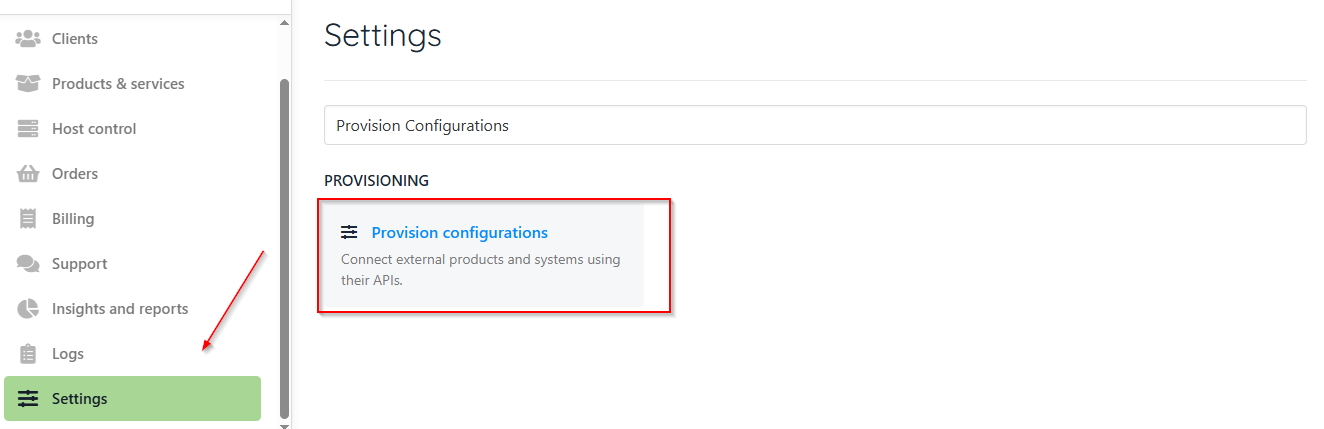 2. Browse or search for the specific provisioning configuration you want to remove.
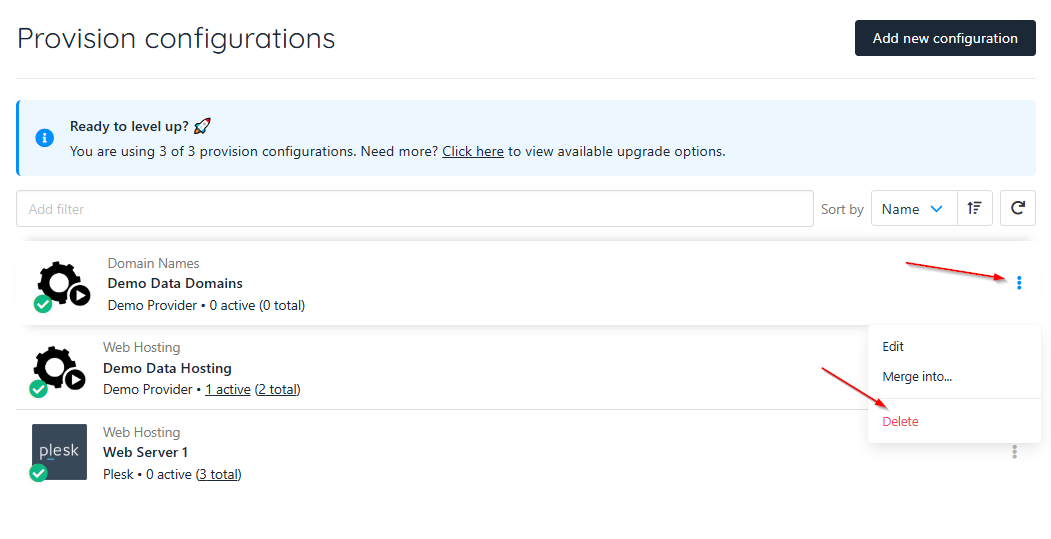
3. You can then click the three dots icon and delete. This removes the provision configuration entirely.
4. Upmind will then delete the provisioning configuration from your system. This action is usually irreversible, so double-check before proceeding.
2. Browse or search for the specific provisioning configuration you want to remove.
3. You can then click the three dots icon and delete. This removes the provision configuration entirely.
4. Upmind will then delete the provisioning configuration from your system. This action is usually irreversible, so double-check before proceeding.
 Before removing, check if any active products or services are currently using this configuration. A provision configuration cannot be deleted if there are any services associated with it.
Removing a configuration that is in use can disrupt service automation or cause provisioning failures. If dependencies exist, reassign those products to a different configuration or disable the products first.
You should also backup important settings. Before deletion, document or export configuration details in case you need to restore or reference them later.
Before removing, check if any active products or services are currently using this configuration. A provision configuration cannot be deleted if there are any services associated with it.
Removing a configuration that is in use can disrupt service automation or cause provisioning failures. If dependencies exist, reassign those products to a different configuration or disable the products first.
You should also backup important settings. Before deletion, document or export configuration details in case you need to restore or reference them later.