> ## Documentation Index
> Fetch the complete documentation index at: https://docs.upmind.com/llms.txt
> Use this file to discover all available pages before exploring further.

# How to Add Upgrade/Downgrade Options for Products

> Learn How to Add Upgrade/Downgrade Options for Products on your online store. clients easily switch between different packages with higher or lower prices. Check Now!

The upgrade/downgrade feature empowers customers to move between higher and lower-tier products as their needs change.

## Setting up upgrade/downgrade paths

To allow clients to upgrade or downgrade products in the client area, specify which products are eligible.

1. Log in to the Upmind dashboard.
2. Access it from the dashboard by clicking on **Store Catalogue**.
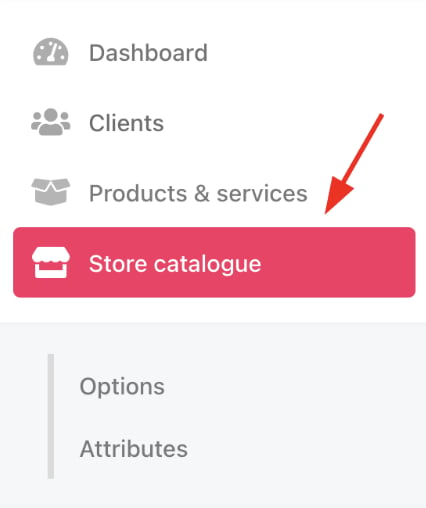
<Frame caption="Store catalogue">
  <img src="https://mintcdn.com/upmind/2ooSxDpt6PiIGMr-/images/fb/0a171fed9a05483b.png?fit=max&auto=format&n=2ooSxDpt6PiIGMr-&q=85&s=9c072fd5fe02a65f7904670967e7a654" alt="Store catalogue" width="426" height="508" data-path="images/fb/0a171fed9a05483b.png" />
</Frame>

3. You can also click **Settings** and select the **Product Catalogue** tile under **Products and Promotions**.
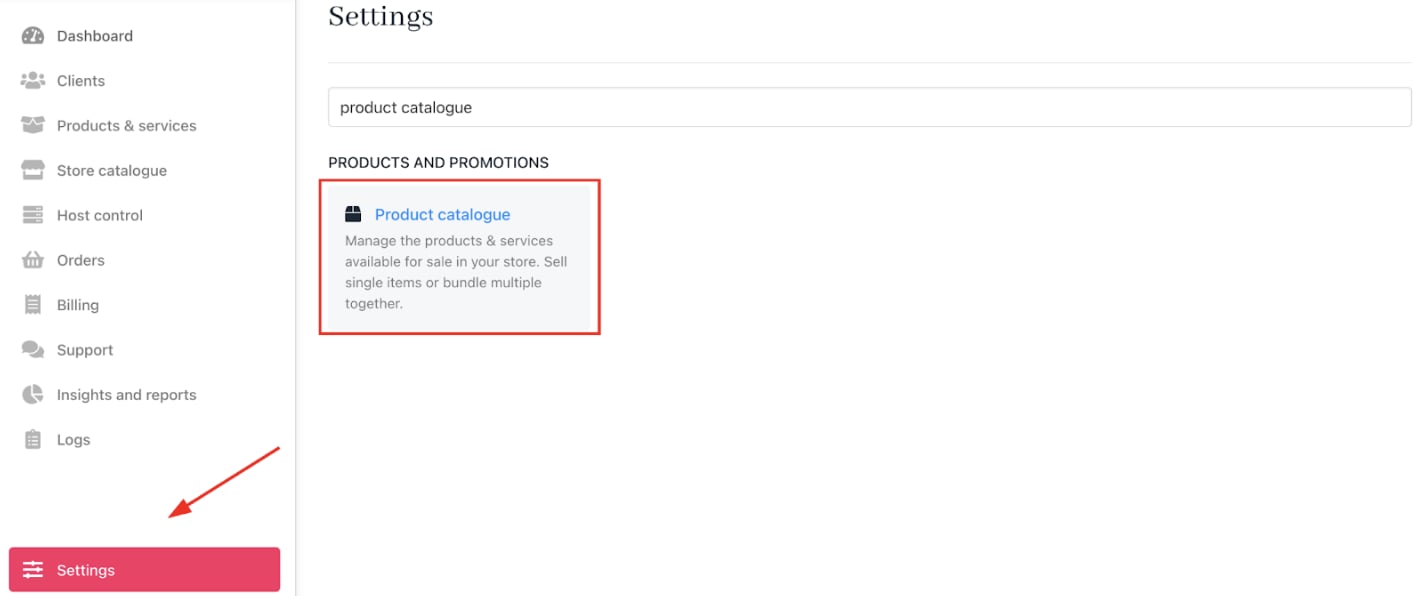
<Frame caption="Settings > Products and Promotions > Product Catalogue">
  <img src="https://mintcdn.com/upmind/JUoAg6onJmXk_-rR/images/fb/e5fe74d1d4224716.png?fit=max&auto=format&n=JUoAg6onJmXk_-rR&q=85&s=8ec058b4110c44009d45368caa1a1fe0" alt="Settings > Products and Promotions > Product Catalogue" data-og-width="1414" width="1414" data-og-height="596" height="596" data-path="images/fb/e5fe74d1d4224716.png" data-optimize="true" data-opv="3" srcset="https://mintcdn.com/upmind/JUoAg6onJmXk_-rR/images/fb/e5fe74d1d4224716.png?w=280&fit=max&auto=format&n=JUoAg6onJmXk_-rR&q=85&s=6ccaa1ca755f0b0b4df81a2e9cdda873 280w, https://mintcdn.com/upmind/JUoAg6onJmXk_-rR/images/fb/e5fe74d1d4224716.png?w=560&fit=max&auto=format&n=JUoAg6onJmXk_-rR&q=85&s=419f97741f85abba75db94595bb31692 560w, https://mintcdn.com/upmind/JUoAg6onJmXk_-rR/images/fb/e5fe74d1d4224716.png?w=840&fit=max&auto=format&n=JUoAg6onJmXk_-rR&q=85&s=5bc99e50877619ad611d511166142106 840w, https://mintcdn.com/upmind/JUoAg6onJmXk_-rR/images/fb/e5fe74d1d4224716.png?w=1100&fit=max&auto=format&n=JUoAg6onJmXk_-rR&q=85&s=797df10439c1139ef042c6b274caeafa 1100w, https://mintcdn.com/upmind/JUoAg6onJmXk_-rR/images/fb/e5fe74d1d4224716.png?w=1650&fit=max&auto=format&n=JUoAg6onJmXk_-rR&q=85&s=ef80fb1e42c0159fd516d4d552723cfd 1650w, https://mintcdn.com/upmind/JUoAg6onJmXk_-rR/images/fb/e5fe74d1d4224716.png?w=2500&fit=max&auto=format&n=JUoAg6onJmXk_-rR&q=85&s=26f5dda75f8fa5578d39315f81056afb 2500w" />
</Frame>

4. Open `Upgrades/Downgrades` and click **Manage**.
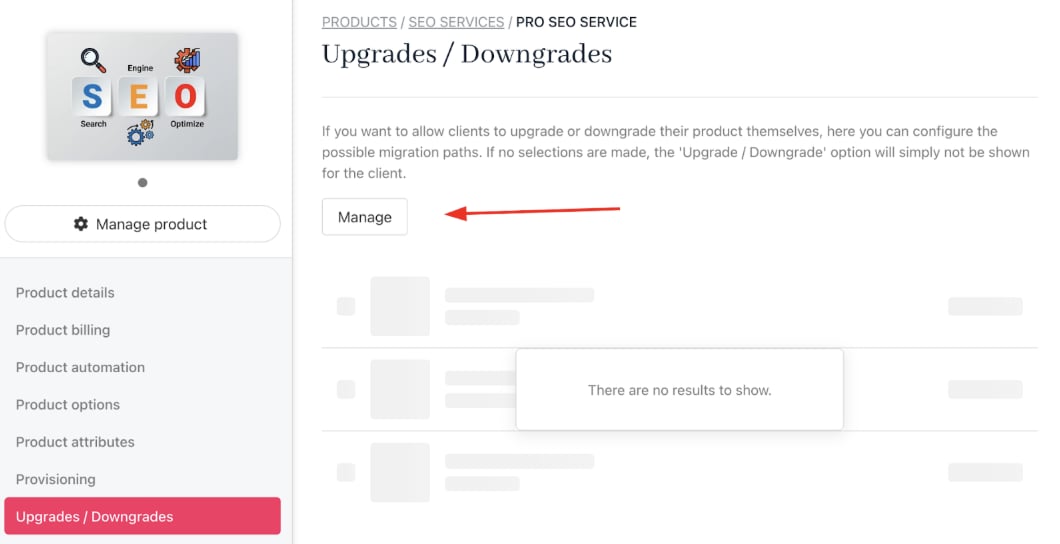
<Frame caption="Click manage">
  <img src="https://mintcdn.com/upmind/JUoAg6onJmXk_-rR/images/fb/e1aaa425734fd726.png?fit=max&auto=format&n=JUoAg6onJmXk_-rR&q=85&s=9344103d5f914f64178f2cb8beb58c28" alt="Click manage" width="1060" height="544" data-path="images/fb/e1aaa425734fd726.png" />
</Frame>

5. Select the products eligible as upgrade or downgrade options.

**Example**: A customer on a Pro SEO Service plan could be allowed to upgrade to an Advanced SEO Service plan, or downgrade to a Starter SEO Service plan. This gives clients flexibility while keeping your product catalogue organised.
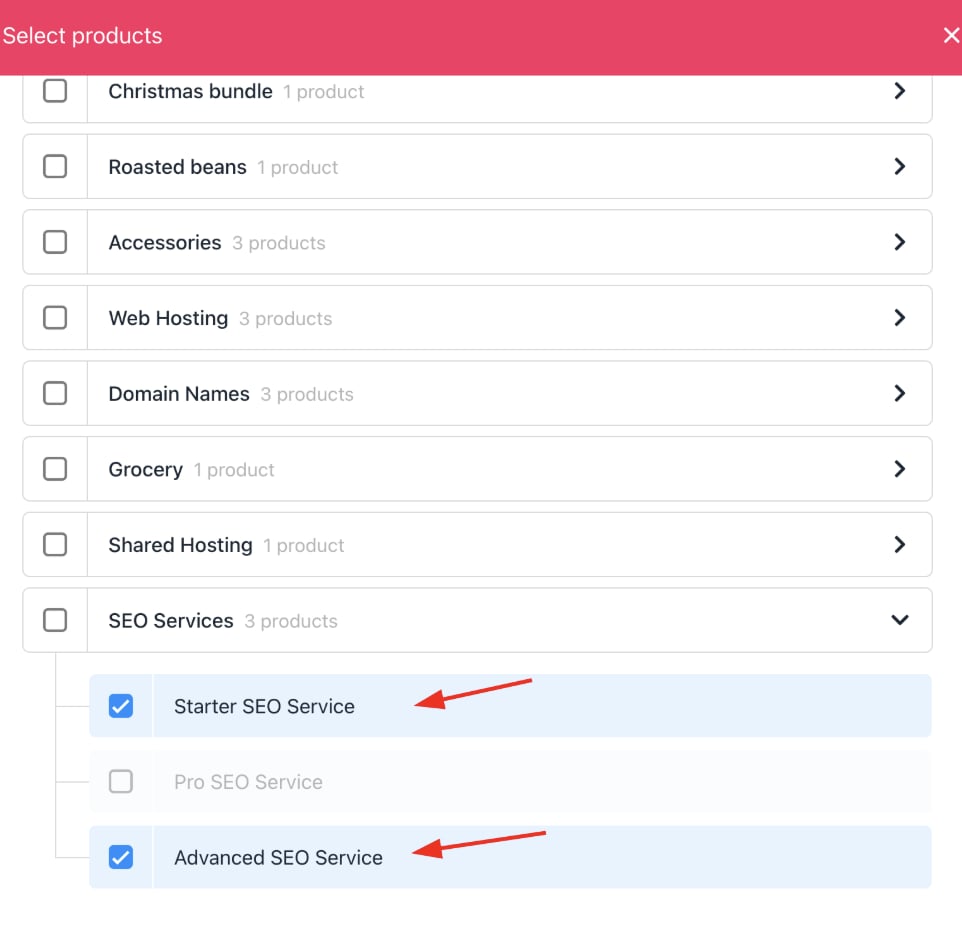
<Frame caption="Select product">
  <img src="https://mintcdn.com/upmind/1-uICsJi9zYpvJVH/images/fb/8786aec417391f02.png?fit=max&auto=format&n=1-uICsJi9zYpvJVH&q=85&s=09716c6822672c49f49d907858075861" alt="Select product" width="962" height="926" data-path="images/fb/8786aec417391f02.png" />
</Frame>

6. **Save** your changes.

## How clients can upgrade/downgrade their product

1. In the client area, customers navigate to `Products & Services`.

<Frame caption="Products and services">
  <img src="https://mintcdn.com/upmind/kXD0Ya8PpcxxNm6Q/images/fb/41ab49f23ee38886.png?fit=max&auto=format&n=kXD0Ya8PpcxxNm6Q&q=85&s=35d1bb014b7d407dbc30f14cbf48de6e" alt="Products and services" width="1292" height="122" data-path="images/fb/41ab49f23ee38886.png" />
</Frame>

2. Select the product to change.
3. Click **Upgrade/Downgrade** under `Quick Actions`.
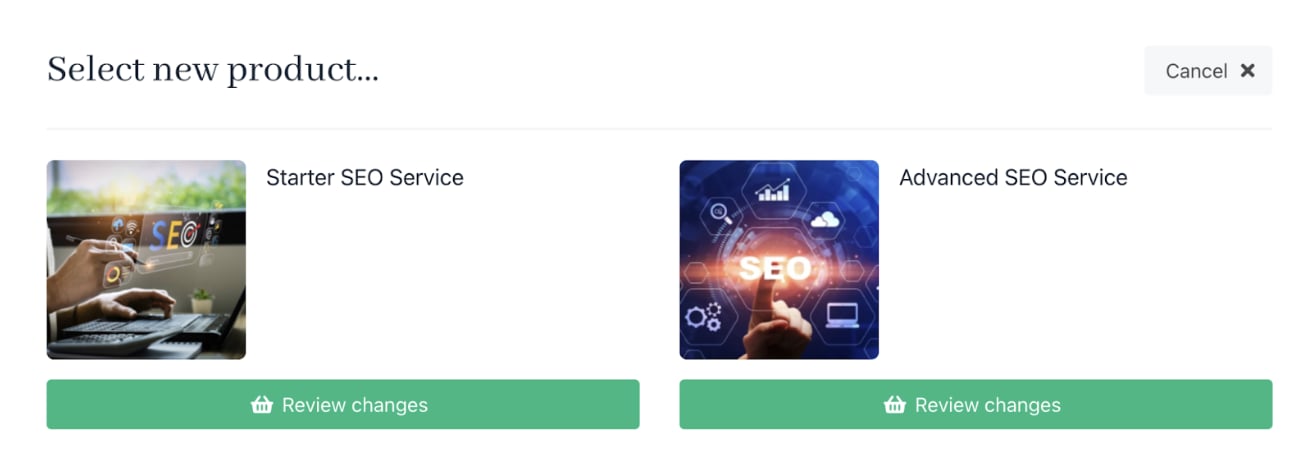
4. Choose among the permitted products and confirm the choice.
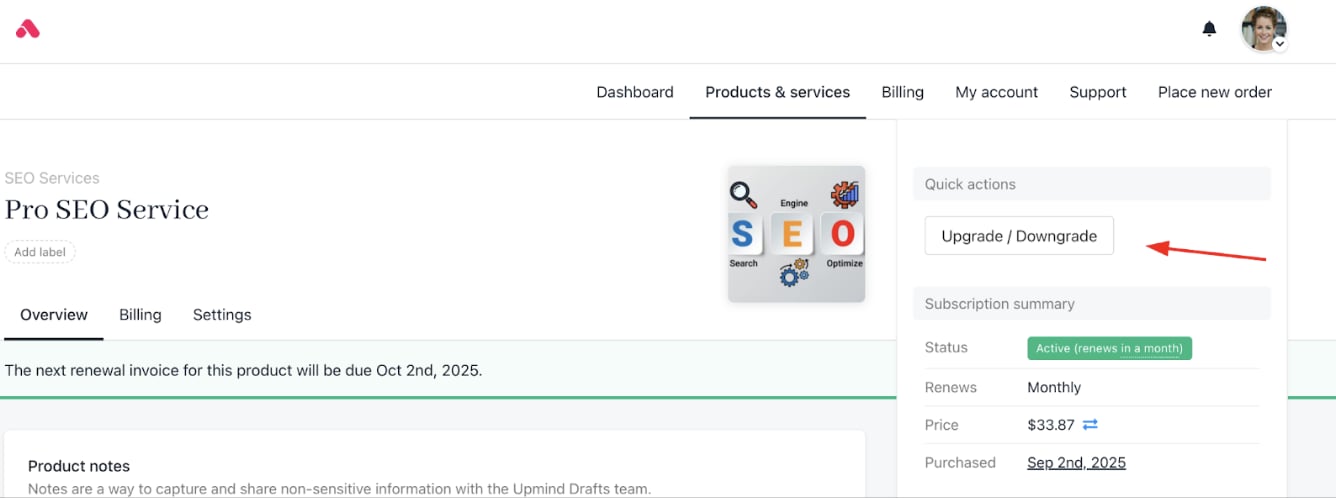
<Frame caption="Quick actions > upgrade/downgrade">
  <img src="https://mintcdn.com/upmind/h8h5zREaX7k8Y-3x/images/fb/1093bc0334b8b672.png?fit=max&auto=format&n=h8h5zREaX7k8Y-3x&q=85&s=9f264e4f6f27279a11b4bd8c13ae2d69" alt="Quick actions > upgrade/downgrade" data-og-width="1336" width="1336" data-og-height="498" height="498" data-path="images/fb/1093bc0334b8b672.png" data-optimize="true" data-opv="3" srcset="https://mintcdn.com/upmind/h8h5zREaX7k8Y-3x/images/fb/1093bc0334b8b672.png?w=280&fit=max&auto=format&n=h8h5zREaX7k8Y-3x&q=85&s=9b68e7feaca7a3085026d6e9dbaddaa4 280w, https://mintcdn.com/upmind/h8h5zREaX7k8Y-3x/images/fb/1093bc0334b8b672.png?w=560&fit=max&auto=format&n=h8h5zREaX7k8Y-3x&q=85&s=b0df82452720d0fa09c0b904838dcec2 560w, https://mintcdn.com/upmind/h8h5zREaX7k8Y-3x/images/fb/1093bc0334b8b672.png?w=840&fit=max&auto=format&n=h8h5zREaX7k8Y-3x&q=85&s=ceb83ccf6e0ab511b257426ff483b1d5 840w, https://mintcdn.com/upmind/h8h5zREaX7k8Y-3x/images/fb/1093bc0334b8b672.png?w=1100&fit=max&auto=format&n=h8h5zREaX7k8Y-3x&q=85&s=d97fbad8d9acc613ad33a7d5703b5e2a 1100w, https://mintcdn.com/upmind/h8h5zREaX7k8Y-3x/images/fb/1093bc0334b8b672.png?w=1650&fit=max&auto=format&n=h8h5zREaX7k8Y-3x&q=85&s=c6f71580f3c1dd3eb8584d7a6aca7c9f 1650w, https://mintcdn.com/upmind/h8h5zREaX7k8Y-3x/images/fb/1093bc0334b8b672.png?w=2500&fit=max&auto=format&n=h8h5zREaX7k8Y-3x&q=85&s=baf58ed9f224e1ae08421c81e9f522af 2500w" />
</Frame>

<Frame caption="Choose the products">
  <img src="https://mintcdn.com/upmind/Dgjmf3QWYVBR40cE/images/fb/5e72da6fb7d8b8ba.png?fit=max&auto=format&n=Dgjmf3QWYVBR40cE&q=85&s=7babbb24842b063162726e8dc0375cac" alt="Choose the products" width="1306" height="466" data-path="images/fb/5e72da6fb7d8b8ba.png" />
</Frame>

**If upgrading**: An invoice is created for the price difference.
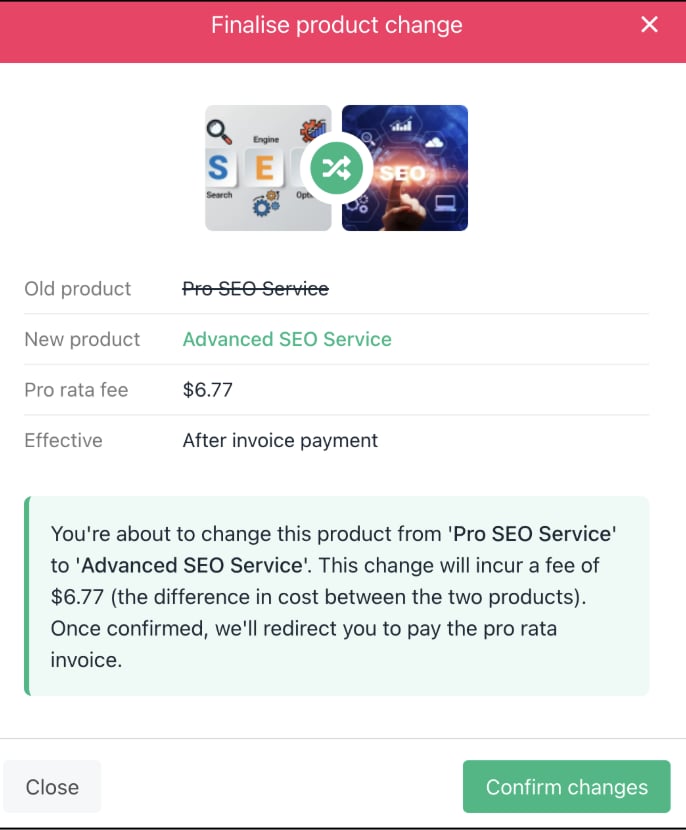
<Frame caption="Upgrading">
  <img src="https://mintcdn.com/upmind/ObllJJl59DabnmMn/images/fb/d177b522b1410029.png?fit=max&auto=format&n=ObllJJl59DabnmMn&q=85&s=27d78fc9de490db01eed4217af5b2489" alt="Upgrading" width="686" height="830" data-path="images/fb/d177b522b1410029.png" />
</Frame>

**If downgrading**: Product switches with no payment required.
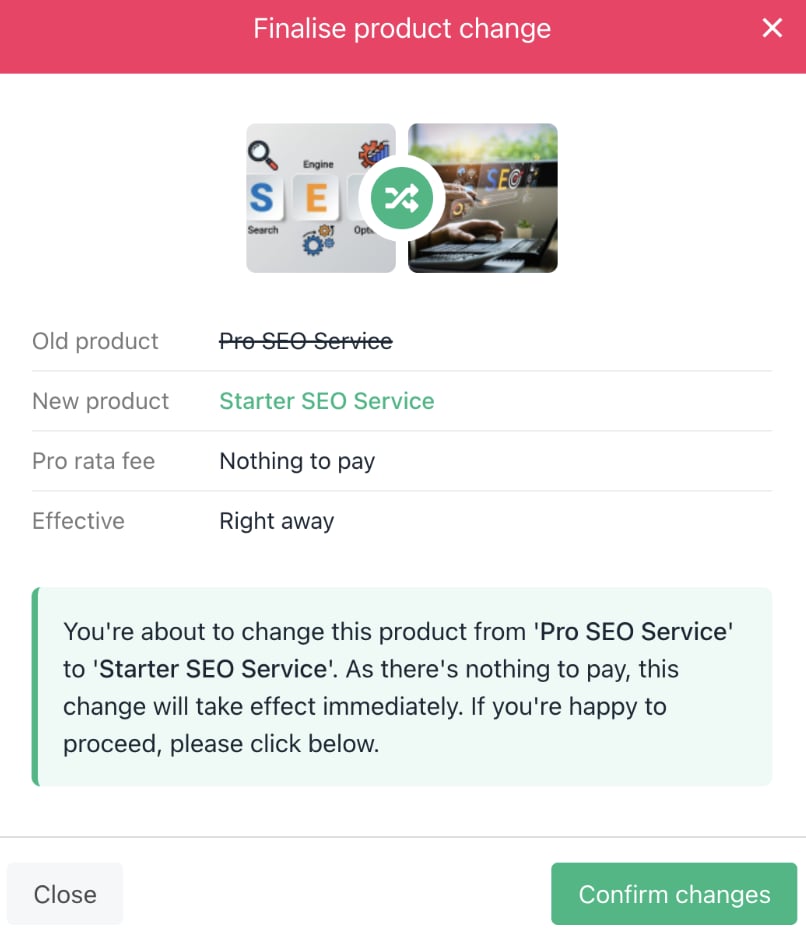
<Frame caption="Downgrading">
  <img src="https://mintcdn.com/upmind/1-uICsJi9zYpvJVH/images/fb/89582ae0714cd949.png?fit=max&auto=format&n=1-uICsJi9zYpvJVH&q=85&s=cddd5f8cfe787ffd50feed23dee02040" alt="Downgrading" width="806" height="934" data-path="images/fb/89582ae0714cd949.png" />
</Frame>
