> ## Documentation Index
> Fetch the complete documentation index at: https://docs.upmind.com/llms.txt
> Use this file to discover all available pages before exploring further.

# How Payments Work in Upmind

Payment methods in Upmind refer to the various ways clients pay for products and services, including credit cards, bank transfers, and cryptocurrency. These can be stored for recurring billing or used once.

Stored methods enable [<u>automatic</u>](/using-upmind/payment-methods/how-to-set-up-automatic-payments#/) and secure invoice payments, while one-time methods require manual action for each transaction.

## **Connection to gateways**

**Payment gateways** are connected to payment methods, which serve as intermediaries, safely transferring transaction data between your company, customers, and financial institutions.

When a client selects a payment method, the gateway encrypts and routes the data, verifies funds, and completes the transaction. Some gateways require a linked merchant account to settle funds. Others (e.g., PayPal) handle settlement directly.

Gateways determine which methods are available, which you can configure in your platform’s settings to align with client preferences and regional requirements.

## **Managing payment methods**

### **Admin area**

You can manage payment methods in Upmind in a few ways. **Admins** can add payment gateways from **Settings** > **Payment Providers**.

Follow this guide for more information on [<u>how to add payment gateways</u>](/using-upmind/payment-methods/payments-in-upmind/available-payment-gateways).
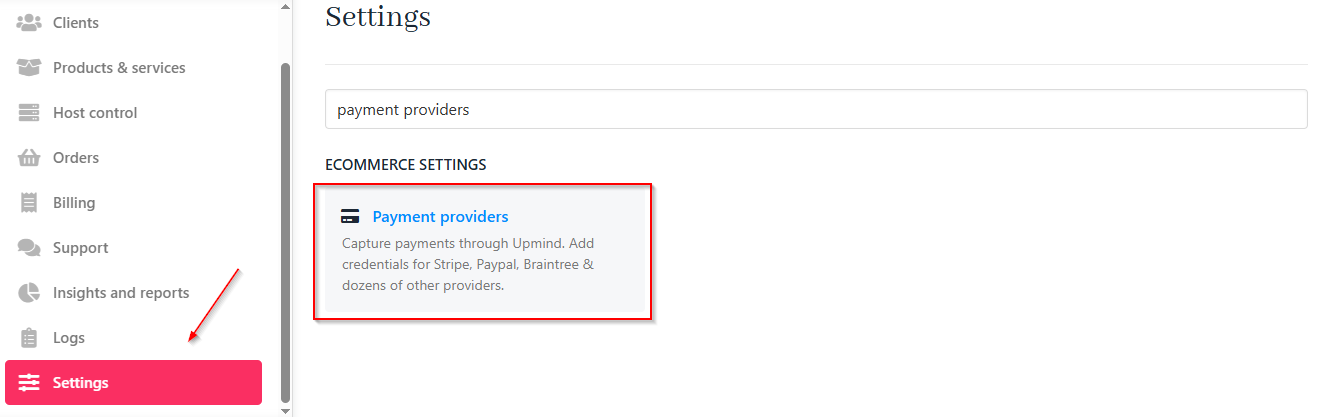
<Frame caption="Settings > Payment providers">
  <img src="https://mintcdn.com/upmind/VnCXiz5rboywDnvn/images/fb/d5885042bfd9b44c.png?fit=max&auto=format&n=VnCXiz5rboywDnvn&q=85&s=2e7568ee403d7df6c17f3a3448fa29a0" alt="Settings > Payment providers" data-og-width="1327" width="1327" data-og-height="417" height="417" data-path="images/fb/d5885042bfd9b44c.png" data-optimize="true" data-opv="3" srcset="https://mintcdn.com/upmind/VnCXiz5rboywDnvn/images/fb/d5885042bfd9b44c.png?w=280&fit=max&auto=format&n=VnCXiz5rboywDnvn&q=85&s=fd8537be5ec8e693e42eb32fd6a3d869 280w, https://mintcdn.com/upmind/VnCXiz5rboywDnvn/images/fb/d5885042bfd9b44c.png?w=560&fit=max&auto=format&n=VnCXiz5rboywDnvn&q=85&s=4134f47ddb54a8a7f7b9961645c95f36 560w, https://mintcdn.com/upmind/VnCXiz5rboywDnvn/images/fb/d5885042bfd9b44c.png?w=840&fit=max&auto=format&n=VnCXiz5rboywDnvn&q=85&s=fb9d4a1b7491f7115d325d95b3f907d2 840w, https://mintcdn.com/upmind/VnCXiz5rboywDnvn/images/fb/d5885042bfd9b44c.png?w=1100&fit=max&auto=format&n=VnCXiz5rboywDnvn&q=85&s=d606403033aca9033ae6cfef0f6c825a 1100w, https://mintcdn.com/upmind/VnCXiz5rboywDnvn/images/fb/d5885042bfd9b44c.png?w=1650&fit=max&auto=format&n=VnCXiz5rboywDnvn&q=85&s=4ddd469abcf71072e537945bf312ed19 1650w, https://mintcdn.com/upmind/VnCXiz5rboywDnvn/images/fb/d5885042bfd9b44c.png?w=2500&fit=max&auto=format&n=VnCXiz5rboywDnvn&q=85&s=b2a2f325bbc18fe92c7e073349908794 2500w" />
</Frame>

They can also add payment methods for individual clients by navigating to **Clients** > **Billing** > **Payment Methods**.
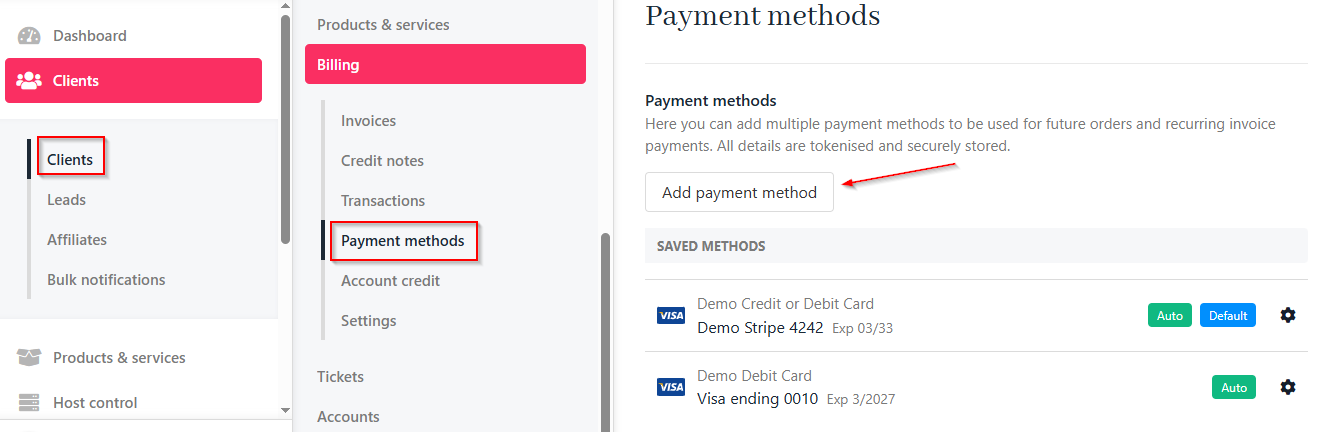
<Frame caption="Clients > Billing > Payment methods">
  <img src="https://mintcdn.com/upmind/Lh8hC132BWHpvRbz/images/fb/4e868c189f5c0cab.png?fit=max&auto=format&n=Lh8hC132BWHpvRbz&q=85&s=2ee1bb7c7616e07d9674489b021248c1" alt="Clients > Billing > Payment methods" data-og-width="1339" width="1339" data-og-height="432" height="432" data-path="images/fb/4e868c189f5c0cab.png" data-optimize="true" data-opv="3" srcset="https://mintcdn.com/upmind/Lh8hC132BWHpvRbz/images/fb/4e868c189f5c0cab.png?w=280&fit=max&auto=format&n=Lh8hC132BWHpvRbz&q=85&s=f026dde638267236bcc6391a180e5d1a 280w, https://mintcdn.com/upmind/Lh8hC132BWHpvRbz/images/fb/4e868c189f5c0cab.png?w=560&fit=max&auto=format&n=Lh8hC132BWHpvRbz&q=85&s=92bb58c53b03fb0e8facd614cc1c287a 560w, https://mintcdn.com/upmind/Lh8hC132BWHpvRbz/images/fb/4e868c189f5c0cab.png?w=840&fit=max&auto=format&n=Lh8hC132BWHpvRbz&q=85&s=7228ac5009810a30eb207b8b467507ba 840w, https://mintcdn.com/upmind/Lh8hC132BWHpvRbz/images/fb/4e868c189f5c0cab.png?w=1100&fit=max&auto=format&n=Lh8hC132BWHpvRbz&q=85&s=de3bb70316712925f8995b2623282663 1100w, https://mintcdn.com/upmind/Lh8hC132BWHpvRbz/images/fb/4e868c189f5c0cab.png?w=1650&fit=max&auto=format&n=Lh8hC132BWHpvRbz&q=85&s=6b1bff53c24ecf8fa6845068ae926126 1650w, https://mintcdn.com/upmind/Lh8hC132BWHpvRbz/images/fb/4e868c189f5c0cab.png?w=2500&fit=max&auto=format&n=Lh8hC132BWHpvRbz&q=85&s=1ef8b5af62b4fa663ea6edf146095f3c 2500w" />
</Frame>

### **Client area**

**Clients** manage their stored methods in the **Billing** > **Payment Methods** area of their portal, where they can add, update, or remove options.
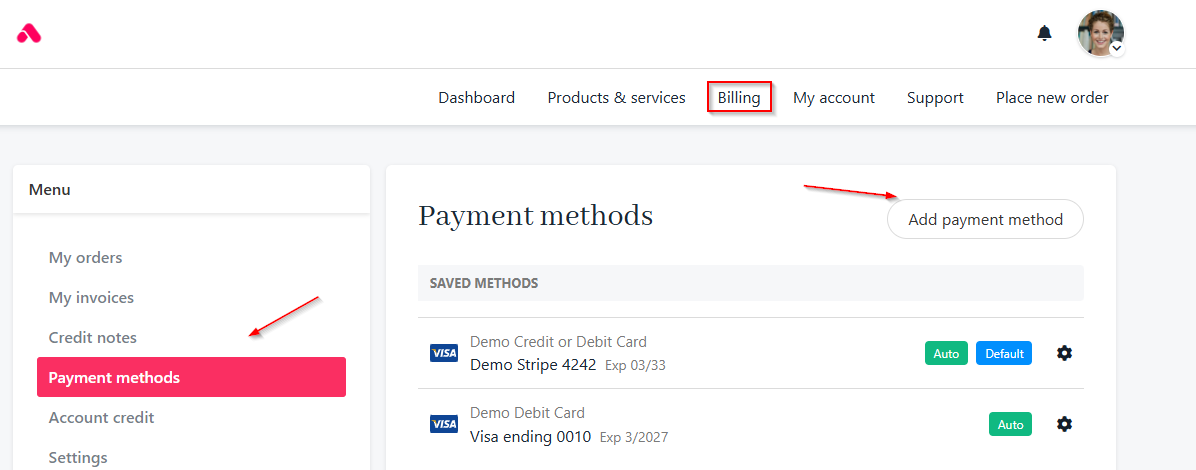
<Frame caption="Billing > Payment methods">
  <img src="https://mintcdn.com/upmind/kAlrCUxI2nwYz4_i/images/fb/1a9353be850ab0dd.png?fit=max&auto=format&n=kAlrCUxI2nwYz4_i&q=85&s=97d66506960e8053d3254782fbe0f150" alt="Billing > Payment methods" data-og-width="1196" width="1196" data-og-height="470" height="470" data-path="images/fb/1a9353be850ab0dd.png" data-optimize="true" data-opv="3" srcset="https://mintcdn.com/upmind/kAlrCUxI2nwYz4_i/images/fb/1a9353be850ab0dd.png?w=280&fit=max&auto=format&n=kAlrCUxI2nwYz4_i&q=85&s=c5d1f5661a649061759ed460d0823dd0 280w, https://mintcdn.com/upmind/kAlrCUxI2nwYz4_i/images/fb/1a9353be850ab0dd.png?w=560&fit=max&auto=format&n=kAlrCUxI2nwYz4_i&q=85&s=95cc8d7f02af832e086d033414a61d59 560w, https://mintcdn.com/upmind/kAlrCUxI2nwYz4_i/images/fb/1a9353be850ab0dd.png?w=840&fit=max&auto=format&n=kAlrCUxI2nwYz4_i&q=85&s=1a78a99fd5d3312347518b2b2def028d 840w, https://mintcdn.com/upmind/kAlrCUxI2nwYz4_i/images/fb/1a9353be850ab0dd.png?w=1100&fit=max&auto=format&n=kAlrCUxI2nwYz4_i&q=85&s=aa0baac9d40a3640e0c813ef55ecd36e 1100w, https://mintcdn.com/upmind/kAlrCUxI2nwYz4_i/images/fb/1a9353be850ab0dd.png?w=1650&fit=max&auto=format&n=kAlrCUxI2nwYz4_i&q=85&s=10cc786b11c72a8e9491c1492a7bc610 1650w, https://mintcdn.com/upmind/kAlrCUxI2nwYz4_i/images/fb/1a9353be850ab0dd.png?w=2500&fit=max&auto=format&n=kAlrCUxI2nwYz4_i&q=85&s=1c8961c6d182a90a0f2f7def6714c1b0 2500w" />
</Frame>

Admins can also [<u>impersonate the client</u>](/using-upmind/client-management/how-impersonating-a-client-works#/) to add payment methods and handle failed payments manually or through automated settings. For more information, follow this [<u>guide</u>](/using-upmind/payment-methods/how-to-use-different-payment-methods#/).
