> ## Documentation Index
> Fetch the complete documentation index at: https://docs.upmind.com/llms.txt
> Use this file to discover all available pages before exploring further.
# How to Add PayPal Subscription Agreement as a Payment Method
> Configure PayPal Subscription Agreement
In this guide, we will set up PayPal Subscription Agreement. You will require:
* A PayPal account
* An Upmind account
Please make sure this feature is enabled on your PayPal account. You may need to contact PayPal or check their [guide](https://developer.paypal.com/docs/subscriptions/).
## Obtaining API credentials from PayPal
1. Log in to your **PayPal Business account**.
2. Go to the `Developer` section (top right).
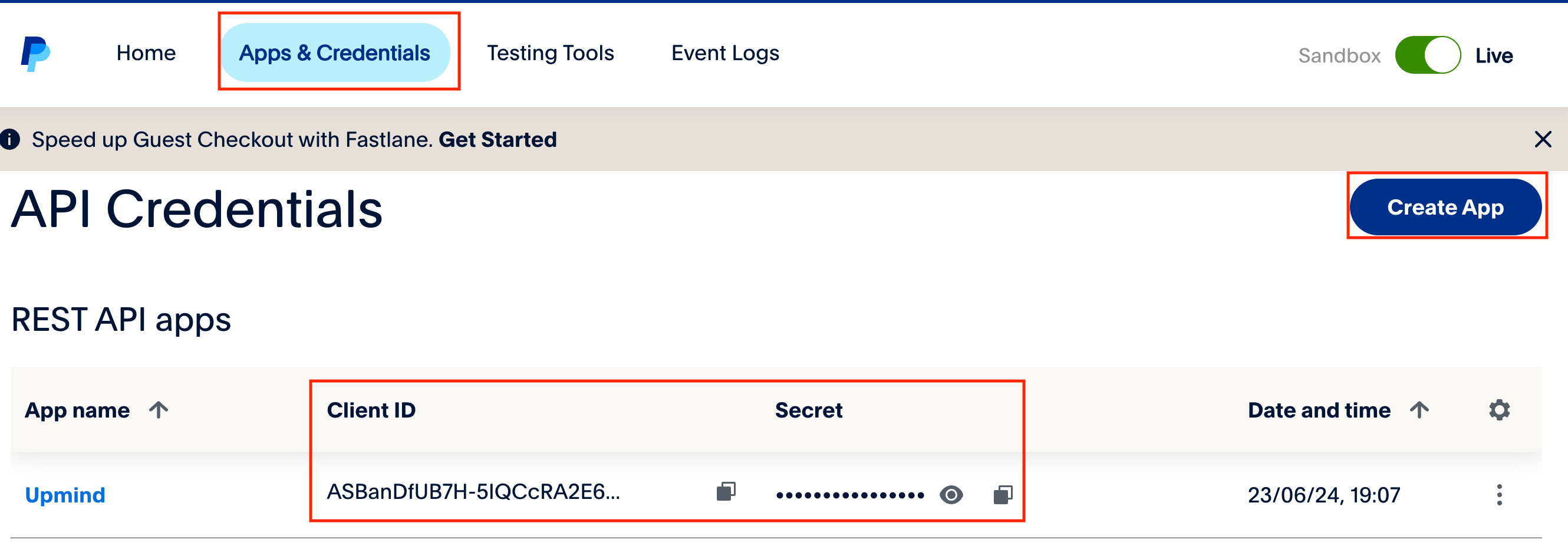
 3. Click **Apps and Credentials**.
4. Click **Create App** or select an existing app to view the **Client ID** and **Secret**.
3. Click **Apps and Credentials**.
4. Click **Create App** or select an existing app to view the **Client ID** and **Secret**.
 ## Adding PayPal Subscription Agreement in Upmind
1. In Upmind, go to **Settings** > **Payment Providers**.
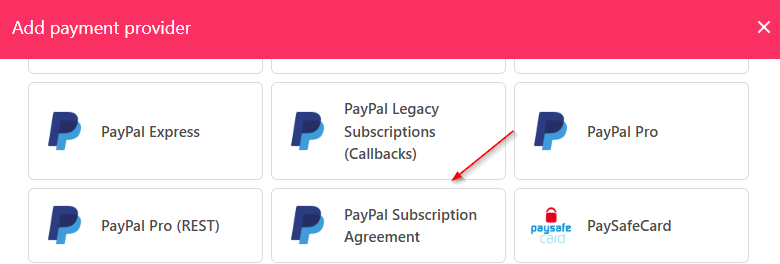
2. Click **Add Payment Provider**.
3. Select **PayPal Subscription Agreement**.
## Adding PayPal Subscription Agreement in Upmind
1. In Upmind, go to **Settings** > **Payment Providers**.
2. Click **Add Payment Provider**.
3. Select **PayPal Subscription Agreement**.
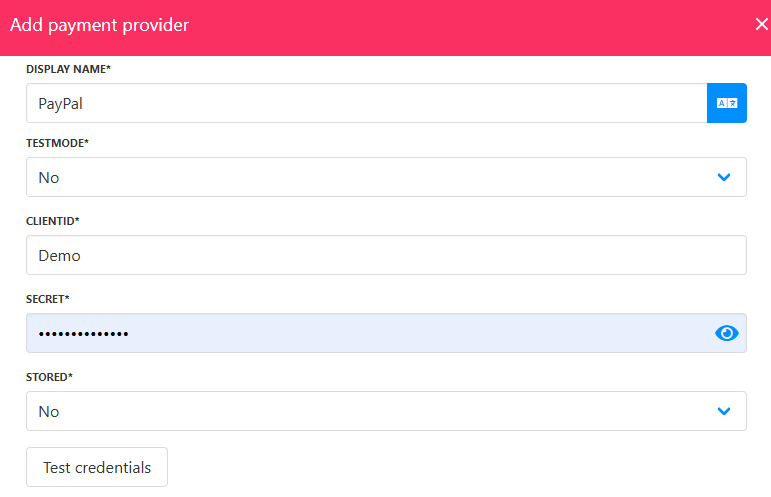
 4. Enter a display name. We suggest **PayPal**.
5. Set **Test Mode** to **No**.
6. Enter your **Client ID** and **Secret**.
7. Choose if you want it **Stored**.
8. Click **Test Credentials**.
9. (Optional) Add currencies and payment instructions.
10. Click **Create**.
4. Enter a display name. We suggest **PayPal**.
5. Set **Test Mode** to **No**.
6. Enter your **Client ID** and **Secret**.
7. Choose if you want it **Stored**.
8. Click **Test Credentials**.
9. (Optional) Add currencies and payment instructions.
10. Click **Create**.
 ## Editing PayPal Subscription Agreement
To edit, go to **Settings** > **Payment Providers**, click the three dots, and select **Edit**.
## Editing PayPal Subscription Agreement
To edit, go to **Settings** > **Payment Providers**, click the three dots, and select **Edit**.