> ## Documentation Index
> Fetch the complete documentation index at: https://docs.upmind.com/llms.txt
> Use this file to discover all available pages before exploring further.

# How to Add Additional Information to an Invoice

> Adding notes, fields, or custom info.

Upmind lets you add extra information to invoices using key-value pairs as metadata, which is especially useful for including additional records when reporting to external fiscal authorities.

## Adding metadata to an invoice

1. Go to **Client** > **Billing**.

2. Select the invoice you wish to update.
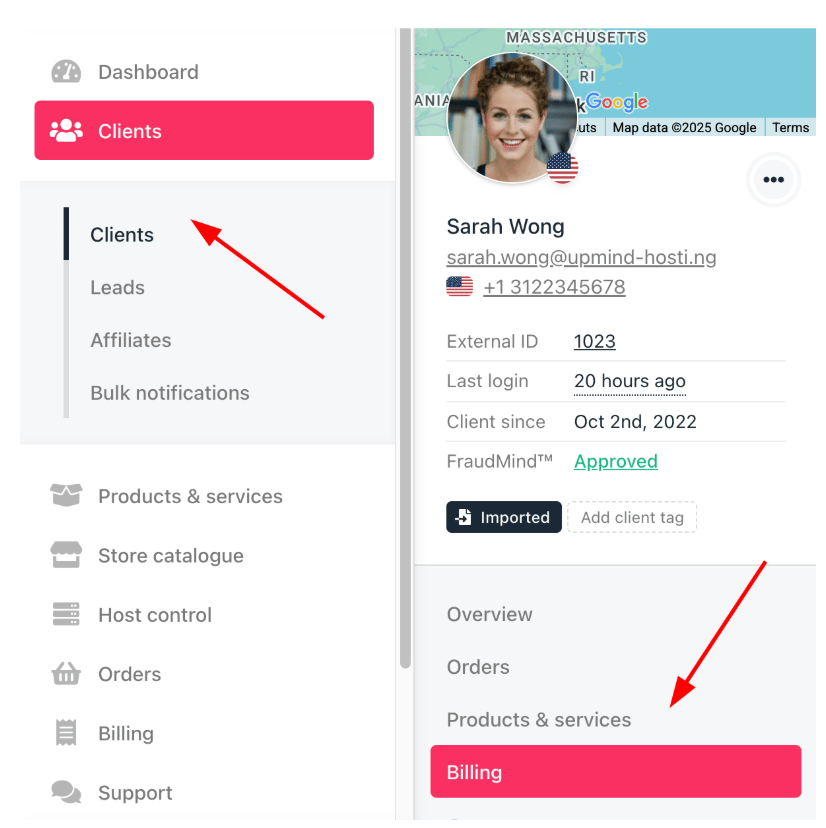
<Frame caption="Clients > Billing">
  <img src="https://mintcdn.com/upmind/pcUdSuxUJ6LgBXnd/images/fb/a0240c52244f3ba3.png?fit=max&auto=format&n=pcUdSuxUJ6LgBXnd&q=85&s=0c171616b68f1ce846ba730c86f91b6f" alt="Clients > Billing" data-og-width="826" width="826" data-og-height="828" height="828" data-path="images/fb/a0240c52244f3ba3.png" data-optimize="true" data-opv="3" srcset="https://mintcdn.com/upmind/pcUdSuxUJ6LgBXnd/images/fb/a0240c52244f3ba3.png?w=280&fit=max&auto=format&n=pcUdSuxUJ6LgBXnd&q=85&s=943e692411e7d151b77bb435d5a5c795 280w, https://mintcdn.com/upmind/pcUdSuxUJ6LgBXnd/images/fb/a0240c52244f3ba3.png?w=560&fit=max&auto=format&n=pcUdSuxUJ6LgBXnd&q=85&s=09d97115f8c59a52288251bc3df507d2 560w, https://mintcdn.com/upmind/pcUdSuxUJ6LgBXnd/images/fb/a0240c52244f3ba3.png?w=840&fit=max&auto=format&n=pcUdSuxUJ6LgBXnd&q=85&s=d29710099d222c26026ef7fefabc129b 840w, https://mintcdn.com/upmind/pcUdSuxUJ6LgBXnd/images/fb/a0240c52244f3ba3.png?w=1100&fit=max&auto=format&n=pcUdSuxUJ6LgBXnd&q=85&s=30eaa541923e633ac9a48e3bdaf66194 1100w, https://mintcdn.com/upmind/pcUdSuxUJ6LgBXnd/images/fb/a0240c52244f3ba3.png?w=1650&fit=max&auto=format&n=pcUdSuxUJ6LgBXnd&q=85&s=088e0d0b13cce3e0193363644d28e94a 1650w, https://mintcdn.com/upmind/pcUdSuxUJ6LgBXnd/images/fb/a0240c52244f3ba3.png?w=2500&fit=max&auto=format&n=pcUdSuxUJ6LgBXnd&q=85&s=97730698ae37e51ca2fdc0eb1d78c6a3 2500w" />
</Frame>

3. Select an invoice, scroll down, and click **Manage metadata** under **Quick Actions**. This is useful for adding fiscal authority references, purchase order numbers, or custom notes.

<Frame caption="Manage metadata">
  <img src="https://mintcdn.com/upmind/ObllJJl59DabnmMn/images/fb/d246a1982af14494.png?fit=max&auto=format&n=ObllJJl59DabnmMn&q=85&s=da9275c002bccb086a842dba8ba40a5a" alt="Manage metadata" width="1360" height="244" data-path="images/fb/d246a1982af14494.png" />
</Frame>

4. Enter a **Meta Key** and **Meta Value**.

* A meta key is a unique identifier or name used to store specific information.

* A meta value is the actual data.
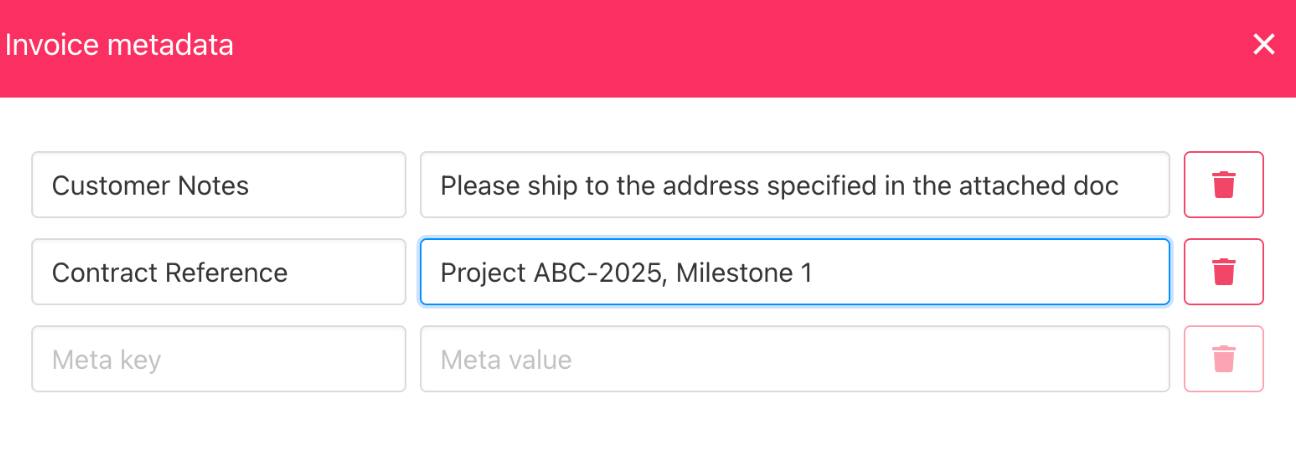
<Frame caption="Meta key and meta value">
  <img src="https://mintcdn.com/upmind/uxzVUXAKtJ2bRWCI/images/fb/66c79b95db81384d.png?fit=max&auto=format&n=uxzVUXAKtJ2bRWCI&q=85&s=76c65f6ee179a8e4588ca6f04a361908" alt="Meta key and meta value" width="1296" height="474" data-path="images/fb/66c79b95db81384d.png" />
</Frame>

5. Click **Save** to add the information to the invoice.

6. Metadata is displayed on the invoice, visible to both admins and clients as needed.
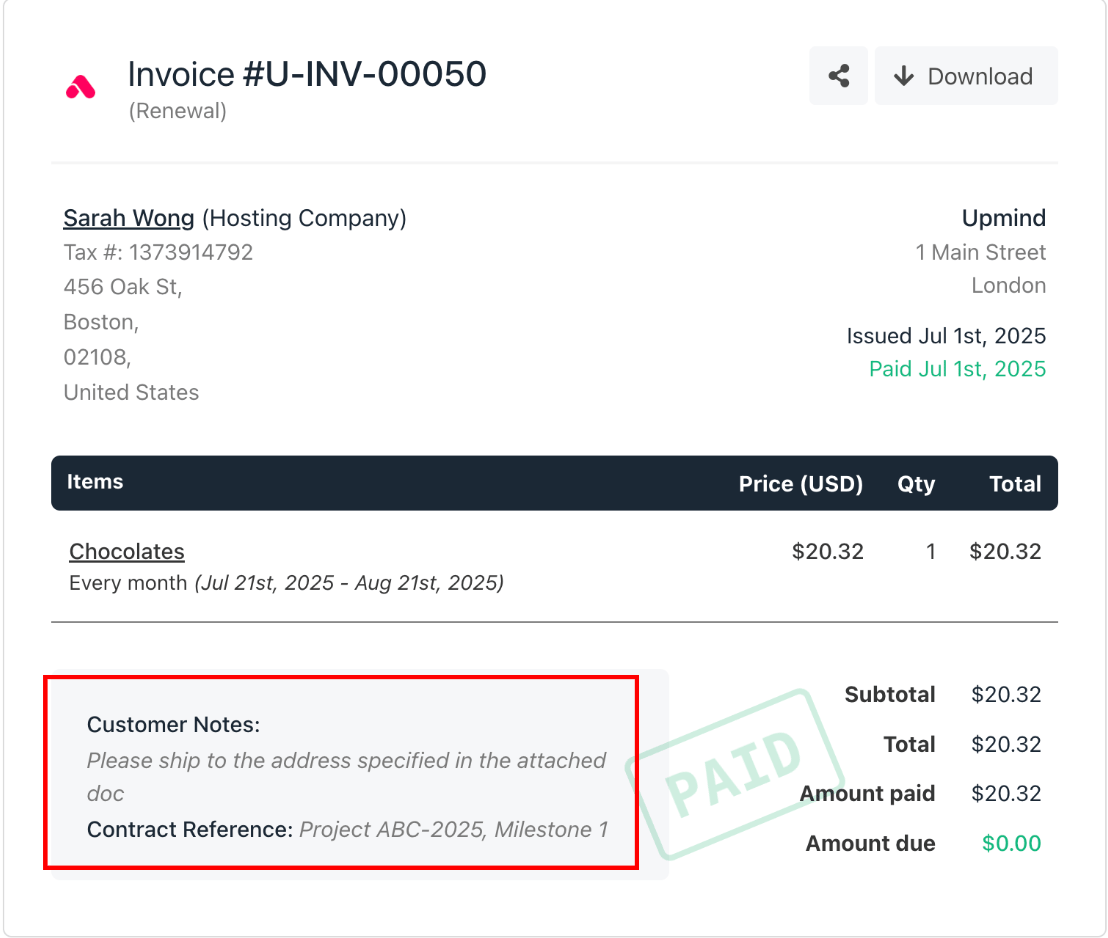
<Frame caption="Updated invoice with metadata">
  <img src="https://mintcdn.com/upmind/wRuKrNY12tQZY8Rr/images/fb/323f670ddf58ac4f.png?fit=max&auto=format&n=wRuKrNY12tQZY8Rr&q=85&s=a03d18092bb9c9fa26598fc19a2120d8" alt="Updated invoice with metadata" width="1108" height="938" data-path="images/fb/323f670ddf58ac4f.png" />
</Frame>
