> ## Documentation Index
> Fetch the complete documentation index at: https://docs.upmind.com/llms.txt
> Use this file to discover all available pages before exploring further.
# Subscription Cancellation Options
> Configure subscription cancellations.
Upmind gives you control over how clients cancel subscriptions through global settings and per-contract actions. Clients can request cancellation from their account. Admins handle requests based on your configured rules.
## **Global cancellation settings**
You can set the default behaviour for all subscription cancellations.
## **Access subscription options**
1. Log in to Upmind admin.
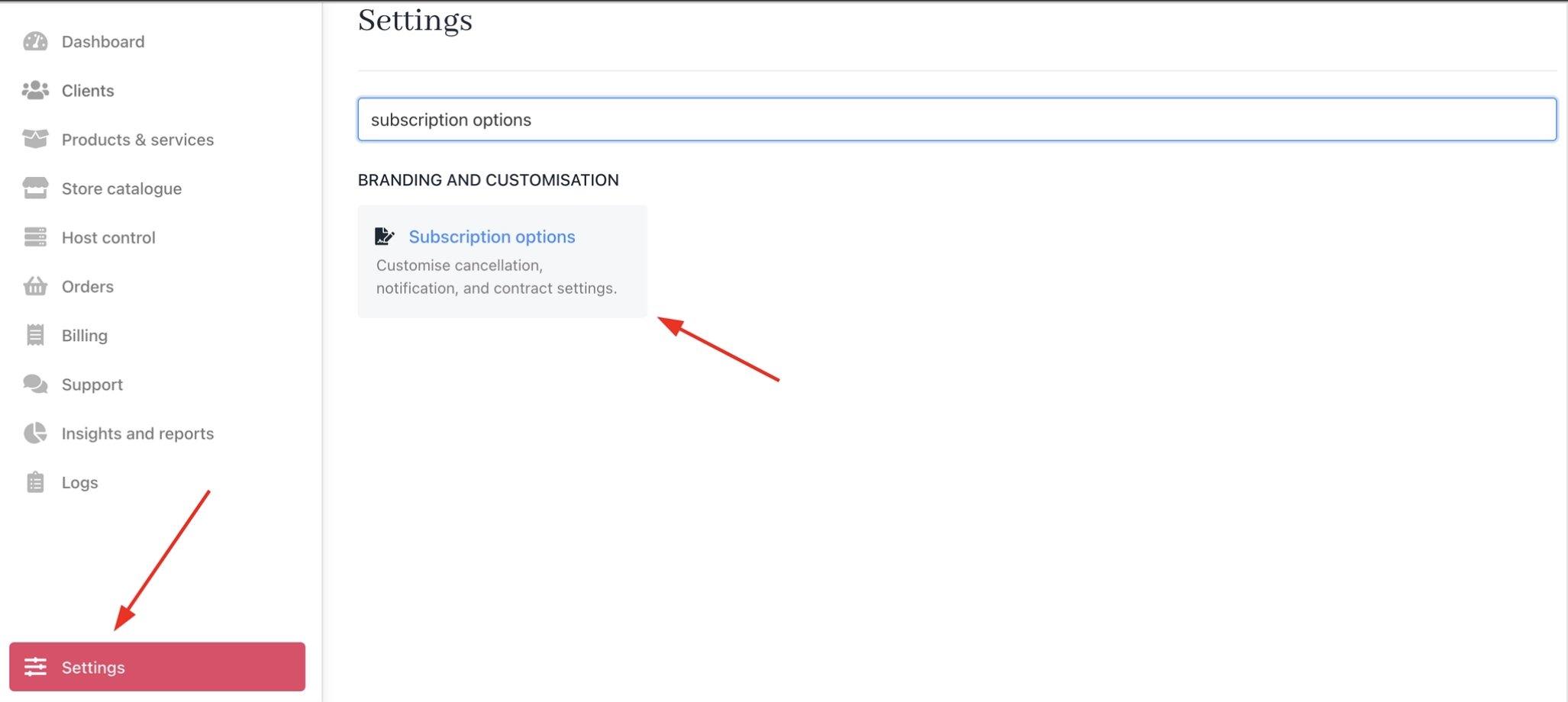
2. Go to **Settings** > **Subscription Options** under **Branding and Customisation**.
 ## **Cancellation terms options**
Upmind supports two cancellation points for subscriptions.
1. Immediate cancellation: The subscription is cancelled right away, and the service stops immediately.
2. End of billing term cancellation: The subscription remains active until the end of the current billing period and then stops.
The cancellation term options can:
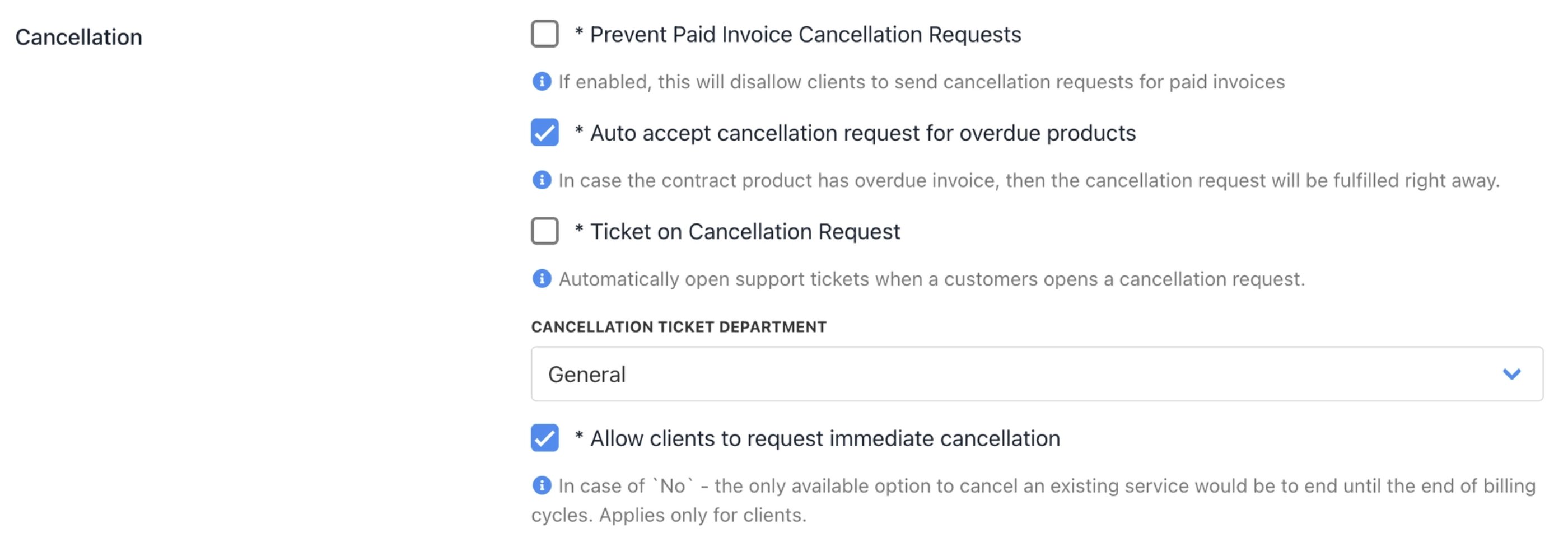
* **Prevent clients from cancelling paid invoices**: Blocks cancellation until the current term ends. This is for services that require full payment periods.
* **Auto-accept requests for overdue invoices**: Approves cancellations on unpaid invoices.
* **Open support ticket automatically**: Creates a ticket assigned to a specific department.
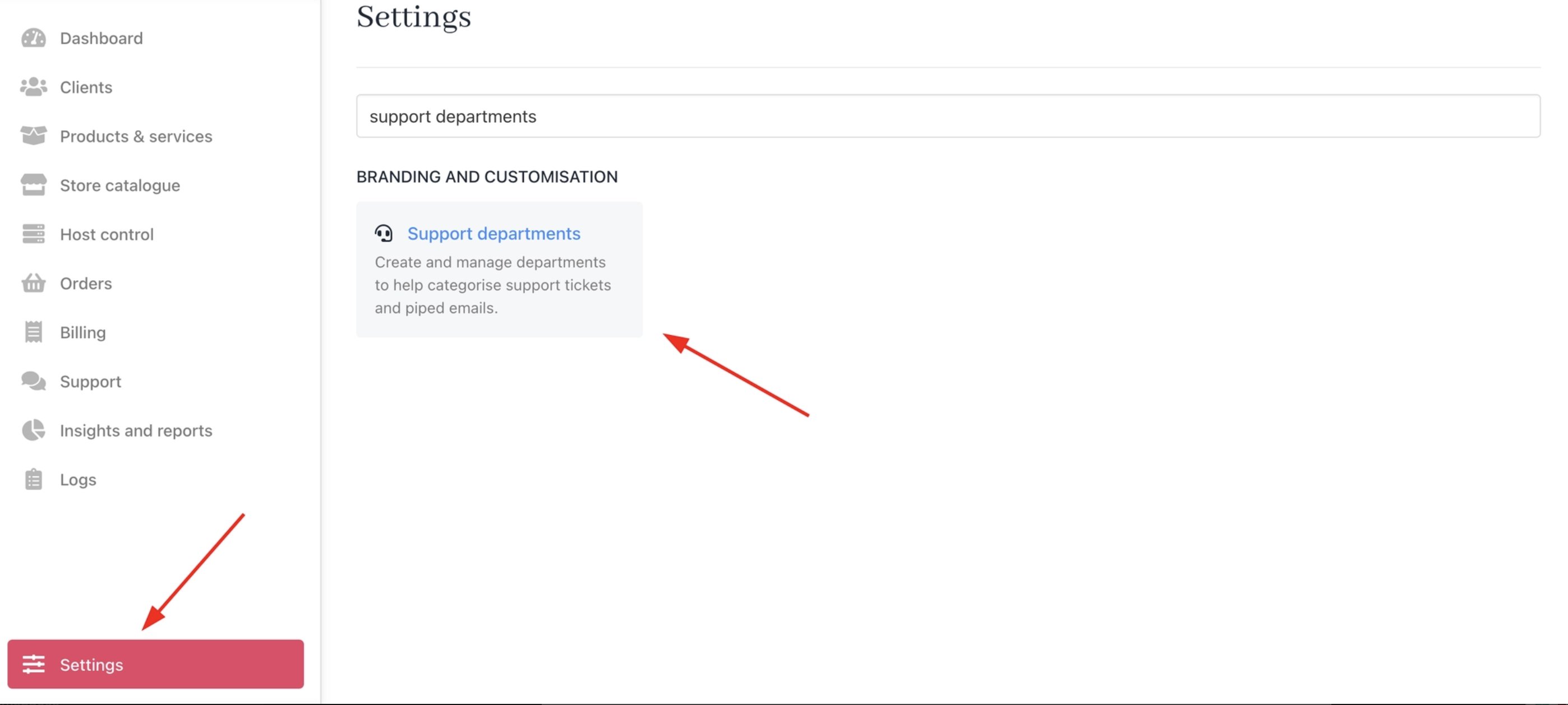
When assigning a cancellation ticket department, make sure **Allow clients to select this department when creating a ticket** is enabled from **Settings** > **Support Departments** > \[Your Department]
## **Cancellation terms options**
Upmind supports two cancellation points for subscriptions.
1. Immediate cancellation: The subscription is cancelled right away, and the service stops immediately.
2. End of billing term cancellation: The subscription remains active until the end of the current billing period and then stops.
The cancellation term options can:
* **Prevent clients from cancelling paid invoices**: Blocks cancellation until the current term ends. This is for services that require full payment periods.
* **Auto-accept requests for overdue invoices**: Approves cancellations on unpaid invoices.
* **Open support ticket automatically**: Creates a ticket assigned to a specific department.
When assigning a cancellation ticket department, make sure **Allow clients to select this department when creating a ticket** is enabled from **Settings** > **Support Departments** > \[Your Department]
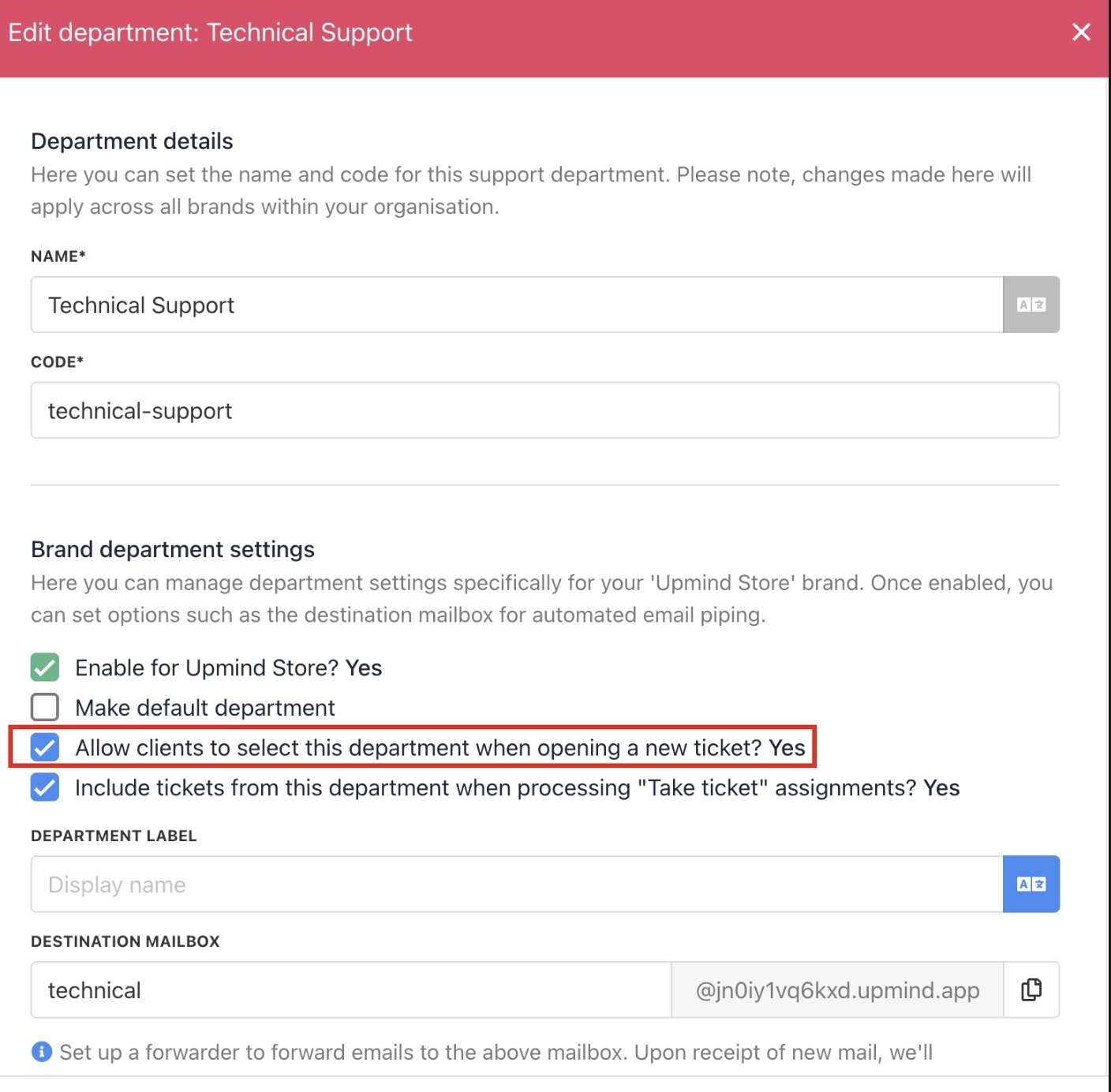 If disabled, clients will see an error: **There was an error while creating a ticket for this invoice**.
* **Allow Immediate Cancellation Requests**: When off, clients can only cancel at the end of the billing term. Applies to client-side requests only.
When assigning a cancellation ticket department, make sure **Allow clients to select this department when creating a ticket** is enabled.
Settings → Support Departments → \[Your Department]
If disabled, clients see an error: "There was an error while creating a ticket for this invoice."
If disabled, clients will see an error: **There was an error while creating a ticket for this invoice**.
* **Allow Immediate Cancellation Requests**: When off, clients can only cancel at the end of the billing term. Applies to client-side requests only.
When assigning a cancellation ticket department, make sure **Allow clients to select this department when creating a ticket** is enabled.
Settings → Support Departments → \[Your Department]
If disabled, clients see an error: "There was an error while creating a ticket for this invoice."
 Client-level overrides are available under Automation Overrides. For more details, follow this [guide](https://features.upmind.com/dashboard/articles/pmbul2hh9yd1joja/4771567).
## **Contract terms (strict mode)**
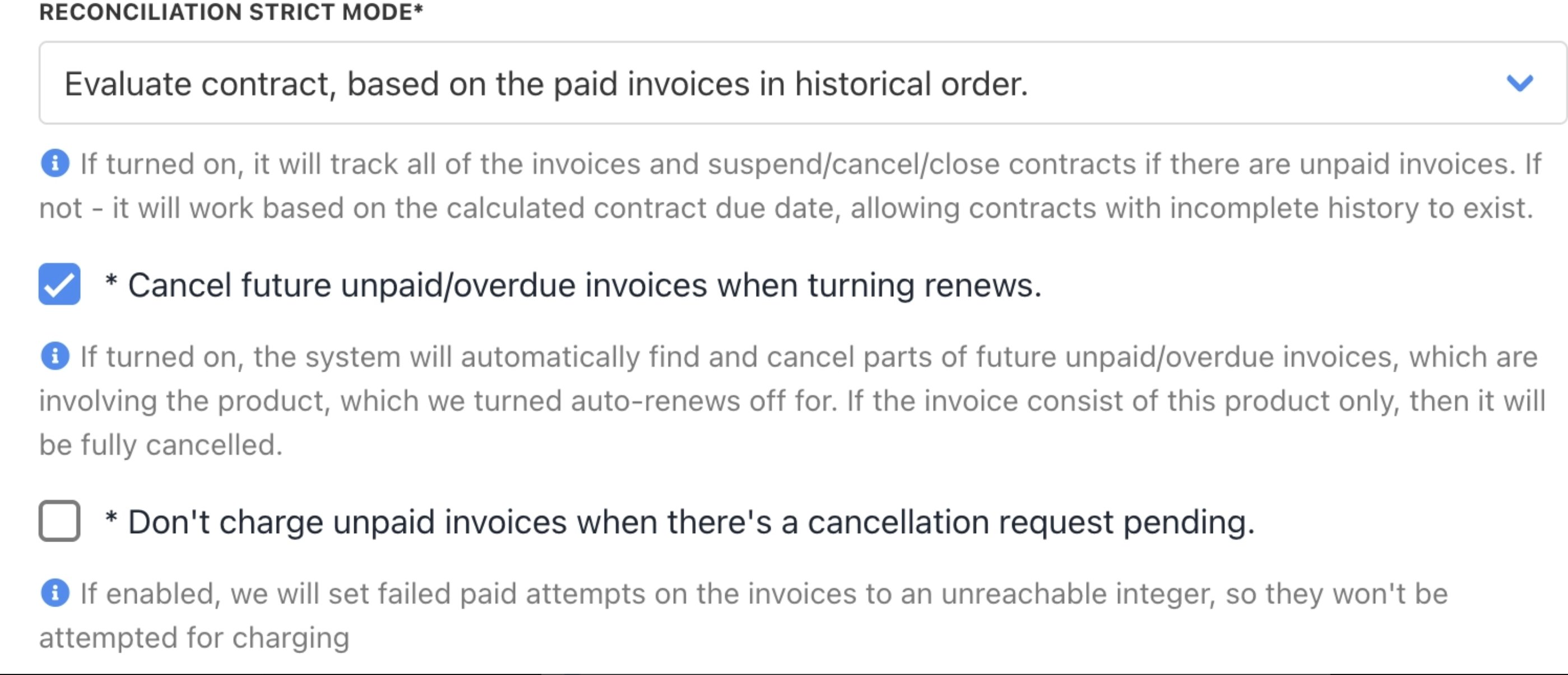
* **Strict Reconciliation Mode**: Evaluates contracts by paid invoices. This suspends or cancels unpaid ones or allows next-due-date mode for incomplete histories.
* **Cancel Unpaid Invoices on Auto-renew Off:** Cancels future unpaid invoices when auto-renew turns off. Fully cancels the contract if the invoice contains only those products.
* **Block Charges on Pending Cancellations**: Stops charge attempts on invoices with pending cancellation requests.
Client-level overrides are available under Automation Overrides. For more details, follow this [guide](https://features.upmind.com/dashboard/articles/pmbul2hh9yd1joja/4771567).
## **Contract terms (strict mode)**
* **Strict Reconciliation Mode**: Evaluates contracts by paid invoices. This suspends or cancels unpaid ones or allows next-due-date mode for incomplete histories.
* **Cancel Unpaid Invoices on Auto-renew Off:** Cancels future unpaid invoices when auto-renew turns off. Fully cancels the contract if the invoice contains only those products.
* **Block Charges on Pending Cancellations**: Stops charge attempts on invoices with pending cancellation requests.
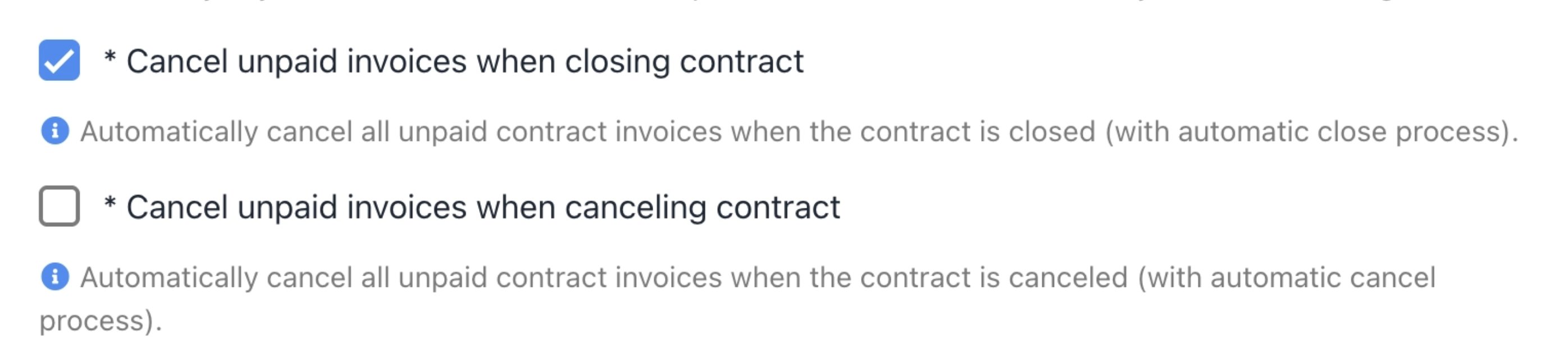
 * **Cancel Unpaid Invoices on Contract Close:** Auto-cancels all unpaid contract invoices during automatic contract closure.
* **Cancel Unpaid Invoices on Contract Cancel**: Auto-cancels all unpaid contract invoices during automatic contract cancellation.
* **Cancel Unpaid Invoices on Contract Close:** Auto-cancels all unpaid contract invoices during automatic contract closure.
* **Cancel Unpaid Invoices on Contract Cancel**: Auto-cancels all unpaid contract invoices during automatic contract cancellation.
 ## How to cancel a subscription
### **Client cancellation process**
Clients cancel from their account dashboard.
1. Log in to the client area.
2. Go to **Products & Services** > **Subscriptions**.
## How to cancel a subscription
### **Client cancellation process**
Clients cancel from their account dashboard.
1. Log in to the client area.
2. Go to **Products & Services** > **Subscriptions**.
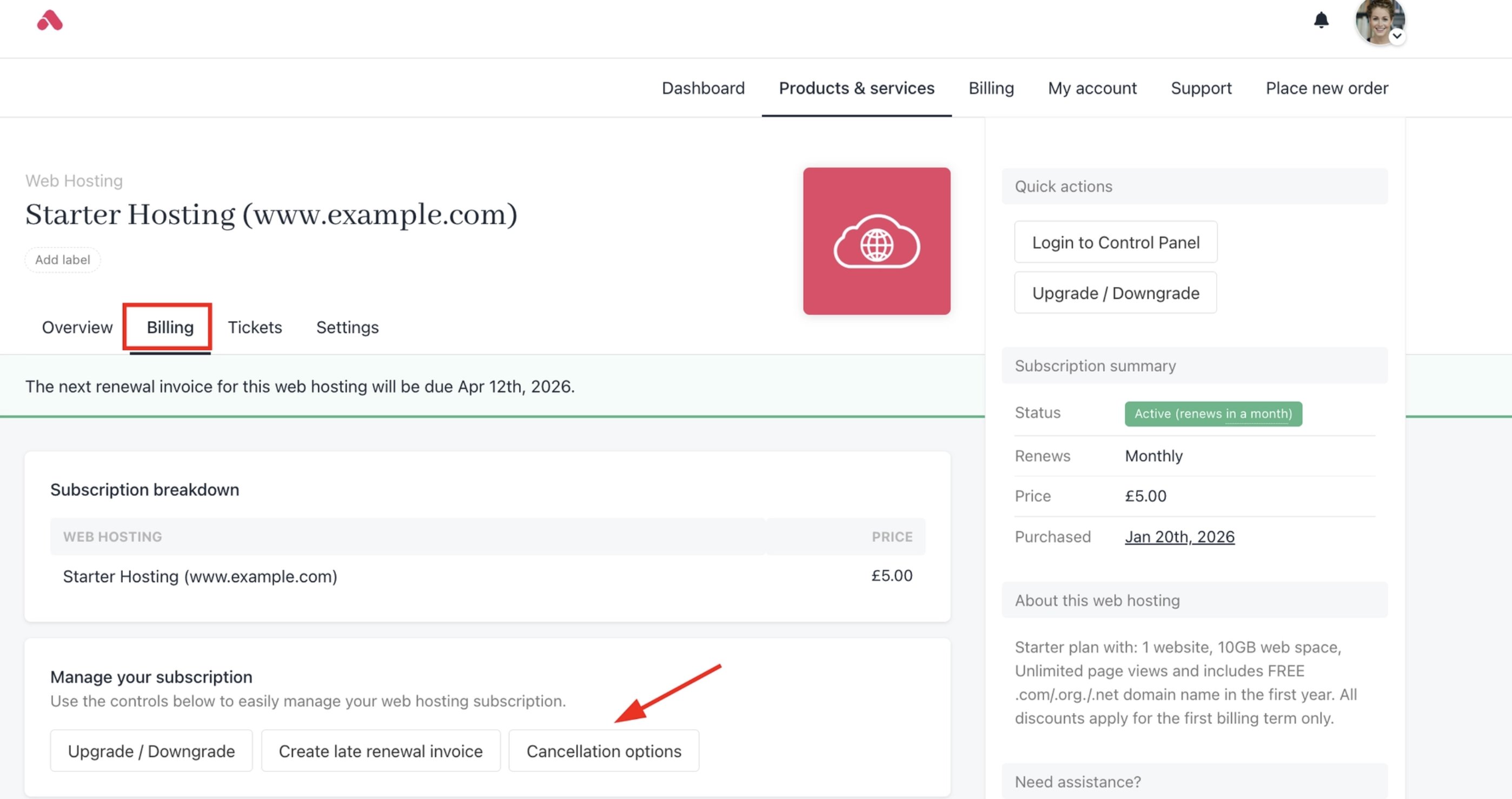
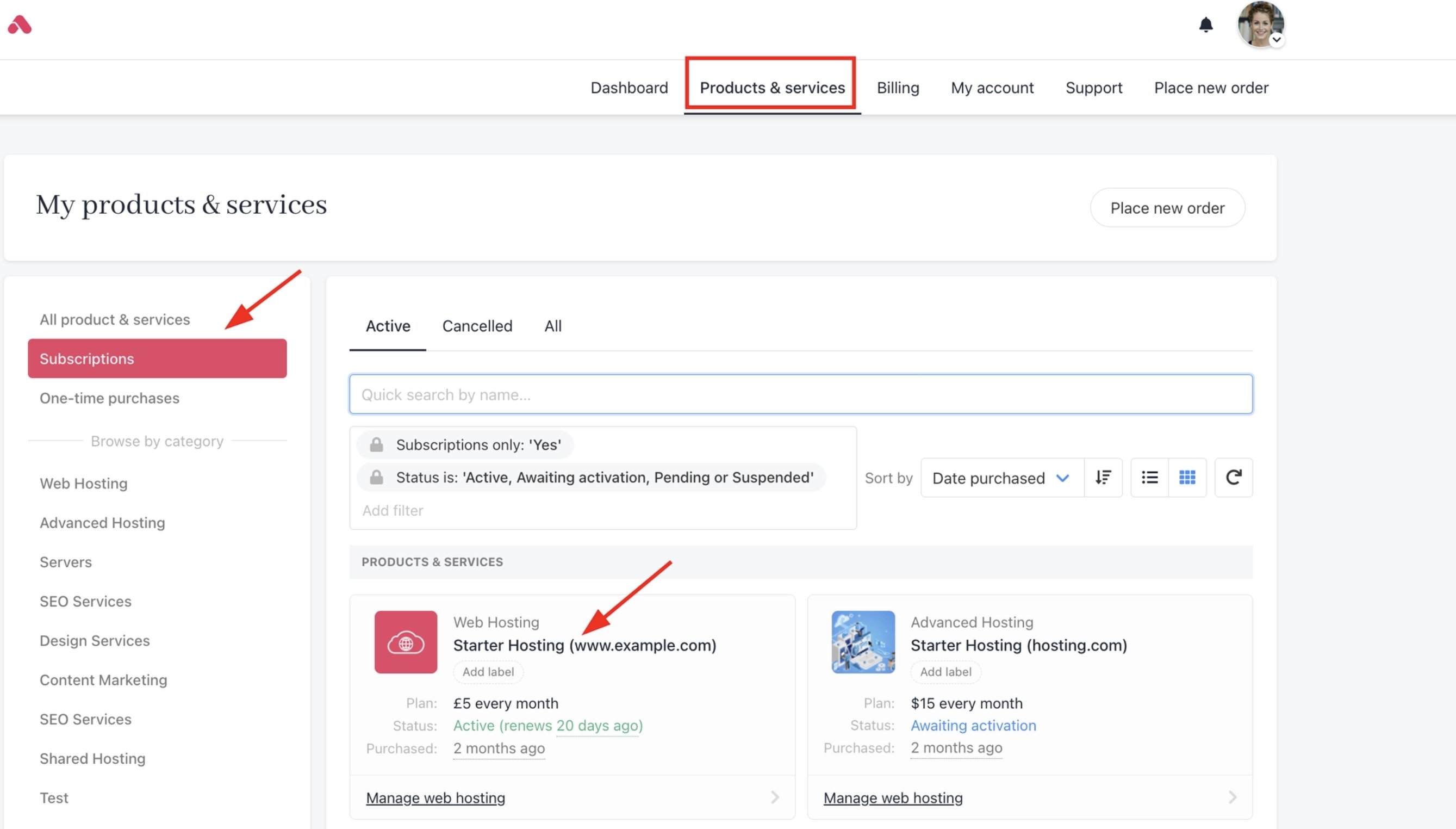 3. Click the product > **Billing** tab.
4. Click **Cancellation Options**.
3. Click the product > **Billing** tab.
4. Click **Cancellation Options**.
 5. Choose **Immediate Cancellation** or **End of Billing Term**.
6. Enter reason (required).
7. Submit a request.
5. Choose **Immediate Cancellation** or **End of Billing Term**.
6. Enter reason (required).
7. Submit a request.
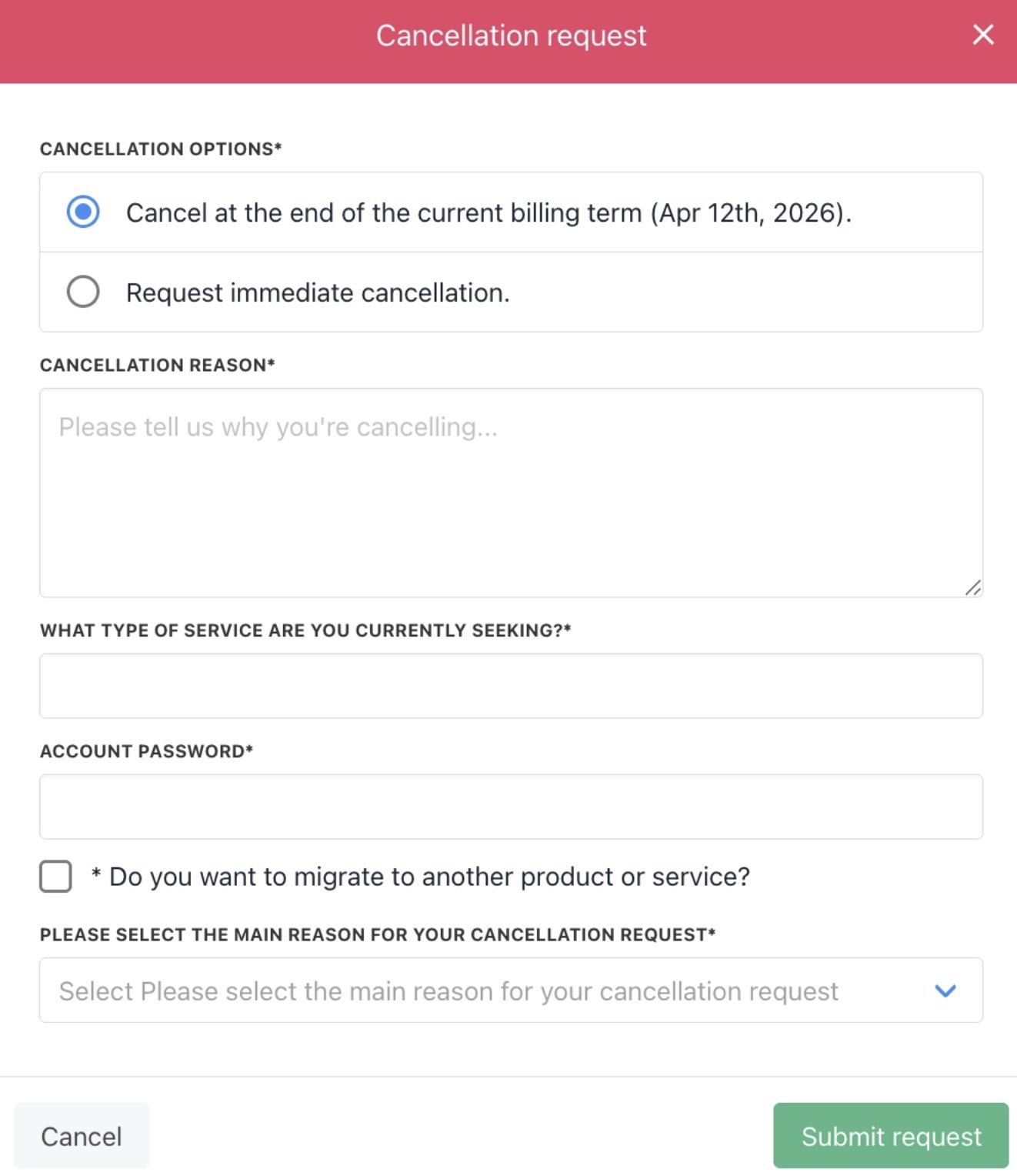 If you cancel with immediate effect, refund options will appear. You can choose to refund to the original payment source or as account credit.
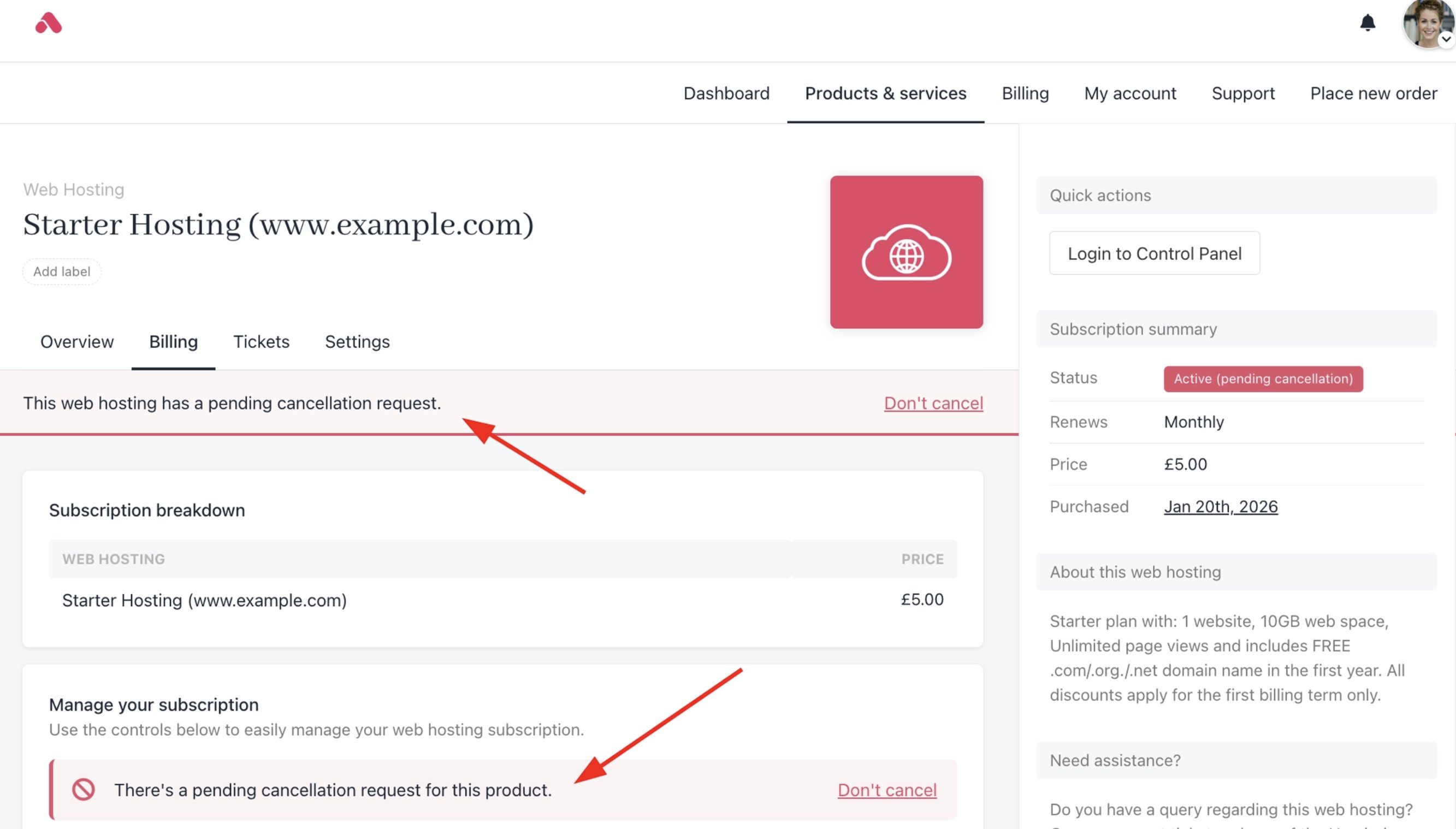
Upmind sends a confirmation email. The status then shows under the **Cancelled** tab in Subscriptions.
If you cancel with immediate effect, refund options will appear. You can choose to refund to the original payment source or as account credit.
Upmind sends a confirmation email. The status then shows under the **Cancelled** tab in Subscriptions.
 ### Product & service cancellation options
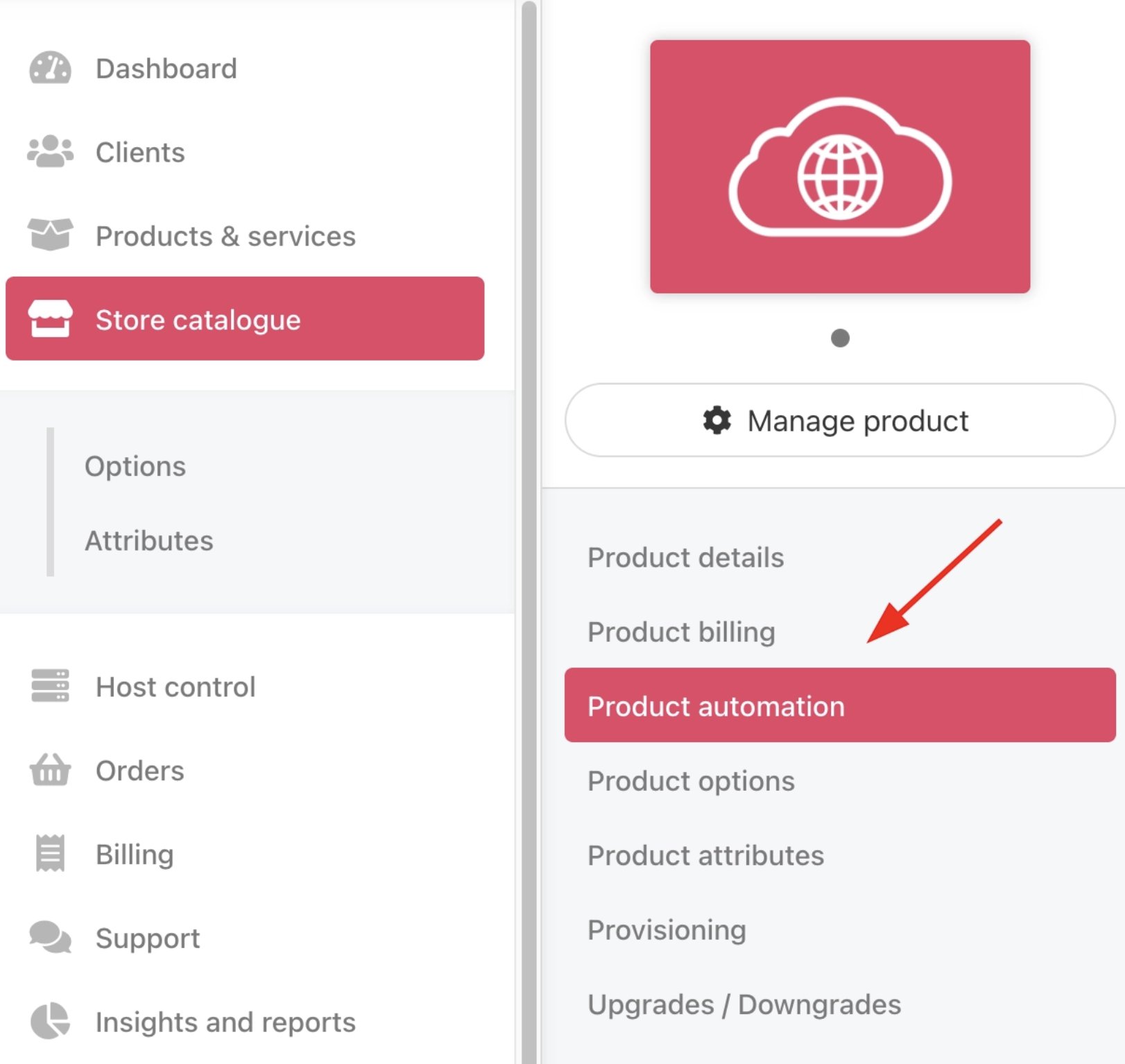
These are options available to the admin or staff. You can access these options from **Product Catalogue** > **Chosen Product or Service** > **Product Automation**.
### Product & service cancellation options
These are options available to the admin or staff. You can access these options from **Product Catalogue** > **Chosen Product or Service** > **Product Automation**.
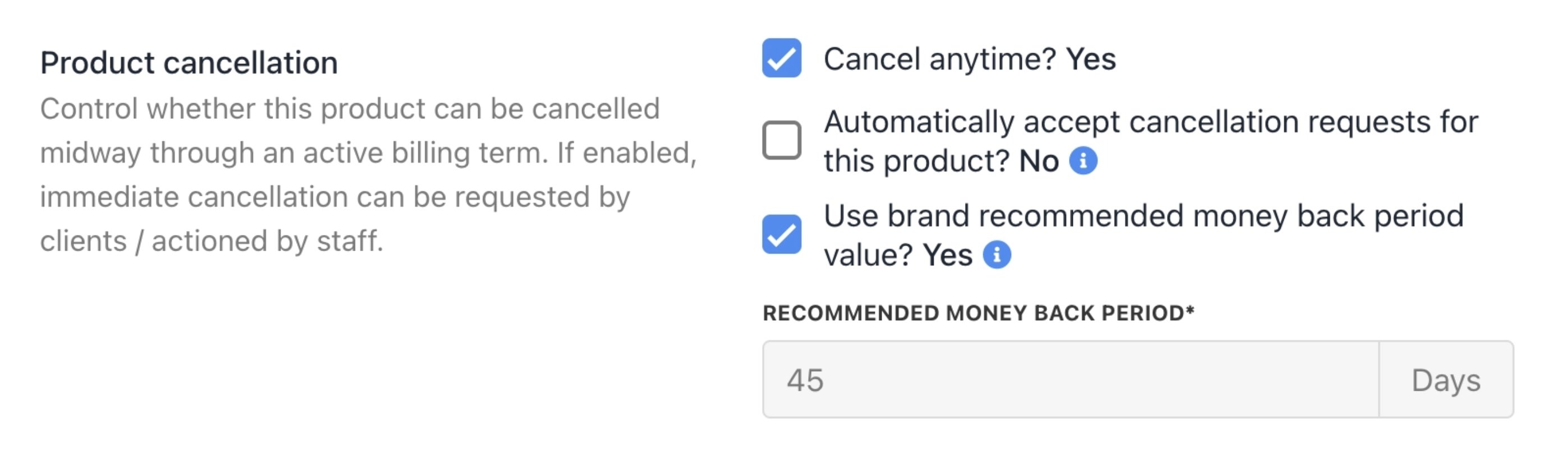
 * **Cancel Anytime:** Allows cancellation requests at any point during the billing term.
* **Automatically Accept Cancellation Requests:** Automatically approves requests for this product. Automated acceptance issues no refunds. You can only do so if you issue it manually.
* **Use Brand Recommended Money Back Period Value:** Applies the brand's recommended money back period from global settings to this product.
* **Recommended Money Back Period:** Number of days for refunds on immediate cancellations, set at the brand level.
* **Cancel Anytime:** Allows cancellation requests at any point during the billing term.
* **Automatically Accept Cancellation Requests:** Automatically approves requests for this product. Automated acceptance issues no refunds. You can only do so if you issue it manually.
* **Use Brand Recommended Money Back Period Value:** Applies the brand's recommended money back period from global settings to this product.
* **Recommended Money Back Period:** Number of days for refunds on immediate cancellations, set at the brand level.
 ### **Admin cancellation actions**
Admin or staff can cancel subscriptions from the admin dashboard.
**Cancel from the client profile**
1. Go to **Products & Services** > **Subscriptions**.
2. Use a menu tab (e.g. Active, Awaiting for payment, etc.) to filter results. (optional)
3. Find the subscription contract > **Manage**.
### **Admin cancellation actions**
Admin or staff can cancel subscriptions from the admin dashboard.
**Cancel from the client profile**
1. Go to **Products & Services** > **Subscriptions**.
2. Use a menu tab (e.g. Active, Awaiting for payment, etc.) to filter results. (optional)
3. Find the subscription contract > **Manage**.
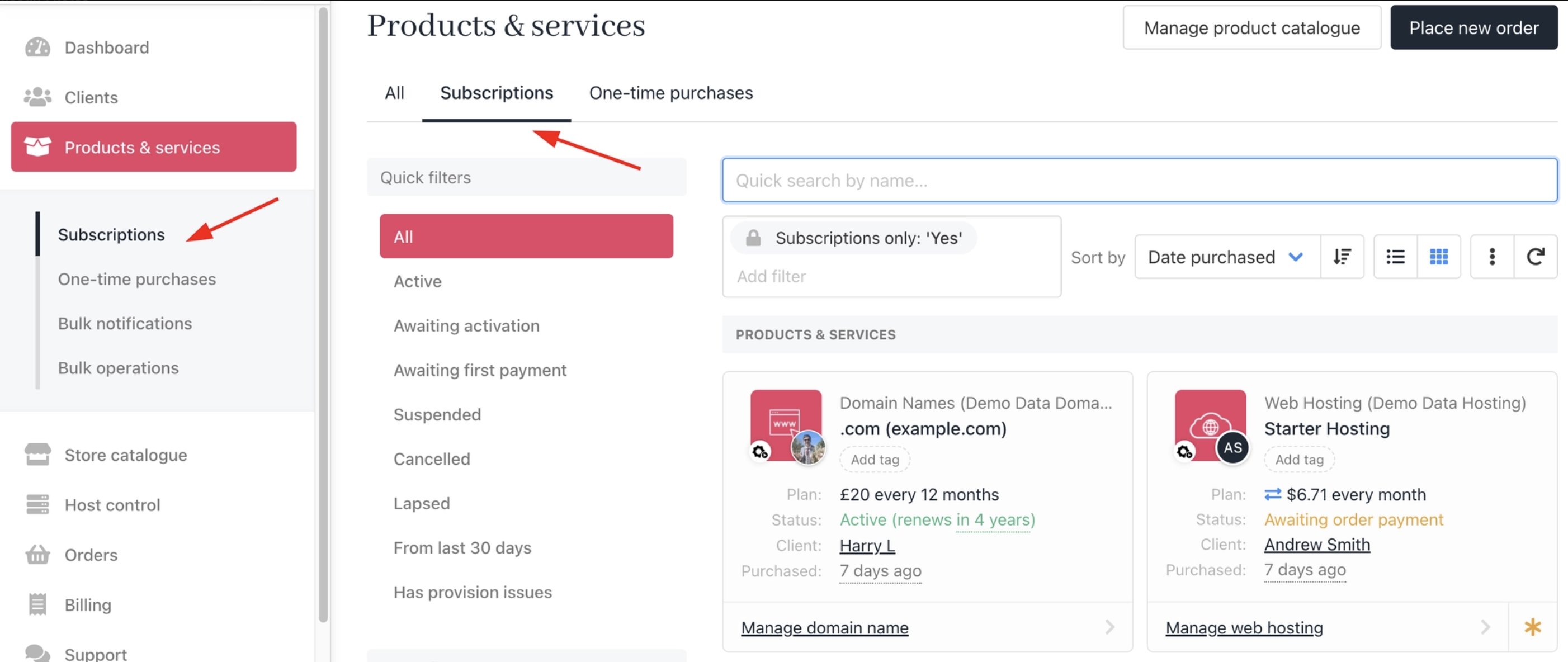 4. Under **Quick Actions**, choose **Cancellation Options** and submit the request.
 ## **Subscription status update**
### For paid invoices
After submitting the cancellation, Upmind changes the subscription status to **Lapsed**.
## **Subscription status update**
### For paid invoices
After submitting the cancellation, Upmind changes the subscription status to **Lapsed**.
 ### For unpaid invoices
When you cancel with **immediate effect**, the status changes to **Cancelled**. The client will receive a notification.
### For unpaid invoices
When you cancel with **immediate effect**, the status changes to **Cancelled**. The client will receive a notification.
 You can reactivate a cancelled or lapsed contract. For more details on **How to Modify a Subscription Contract**, follow this [guide](/using-upmind/manage-client-services/how-to-modify-a-subscription-contract).