> ## Documentation Index
> Fetch the complete documentation index at: https://docs.upmind.com/llms.txt
> Use this file to discover all available pages before exploring further.

# Retention Systems (Beta)

> Overview of tools designed to measure and improve retention.

Upmind’s Retention Tools help you effectively manage overdue subscriptions and recently cancelled products to reduce customer churn.

The tools provide a clear dashboard displaying all at-risk subscriptions with essential contract information such as status, billing cycle, pricing, and renewal dates.

You can categorise reasons for lost subscriptions, and also track your retention process.

<Warning>
  This system can provide a structured **cancellation flow,** which can allow you to understand why a client is cancelling their subscription and offer a last-minute, personalised incentive to stay.
</Warning>

## **Accessing the retention dashboard**

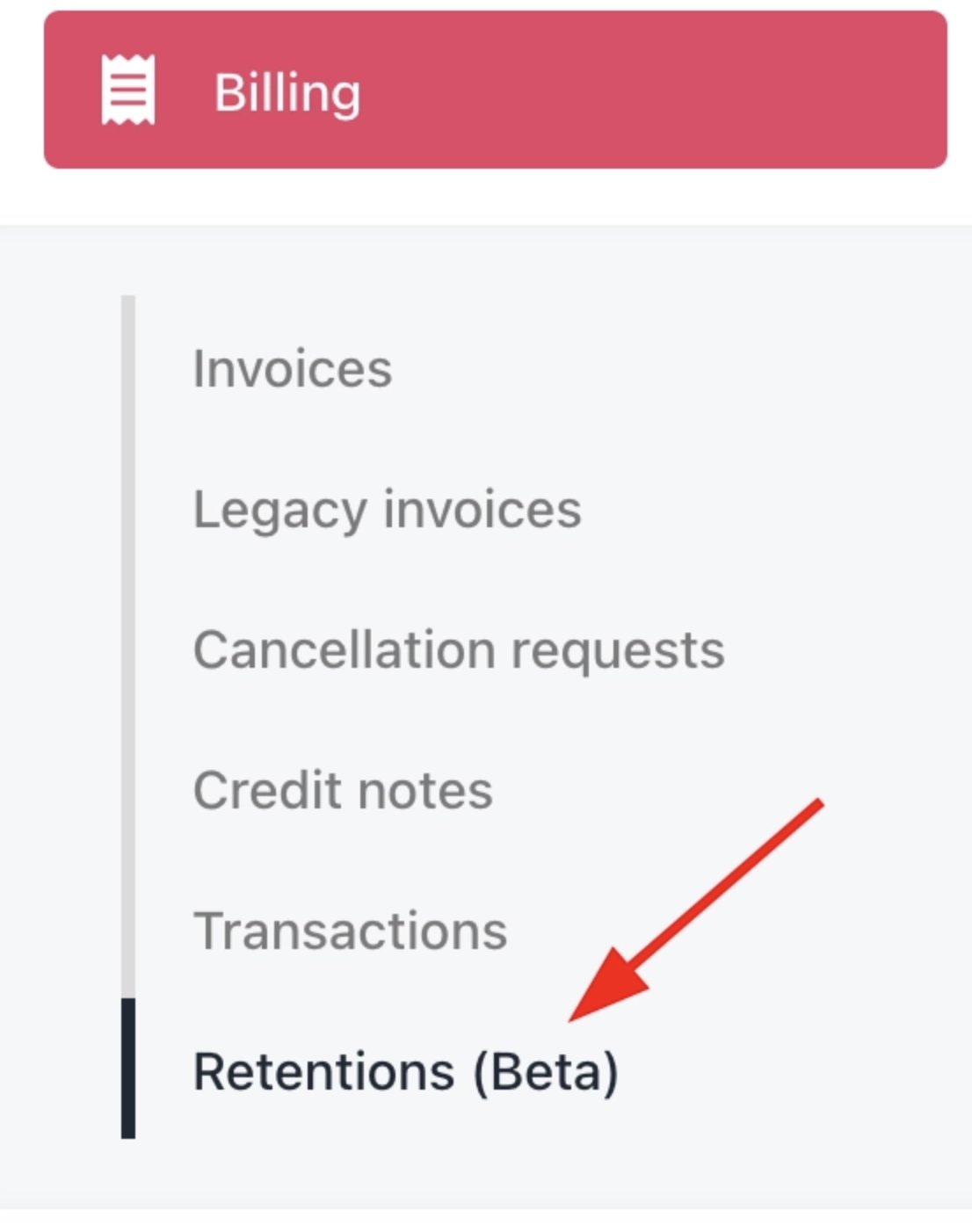
Navigate to **Billing** > **Retention (Beta)** in the Upmind Admin Panel to view detailed contract and product status data.
<Frame caption="Billing > Retention (Beta)">
  <img src="https://mintcdn.com/upmind/bPO2bBzOxYQR4tYr/images/fb/f7d798d97c01a22f.png?fit=max&auto=format&n=bPO2bBzOxYQR4tYr&q=85&s=758937797c2761dfdce23dd5149f0fa2" alt="Billing > Retention (Beta)" data-og-width="1106" width="1106" data-og-height="1402" height="1402" data-path="images/fb/f7d798d97c01a22f.png" data-optimize="true" data-opv="3" srcset="https://mintcdn.com/upmind/bPO2bBzOxYQR4tYr/images/fb/f7d798d97c01a22f.png?w=280&fit=max&auto=format&n=bPO2bBzOxYQR4tYr&q=85&s=82bd22d7e6ea60531cd13d7a2ac8b13d 280w, https://mintcdn.com/upmind/bPO2bBzOxYQR4tYr/images/fb/f7d798d97c01a22f.png?w=560&fit=max&auto=format&n=bPO2bBzOxYQR4tYr&q=85&s=486d0681eec782988b6765993266515a 560w, https://mintcdn.com/upmind/bPO2bBzOxYQR4tYr/images/fb/f7d798d97c01a22f.png?w=840&fit=max&auto=format&n=bPO2bBzOxYQR4tYr&q=85&s=f89273590e3ae9cac39aad0594a4bc43 840w, https://mintcdn.com/upmind/bPO2bBzOxYQR4tYr/images/fb/f7d798d97c01a22f.png?w=1100&fit=max&auto=format&n=bPO2bBzOxYQR4tYr&q=85&s=d534159ac24c30a26dbce12762454d79 1100w, https://mintcdn.com/upmind/bPO2bBzOxYQR4tYr/images/fb/f7d798d97c01a22f.png?w=1650&fit=max&auto=format&n=bPO2bBzOxYQR4tYr&q=85&s=cac1915adeba94f6900becac8ec8c4d5 1650w, https://mintcdn.com/upmind/bPO2bBzOxYQR4tYr/images/fb/f7d798d97c01a22f.png?w=2500&fit=max&auto=format&n=bPO2bBzOxYQR4tYr&q=85&s=08c6dd04aec833a9c1b9ef37c1094390 2500w" />
</Frame>

## **Retention process and statuses**

Track the status of each contract’s retention journey to intervene promptly, improving the chances of retaining subscriptions before they lapse:

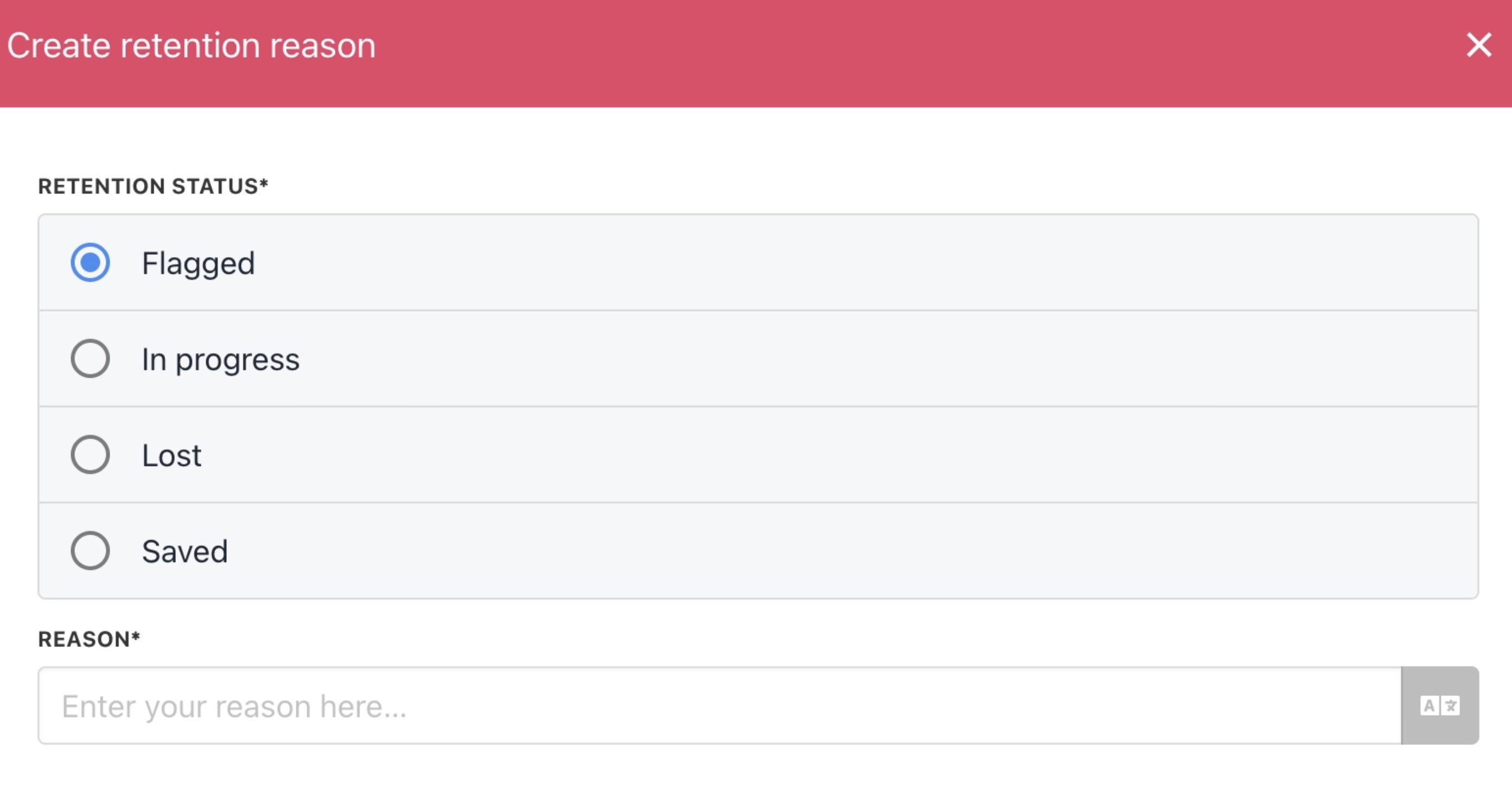
* **Flagged**: Subscription or contract product is cancelled or overdue.

* **In Progress**: Active retention efforts are underway by the retention or customer care team.

* **Lost**: Subscription has been lost and is no longer recoverable.

* **Saved**: Subscription has been successfully retained through intervention and has been prevented from being cancelled.

## **Custom retention reasons**

You can create custom reasons and assign them manually to retention cards, using as many as needed within the retention system.

1. Go to **Settings** > **Miscellaneous** > **Retention Reasons**.
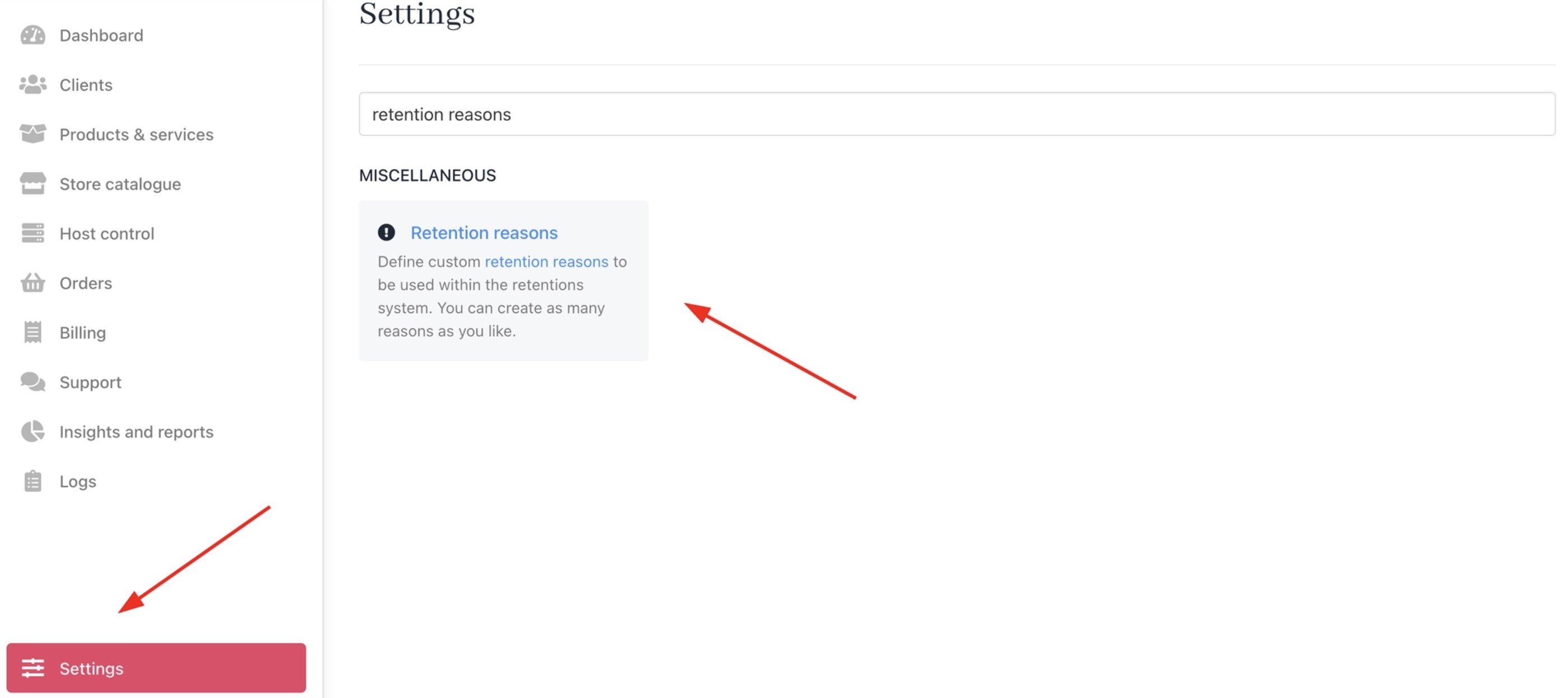
<Frame caption="Settings > Miscellaneous > Retention reasons">
  <img src="https://mintcdn.com/upmind/FQ1NhxALxjSHvvWW/images/fb/b3a7beadbd16eb9e.png?fit=max&auto=format&n=FQ1NhxALxjSHvvWW&q=85&s=90a527c33cb7bae00ac8a387b366b66b" alt="Settings > Miscellaneous > Retention reasons" data-og-width="2802" width="2802" data-og-height="1248" height="1248" data-path="images/fb/b3a7beadbd16eb9e.png" data-optimize="true" data-opv="3" srcset="https://mintcdn.com/upmind/FQ1NhxALxjSHvvWW/images/fb/b3a7beadbd16eb9e.png?w=280&fit=max&auto=format&n=FQ1NhxALxjSHvvWW&q=85&s=ce5700479365f3ecfcd3fcf6f106ac33 280w, https://mintcdn.com/upmind/FQ1NhxALxjSHvvWW/images/fb/b3a7beadbd16eb9e.png?w=560&fit=max&auto=format&n=FQ1NhxALxjSHvvWW&q=85&s=a28e6622b35599c5523f8452b2e9cf7c 560w, https://mintcdn.com/upmind/FQ1NhxALxjSHvvWW/images/fb/b3a7beadbd16eb9e.png?w=840&fit=max&auto=format&n=FQ1NhxALxjSHvvWW&q=85&s=ce6131c21558ae320f95a59644c4724d 840w, https://mintcdn.com/upmind/FQ1NhxALxjSHvvWW/images/fb/b3a7beadbd16eb9e.png?w=1100&fit=max&auto=format&n=FQ1NhxALxjSHvvWW&q=85&s=8653b733dbff0493d1dbc86013dfd76c 1100w, https://mintcdn.com/upmind/FQ1NhxALxjSHvvWW/images/fb/b3a7beadbd16eb9e.png?w=1650&fit=max&auto=format&n=FQ1NhxALxjSHvvWW&q=85&s=f00c8169f9e53735c092adbdf8340160 1650w, https://mintcdn.com/upmind/FQ1NhxALxjSHvvWW/images/fb/b3a7beadbd16eb9e.png?w=2500&fit=max&auto=format&n=FQ1NhxALxjSHvvWW&q=85&s=48d2f670cfc003def8b130d315588dff 2500w" />
</Frame>

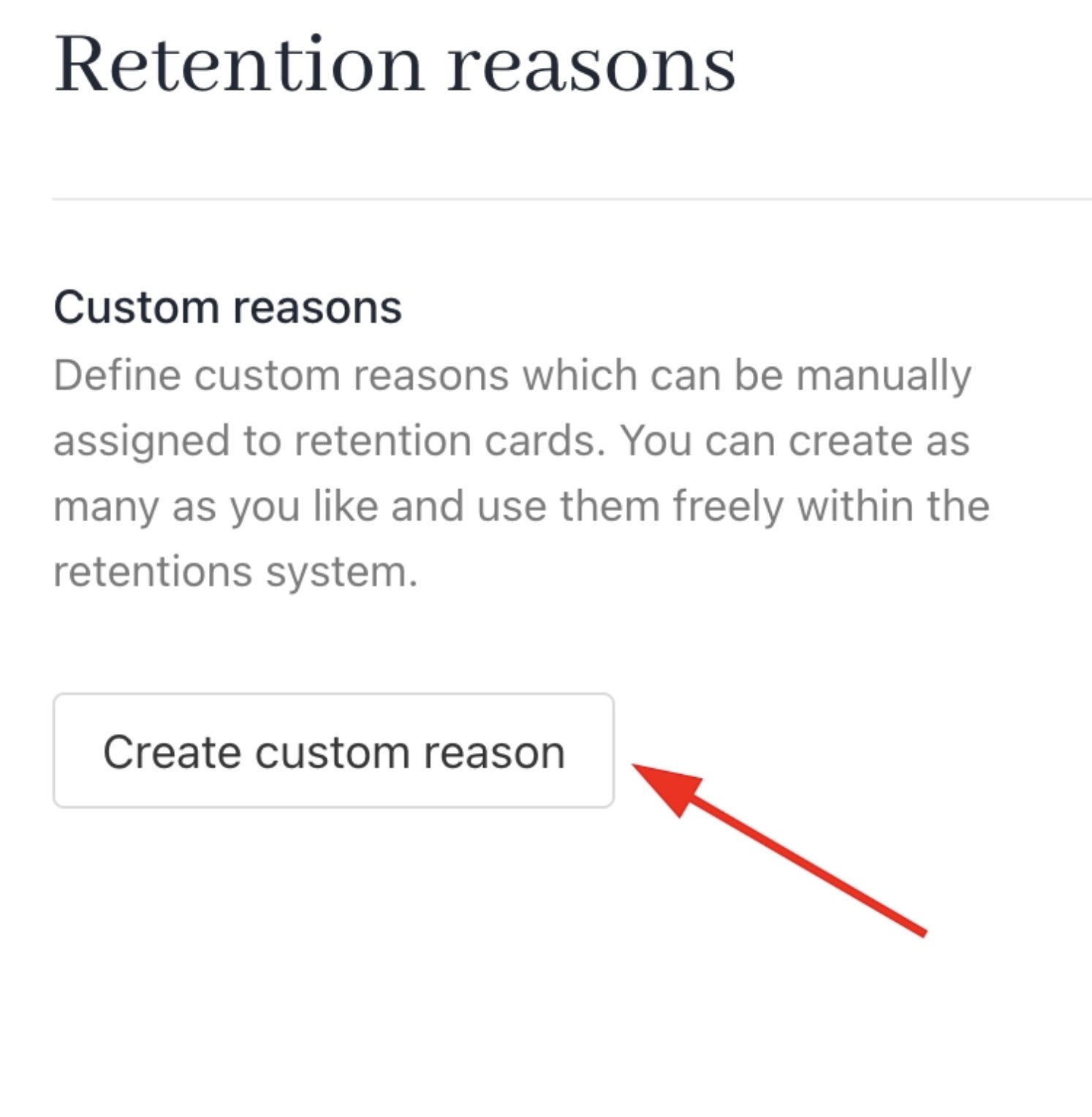
2. Click **Create Custom Reason**.

<Frame caption="Create custom reason">
  <img src="https://mintcdn.com/upmind/bPO2bBzOxYQR4tYr/images/fb/fd881d464e303625.png?fit=max&auto=format&n=bPO2bBzOxYQR4tYr&q=85&s=00915aa853a829b452e1040208efa930" alt="Create custom reason" width="1494" height="1528" data-path="images/fb/fd881d464e303625.png" />
</Frame>

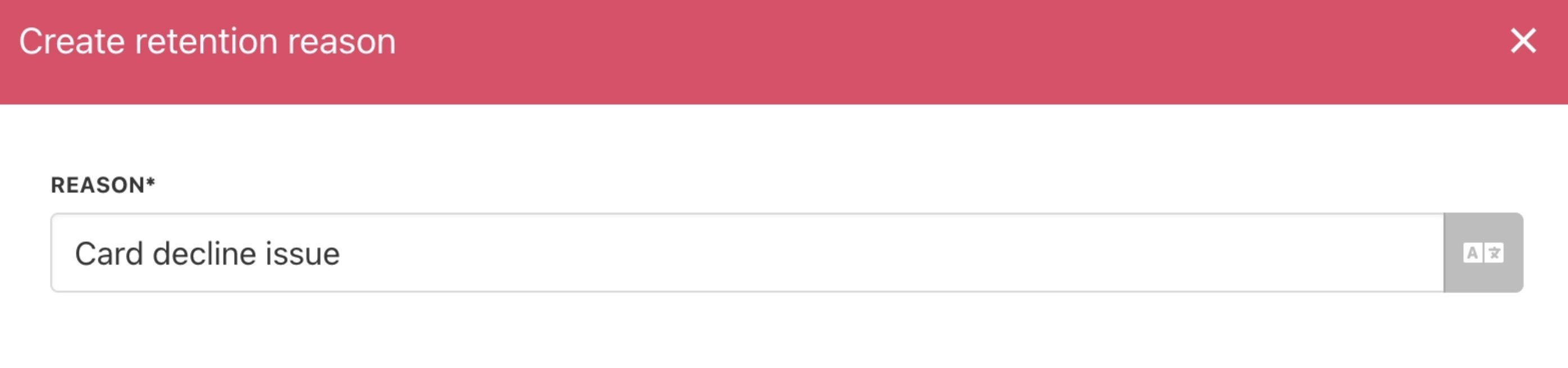
3. Enter reason details and save.

<Frame caption="Enter reason">
  <img src="https://mintcdn.com/upmind/z5ofg3t7by4uN44v/images/fb/eaaf525ea32d5c94.png?fit=max&auto=format&n=z5ofg3t7by4uN44v&q=85&s=bbf50e4eca77c37ebc986ed14fb34174" alt="Enter reason" width="2788" height="654" data-path="images/fb/eaaf525ea32d5c94.png" />
</Frame>

## **Create default retention reasons**

You can add default retention reasons and assign them to specific retention statuses.

<Frame caption="Default retention reasons">
  <img src="https://mintcdn.com/upmind/kXD0Ya8PpcxxNm6Q/images/fb/441fc10a9cc53af5.png?fit=max&auto=format&n=kXD0Ya8PpcxxNm6Q&q=85&s=58c1784958c01e21fbf332bd9f350297" alt="Default retention reasons" width="2800" height="542" data-path="images/fb/441fc10a9cc53af5.png" />
</Frame>

<Frame caption="Create retention reason">
  <img src="https://mintcdn.com/upmind/uxzVUXAKtJ2bRWCI/images/fb/6971c826ab837132.png?fit=max&auto=format&n=uxzVUXAKtJ2bRWCI&q=85&s=38708b382a87212988d4bf783e5528a3" alt="Create retention reason" width="2786" height="1468" data-path="images/fb/6971c826ab837132.png" />
</Frame>

In the **Retention UI**, you can flag cards, select reasons, add notes, and view the activity log.
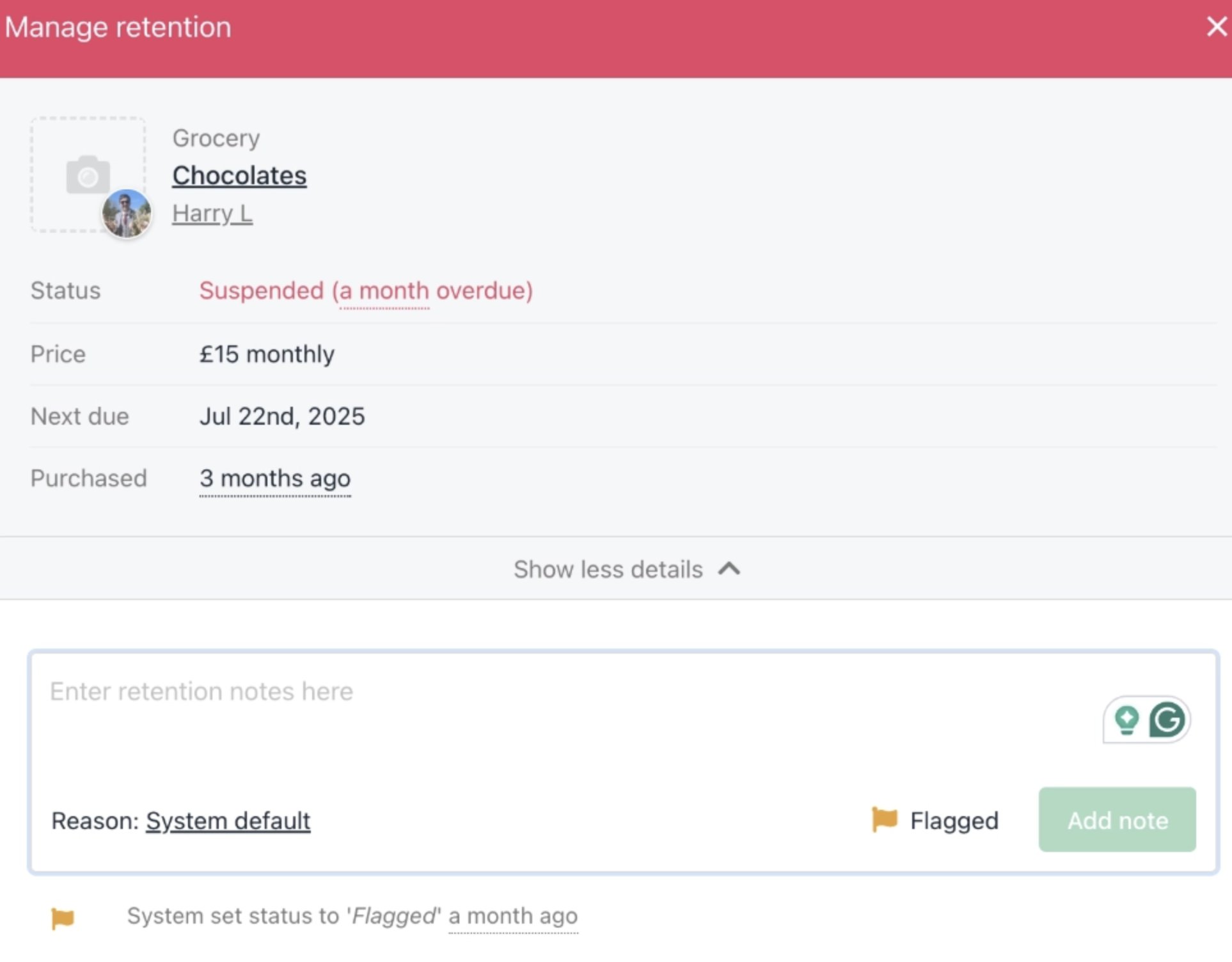
<Frame caption="Manage retention">
  <img src="https://mintcdn.com/upmind/VnCXiz5rboywDnvn/images/fb/dc15c88a1dfc1201.png?fit=max&auto=format&n=VnCXiz5rboywDnvn&q=85&s=2c5ac738c61e267524f7d9e8b5f11b12" alt="Manage retention" width="1926" height="1504" data-path="images/fb/dc15c88a1dfc1201.png" />
</Frame>

<Note>
  As this feature is in Beta, updates and enhancements will be reflected in the guide.
</Note>