> ## Documentation Index
> Fetch the complete documentation index at: https://docs.upmind.com/llms.txt
> Use this file to discover all available pages before exploring further.
# Auto-accepting Requests
> Auto-accept requests to cancel overdue products.
Auto-accept skips manual review for specific cancellation requests. You can configure this in subscription options.
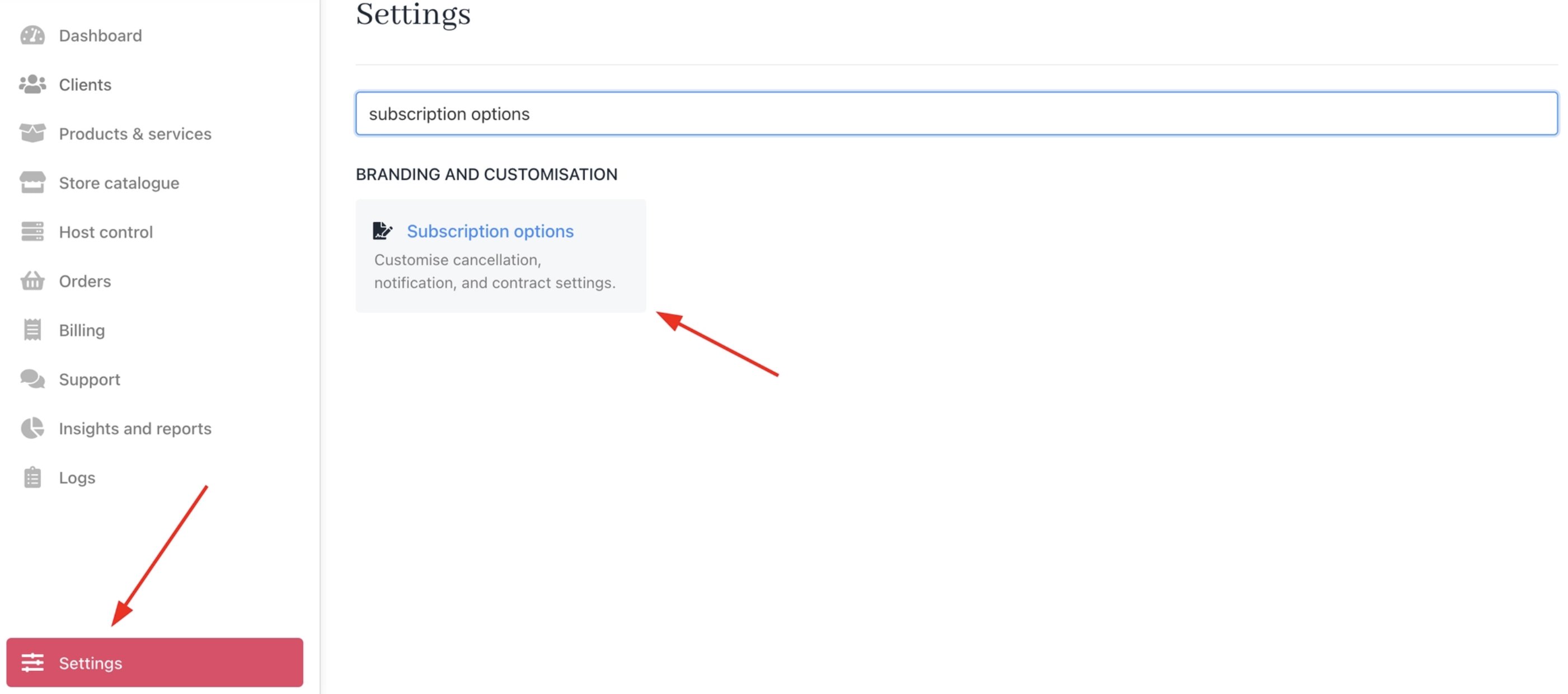
## **Access subscription options**
1. Log in to Upmind admin.
2. Go to **Settings** > **Subscription Options** under **Branding and Customisation**.
 ## **Enable auto-accept**
1. Under **Cancellation Terms**, select **Auto-accept cancellation requests for overdue products**.
2. Save changes.
## **Enable auto-accept**
1. Under **Cancellation Terms**, select **Auto-accept cancellation requests for overdue products**.
2. Save changes.
 ## **When auto-accept triggers**
1. Client submits a cancellation request on an overdue subscription.
2. Upmind skips creating an open support ticket.
3. Contract cancels based on the selected option, either immediate or end of term.
Client-level overrides are available under Automation Overrides. For more details, follow this [guide](https://features.upmind.com/dashboard/articles/pmbul2hh9yd1joja/4771567).
## **When auto-accept triggers**
1. Client submits a cancellation request on an overdue subscription.
2. Upmind skips creating an open support ticket.
3. Contract cancels based on the selected option, either immediate or end of term.
Client-level overrides are available under Automation Overrides. For more details, follow this [guide](https://features.upmind.com/dashboard/articles/pmbul2hh9yd1joja/4771567).