> ## Documentation Index
> Fetch the complete documentation index at: https://docs.upmind.com/llms.txt
> Use this file to discover all available pages before exploring further.

# How to Format Email Templates

> Upmind makes formatting email templates easier for you so you can work with ease.

Upmind’s email templates power all automated and manual messages sent to clients and staff. Email templates consist of three elements:

1. **Text**: The plain content visible to recipients.
2. **HTML**: Enables rich formatting, branding, and layout control.
3. **Snippets of Twig code**: Insert dynamic data (e.g., client name, invoice number) that updates for each recipient.

This guide shows you how to properly format templates used to create and send [bulk client](https://docs.upmind.com/setup-and-configuration/email-configuring-and-sending/how-to-create-and-send-client-bulk-email-messages) messages, as well as emails sent to a [single client](https://docs.upmind.com/setup-and-configuration/email-configuring-and-sending/how-to-email-a-client).

<Warning>
  The same template structure (text, HTML, and Twig code) is used to create [notifications](https://docs.upmind.com/setup-and-configuration/notifications/how-to-create-and-disable-notifications#how-to-create-and-disable-notifications) (automated trigger-based messages).
</Warning>

## Accessing email templates

You can access the templates from **Settings** > **Automation** > **Email Templates**.
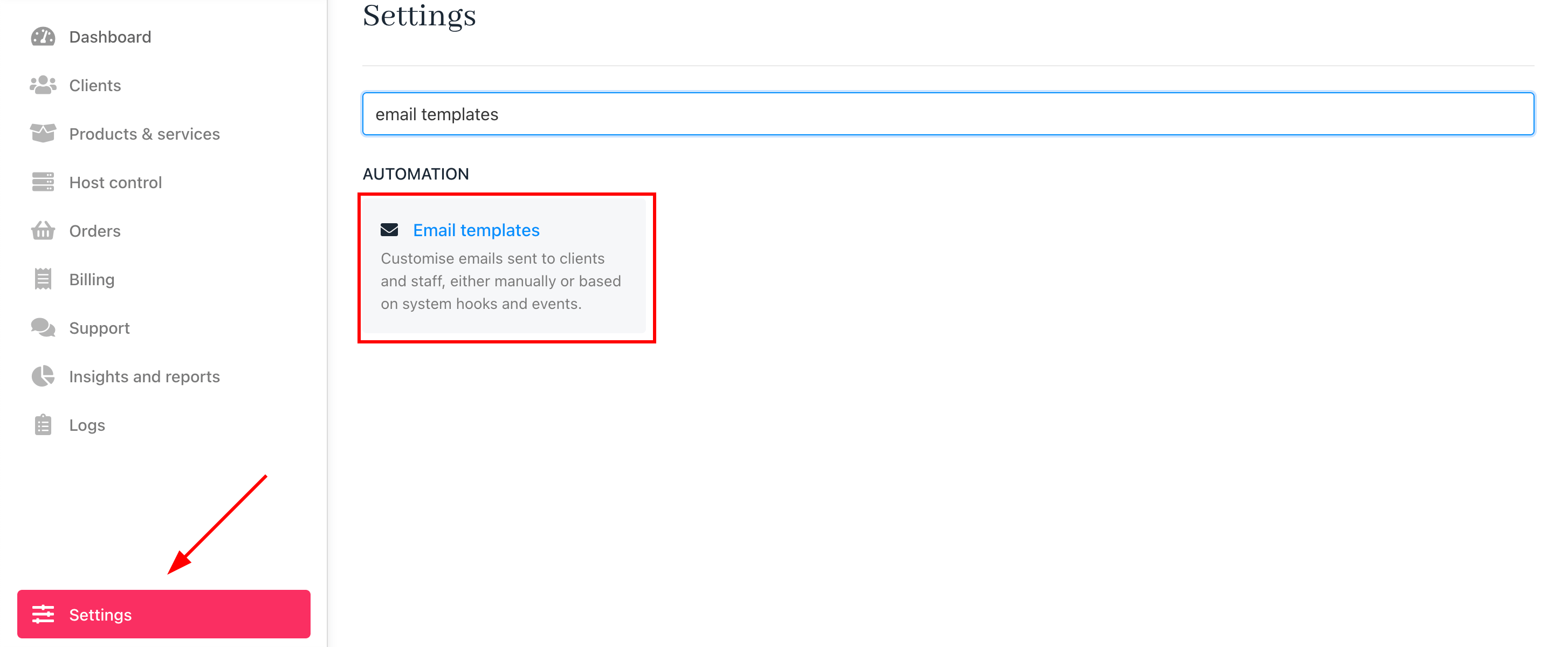
<Frame caption="Settings > Email templates">
  <img src="https://mintcdn.com/upmind/JUoAg6onJmXk_-rR/images/fb/e66713a8d56a57ef.png?fit=max&auto=format&n=JUoAg6onJmXk_-rR&q=85&s=6589fbdd96230127bd0f82cde1e1b9fb" alt="Settings > Email templates" className="mx-auto" style={{ width:"98%" }} data-og-width="2908" width="2908" data-og-height="1200" height="1200" data-path="images/fb/e66713a8d56a57ef.png" data-optimize="true" data-opv="3" srcset="https://mintcdn.com/upmind/JUoAg6onJmXk_-rR/images/fb/e66713a8d56a57ef.png?w=280&fit=max&auto=format&n=JUoAg6onJmXk_-rR&q=85&s=4e57c26e1766d06fef6e3b23dd1c5672 280w, https://mintcdn.com/upmind/JUoAg6onJmXk_-rR/images/fb/e66713a8d56a57ef.png?w=560&fit=max&auto=format&n=JUoAg6onJmXk_-rR&q=85&s=77a2a07b68de069a2ef9cce8a17ff616 560w, https://mintcdn.com/upmind/JUoAg6onJmXk_-rR/images/fb/e66713a8d56a57ef.png?w=840&fit=max&auto=format&n=JUoAg6onJmXk_-rR&q=85&s=8d27f37fcb77526a1a395d6b10cb4e74 840w, https://mintcdn.com/upmind/JUoAg6onJmXk_-rR/images/fb/e66713a8d56a57ef.png?w=1100&fit=max&auto=format&n=JUoAg6onJmXk_-rR&q=85&s=f2d8c87111a7011d5a5e825ebb58558d 1100w, https://mintcdn.com/upmind/JUoAg6onJmXk_-rR/images/fb/e66713a8d56a57ef.png?w=1650&fit=max&auto=format&n=JUoAg6onJmXk_-rR&q=85&s=d4be0d5b12c1e7158f4777e2ae328fb0 1650w, https://mintcdn.com/upmind/JUoAg6onJmXk_-rR/images/fb/e66713a8d56a57ef.png?w=2500&fit=max&auto=format&n=JUoAg6onJmXk_-rR&q=85&s=34640f1c2d6cf5bcdbd001aaa039710a 2500w" />

  <img src="https://mintcdn.com/upmind/JUoAg6onJmXk_-rR/images/fb/e66713a8d56a57ef.png?fit=max&auto=format&n=JUoAg6onJmXk_-rR&q=85&s=6589fbdd96230127bd0f82cde1e1b9fb" alt="Settings > Email templates" className="mx-auto" style={{ width:"98%" }} data-og-width="2908" width="2908" data-og-height="1200" height="1200" data-path="images/fb/e66713a8d56a57ef.png" data-optimize="true" data-opv="3" srcset="https://mintcdn.com/upmind/JUoAg6onJmXk_-rR/images/fb/e66713a8d56a57ef.png?w=280&fit=max&auto=format&n=JUoAg6onJmXk_-rR&q=85&s=4e57c26e1766d06fef6e3b23dd1c5672 280w, https://mintcdn.com/upmind/JUoAg6onJmXk_-rR/images/fb/e66713a8d56a57ef.png?w=560&fit=max&auto=format&n=JUoAg6onJmXk_-rR&q=85&s=77a2a07b68de069a2ef9cce8a17ff616 560w, https://mintcdn.com/upmind/JUoAg6onJmXk_-rR/images/fb/e66713a8d56a57ef.png?w=840&fit=max&auto=format&n=JUoAg6onJmXk_-rR&q=85&s=8d27f37fcb77526a1a395d6b10cb4e74 840w, https://mintcdn.com/upmind/JUoAg6onJmXk_-rR/images/fb/e66713a8d56a57ef.png?w=1100&fit=max&auto=format&n=JUoAg6onJmXk_-rR&q=85&s=f2d8c87111a7011d5a5e825ebb58558d 1100w, https://mintcdn.com/upmind/JUoAg6onJmXk_-rR/images/fb/e66713a8d56a57ef.png?w=1650&fit=max&auto=format&n=JUoAg6onJmXk_-rR&q=85&s=d4be0d5b12c1e7158f4777e2ae328fb0 1650w, https://mintcdn.com/upmind/JUoAg6onJmXk_-rR/images/fb/e66713a8d56a57ef.png?w=2500&fit=max&auto=format&n=JUoAg6onJmXk_-rR&q=85&s=34640f1c2d6cf5bcdbd001aaa039710a 2500w" />
</Frame>

## Formatting text and HTML

Upmind supports basic formatting for the text in the body with standard HTML tags for headings, bold, italics, and links. You can also use \`\` for line breaks as needed.

Combining HTML and plain text also helps to make the emails visually appealing and accessible.
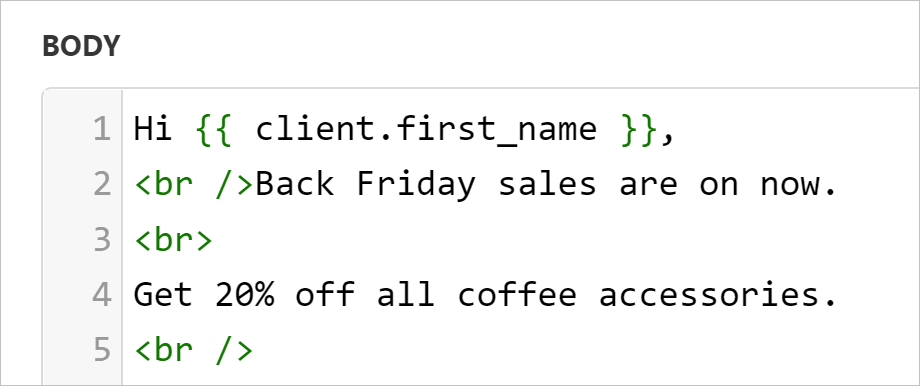
<Frame caption="Use br  / inside \<> to insert line breaks">
  <img src="https://mintcdn.com/upmind/A-RwNPXmK_xnEEqe/images/fb/78b1fc6c8cf460bb.png?fit=max&auto=format&n=A-RwNPXmK_xnEEqe&q=85&s=75bee34822767f220e72acbd7ab58f43" alt="Use br  / inside \<> to insert line breaks" className="mx-auto" style={{ width:"76%" }} data-og-width="920" width="920" data-og-height="386" height="386" data-path="images/fb/78b1fc6c8cf460bb.png" data-optimize="true" data-opv="3" srcset="https://mintcdn.com/upmind/A-RwNPXmK_xnEEqe/images/fb/78b1fc6c8cf460bb.png?w=280&fit=max&auto=format&n=A-RwNPXmK_xnEEqe&q=85&s=aa7f1bef2b169036ce22a0d44081a96a 280w, https://mintcdn.com/upmind/A-RwNPXmK_xnEEqe/images/fb/78b1fc6c8cf460bb.png?w=560&fit=max&auto=format&n=A-RwNPXmK_xnEEqe&q=85&s=67ee7a97cfd080ab2edeaa3f1b71f88c 560w, https://mintcdn.com/upmind/A-RwNPXmK_xnEEqe/images/fb/78b1fc6c8cf460bb.png?w=840&fit=max&auto=format&n=A-RwNPXmK_xnEEqe&q=85&s=ede191724dd53e104972596fc84e0331 840w, https://mintcdn.com/upmind/A-RwNPXmK_xnEEqe/images/fb/78b1fc6c8cf460bb.png?w=1100&fit=max&auto=format&n=A-RwNPXmK_xnEEqe&q=85&s=53290ccb73a848b65265daefd52787c0 1100w, https://mintcdn.com/upmind/A-RwNPXmK_xnEEqe/images/fb/78b1fc6c8cf460bb.png?w=1650&fit=max&auto=format&n=A-RwNPXmK_xnEEqe&q=85&s=14139e5013cba67127657836cc98a9d7 1650w, https://mintcdn.com/upmind/A-RwNPXmK_xnEEqe/images/fb/78b1fc6c8cf460bb.png?w=2500&fit=max&auto=format&n=A-RwNPXmK_xnEEqe&q=85&s=4f7bec541182aa6a125991d6e46d4e13 2500w" />

  <img src="https://mintcdn.com/upmind/A-RwNPXmK_xnEEqe/images/fb/78b1fc6c8cf460bb.png?fit=max&auto=format&n=A-RwNPXmK_xnEEqe&q=85&s=75bee34822767f220e72acbd7ab58f43" alt="Use br  / inside \<> to insert line breaks" className="mx-auto" style={{ width:"76%" }} data-og-width="920" width="920" data-og-height="386" height="386" data-path="images/fb/78b1fc6c8cf460bb.png" data-optimize="true" data-opv="3" srcset="https://mintcdn.com/upmind/A-RwNPXmK_xnEEqe/images/fb/78b1fc6c8cf460bb.png?w=280&fit=max&auto=format&n=A-RwNPXmK_xnEEqe&q=85&s=aa7f1bef2b169036ce22a0d44081a96a 280w, https://mintcdn.com/upmind/A-RwNPXmK_xnEEqe/images/fb/78b1fc6c8cf460bb.png?w=560&fit=max&auto=format&n=A-RwNPXmK_xnEEqe&q=85&s=67ee7a97cfd080ab2edeaa3f1b71f88c 560w, https://mintcdn.com/upmind/A-RwNPXmK_xnEEqe/images/fb/78b1fc6c8cf460bb.png?w=840&fit=max&auto=format&n=A-RwNPXmK_xnEEqe&q=85&s=ede191724dd53e104972596fc84e0331 840w, https://mintcdn.com/upmind/A-RwNPXmK_xnEEqe/images/fb/78b1fc6c8cf460bb.png?w=1100&fit=max&auto=format&n=A-RwNPXmK_xnEEqe&q=85&s=53290ccb73a848b65265daefd52787c0 1100w, https://mintcdn.com/upmind/A-RwNPXmK_xnEEqe/images/fb/78b1fc6c8cf460bb.png?w=1650&fit=max&auto=format&n=A-RwNPXmK_xnEEqe&q=85&s=14139e5013cba67127657836cc98a9d7 1650w, https://mintcdn.com/upmind/A-RwNPXmK_xnEEqe/images/fb/78b1fc6c8cf460bb.png?w=2500&fit=max&auto=format&n=A-RwNPXmK_xnEEqe&q=85&s=4f7bec541182aa6a125991d6e46d4e13 2500w" />
</Frame>

## Adding Twig snippets

Twig is a flexible templating language for logic and formatting. It is used for conditional content, loops, and formatting dates or numbers.

Code snippets personalise emails by inserting dynamic content that updates with live data from Upmind when recipients open the message.

### How to insert a snippet

1. Scroll to the bottom of the template editor.
2. Click a menu tab (e.g., Client, Invoice, Order) to view available snippets for that context. Each tab contains a unique set of related code snippets, with available options varying based on the message type you create.
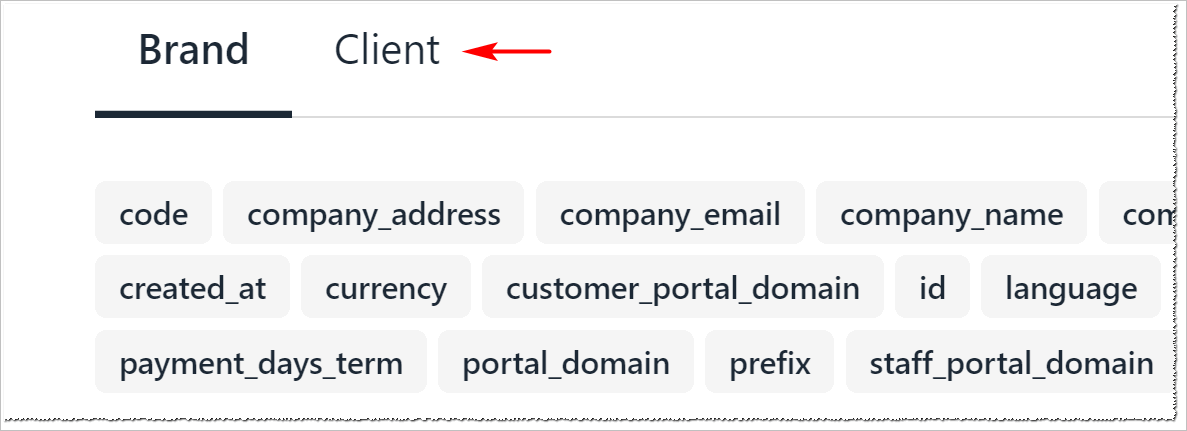
<Frame caption="Menu tab">
  <img src="https://mintcdn.com/upmind/A-RwNPXmK_xnEEqe/images/fb/78e37749a8c9c9a6.png?fit=max&auto=format&n=A-RwNPXmK_xnEEqe&q=85&s=25860aa0bc035de4b31197cbc4efd703" alt="Menu tab" className="mx-auto" style={{ width:"86%" }} width="1187" height="431" data-path="images/fb/78e37749a8c9c9a6.png" />

  <img src="https://mintcdn.com/upmind/A-RwNPXmK_xnEEqe/images/fb/78e37749a8c9c9a6.png?fit=max&auto=format&n=A-RwNPXmK_xnEEqe&q=85&s=25860aa0bc035de4b31197cbc4efd703" alt="Menu tab" className="mx-auto" style={{ width:"86%" }} width="1187" height="431" data-path="images/fb/78e37749a8c9c9a6.png" />
</Frame>

3. Click a snippet to copy it to your clipboard.
4. Paste the snippet into the **Subject** or **Body** field where you want the dynamic content to appear.
5. You can also add snippets when you type `{{` in the email body.
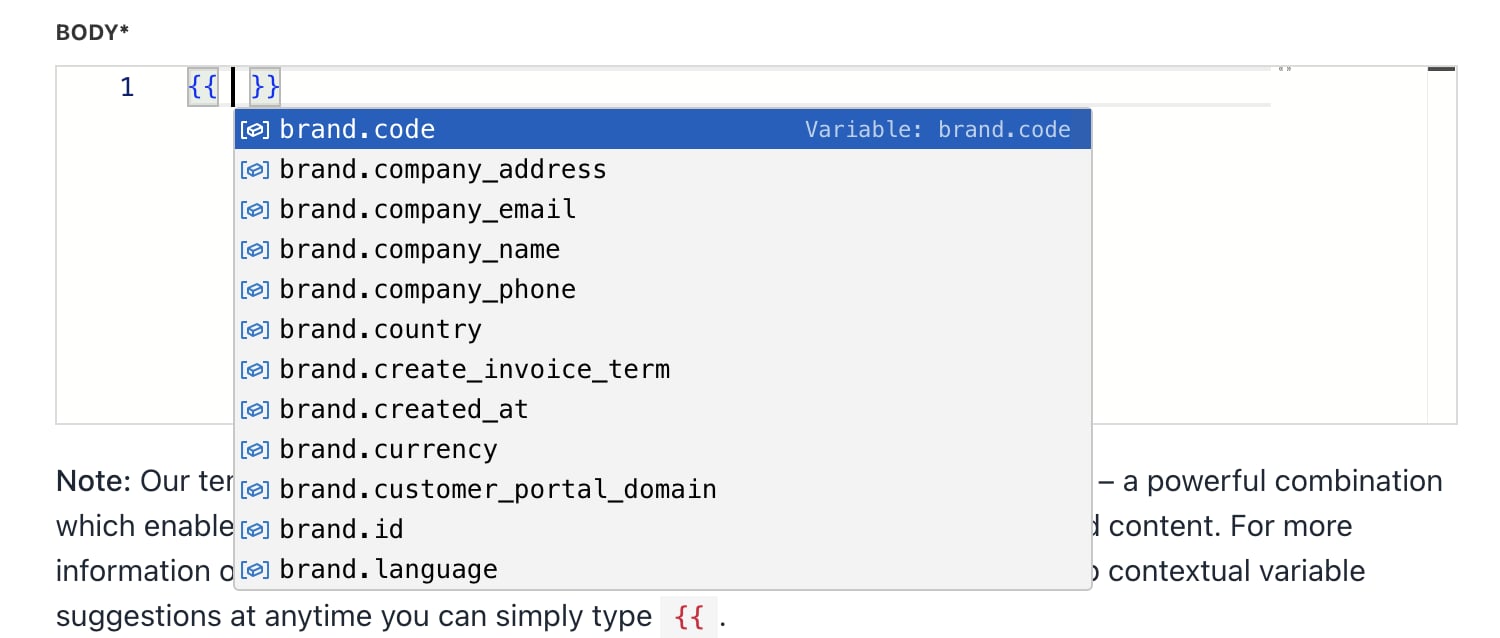
<Frame caption="Add snippets">
  <img src="https://mintcdn.com/upmind/1-uICsJi9zYpvJVH/images/fb/8d6ca94caa8e8786.png?fit=max&auto=format&n=1-uICsJi9zYpvJVH&q=85&s=154201ebac8f6340b8c59b2ecd366a43" alt="Add snippets" className="mx-auto" style={{ width:"98%" }} width="1500" height="638" data-path="images/fb/8d6ca94caa8e8786.png" />

  <img src="https://mintcdn.com/upmind/1-uICsJi9zYpvJVH/images/fb/8d6ca94caa8e8786.png?fit=max&auto=format&n=1-uICsJi9zYpvJVH&q=85&s=154201ebac8f6340b8c59b2ecd366a43" alt="Add snippets" className="mx-auto" style={{ width:"98%" }} width="1500" height="638" data-path="images/fb/8d6ca94caa8e8786.png" />
</Frame>

6. Add as many snippets as needed to customise the message.
7. Click **Save** to apply changes.
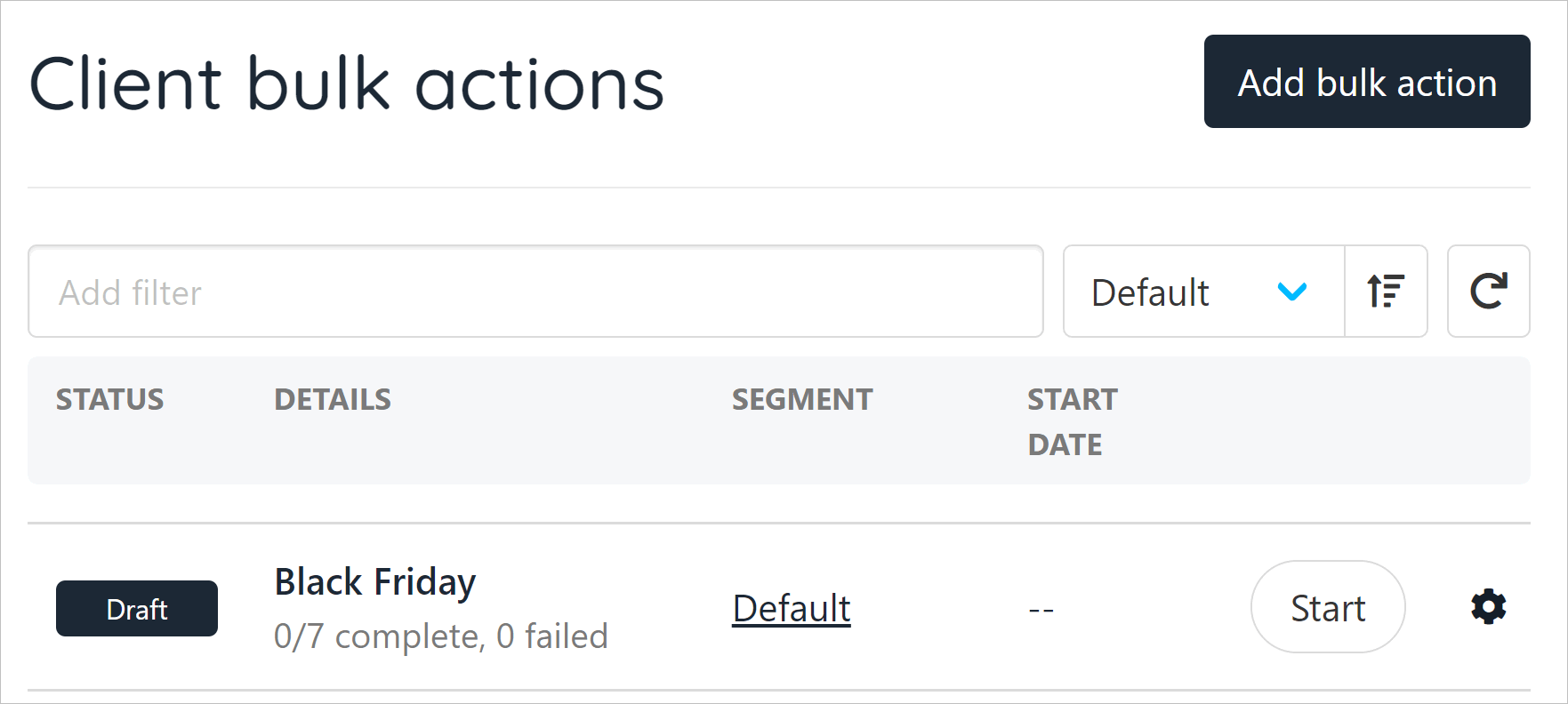
<Frame caption="Draft bulk action template">
  <img src="https://mintcdn.com/upmind/Lh8hC132BWHpvRbz/images/fb/4e3e791b6fcbd19e.png?fit=max&auto=format&n=Lh8hC132BWHpvRbz&q=85&s=3e20a31e5e7ef762692d0224fe7603b1" alt="Draft bulk action template" className="mx-auto" style={{ width:"91%" }} width="1763" height="792" data-path="images/fb/4e3e791b6fcbd19e.png" />

  <img src="https://mintcdn.com/upmind/Lh8hC132BWHpvRbz/images/fb/4e3e791b6fcbd19e.png?fit=max&auto=format&n=Lh8hC132BWHpvRbz&q=85&s=3e20a31e5e7ef762692d0224fe7603b1" alt="Draft bulk action template" className="mx-auto" style={{ width:"91%" }} width="1763" height="792" data-path="images/fb/4e3e791b6fcbd19e.png" />
</Frame>

To manage templates for bulk and triggered emails, you can access all templates through **Settings** > **Notification Templates**.

The bulk action templates (for newsletters or announcements) follow the same structure as automated notifications. Use clear subject lines and consistent branding for all templates.

<Warning>
  Email templates are built with Twig code. To learn more about this code syntax, open the [Twig site](https://twig.symfony.com/).
</Warning>

### Previewing and testing templates

1. After saving, Upmind displays a preview of the message.
2. Choose a client
3. From the overview, under `Quick Actions`, use the **Send Email** function to [test your email](https://docs.upmind.com/setup-and-configuration/email-configuring-and-sending/how-to-test-emails) and check formatting and dynamic content before activating the template.
4. Adjust as needed for different email clients and devices.

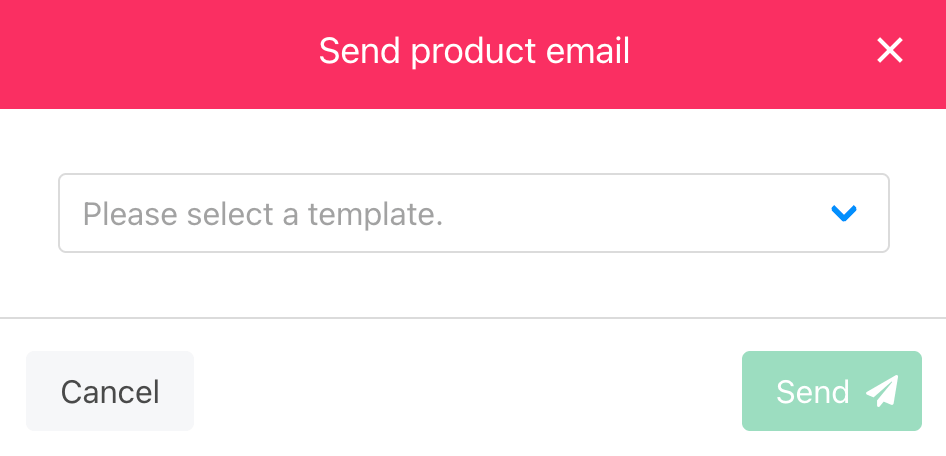
<Frame caption="Clients > Quick actions > Send email">
  <img src="https://mintcdn.com/upmind/1-uICsJi9zYpvJVH/images/fb/8ca04aaca09618e3.png?fit=max&auto=format&n=1-uICsJi9zYpvJVH&q=85&s=207d3c1f932d53d8e9843be22daf1620" alt="Clients > Quick actions > Send email" className="mx-auto" style={{ width:"98%" }} data-og-width="1508" width="1508" data-og-height="244" height="244" data-path="images/fb/8ca04aaca09618e3.png" data-optimize="true" data-opv="3" srcset="https://mintcdn.com/upmind/1-uICsJi9zYpvJVH/images/fb/8ca04aaca09618e3.png?w=280&fit=max&auto=format&n=1-uICsJi9zYpvJVH&q=85&s=4be595174d62bfc978d6621a9fbf8a78 280w, https://mintcdn.com/upmind/1-uICsJi9zYpvJVH/images/fb/8ca04aaca09618e3.png?w=560&fit=max&auto=format&n=1-uICsJi9zYpvJVH&q=85&s=5d81712c78ce40f1ff7495a0876fa762 560w, https://mintcdn.com/upmind/1-uICsJi9zYpvJVH/images/fb/8ca04aaca09618e3.png?w=840&fit=max&auto=format&n=1-uICsJi9zYpvJVH&q=85&s=f772da8d23cf63d828c3deee1533b82d 840w, https://mintcdn.com/upmind/1-uICsJi9zYpvJVH/images/fb/8ca04aaca09618e3.png?w=1100&fit=max&auto=format&n=1-uICsJi9zYpvJVH&q=85&s=1c552aed54cc5af61c852e8d2d5629dc 1100w, https://mintcdn.com/upmind/1-uICsJi9zYpvJVH/images/fb/8ca04aaca09618e3.png?w=1650&fit=max&auto=format&n=1-uICsJi9zYpvJVH&q=85&s=00c1880c00b0796c5a821c7b7a51f585 1650w, https://mintcdn.com/upmind/1-uICsJi9zYpvJVH/images/fb/8ca04aaca09618e3.png?w=2500&fit=max&auto=format&n=1-uICsJi9zYpvJVH&q=85&s=7614e2e0d7dbe4e78b7d008c340458ee 2500w" />

  <img src="https://mintcdn.com/upmind/1-uICsJi9zYpvJVH/images/fb/8ca04aaca09618e3.png?fit=max&auto=format&n=1-uICsJi9zYpvJVH&q=85&s=207d3c1f932d53d8e9843be22daf1620" alt="Clients > Quick actions > Send email" className="mx-auto" style={{ width:"98%" }} data-og-width="1508" width="1508" data-og-height="244" height="244" data-path="images/fb/8ca04aaca09618e3.png" data-optimize="true" data-opv="3" srcset="https://mintcdn.com/upmind/1-uICsJi9zYpvJVH/images/fb/8ca04aaca09618e3.png?w=280&fit=max&auto=format&n=1-uICsJi9zYpvJVH&q=85&s=4be595174d62bfc978d6621a9fbf8a78 280w, https://mintcdn.com/upmind/1-uICsJi9zYpvJVH/images/fb/8ca04aaca09618e3.png?w=560&fit=max&auto=format&n=1-uICsJi9zYpvJVH&q=85&s=5d81712c78ce40f1ff7495a0876fa762 560w, https://mintcdn.com/upmind/1-uICsJi9zYpvJVH/images/fb/8ca04aaca09618e3.png?w=840&fit=max&auto=format&n=1-uICsJi9zYpvJVH&q=85&s=f772da8d23cf63d828c3deee1533b82d 840w, https://mintcdn.com/upmind/1-uICsJi9zYpvJVH/images/fb/8ca04aaca09618e3.png?w=1100&fit=max&auto=format&n=1-uICsJi9zYpvJVH&q=85&s=1c552aed54cc5af61c852e8d2d5629dc 1100w, https://mintcdn.com/upmind/1-uICsJi9zYpvJVH/images/fb/8ca04aaca09618e3.png?w=1650&fit=max&auto=format&n=1-uICsJi9zYpvJVH&q=85&s=00c1880c00b0796c5a821c7b7a51f585 1650w, https://mintcdn.com/upmind/1-uICsJi9zYpvJVH/images/fb/8ca04aaca09618e3.png?w=2500&fit=max&auto=format&n=1-uICsJi9zYpvJVH&q=85&s=7614e2e0d7dbe4e78b7d008c340458ee 2500w" />
</Frame>

<Frame caption="Send test email">
  <img src="https://mintcdn.com/upmind/c5sDUwEs8YpzGbjA/images/fb/995c7cc084a54f1e.png?fit=max&auto=format&n=c5sDUwEs8YpzGbjA&q=85&s=9a5072fe30bf446e33badaa58ccabf12" alt="Send test email" className="mx-auto" style={{ width:"74%" }} width="946" height="456" data-path="images/fb/995c7cc084a54f1e.png" />

  <img src="https://mintcdn.com/upmind/c5sDUwEs8YpzGbjA/images/fb/995c7cc084a54f1e.png?fit=max&auto=format&n=c5sDUwEs8YpzGbjA&q=85&s=9a5072fe30bf446e33badaa58ccabf12" alt="Send test email" className="mx-auto" style={{ width:"74%" }} width="946" height="456" data-path="images/fb/995c7cc084a54f1e.png" />
</Frame>
