> ## Documentation Index
> Fetch the complete documentation index at: https://docs.upmind.com/llms.txt
> Use this file to discover all available pages before exploring further.
# User Interface Overview
> Customise the client area experience, from appearance and behaviour to registration and checkout.
The user interface for Upmind provides configurable options that allow you to customise the client area experience, client registration, basket flow, and checkout appearance to create a smooth and branded user journey.
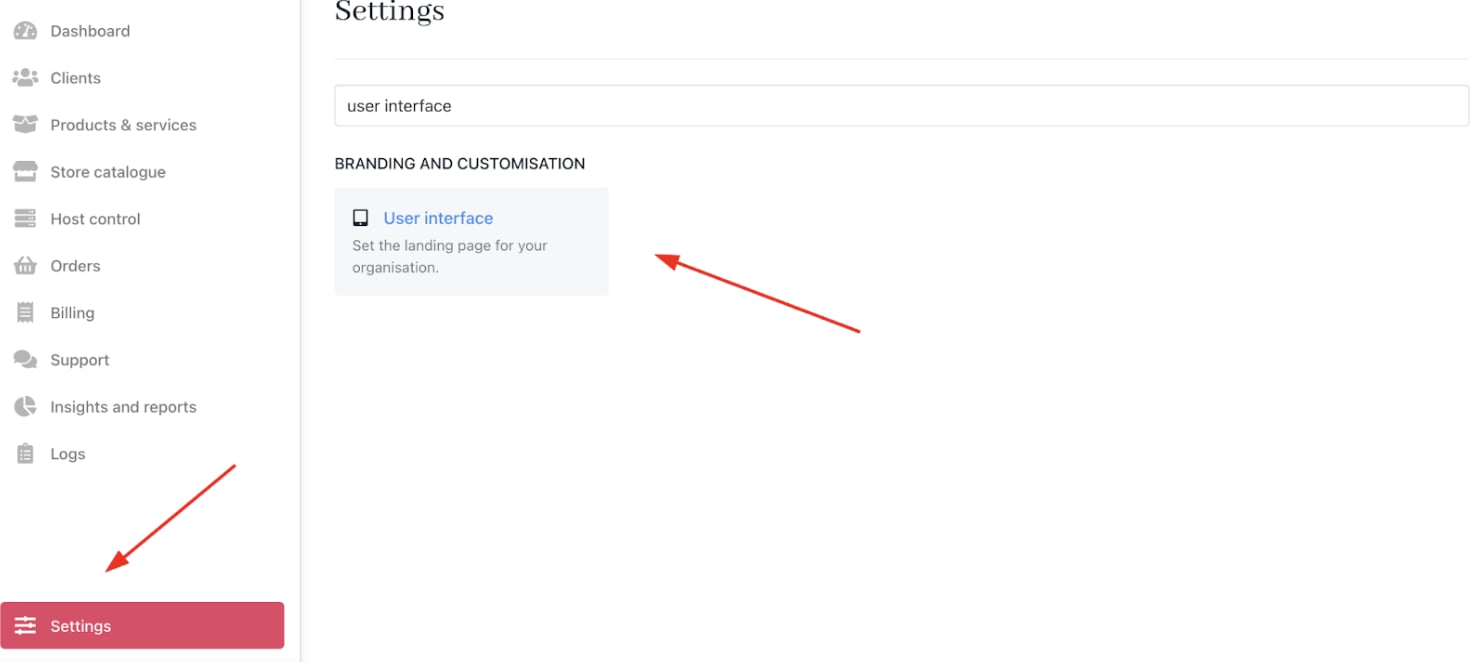
This can be accessed from **Settings** > **User Interface** under **Branding and Customisation**.
 ## **Client area**
Adjust the look, feel, and behaviour of your client-facing portal to create a simple branded look.
| **Field Name** | **Description** |
| ------------------------------------------ | --------------------------------------------------------------------------------------------------------------------------------------------------------------------------- |
| Landing page | Select the default page visitors see when arriving at your client portal. Options include: - Login page - Registration page - Store page |
| Page after login | Determine which page clients first see after signing in: - Dashboard - Products and Services - Support Section - Billing Section - My Account |
| Show catalogue | Control catalogue visibility based on conditions: - Always show - Show only to logged-in clients - Hide catalogue |
| Enter key action | Define the behaviour of the Enter key in forms: - Enter key - Enter + Shift key combination |
| Disable support system | Option to enable or disable the integrated support ticketing system. |
| Hide client area signup/registration forms | Toggle visibility of signup and registration forms to clients. |
| Custom URL for logo button | Set a personalised URL that your brand logo links to within the client area. |
| Allow branding for parent clients | Enable parent clients to see brand imagery and appearance. |
| Whitelabel login | Render login and password reset pages without branding for a neutral, white-labelled look. |
## **Client registration**
Configure settings related to client account creation.
| **Field Name** | **Description** |
| -------------------- | ---------------------------------------------------------------- |
| Require phone number | Toggle requirement of a valid phone number during client signup. |
## **Basket**
Customise the user experience and currency handling in the store's shopping basket.
| **Field Name** | **Description** |
| ------------------------------ | ---------------------------------------------------------------------------------------------------------------------------------------------------------------------- |
| Default basket currency | Determine how basket currency is set for new visitors: - Use default brand currency - Use visitor’s browser/language locale |
| Add to basket funneling | Control what happens after users add a product to the basket: - Keep users on the current page when possible - Redirect users to the next setup/checkout step |
| Billing term display | Choose how billing terms display when selecting product options: - Radio select (list) - Card select (visual cards) |
| Price before discount position | Decide where the original price displays relative to the discounted price: - Before discounted price - After discounted price |
| Payment term descriptions | Select cycle term description style: - Use yearly terms (e.g., annually) - Use monthly terms (e.g., 12 months) |
| Truncate product descriptions | Enable or disable truncation of product descriptions in listings. |
## **Checkout**
Customise checkout page layout and appearance.
| **Field Name** | **Description** |
| -------------------------------------------- | ---------------------------------------------------------------------------------------------------------------------------------------------------------------------- |
| Checkout flow | Choose your checkout style: - Stepped checkout (multi-step) - One-page checkout |
| Checkout summary colour | Set background colour for the checkout summary in one-page checkout; choose a dark or light tone for accessibility. |
| Checkout summary colour 2 | Add a second background colour to create a gradient effect (optional). |
| Checkout summary contrast mode | Select text contrast for checkout summary to ensure readability: - Dark mode (white text for dark backgrounds) - Light mode (dark text for light backgrounds) |
| Hide promo code field for clients and guests | Optionally hide the promotional code input box during checkout while still allowing automatic promotions. |
## **Client area**
Adjust the look, feel, and behaviour of your client-facing portal to create a simple branded look.
| **Field Name** | **Description** |
| ------------------------------------------ | --------------------------------------------------------------------------------------------------------------------------------------------------------------------------- |
| Landing page | Select the default page visitors see when arriving at your client portal. Options include: - Login page - Registration page - Store page |
| Page after login | Determine which page clients first see after signing in: - Dashboard - Products and Services - Support Section - Billing Section - My Account |
| Show catalogue | Control catalogue visibility based on conditions: - Always show - Show only to logged-in clients - Hide catalogue |
| Enter key action | Define the behaviour of the Enter key in forms: - Enter key - Enter + Shift key combination |
| Disable support system | Option to enable or disable the integrated support ticketing system. |
| Hide client area signup/registration forms | Toggle visibility of signup and registration forms to clients. |
| Custom URL for logo button | Set a personalised URL that your brand logo links to within the client area. |
| Allow branding for parent clients | Enable parent clients to see brand imagery and appearance. |
| Whitelabel login | Render login and password reset pages without branding for a neutral, white-labelled look. |
## **Client registration**
Configure settings related to client account creation.
| **Field Name** | **Description** |
| -------------------- | ---------------------------------------------------------------- |
| Require phone number | Toggle requirement of a valid phone number during client signup. |
## **Basket**
Customise the user experience and currency handling in the store's shopping basket.
| **Field Name** | **Description** |
| ------------------------------ | ---------------------------------------------------------------------------------------------------------------------------------------------------------------------- |
| Default basket currency | Determine how basket currency is set for new visitors: - Use default brand currency - Use visitor’s browser/language locale |
| Add to basket funneling | Control what happens after users add a product to the basket: - Keep users on the current page when possible - Redirect users to the next setup/checkout step |
| Billing term display | Choose how billing terms display when selecting product options: - Radio select (list) - Card select (visual cards) |
| Price before discount position | Decide where the original price displays relative to the discounted price: - Before discounted price - After discounted price |
| Payment term descriptions | Select cycle term description style: - Use yearly terms (e.g., annually) - Use monthly terms (e.g., 12 months) |
| Truncate product descriptions | Enable or disable truncation of product descriptions in listings. |
## **Checkout**
Customise checkout page layout and appearance.
| **Field Name** | **Description** |
| -------------------------------------------- | ---------------------------------------------------------------------------------------------------------------------------------------------------------------------- |
| Checkout flow | Choose your checkout style: - Stepped checkout (multi-step) - One-page checkout |
| Checkout summary colour | Set background colour for the checkout summary in one-page checkout; choose a dark or light tone for accessibility. |
| Checkout summary colour 2 | Add a second background colour to create a gradient effect (optional). |
| Checkout summary contrast mode | Select text contrast for checkout summary to ensure readability: - Dark mode (white text for dark backgrounds) - Light mode (dark text for light backgrounds) |
| Hide promo code field for clients and guests | Optionally hide the promotional code input box during checkout while still allowing automatic promotions. |