> ## Documentation Index
> Fetch the complete documentation index at: https://docs.upmind.com/llms.txt
> Use this file to discover all available pages before exploring further.

# How to Add a Custom Domain Name

> Brand your site with a unique URL. Point a unique domain to your default Upmind web address and learn how to add a custom domain name.

Every Upmind brand comes with a unique subdomain (**randomID.upmind.app**) for client login and staff admin access (**randomID.upmind.app/admin**).

To reflect your brand more professionally, we recommend that you add your own custom domain (like **subdomain.yourdomain.com** or **clients.yourdomain.com**).

## Steps to add a custom domain

1. Log in to the Upmind dashboard.
2. Go to **Settings** > **Domains** under **Branding and customisation**.
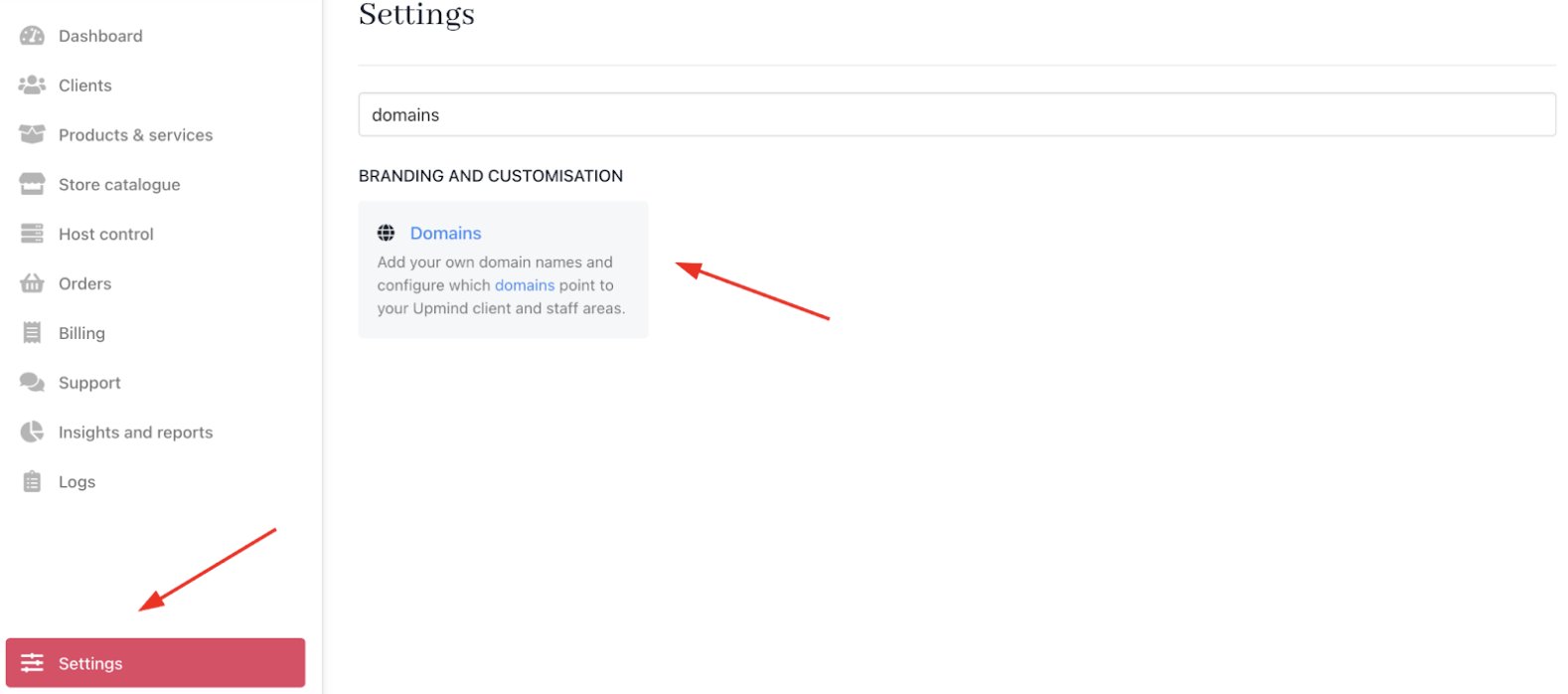
<Frame caption="Settings > Branding and customisation > Domains">
  <img src="https://mintcdn.com/upmind/92wYnpdR_k6AjH3x/images/fb/55279dcf3c40c3ae.png?fit=max&auto=format&n=92wYnpdR_k6AjH3x&q=85&s=a598420599ae990942f7990520ad37a5" alt="Settings > Branding and customisation > Domains" className="mx-auto" style={{ width:"99%" }} data-og-width="1578" width="1578" data-og-height="698" height="698" data-path="images/fb/55279dcf3c40c3ae.png" data-optimize="true" data-opv="3" srcset="https://mintcdn.com/upmind/92wYnpdR_k6AjH3x/images/fb/55279dcf3c40c3ae.png?w=280&fit=max&auto=format&n=92wYnpdR_k6AjH3x&q=85&s=097be63138ac9db6885e3ce26bf8e747 280w, https://mintcdn.com/upmind/92wYnpdR_k6AjH3x/images/fb/55279dcf3c40c3ae.png?w=560&fit=max&auto=format&n=92wYnpdR_k6AjH3x&q=85&s=dc11b79cd2cbc68d7c98851416e5298d 560w, https://mintcdn.com/upmind/92wYnpdR_k6AjH3x/images/fb/55279dcf3c40c3ae.png?w=840&fit=max&auto=format&n=92wYnpdR_k6AjH3x&q=85&s=761a0954c017f4d331b70a26c88eea15 840w, https://mintcdn.com/upmind/92wYnpdR_k6AjH3x/images/fb/55279dcf3c40c3ae.png?w=1100&fit=max&auto=format&n=92wYnpdR_k6AjH3x&q=85&s=be5d7f2d81f65f045b413a6c4a43543c 1100w, https://mintcdn.com/upmind/92wYnpdR_k6AjH3x/images/fb/55279dcf3c40c3ae.png?w=1650&fit=max&auto=format&n=92wYnpdR_k6AjH3x&q=85&s=76189463214f6e9efa8d409f218027c4 1650w, https://mintcdn.com/upmind/92wYnpdR_k6AjH3x/images/fb/55279dcf3c40c3ae.png?w=2500&fit=max&auto=format&n=92wYnpdR_k6AjH3x&q=85&s=08810a290123d08fefdebd30d9f56997 2500w" />

  <img src="https://mintcdn.com/upmind/92wYnpdR_k6AjH3x/images/fb/55279dcf3c40c3ae.png?fit=max&auto=format&n=92wYnpdR_k6AjH3x&q=85&s=a598420599ae990942f7990520ad37a5" alt="Settings > Branding and customisation > Domains" className="mx-auto" style={{ width:"99%" }} data-og-width="1578" width="1578" data-og-height="698" height="698" data-path="images/fb/55279dcf3c40c3ae.png" data-optimize="true" data-opv="3" srcset="https://mintcdn.com/upmind/92wYnpdR_k6AjH3x/images/fb/55279dcf3c40c3ae.png?w=280&fit=max&auto=format&n=92wYnpdR_k6AjH3x&q=85&s=097be63138ac9db6885e3ce26bf8e747 280w, https://mintcdn.com/upmind/92wYnpdR_k6AjH3x/images/fb/55279dcf3c40c3ae.png?w=560&fit=max&auto=format&n=92wYnpdR_k6AjH3x&q=85&s=dc11b79cd2cbc68d7c98851416e5298d 560w, https://mintcdn.com/upmind/92wYnpdR_k6AjH3x/images/fb/55279dcf3c40c3ae.png?w=840&fit=max&auto=format&n=92wYnpdR_k6AjH3x&q=85&s=761a0954c017f4d331b70a26c88eea15 840w, https://mintcdn.com/upmind/92wYnpdR_k6AjH3x/images/fb/55279dcf3c40c3ae.png?w=1100&fit=max&auto=format&n=92wYnpdR_k6AjH3x&q=85&s=be5d7f2d81f65f045b413a6c4a43543c 1100w, https://mintcdn.com/upmind/92wYnpdR_k6AjH3x/images/fb/55279dcf3c40c3ae.png?w=1650&fit=max&auto=format&n=92wYnpdR_k6AjH3x&q=85&s=76189463214f6e9efa8d409f218027c4 1650w, https://mintcdn.com/upmind/92wYnpdR_k6AjH3x/images/fb/55279dcf3c40c3ae.png?w=2500&fit=max&auto=format&n=92wYnpdR_k6AjH3x&q=85&s=08810a290123d08fefdebd30d9f56997 2500w" />

  <img src="https://mintcdn.com/upmind/92wYnpdR_k6AjH3x/images/fb/55279dcf3c40c3ae.png?fit=max&auto=format&n=92wYnpdR_k6AjH3x&q=85&s=a598420599ae990942f7990520ad37a5" alt="Settings > Branding and customisation > Domains" className="mx-auto" style={{ width:"99%" }} data-og-width="1578" width="1578" data-og-height="698" height="698" data-path="images/fb/55279dcf3c40c3ae.png" data-optimize="true" data-opv="3" srcset="https://mintcdn.com/upmind/92wYnpdR_k6AjH3x/images/fb/55279dcf3c40c3ae.png?w=280&fit=max&auto=format&n=92wYnpdR_k6AjH3x&q=85&s=097be63138ac9db6885e3ce26bf8e747 280w, https://mintcdn.com/upmind/92wYnpdR_k6AjH3x/images/fb/55279dcf3c40c3ae.png?w=560&fit=max&auto=format&n=92wYnpdR_k6AjH3x&q=85&s=dc11b79cd2cbc68d7c98851416e5298d 560w, https://mintcdn.com/upmind/92wYnpdR_k6AjH3x/images/fb/55279dcf3c40c3ae.png?w=840&fit=max&auto=format&n=92wYnpdR_k6AjH3x&q=85&s=761a0954c017f4d331b70a26c88eea15 840w, https://mintcdn.com/upmind/92wYnpdR_k6AjH3x/images/fb/55279dcf3c40c3ae.png?w=1100&fit=max&auto=format&n=92wYnpdR_k6AjH3x&q=85&s=be5d7f2d81f65f045b413a6c4a43543c 1100w, https://mintcdn.com/upmind/92wYnpdR_k6AjH3x/images/fb/55279dcf3c40c3ae.png?w=1650&fit=max&auto=format&n=92wYnpdR_k6AjH3x&q=85&s=76189463214f6e9efa8d409f218027c4 1650w, https://mintcdn.com/upmind/92wYnpdR_k6AjH3x/images/fb/55279dcf3c40c3ae.png?w=2500&fit=max&auto=format&n=92wYnpdR_k6AjH3x&q=85&s=08810a290123d08fefdebd30d9f56997 2500w" />
</Frame>

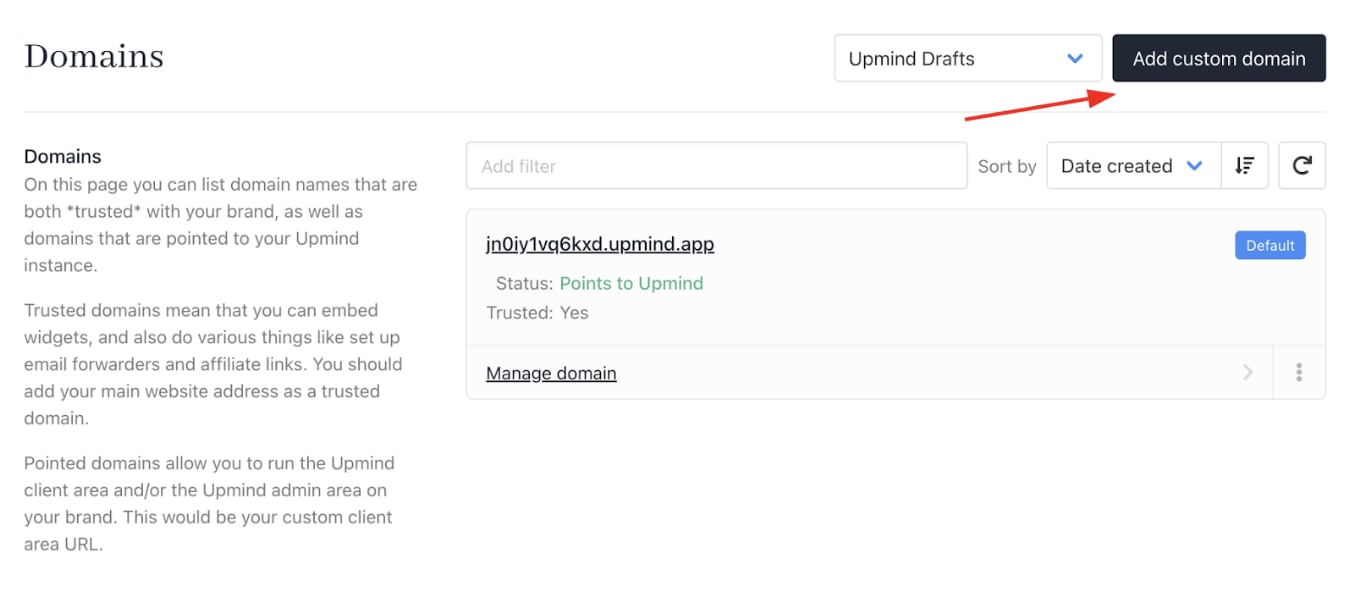
3. Click **Add custom domain**.

<Frame caption="Add custom domain">
  <img src="https://mintcdn.com/upmind/uxzVUXAKtJ2bRWCI/images/fb/66290a2bc45fb95a.png?fit=max&auto=format&n=uxzVUXAKtJ2bRWCI&q=85&s=67e7ccb7cae8fd26234f3db7a3019cf3" alt="Add custom domain" className="mx-auto" style={{ width:"99%" }} width="1346" height="590" data-path="images/fb/66290a2bc45fb95a.png" />

  <img src="https://mintcdn.com/upmind/uxzVUXAKtJ2bRWCI/images/fb/66290a2bc45fb95a.png?fit=max&auto=format&n=uxzVUXAKtJ2bRWCI&q=85&s=67e7ccb7cae8fd26234f3db7a3019cf3" alt="Add custom domain" className="mx-auto" style={{ width:"99%" }} width="1346" height="590" data-path="images/fb/66290a2bc45fb95a.png" />

  <img src="https://mintcdn.com/upmind/uxzVUXAKtJ2bRWCI/images/fb/66290a2bc45fb95a.png?fit=max&auto=format&n=uxzVUXAKtJ2bRWCI&q=85&s=67e7ccb7cae8fd26234f3db7a3019cf3" alt="Add custom domain" className="mx-auto" style={{ width:"99%" }} width="1346" height="590" data-path="images/fb/66290a2bc45fb95a.png" />
</Frame>

<Warning>
  Do not include `https://`. Use the format [**example.yourdomain.com**](http://example.yourdomain.com).
</Warning>

4. Use toggles to enable admin login, client login, or both. By default, both options are disabled.

You will be prompted to add a **CNAME**. This needs to be done with your domain registrar.
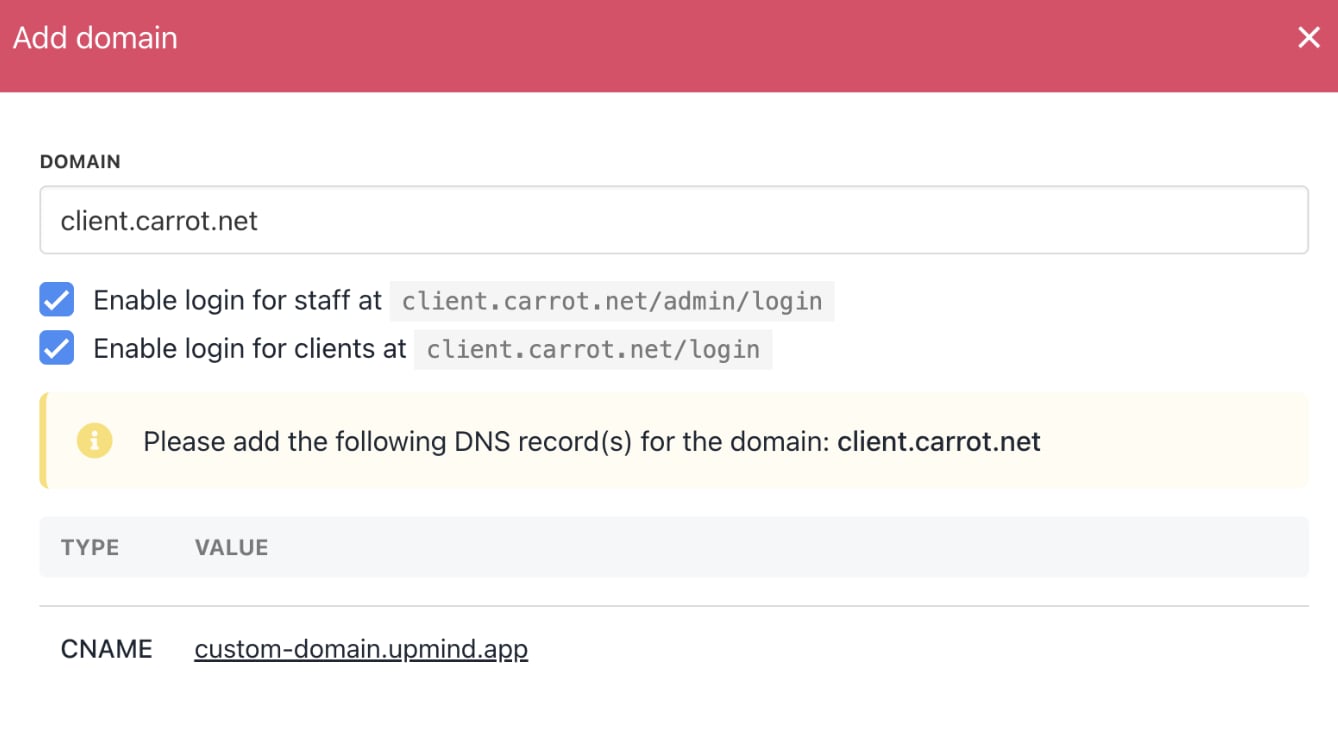
<Frame caption="Click and copy records">
  <img src="https://mintcdn.com/upmind/kXD0Ya8PpcxxNm6Q/images/fb/3c6f96c51e1d58f9.png?fit=max&auto=format&n=kXD0Ya8PpcxxNm6Q&q=85&s=f9fafd4b534955a51ba294332f54c1b1" alt="Click and copy records" className="mx-auto" style={{ width:"98%" }} width="1338" height="730" data-path="images/fb/3c6f96c51e1d58f9.png" />

  <img src="https://mintcdn.com/upmind/kXD0Ya8PpcxxNm6Q/images/fb/3c6f96c51e1d58f9.png?fit=max&auto=format&n=kXD0Ya8PpcxxNm6Q&q=85&s=f9fafd4b534955a51ba294332f54c1b1" alt="Click and copy records" className="mx-auto" style={{ width:"98%" }} width="1338" height="730" data-path="images/fb/3c6f96c51e1d58f9.png" />

  <img src="https://mintcdn.com/upmind/kXD0Ya8PpcxxNm6Q/images/fb/3c6f96c51e1d58f9.png?fit=max&auto=format&n=kXD0Ya8PpcxxNm6Q&q=85&s=f9fafd4b534955a51ba294332f54c1b1" alt="Click and copy records" className="mx-auto" style={{ width:"98%" }} width="1338" height="730" data-path="images/fb/3c6f96c51e1d58f9.png" />
</Frame>

5. Click **Save**. The domain will appear as unverified on the list.
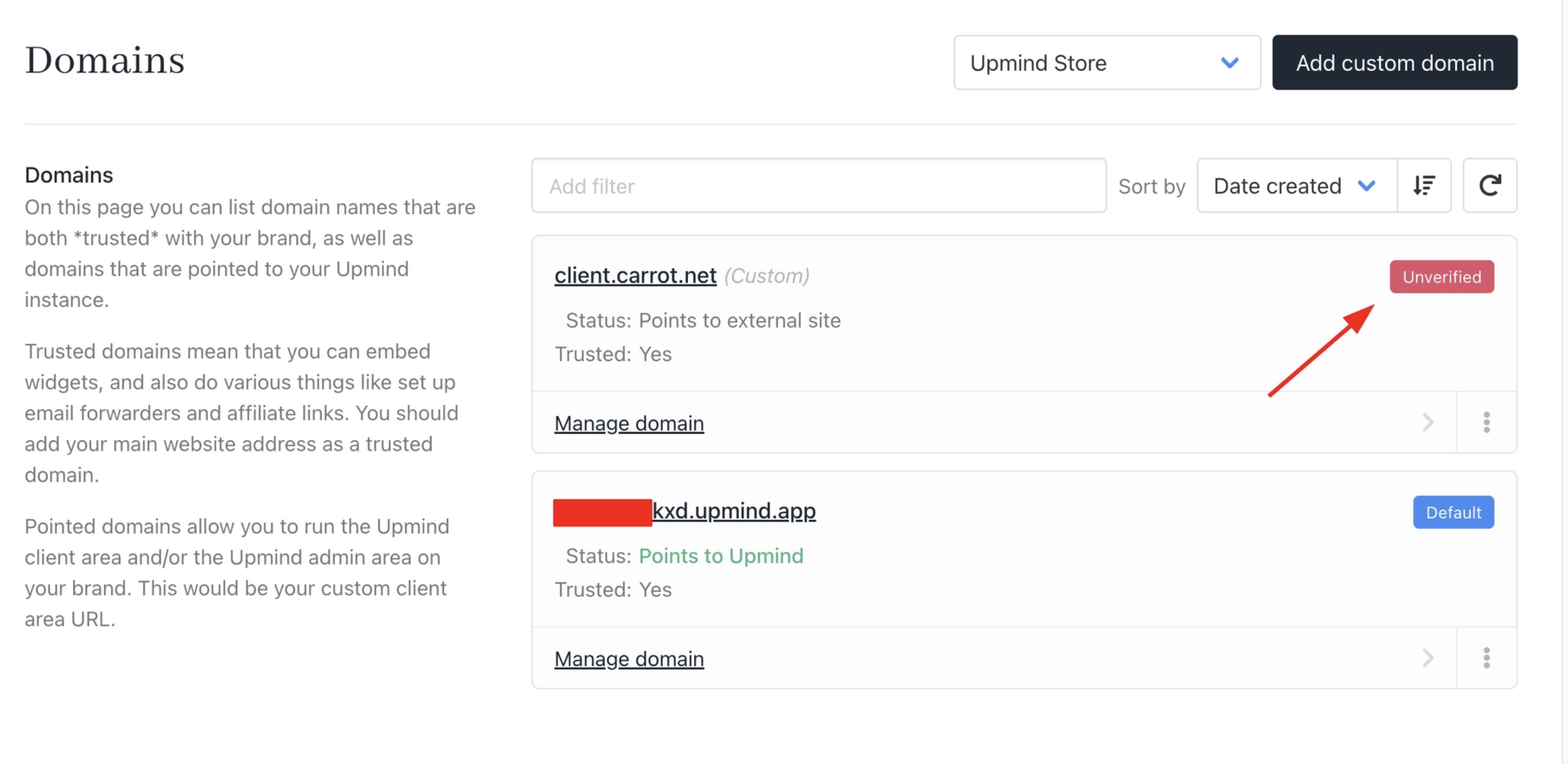
<Frame caption="Upmind adds unverified tag">
  <img src="https://mintcdn.com/upmind/h8h5zREaX7k8Y-3x/images/fb/12d0aeefec60d7be.png?fit=max&auto=format&n=h8h5zREaX7k8Y-3x&q=85&s=6e0e642850a1cb139bf96772c5b14cd6" alt="Upmind adds unverified tag" className="mx-auto" style={{ width:"98%" }} width="2798" height="1364" data-path="images/fb/12d0aeefec60d7be.png" />

  <img src="https://mintcdn.com/upmind/h8h5zREaX7k8Y-3x/images/fb/12d0aeefec60d7be.png?fit=max&auto=format&n=h8h5zREaX7k8Y-3x&q=85&s=6e0e642850a1cb139bf96772c5b14cd6" alt="Upmind adds unverified tag" className="mx-auto" style={{ width:"98%" }} width="2798" height="1364" data-path="images/fb/12d0aeefec60d7be.png" />

  <img src="https://mintcdn.com/upmind/h8h5zREaX7k8Y-3x/images/fb/12d0aeefec60d7be.png?fit=max&auto=format&n=h8h5zREaX7k8Y-3x&q=85&s=6e0e642850a1cb139bf96772c5b14cd6" alt="Upmind adds unverified tag" className="mx-auto" style={{ width:"98%" }} width="2798" height="1364" data-path="images/fb/12d0aeefec60d7be.png" />
</Frame>

## Configuring CNAME record

Before you can verify a URL, direct your current domain name to your Upmind URL with a new CNAME.

1. Log in to your domain registrar.
2. Create a new **CNAME Record**.
3. Paste the code into the field.
4. Wait about 10 minutes for DNS propagation.

<Note>
  Watch this [<u>YouTube video</u>](https://www.youtube.com/watch?v=N8bzgwIxP-U) to learn how to update domains to use CNAME.
</Note>

### For cPanel users

If you're using cPanel, please ensure that you add the CNAME in the **Zone Editor**.
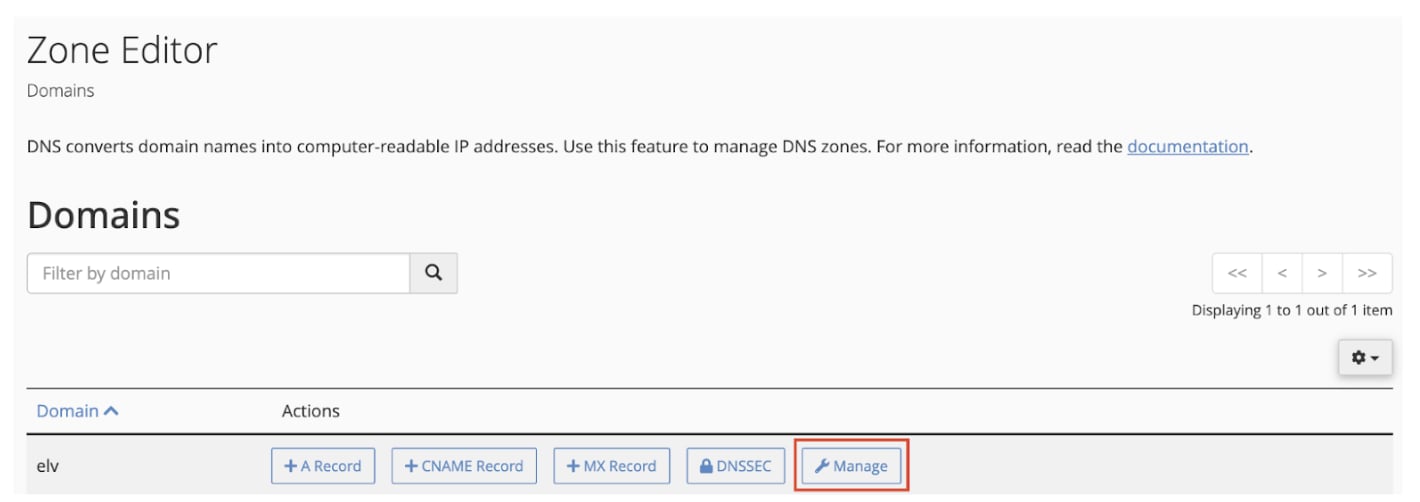
<Frame caption="DNS Zone Manager > Choose the Domain > Manage">
  <img src="https://mintcdn.com/upmind/JUoAg6onJmXk_-rR/images/fb/df83e1ed62883b52.png?fit=max&auto=format&n=JUoAg6onJmXk_-rR&q=85&s=7e2ecd78d7898eb1def1f8d06624e2d2" alt="DNS Zone Manager > Choose the Domain > Manage" className="mx-auto" style={{ width:"97%" }} data-og-width="1420" width="1420" data-og-height="502" height="502" data-path="images/fb/df83e1ed62883b52.png" data-optimize="true" data-opv="3" srcset="https://mintcdn.com/upmind/JUoAg6onJmXk_-rR/images/fb/df83e1ed62883b52.png?w=280&fit=max&auto=format&n=JUoAg6onJmXk_-rR&q=85&s=84a63b217e8c1cb414cba9e75666d590 280w, https://mintcdn.com/upmind/JUoAg6onJmXk_-rR/images/fb/df83e1ed62883b52.png?w=560&fit=max&auto=format&n=JUoAg6onJmXk_-rR&q=85&s=423307ad3facd1872567973cf05f83c6 560w, https://mintcdn.com/upmind/JUoAg6onJmXk_-rR/images/fb/df83e1ed62883b52.png?w=840&fit=max&auto=format&n=JUoAg6onJmXk_-rR&q=85&s=5cbfb0541cdc785e88521563ad456fb2 840w, https://mintcdn.com/upmind/JUoAg6onJmXk_-rR/images/fb/df83e1ed62883b52.png?w=1100&fit=max&auto=format&n=JUoAg6onJmXk_-rR&q=85&s=5b25691eeeda6150e4a9cdffc4020f8e 1100w, https://mintcdn.com/upmind/JUoAg6onJmXk_-rR/images/fb/df83e1ed62883b52.png?w=1650&fit=max&auto=format&n=JUoAg6onJmXk_-rR&q=85&s=12a8db2bcec73f39efa373fa2b29784b 1650w, https://mintcdn.com/upmind/JUoAg6onJmXk_-rR/images/fb/df83e1ed62883b52.png?w=2500&fit=max&auto=format&n=JUoAg6onJmXk_-rR&q=85&s=72cd3a7530cfaa5a2c61a1c6d3c2f130 2500w" />

  <img src="https://mintcdn.com/upmind/JUoAg6onJmXk_-rR/images/fb/df83e1ed62883b52.png?fit=max&auto=format&n=JUoAg6onJmXk_-rR&q=85&s=7e2ecd78d7898eb1def1f8d06624e2d2" alt="DNS Zone Manager > Choose the Domain > Manage" className="mx-auto" style={{ width:"97%" }} data-og-width="1420" width="1420" data-og-height="502" height="502" data-path="images/fb/df83e1ed62883b52.png" data-optimize="true" data-opv="3" srcset="https://mintcdn.com/upmind/JUoAg6onJmXk_-rR/images/fb/df83e1ed62883b52.png?w=280&fit=max&auto=format&n=JUoAg6onJmXk_-rR&q=85&s=84a63b217e8c1cb414cba9e75666d590 280w, https://mintcdn.com/upmind/JUoAg6onJmXk_-rR/images/fb/df83e1ed62883b52.png?w=560&fit=max&auto=format&n=JUoAg6onJmXk_-rR&q=85&s=423307ad3facd1872567973cf05f83c6 560w, https://mintcdn.com/upmind/JUoAg6onJmXk_-rR/images/fb/df83e1ed62883b52.png?w=840&fit=max&auto=format&n=JUoAg6onJmXk_-rR&q=85&s=5cbfb0541cdc785e88521563ad456fb2 840w, https://mintcdn.com/upmind/JUoAg6onJmXk_-rR/images/fb/df83e1ed62883b52.png?w=1100&fit=max&auto=format&n=JUoAg6onJmXk_-rR&q=85&s=5b25691eeeda6150e4a9cdffc4020f8e 1100w, https://mintcdn.com/upmind/JUoAg6onJmXk_-rR/images/fb/df83e1ed62883b52.png?w=1650&fit=max&auto=format&n=JUoAg6onJmXk_-rR&q=85&s=12a8db2bcec73f39efa373fa2b29784b 1650w, https://mintcdn.com/upmind/JUoAg6onJmXk_-rR/images/fb/df83e1ed62883b52.png?w=2500&fit=max&auto=format&n=JUoAg6onJmXk_-rR&q=85&s=72cd3a7530cfaa5a2c61a1c6d3c2f130 2500w" />

  <img src="https://mintcdn.com/upmind/JUoAg6onJmXk_-rR/images/fb/df83e1ed62883b52.png?fit=max&auto=format&n=JUoAg6onJmXk_-rR&q=85&s=7e2ecd78d7898eb1def1f8d06624e2d2" alt="DNS Zone Manager > Choose the Domain > Manage" className="mx-auto" style={{ width:"97%" }} data-og-width="1420" width="1420" data-og-height="502" height="502" data-path="images/fb/df83e1ed62883b52.png" data-optimize="true" data-opv="3" srcset="https://mintcdn.com/upmind/JUoAg6onJmXk_-rR/images/fb/df83e1ed62883b52.png?w=280&fit=max&auto=format&n=JUoAg6onJmXk_-rR&q=85&s=84a63b217e8c1cb414cba9e75666d590 280w, https://mintcdn.com/upmind/JUoAg6onJmXk_-rR/images/fb/df83e1ed62883b52.png?w=560&fit=max&auto=format&n=JUoAg6onJmXk_-rR&q=85&s=423307ad3facd1872567973cf05f83c6 560w, https://mintcdn.com/upmind/JUoAg6onJmXk_-rR/images/fb/df83e1ed62883b52.png?w=840&fit=max&auto=format&n=JUoAg6onJmXk_-rR&q=85&s=5cbfb0541cdc785e88521563ad456fb2 840w, https://mintcdn.com/upmind/JUoAg6onJmXk_-rR/images/fb/df83e1ed62883b52.png?w=1100&fit=max&auto=format&n=JUoAg6onJmXk_-rR&q=85&s=5b25691eeeda6150e4a9cdffc4020f8e 1100w, https://mintcdn.com/upmind/JUoAg6onJmXk_-rR/images/fb/df83e1ed62883b52.png?w=1650&fit=max&auto=format&n=JUoAg6onJmXk_-rR&q=85&s=12a8db2bcec73f39efa373fa2b29784b 1650w, https://mintcdn.com/upmind/JUoAg6onJmXk_-rR/images/fb/df83e1ed62883b52.png?w=2500&fit=max&auto=format&n=JUoAg6onJmXk_-rR&q=85&s=72cd3a7530cfaa5a2c61a1c6d3c2f130 2500w" />
</Frame>

### For Cloudflare users

We recommend **disabling Proxied (set Proxy status to DNS only)** to ensure proper connection to Upmind.

If you have MX records on the same subdomain, you can enable proxy, which allows Cloudflare to convert CNAME records to A records, letting you use both CNAME and MX records, something that is normally not possible.

<Frame caption="Make sure the Type is CNAME and paste Upmind CNAME to the Record">
  <img src="https://mintcdn.com/upmind/1-uICsJi9zYpvJVH/images/fb/890236aa7fd54289.png?fit=max&auto=format&n=1-uICsJi9zYpvJVH&q=85&s=6f92bfb2b75537e4069f1aec9fae051f" alt="Make sure the Type is CNAME and paste Upmind CNAME to the Record" className="mx-auto" style={{ width:"98%" }} width="1518" height="214" data-path="images/fb/890236aa7fd54289.png" />

  <img src="https://mintcdn.com/upmind/1-uICsJi9zYpvJVH/images/fb/890236aa7fd54289.png?fit=max&auto=format&n=1-uICsJi9zYpvJVH&q=85&s=6f92bfb2b75537e4069f1aec9fae051f" alt="Make sure the Type is CNAME and paste Upmind CNAME to the Record" className="mx-auto" style={{ width:"98%" }} width="1518" height="214" data-path="images/fb/890236aa7fd54289.png" />

  <img src="https://mintcdn.com/upmind/1-uICsJi9zYpvJVH/images/fb/890236aa7fd54289.png?fit=max&auto=format&n=1-uICsJi9zYpvJVH&q=85&s=6f92bfb2b75537e4069f1aec9fae051f" alt="Make sure the Type is CNAME and paste Upmind CNAME to the Record" className="mx-auto" style={{ width:"98%" }} width="1518" height="214" data-path="images/fb/890236aa7fd54289.png" />
</Frame>

## Verifying the domain

<Warning>
  Domain verification may take a few hours.
</Warning>

1. Return to the Upmind Domains page.
2. Click the **three-dots icon** on your new domain.
3. Click **Verify**.
4. After verification, SSL certificates are auto-installed for a secure connection.
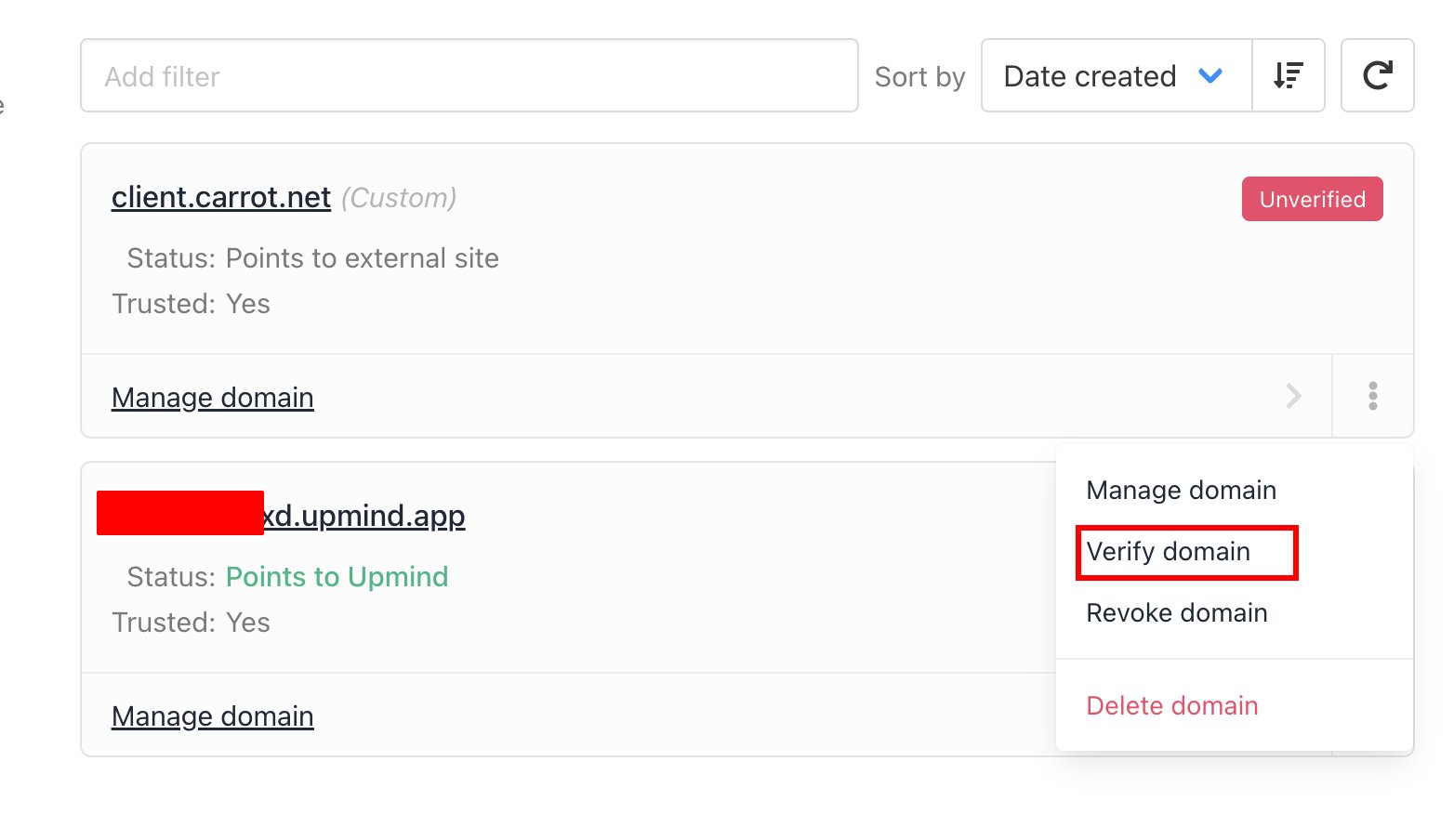
<Frame caption="Verify account">
  <img src="https://mintcdn.com/upmind/h8h5zREaX7k8Y-3x/images/fb/0f9fc2666f71eed7.png?fit=max&auto=format&n=h8h5zREaX7k8Y-3x&q=85&s=4b28b3e6dfe598e69395a4b4fe1b5570" alt="Verify account" className="mx-auto" style={{ width:"98%" }} width="1564" height="904" data-path="images/fb/0f9fc2666f71eed7.png" />

  <img src="https://mintcdn.com/upmind/h8h5zREaX7k8Y-3x/images/fb/0f9fc2666f71eed7.png?fit=max&auto=format&n=h8h5zREaX7k8Y-3x&q=85&s=4b28b3e6dfe598e69395a4b4fe1b5570" alt="Verify account" className="mx-auto" style={{ width:"98%" }} width="1564" height="904" data-path="images/fb/0f9fc2666f71eed7.png" />

  <img src="https://mintcdn.com/upmind/h8h5zREaX7k8Y-3x/images/fb/0f9fc2666f71eed7.png?fit=max&auto=format&n=h8h5zREaX7k8Y-3x&q=85&s=4b28b3e6dfe598e69395a4b4fe1b5570" alt="Verify account" className="mx-auto" style={{ width:"98%" }} width="1564" height="904" data-path="images/fb/0f9fc2666f71eed7.png" />
</Frame>

This is what it looks like when your custom domain has been successfully verified.
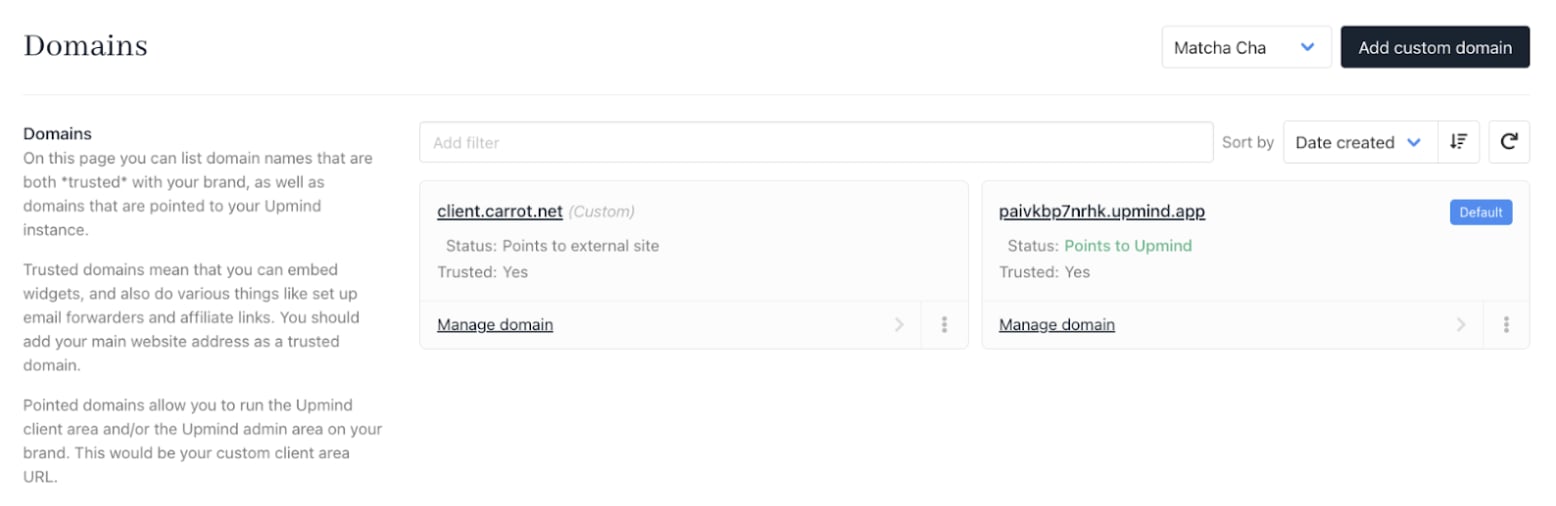
<Frame caption="The tag is removed">
  <img src="https://mintcdn.com/upmind/5gi4DQpw4X76kT6T/images/fb/be6dea4125d9fcb3.png?fit=max&auto=format&n=5gi4DQpw4X76kT6T&q=85&s=f33fcd8743500661ef9f2eee2e9e77e6" alt="The tag is removed" className="mx-auto" style={{ width:"98%" }} width="1556" height="506" data-path="images/fb/be6dea4125d9fcb3.png" />

  <img src="https://mintcdn.com/upmind/5gi4DQpw4X76kT6T/images/fb/be6dea4125d9fcb3.png?fit=max&auto=format&n=5gi4DQpw4X76kT6T&q=85&s=f33fcd8743500661ef9f2eee2e9e77e6" alt="The tag is removed" className="mx-auto" style={{ width:"98%" }} width="1556" height="506" data-path="images/fb/be6dea4125d9fcb3.png" />

  <img src="https://mintcdn.com/upmind/5gi4DQpw4X76kT6T/images/fb/be6dea4125d9fcb3.png?fit=max&auto=format&n=5gi4DQpw4X76kT6T&q=85&s=f33fcd8743500661ef9f2eee2e9e77e6" alt="The tag is removed" className="mx-auto" style={{ width:"98%" }} width="1556" height="506" data-path="images/fb/be6dea4125d9fcb3.png" />
</Frame>

## How to use your custom domain

To set the domain as default, click the three-dot menu and select **Make Default Domain**.
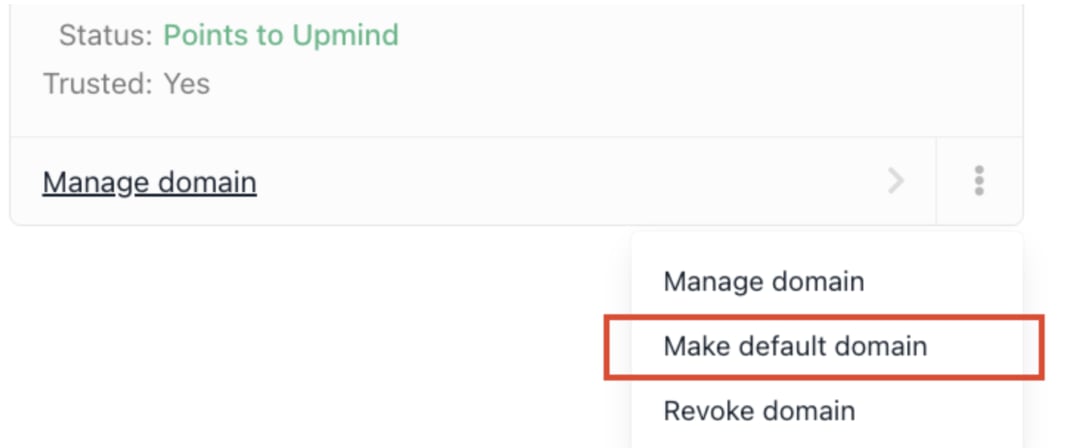
<Frame caption="Make default domain">
  <img src="https://mintcdn.com/upmind/2ooSxDpt6PiIGMr-/images/fb/08dbf0613337cb22.png?fit=max&auto=format&n=2ooSxDpt6PiIGMr-&q=85&s=6915f5dd93b6905728c2022634576c99" alt="Make default domain" className="mx-auto" style={{ width:"94%" }} width="1080" height="448" data-path="images/fb/08dbf0613337cb22.png" />

  <img src="https://mintcdn.com/upmind/2ooSxDpt6PiIGMr-/images/fb/08dbf0613337cb22.png?fit=max&auto=format&n=2ooSxDpt6PiIGMr-&q=85&s=6915f5dd93b6905728c2022634576c99" alt="Make default domain" className="mx-auto" style={{ width:"94%" }} width="1080" height="448" data-path="images/fb/08dbf0613337cb22.png" />

  <img src="https://mintcdn.com/upmind/2ooSxDpt6PiIGMr-/images/fb/08dbf0613337cb22.png?fit=max&auto=format&n=2ooSxDpt6PiIGMr-&q=85&s=6915f5dd93b6905728c2022634576c99" alt="Make default domain" className="mx-auto" style={{ width:"94%" }} width="1080" height="448" data-path="images/fb/08dbf0613337cb22.png" />
</Frame>

The **Client URL** login path is designated as `/login`.
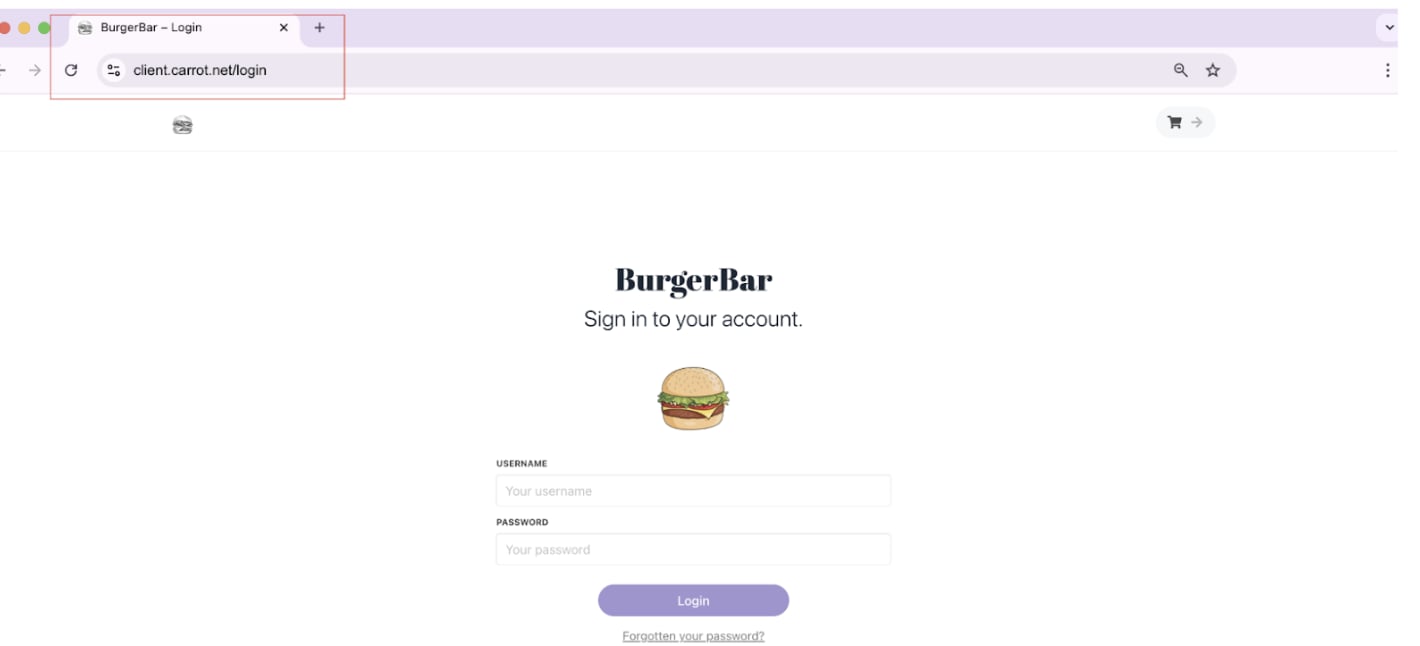
<Frame caption="Client interface login">
  <img src="https://mintcdn.com/upmind/VnCXiz5rboywDnvn/images/fb/d8a40f0cd32fdacf.png?fit=max&auto=format&n=VnCXiz5rboywDnvn&q=85&s=3db7b9888b7f4fa04ab79f046f12a6e4" alt="Client interface login" className="mx-auto" style={{ width:"98%" }} width="1420" height="646" data-path="images/fb/d8a40f0cd32fdacf.png" />

  <img src="https://mintcdn.com/upmind/VnCXiz5rboywDnvn/images/fb/d8a40f0cd32fdacf.png?fit=max&auto=format&n=VnCXiz5rboywDnvn&q=85&s=3db7b9888b7f4fa04ab79f046f12a6e4" alt="Client interface login" className="mx-auto" style={{ width:"98%" }} width="1420" height="646" data-path="images/fb/d8a40f0cd32fdacf.png" />

  <img src="https://mintcdn.com/upmind/VnCXiz5rboywDnvn/images/fb/d8a40f0cd32fdacf.png?fit=max&auto=format&n=VnCXiz5rboywDnvn&q=85&s=3db7b9888b7f4fa04ab79f046f12a6e4" alt="Client interface login" className="mx-auto" style={{ width:"98%" }} width="1420" height="646" data-path="images/fb/d8a40f0cd32fdacf.png" />
</Frame>

The **Admin URL** path is set as `/admin`.
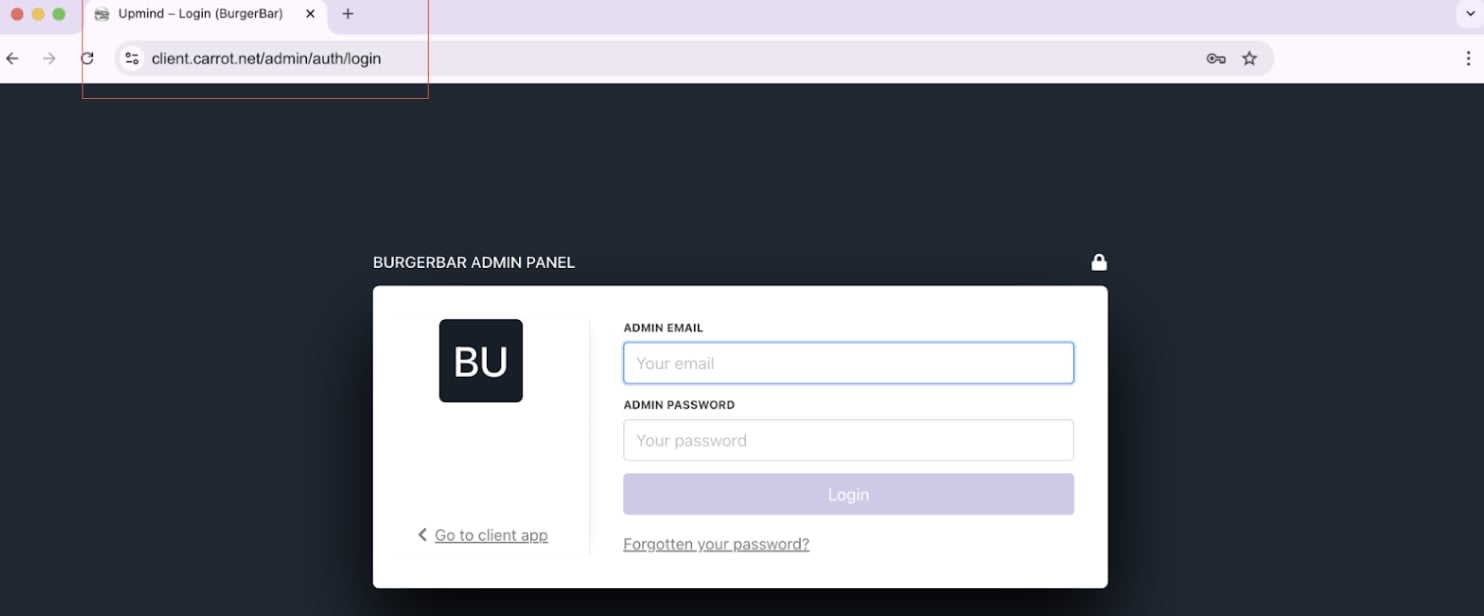
<Frame caption="Admin interface login">
  <img src="https://mintcdn.com/upmind/z5ofg3t7by4uN44v/images/fb/ed6e5c23887e208d.png?fit=max&auto=format&n=z5ofg3t7by4uN44v&q=85&s=bf8f42e0f3b456be59e3ac8083b1c3c8" alt="Admin interface login" className="mx-auto" style={{ width:"98%" }} width="1484" height="616" data-path="images/fb/ed6e5c23887e208d.png" />

  <img src="https://mintcdn.com/upmind/z5ofg3t7by4uN44v/images/fb/ed6e5c23887e208d.png?fit=max&auto=format&n=z5ofg3t7by4uN44v&q=85&s=bf8f42e0f3b456be59e3ac8083b1c3c8" alt="Admin interface login" className="mx-auto" style={{ width:"98%" }} width="1484" height="616" data-path="images/fb/ed6e5c23887e208d.png" />

  <img src="https://mintcdn.com/upmind/z5ofg3t7by4uN44v/images/fb/ed6e5c23887e208d.png?fit=max&auto=format&n=z5ofg3t7by4uN44v&q=85&s=bf8f42e0f3b456be59e3ac8083b1c3c8" alt="Admin interface login" className="mx-auto" style={{ width:"98%" }} width="1484" height="616" data-path="images/fb/ed6e5c23887e208d.png" />
</Frame>