> ## Documentation Index
> Fetch the complete documentation index at: https://docs.upmind.com/llms.txt
> Use this file to discover all available pages before exploring further.

# How to View Client and Staff Login Attempts

Monitor account access and spot unrecognised login activity.

Upmind logs all sign-in activity for both clients and staff, including the IP address and approximate location of each attempt. You can review these logs to identify any logins you don't recognise.

## Viewing staff login attempts

1. Go to **Settings** > **Staff Users**.
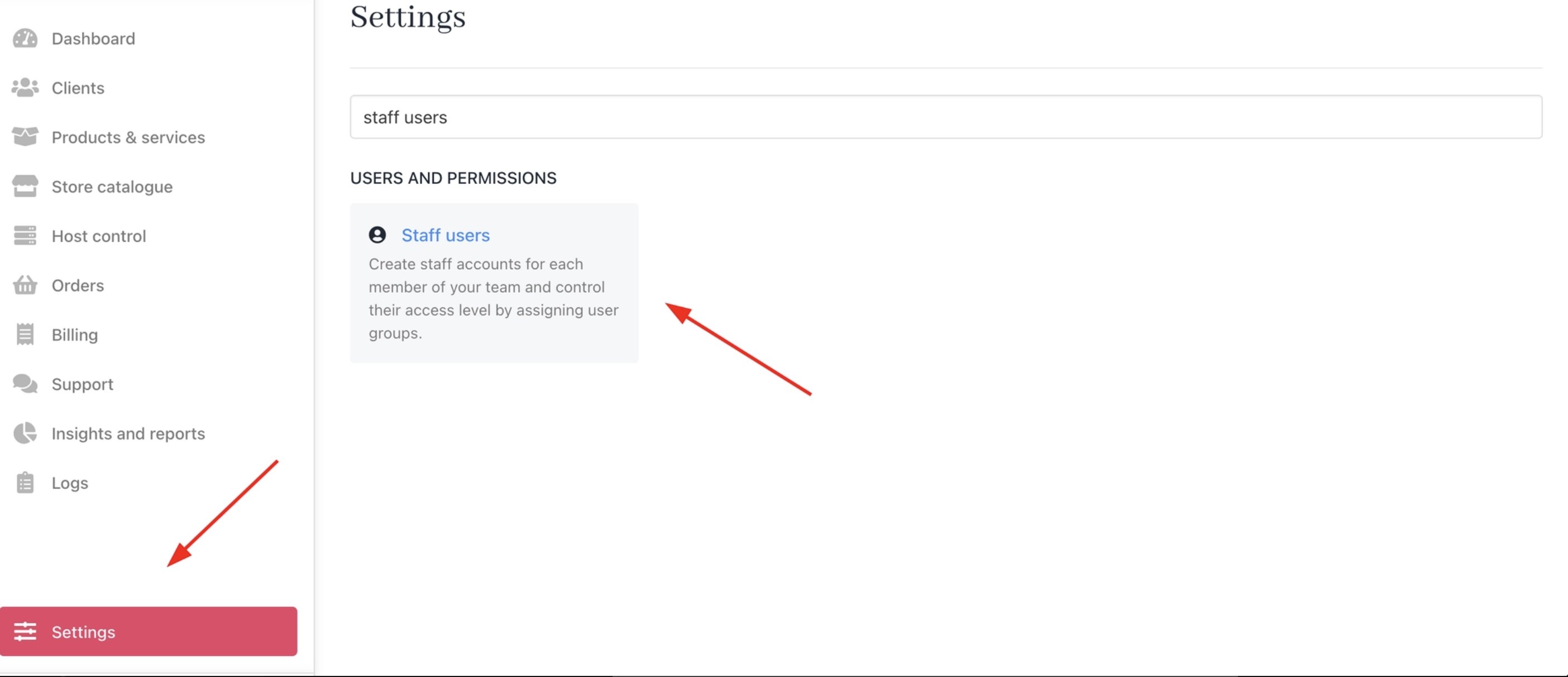
<Frame caption="Settings > Staff Users">
  <img src="https://mintcdn.com/upmind/o1ZuRFVGUlbsjwP3/images/image-44.png?fit=max&auto=format&n=o1ZuRFVGUlbsjwP3&q=85&s=4cc1ab6814d5c9c9dd45dd92e3240155" alt="Settings > Staff Users" title="Image" className="mx-auto" style={{ width:"96%" }} data-og-width="2808" width="2808" data-og-height="1212" height="1212" data-path="images/image-44.png" data-optimize="true" data-opv="3" srcset="https://mintcdn.com/upmind/o1ZuRFVGUlbsjwP3/images/image-44.png?w=280&fit=max&auto=format&n=o1ZuRFVGUlbsjwP3&q=85&s=a9257f2f0644b16355ccd29d05b457e1 280w, https://mintcdn.com/upmind/o1ZuRFVGUlbsjwP3/images/image-44.png?w=560&fit=max&auto=format&n=o1ZuRFVGUlbsjwP3&q=85&s=14e1060b9fa12f4d6f10f1c006430751 560w, https://mintcdn.com/upmind/o1ZuRFVGUlbsjwP3/images/image-44.png?w=840&fit=max&auto=format&n=o1ZuRFVGUlbsjwP3&q=85&s=975023314dca7ca6dfb87065772907a1 840w, https://mintcdn.com/upmind/o1ZuRFVGUlbsjwP3/images/image-44.png?w=1100&fit=max&auto=format&n=o1ZuRFVGUlbsjwP3&q=85&s=ae0259cc57977426471df7dcd8294669 1100w, https://mintcdn.com/upmind/o1ZuRFVGUlbsjwP3/images/image-44.png?w=1650&fit=max&auto=format&n=o1ZuRFVGUlbsjwP3&q=85&s=60d9dc8128b7e7c5dd9bd4aad2f43d00 1650w, https://mintcdn.com/upmind/o1ZuRFVGUlbsjwP3/images/image-44.png?w=2500&fit=max&auto=format&n=o1ZuRFVGUlbsjwP3&q=85&s=5e1107cc88768512df3823db16c72d72 2500w" />
</Frame>

2. Click the **three dots** next to the staff member and select **Manage User**.
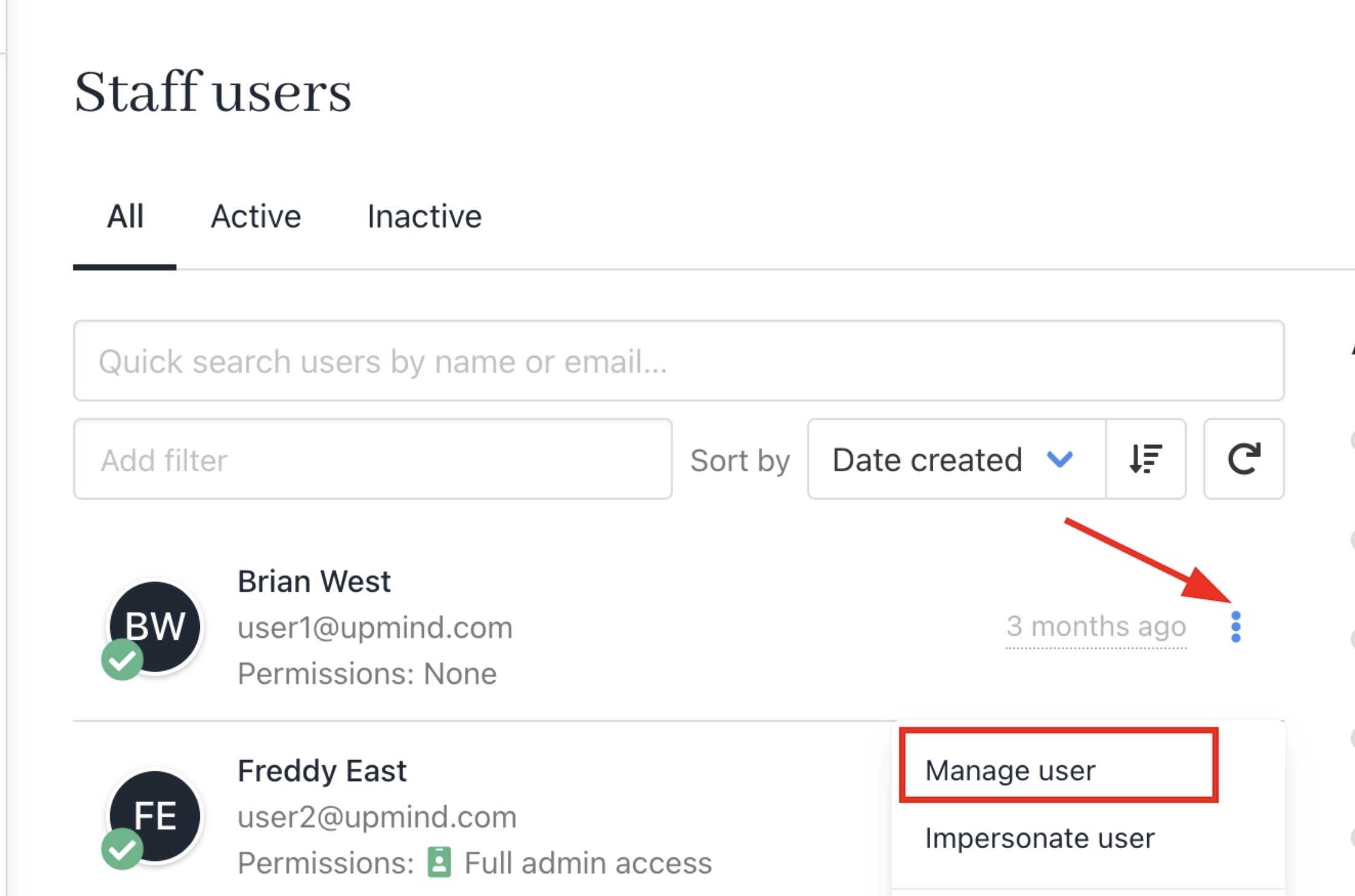
<Frame caption="Manage user">
  <img src="https://mintcdn.com/upmind/o1ZuRFVGUlbsjwP3/images/image-45.png?fit=max&auto=format&n=o1ZuRFVGUlbsjwP3&q=85&s=1b4e197a03714b15028952f5919bba40" alt="Manage user" title="Image" className="mx-auto" style={{ width:"87%" }} width="2204" height="1458" data-path="images/image-45.png" />
</Frame>

3. Navigate to **Logs** > **Login Attempt Logs** to view their sign-in history.
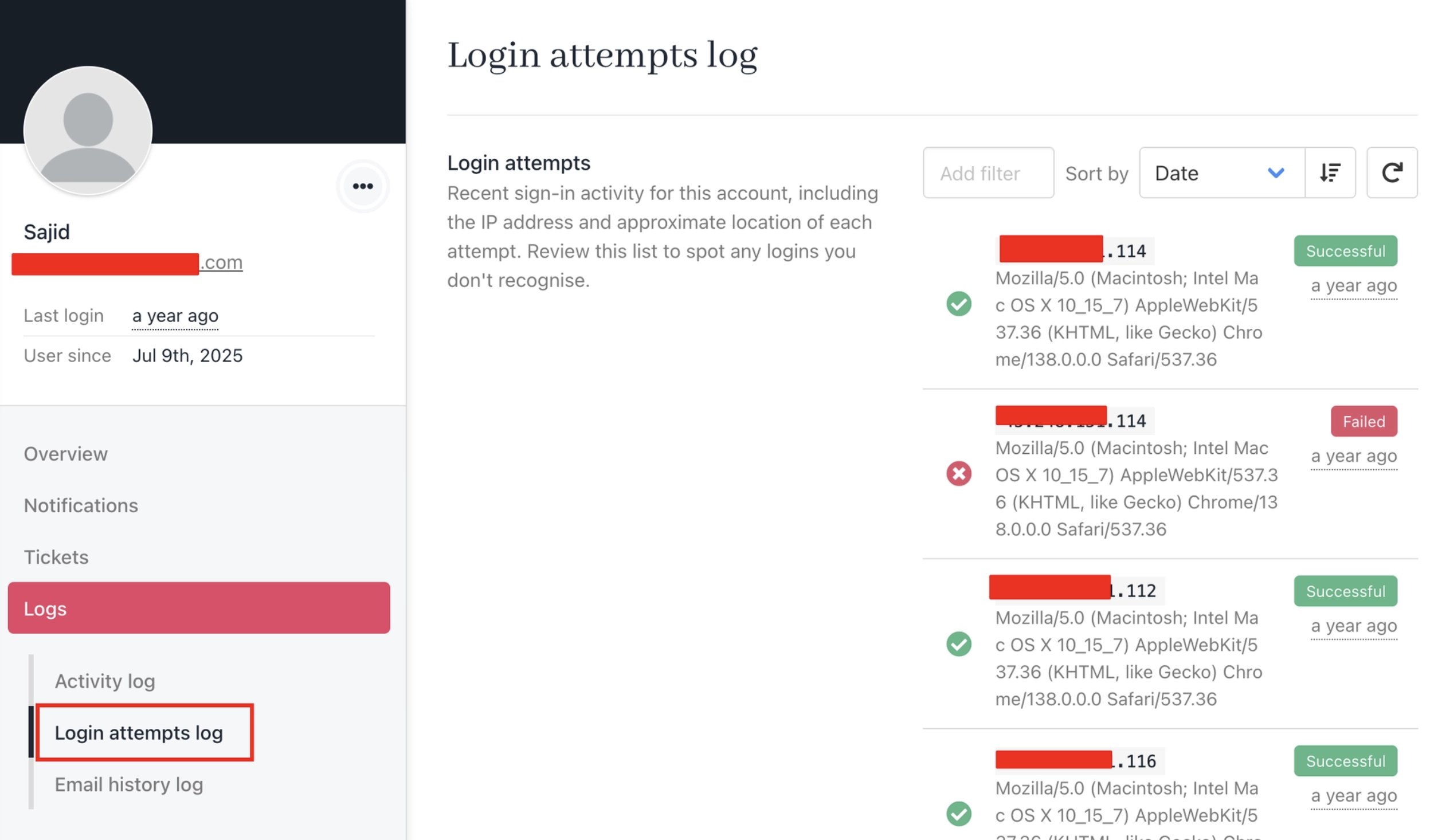
<Frame caption="Logs > Login Attempt Logs (staff)">
  <img src="https://mintcdn.com/upmind/o1ZuRFVGUlbsjwP3/images/image-46.png?fit=max&auto=format&n=o1ZuRFVGUlbsjwP3&q=85&s=70bc2d7d9e9c261d2ca733c08ea4000b" alt="Logs > Login Attempt Logs (staff)" title="Image" className="mx-auto" style={{ width:"96%" }} data-og-width="2502" width="2502" data-og-height="1466" height="1466" data-path="images/image-46.png" data-optimize="true" data-opv="3" srcset="https://mintcdn.com/upmind/o1ZuRFVGUlbsjwP3/images/image-46.png?w=280&fit=max&auto=format&n=o1ZuRFVGUlbsjwP3&q=85&s=28ccd27ce3c0859adf9b8cda9dd3ac40 280w, https://mintcdn.com/upmind/o1ZuRFVGUlbsjwP3/images/image-46.png?w=560&fit=max&auto=format&n=o1ZuRFVGUlbsjwP3&q=85&s=457bf5a5eb54bd38ff4b9b9e94dbc15e 560w, https://mintcdn.com/upmind/o1ZuRFVGUlbsjwP3/images/image-46.png?w=840&fit=max&auto=format&n=o1ZuRFVGUlbsjwP3&q=85&s=2887135981bdd5a4da5e65174e08315a 840w, https://mintcdn.com/upmind/o1ZuRFVGUlbsjwP3/images/image-46.png?w=1100&fit=max&auto=format&n=o1ZuRFVGUlbsjwP3&q=85&s=528b3aa7b97f9c9493bf62d39bc6e82b 1100w, https://mintcdn.com/upmind/o1ZuRFVGUlbsjwP3/images/image-46.png?w=1650&fit=max&auto=format&n=o1ZuRFVGUlbsjwP3&q=85&s=5753d98ad1b4947db334a7f72e06d4ff 1650w, https://mintcdn.com/upmind/o1ZuRFVGUlbsjwP3/images/image-46.png?w=2500&fit=max&auto=format&n=o1ZuRFVGUlbsjwP3&q=85&s=e011e77e6163cf010641c0d3bb6a8996 2500w" />
</Frame>

## Viewing client login attempts

### From the Admin area

1. Go to **Clients** and select the client you want to review.
2. Navigate to **Logs** > **Login Attempt Logs** to view their sign-in history.
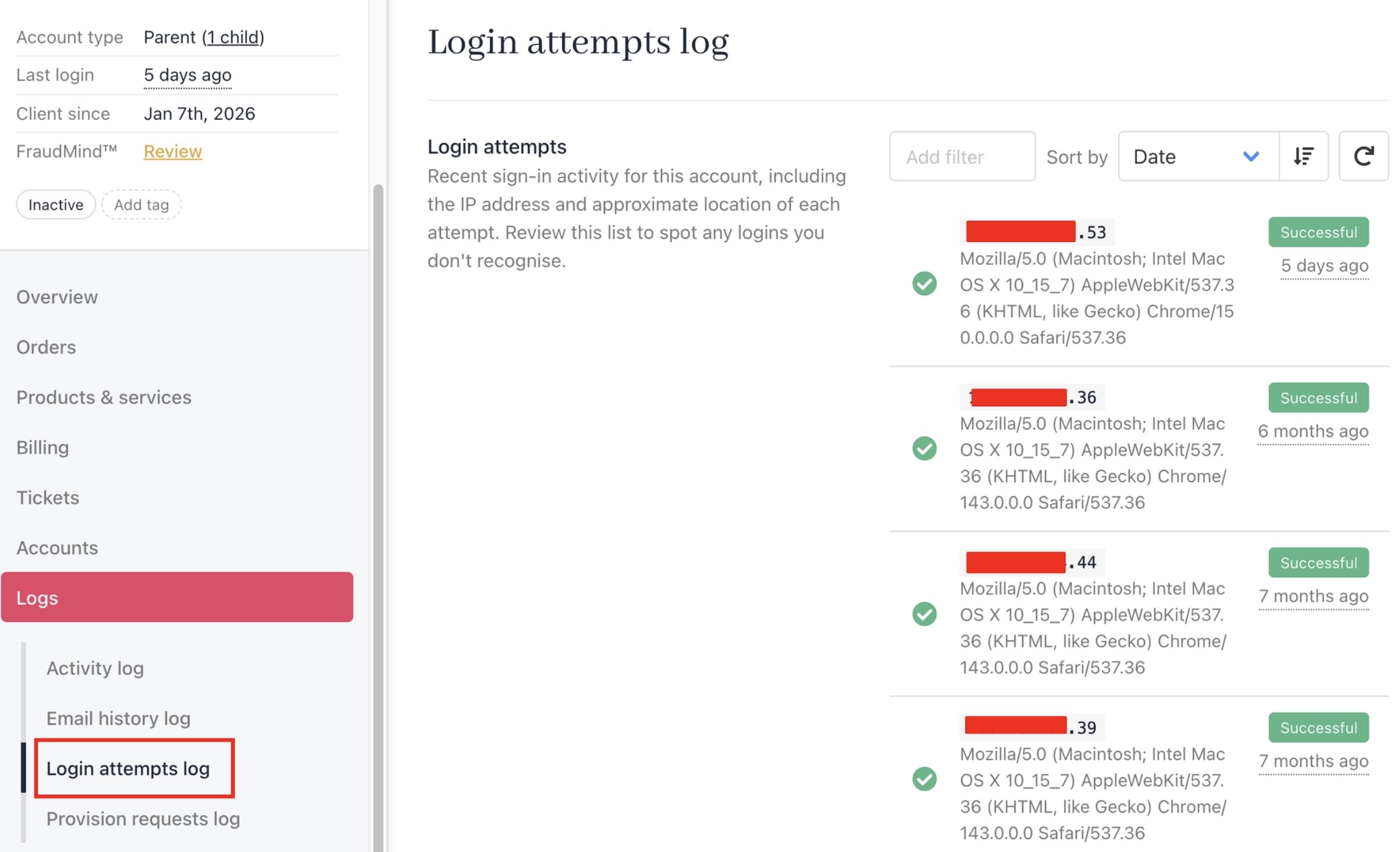
<Frame caption="Logs > Login Attempt Logs (admin area)">
  <img src="https://mintcdn.com/upmind/o1ZuRFVGUlbsjwP3/images/image-47.png?fit=max&auto=format&n=o1ZuRFVGUlbsjwP3&q=85&s=f288a411cf8dcb7ae19eff048eb2a807" alt="Logs > Login Attempt Logs (admin area)" title="Image" className="mx-auto" style={{ width:"98%" }} data-og-width="2406" width="2406" data-og-height="1464" height="1464" data-path="images/image-47.png" data-optimize="true" data-opv="3" srcset="https://mintcdn.com/upmind/o1ZuRFVGUlbsjwP3/images/image-47.png?w=280&fit=max&auto=format&n=o1ZuRFVGUlbsjwP3&q=85&s=7dceb846718e757c1ceeba67bf19da7d 280w, https://mintcdn.com/upmind/o1ZuRFVGUlbsjwP3/images/image-47.png?w=560&fit=max&auto=format&n=o1ZuRFVGUlbsjwP3&q=85&s=b9a7395bc74197ea405420d6e469683a 560w, https://mintcdn.com/upmind/o1ZuRFVGUlbsjwP3/images/image-47.png?w=840&fit=max&auto=format&n=o1ZuRFVGUlbsjwP3&q=85&s=5764eecc12a73437625d95d6c688e385 840w, https://mintcdn.com/upmind/o1ZuRFVGUlbsjwP3/images/image-47.png?w=1100&fit=max&auto=format&n=o1ZuRFVGUlbsjwP3&q=85&s=8aa4f616e566bf111ad0926f2fc185d1 1100w, https://mintcdn.com/upmind/o1ZuRFVGUlbsjwP3/images/image-47.png?w=1650&fit=max&auto=format&n=o1ZuRFVGUlbsjwP3&q=85&s=8e91382fd6a2874a87be4b8653215eaa 1650w, https://mintcdn.com/upmind/o1ZuRFVGUlbsjwP3/images/image-47.png?w=2500&fit=max&auto=format&n=o1ZuRFVGUlbsjwP3&q=85&s=e59db2ade582e74681eb9f2489e010ea 2500w" />
</Frame>

### From the Client area

Clients can also view their own login activity directly from their account.

1. Log in to the client area and go to **My Account**.
2. Navigate to **Logs** > **Login Attempt Logs** to view recent sign-in activity.
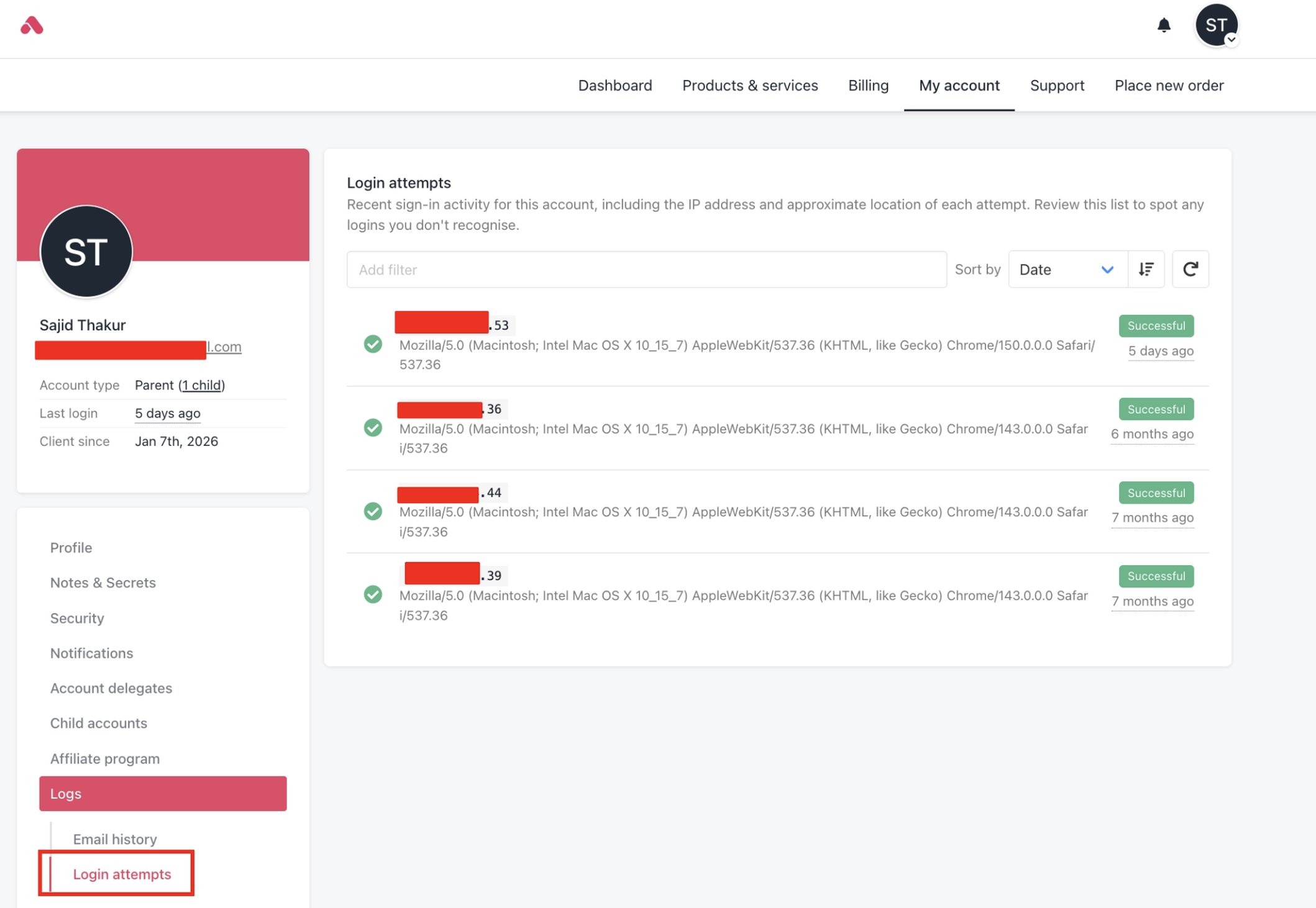
<Frame caption="Logs > Login Attempt Logs (client area)">
  <img src="https://mintcdn.com/upmind/o1ZuRFVGUlbsjwP3/images/image-48.png?fit=max&auto=format&n=o1ZuRFVGUlbsjwP3&q=85&s=96ab324ae2f9510b678ac868c45ed2f5" alt="Logs > Login Attempt Logs (client area)" title="Image" className="mx-auto" style={{ width:"98%" }} data-og-width="2118" width="2118" data-og-height="1462" height="1462" data-path="images/image-48.png" data-optimize="true" data-opv="3" srcset="https://mintcdn.com/upmind/o1ZuRFVGUlbsjwP3/images/image-48.png?w=280&fit=max&auto=format&n=o1ZuRFVGUlbsjwP3&q=85&s=392aedd9b35c4d0a553cab0db3d2b5b2 280w, https://mintcdn.com/upmind/o1ZuRFVGUlbsjwP3/images/image-48.png?w=560&fit=max&auto=format&n=o1ZuRFVGUlbsjwP3&q=85&s=a63df4fd44b43c0ed233f4f00a35a97f 560w, https://mintcdn.com/upmind/o1ZuRFVGUlbsjwP3/images/image-48.png?w=840&fit=max&auto=format&n=o1ZuRFVGUlbsjwP3&q=85&s=64d9e5dfd2307ffcbd4e950fa0db6d9b 840w, https://mintcdn.com/upmind/o1ZuRFVGUlbsjwP3/images/image-48.png?w=1100&fit=max&auto=format&n=o1ZuRFVGUlbsjwP3&q=85&s=816ceaf28430633f3377d88b70cf330d 1100w, https://mintcdn.com/upmind/o1ZuRFVGUlbsjwP3/images/image-48.png?w=1650&fit=max&auto=format&n=o1ZuRFVGUlbsjwP3&q=85&s=9bee0b6b980320ce516315f7304c86b1 1650w, https://mintcdn.com/upmind/o1ZuRFVGUlbsjwP3/images/image-48.png?w=2500&fit=max&auto=format&n=o1ZuRFVGUlbsjwP3&q=85&s=bdb74b5281de1a7c72c3141d7975f53e 2500w" />
</Frame>
