> ## Documentation Index
> Fetch the complete documentation index at: https://docs.upmind.com/llms.txt
> Use this file to discover all available pages before exploring further.

# How to Manage Account Security as an Admin/Staff

> Security Management is important for any Account. Manage account security for your Upmind account and secure your complete automation platform account.

Upmind offers a comprehensive suite of security features for both admins and clients. This guide will give an overview of user-level security protections. It covers:

1. **IP Whitelisting**
2. **Extra Client Functionalities**
3. **Login Attempts**
4. **Two-factor Authentication**
5. **Password Resets**
6. **Secure Link Sharing**
7. **File Upload Types**
8. **General Security Settings**

<Warning>
  For information on managing two-factor authentication (2FA) as an admin/staff, follow this [guide](/managing-your-account/managing-2fa-two-factor-authentication-in-upmind/how-to-manage-two-factor-authentication-2fa-as-an-adminstaff).
</Warning>

## **Security menu access**

* **Admins and staff**: Log in, go to `Settings`, and select **Security** under the `Branding and Customisation` section.
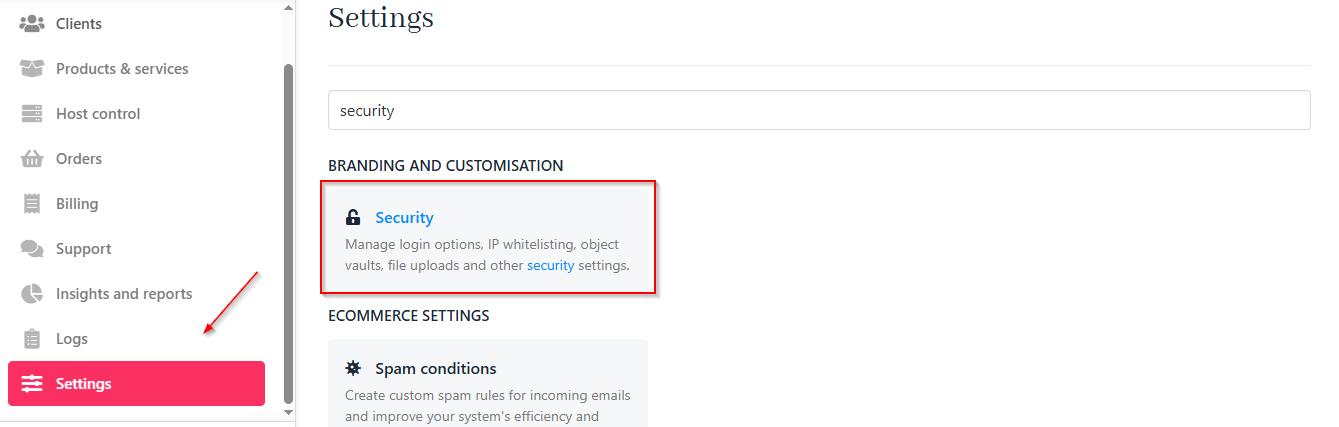
<Frame caption="Settings > Security">
  <img src="https://mintcdn.com/upmind/Dgjmf3QWYVBR40cE/images/fb/5a4e1a623aab10c1.png?fit=max&auto=format&n=Dgjmf3QWYVBR40cE&q=85&s=ddf8e06eb5d121f1a734f94b5d780859" alt="Settings > Security" className="mx-auto" style={{ width:"99%" }} data-og-width="1339" width="1339" data-og-height="427" height="427" data-path="images/fb/5a4e1a623aab10c1.png" data-optimize="true" data-opv="3" srcset="https://mintcdn.com/upmind/Dgjmf3QWYVBR40cE/images/fb/5a4e1a623aab10c1.png?w=280&fit=max&auto=format&n=Dgjmf3QWYVBR40cE&q=85&s=ed412f4598d154b88cd579954b899d10 280w, https://mintcdn.com/upmind/Dgjmf3QWYVBR40cE/images/fb/5a4e1a623aab10c1.png?w=560&fit=max&auto=format&n=Dgjmf3QWYVBR40cE&q=85&s=ddbd9a714170253114830a868845a6f9 560w, https://mintcdn.com/upmind/Dgjmf3QWYVBR40cE/images/fb/5a4e1a623aab10c1.png?w=840&fit=max&auto=format&n=Dgjmf3QWYVBR40cE&q=85&s=be62c7de1e647932ca8867b62b706475 840w, https://mintcdn.com/upmind/Dgjmf3QWYVBR40cE/images/fb/5a4e1a623aab10c1.png?w=1100&fit=max&auto=format&n=Dgjmf3QWYVBR40cE&q=85&s=32e12a6f0d74b20e1dd4299411e3f83d 1100w, https://mintcdn.com/upmind/Dgjmf3QWYVBR40cE/images/fb/5a4e1a623aab10c1.png?w=1650&fit=max&auto=format&n=Dgjmf3QWYVBR40cE&q=85&s=741bf44b7e17f3966c3809da199aa7e5 1650w, https://mintcdn.com/upmind/Dgjmf3QWYVBR40cE/images/fb/5a4e1a623aab10c1.png?w=2500&fit=max&auto=format&n=Dgjmf3QWYVBR40cE&q=85&s=cc9d8c436b397df88ba43c6daa2bac52 2500w" />

  <img src="https://mintcdn.com/upmind/Dgjmf3QWYVBR40cE/images/fb/5a4e1a623aab10c1.png?fit=max&auto=format&n=Dgjmf3QWYVBR40cE&q=85&s=ddf8e06eb5d121f1a734f94b5d780859" alt="Settings > Security" className="mx-auto" style={{ width:"99%" }} data-og-width="1339" width="1339" data-og-height="427" height="427" data-path="images/fb/5a4e1a623aab10c1.png" data-optimize="true" data-opv="3" srcset="https://mintcdn.com/upmind/Dgjmf3QWYVBR40cE/images/fb/5a4e1a623aab10c1.png?w=280&fit=max&auto=format&n=Dgjmf3QWYVBR40cE&q=85&s=ed412f4598d154b88cd579954b899d10 280w, https://mintcdn.com/upmind/Dgjmf3QWYVBR40cE/images/fb/5a4e1a623aab10c1.png?w=560&fit=max&auto=format&n=Dgjmf3QWYVBR40cE&q=85&s=ddbd9a714170253114830a868845a6f9 560w, https://mintcdn.com/upmind/Dgjmf3QWYVBR40cE/images/fb/5a4e1a623aab10c1.png?w=840&fit=max&auto=format&n=Dgjmf3QWYVBR40cE&q=85&s=be62c7de1e647932ca8867b62b706475 840w, https://mintcdn.com/upmind/Dgjmf3QWYVBR40cE/images/fb/5a4e1a623aab10c1.png?w=1100&fit=max&auto=format&n=Dgjmf3QWYVBR40cE&q=85&s=32e12a6f0d74b20e1dd4299411e3f83d 1100w, https://mintcdn.com/upmind/Dgjmf3QWYVBR40cE/images/fb/5a4e1a623aab10c1.png?w=1650&fit=max&auto=format&n=Dgjmf3QWYVBR40cE&q=85&s=741bf44b7e17f3966c3809da199aa7e5 1650w, https://mintcdn.com/upmind/Dgjmf3QWYVBR40cE/images/fb/5a4e1a623aab10c1.png?w=2500&fit=max&auto=format&n=Dgjmf3QWYVBR40cE&q=85&s=cc9d8c436b397df88ba43c6daa2bac52 2500w" />
</Frame>

* **Clients**: Access security options through **My Account** > **Security**.
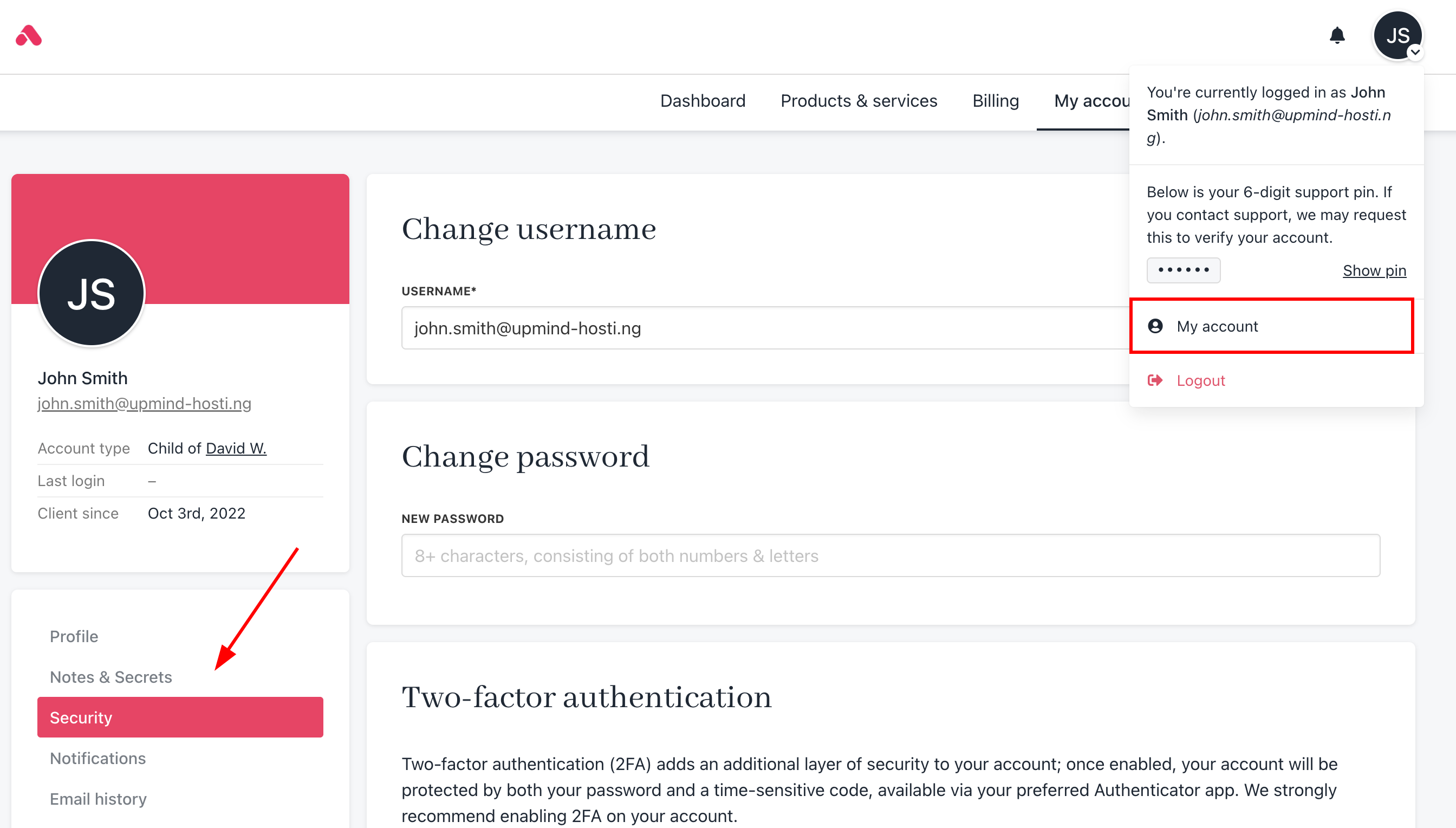
<Frame caption="My account > Security">
  <img src="https://mintcdn.com/upmind/uxzVUXAKtJ2bRWCI/images/fb/65a8e8416c82bcf5.png?fit=max&auto=format&n=uxzVUXAKtJ2bRWCI&q=85&s=e9dc543107a900809d9c261e22edc737" alt="My account > Security" className="mx-auto" style={{ width:"99%" }} data-og-width="2688" width="2688" data-og-height="1528" height="1528" data-path="images/fb/65a8e8416c82bcf5.png" data-optimize="true" data-opv="3" srcset="https://mintcdn.com/upmind/uxzVUXAKtJ2bRWCI/images/fb/65a8e8416c82bcf5.png?w=280&fit=max&auto=format&n=uxzVUXAKtJ2bRWCI&q=85&s=84f17052fe3857b43ff7c60ddd9c06c2 280w, https://mintcdn.com/upmind/uxzVUXAKtJ2bRWCI/images/fb/65a8e8416c82bcf5.png?w=560&fit=max&auto=format&n=uxzVUXAKtJ2bRWCI&q=85&s=f5f0e3fc8ed5500ead872252f6e3b030 560w, https://mintcdn.com/upmind/uxzVUXAKtJ2bRWCI/images/fb/65a8e8416c82bcf5.png?w=840&fit=max&auto=format&n=uxzVUXAKtJ2bRWCI&q=85&s=ce91a1d1619e7747d15a4722ba8f8c9f 840w, https://mintcdn.com/upmind/uxzVUXAKtJ2bRWCI/images/fb/65a8e8416c82bcf5.png?w=1100&fit=max&auto=format&n=uxzVUXAKtJ2bRWCI&q=85&s=2f633a117f12f2d00c33646c39d7f66a 1100w, https://mintcdn.com/upmind/uxzVUXAKtJ2bRWCI/images/fb/65a8e8416c82bcf5.png?w=1650&fit=max&auto=format&n=uxzVUXAKtJ2bRWCI&q=85&s=3db4c97d6f33cb36701941d8b4cef8e6 1650w, https://mintcdn.com/upmind/uxzVUXAKtJ2bRWCI/images/fb/65a8e8416c82bcf5.png?w=2500&fit=max&auto=format&n=uxzVUXAKtJ2bRWCI&q=85&s=58816a69aec561eeea65a5ef69f89519 2500w" />

  <img src="https://mintcdn.com/upmind/uxzVUXAKtJ2bRWCI/images/fb/65a8e8416c82bcf5.png?fit=max&auto=format&n=uxzVUXAKtJ2bRWCI&q=85&s=e9dc543107a900809d9c261e22edc737" alt="My account > Security" className="mx-auto" style={{ width:"99%" }} data-og-width="2688" width="2688" data-og-height="1528" height="1528" data-path="images/fb/65a8e8416c82bcf5.png" data-optimize="true" data-opv="3" srcset="https://mintcdn.com/upmind/uxzVUXAKtJ2bRWCI/images/fb/65a8e8416c82bcf5.png?w=280&fit=max&auto=format&n=uxzVUXAKtJ2bRWCI&q=85&s=84f17052fe3857b43ff7c60ddd9c06c2 280w, https://mintcdn.com/upmind/uxzVUXAKtJ2bRWCI/images/fb/65a8e8416c82bcf5.png?w=560&fit=max&auto=format&n=uxzVUXAKtJ2bRWCI&q=85&s=f5f0e3fc8ed5500ead872252f6e3b030 560w, https://mintcdn.com/upmind/uxzVUXAKtJ2bRWCI/images/fb/65a8e8416c82bcf5.png?w=840&fit=max&auto=format&n=uxzVUXAKtJ2bRWCI&q=85&s=ce91a1d1619e7747d15a4722ba8f8c9f 840w, https://mintcdn.com/upmind/uxzVUXAKtJ2bRWCI/images/fb/65a8e8416c82bcf5.png?w=1100&fit=max&auto=format&n=uxzVUXAKtJ2bRWCI&q=85&s=2f633a117f12f2d00c33646c39d7f66a 1100w, https://mintcdn.com/upmind/uxzVUXAKtJ2bRWCI/images/fb/65a8e8416c82bcf5.png?w=1650&fit=max&auto=format&n=uxzVUXAKtJ2bRWCI&q=85&s=3db4c97d6f33cb36701941d8b4cef8e6 1650w, https://mintcdn.com/upmind/uxzVUXAKtJ2bRWCI/images/fb/65a8e8416c82bcf5.png?w=2500&fit=max&auto=format&n=uxzVUXAKtJ2bRWCI&q=85&s=58816a69aec561eeea65a5ef69f89519 2500w" />
</Frame>

## **Restrict access by IP (IP whitelisting)**

You can control which IP addresses can access your organisation’s admin area and the client area to restrict access to trusted sources. Upmind supports static IPs, staff-specific whitelists, and CIDR ranges.

<Note>
  Avoid dynamic IPs to prevent accidental lockouts.
</Note>

### **IP whitelisting from admin**

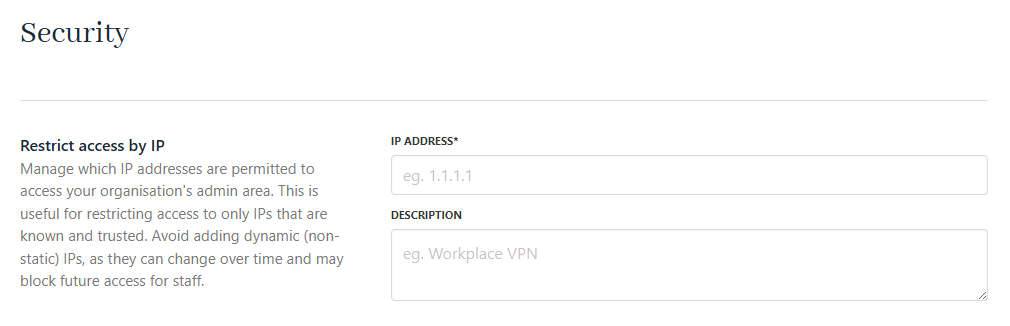
To add an IP whitelist entry from admin, enter the **IP address** (required) and a **Description** (optional).
<Frame caption="Restrict access by IP from Admin (Setting > Security)">
  <img src="https://mintcdn.com/upmind/c5sDUwEs8YpzGbjA/images/fb/92d79dd778e13ff1.png?fit=max&auto=format&n=c5sDUwEs8YpzGbjA&q=85&s=54ff4a4939cda989e844974f1aadf50b" alt="Restrict access by IP from Admin (Setting > Security)" className="mx-auto" style={{ width:"99%" }} data-og-width="1010" width="1010" data-og-height="326" height="326" data-path="images/fb/92d79dd778e13ff1.png" data-optimize="true" data-opv="3" srcset="https://mintcdn.com/upmind/c5sDUwEs8YpzGbjA/images/fb/92d79dd778e13ff1.png?w=280&fit=max&auto=format&n=c5sDUwEs8YpzGbjA&q=85&s=8b0d66bdff7f87fe1908ad36e0b683a6 280w, https://mintcdn.com/upmind/c5sDUwEs8YpzGbjA/images/fb/92d79dd778e13ff1.png?w=560&fit=max&auto=format&n=c5sDUwEs8YpzGbjA&q=85&s=cad4b96866963803e704cb603ed86627 560w, https://mintcdn.com/upmind/c5sDUwEs8YpzGbjA/images/fb/92d79dd778e13ff1.png?w=840&fit=max&auto=format&n=c5sDUwEs8YpzGbjA&q=85&s=059ee245b820a703c386d1de50dd91d7 840w, https://mintcdn.com/upmind/c5sDUwEs8YpzGbjA/images/fb/92d79dd778e13ff1.png?w=1100&fit=max&auto=format&n=c5sDUwEs8YpzGbjA&q=85&s=e6b9ae038c6c4507c882af32a1f293b4 1100w, https://mintcdn.com/upmind/c5sDUwEs8YpzGbjA/images/fb/92d79dd778e13ff1.png?w=1650&fit=max&auto=format&n=c5sDUwEs8YpzGbjA&q=85&s=1878e47d3816b62d00416fd52aabacb3 1650w, https://mintcdn.com/upmind/c5sDUwEs8YpzGbjA/images/fb/92d79dd778e13ff1.png?w=2500&fit=max&auto=format&n=c5sDUwEs8YpzGbjA&q=85&s=499d647e53e9376289477051a15c16c5 2500w" />

  <img src="https://mintcdn.com/upmind/c5sDUwEs8YpzGbjA/images/fb/92d79dd778e13ff1.png?fit=max&auto=format&n=c5sDUwEs8YpzGbjA&q=85&s=54ff4a4939cda989e844974f1aadf50b" alt="Restrict access by IP from Admin (Setting > Security)" className="mx-auto" style={{ width:"99%" }} data-og-width="1010" width="1010" data-og-height="326" height="326" data-path="images/fb/92d79dd778e13ff1.png" data-optimize="true" data-opv="3" srcset="https://mintcdn.com/upmind/c5sDUwEs8YpzGbjA/images/fb/92d79dd778e13ff1.png?w=280&fit=max&auto=format&n=c5sDUwEs8YpzGbjA&q=85&s=8b0d66bdff7f87fe1908ad36e0b683a6 280w, https://mintcdn.com/upmind/c5sDUwEs8YpzGbjA/images/fb/92d79dd778e13ff1.png?w=560&fit=max&auto=format&n=c5sDUwEs8YpzGbjA&q=85&s=cad4b96866963803e704cb603ed86627 560w, https://mintcdn.com/upmind/c5sDUwEs8YpzGbjA/images/fb/92d79dd778e13ff1.png?w=840&fit=max&auto=format&n=c5sDUwEs8YpzGbjA&q=85&s=059ee245b820a703c386d1de50dd91d7 840w, https://mintcdn.com/upmind/c5sDUwEs8YpzGbjA/images/fb/92d79dd778e13ff1.png?w=1100&fit=max&auto=format&n=c5sDUwEs8YpzGbjA&q=85&s=e6b9ae038c6c4507c882af32a1f293b4 1100w, https://mintcdn.com/upmind/c5sDUwEs8YpzGbjA/images/fb/92d79dd778e13ff1.png?w=1650&fit=max&auto=format&n=c5sDUwEs8YpzGbjA&q=85&s=1878e47d3816b62d00416fd52aabacb3 1650w, https://mintcdn.com/upmind/c5sDUwEs8YpzGbjA/images/fb/92d79dd778e13ff1.png?w=2500&fit=max&auto=format&n=c5sDUwEs8YpzGbjA&q=85&s=499d647e53e9376289477051a15c16c5 2500w" />
</Frame>

### **IP whitelisting for staff**

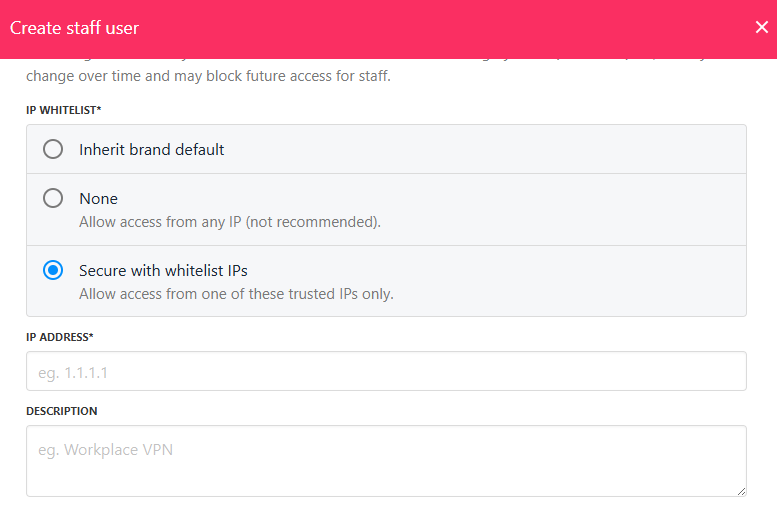
For staff, IPs can be set on a per-user basis in the staff control panel or per **API token**. This overrides global settings.

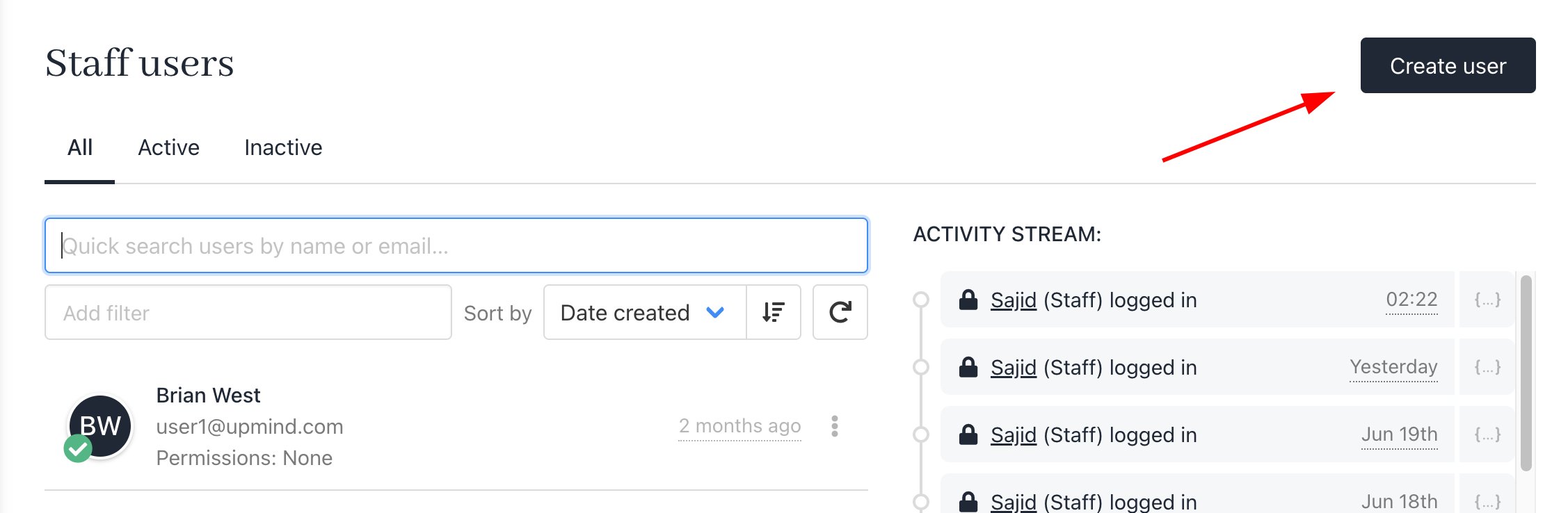
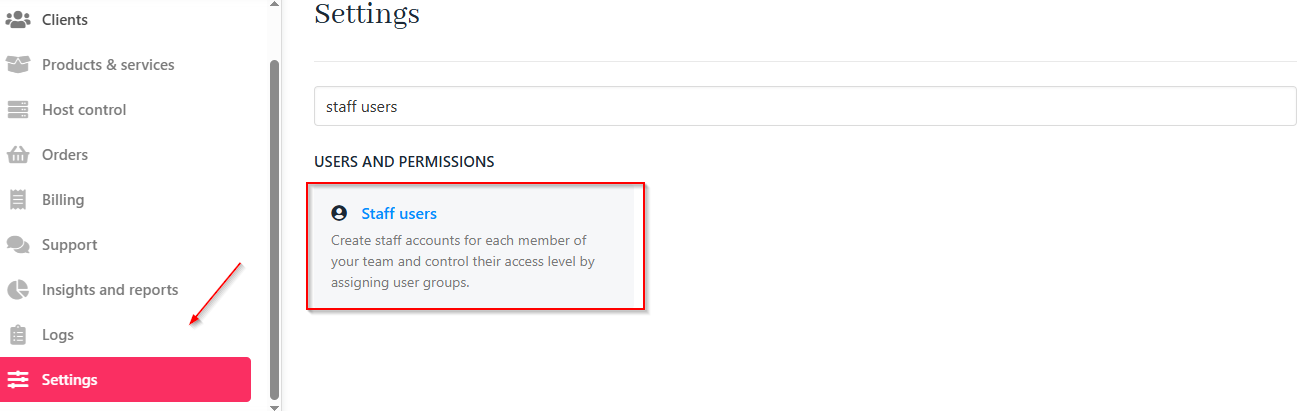
1. As an admin, you can add a staff user under **Settings** > **Staff Users**.
<Frame caption="Settings > Staff users">
  <img src="https://mintcdn.com/upmind/uxzVUXAKtJ2bRWCI/images/fb/6aa6fc6e4dd800e8.png?fit=max&auto=format&n=uxzVUXAKtJ2bRWCI&q=85&s=250034fecc1924b5b054668dc1df0937" alt="Settings > Staff users" className="mx-auto" style={{ width:"99%" }} data-og-width="1315" width="1315" data-og-height="411" height="411" data-path="images/fb/6aa6fc6e4dd800e8.png" data-optimize="true" data-opv="3" srcset="https://mintcdn.com/upmind/uxzVUXAKtJ2bRWCI/images/fb/6aa6fc6e4dd800e8.png?w=280&fit=max&auto=format&n=uxzVUXAKtJ2bRWCI&q=85&s=d196dd0336f2680e984e82681f71daa2 280w, https://mintcdn.com/upmind/uxzVUXAKtJ2bRWCI/images/fb/6aa6fc6e4dd800e8.png?w=560&fit=max&auto=format&n=uxzVUXAKtJ2bRWCI&q=85&s=fd34326cf87abf3d677a75a344ef2a67 560w, https://mintcdn.com/upmind/uxzVUXAKtJ2bRWCI/images/fb/6aa6fc6e4dd800e8.png?w=840&fit=max&auto=format&n=uxzVUXAKtJ2bRWCI&q=85&s=fcb9e7e5919f57087bd457043af22e01 840w, https://mintcdn.com/upmind/uxzVUXAKtJ2bRWCI/images/fb/6aa6fc6e4dd800e8.png?w=1100&fit=max&auto=format&n=uxzVUXAKtJ2bRWCI&q=85&s=afef5381252e67bfe55b696a139df5a9 1100w, https://mintcdn.com/upmind/uxzVUXAKtJ2bRWCI/images/fb/6aa6fc6e4dd800e8.png?w=1650&fit=max&auto=format&n=uxzVUXAKtJ2bRWCI&q=85&s=94063335a113c4cbd629b679d445454a 1650w, https://mintcdn.com/upmind/uxzVUXAKtJ2bRWCI/images/fb/6aa6fc6e4dd800e8.png?w=2500&fit=max&auto=format&n=uxzVUXAKtJ2bRWCI&q=85&s=1b1e435b56ed387bfb89559aa856060a 2500w" />

  <img src="https://mintcdn.com/upmind/uxzVUXAKtJ2bRWCI/images/fb/6aa6fc6e4dd800e8.png?fit=max&auto=format&n=uxzVUXAKtJ2bRWCI&q=85&s=250034fecc1924b5b054668dc1df0937" alt="Settings > Staff users" className="mx-auto" style={{ width:"99%" }} data-og-width="1315" width="1315" data-og-height="411" height="411" data-path="images/fb/6aa6fc6e4dd800e8.png" data-optimize="true" data-opv="3" srcset="https://mintcdn.com/upmind/uxzVUXAKtJ2bRWCI/images/fb/6aa6fc6e4dd800e8.png?w=280&fit=max&auto=format&n=uxzVUXAKtJ2bRWCI&q=85&s=d196dd0336f2680e984e82681f71daa2 280w, https://mintcdn.com/upmind/uxzVUXAKtJ2bRWCI/images/fb/6aa6fc6e4dd800e8.png?w=560&fit=max&auto=format&n=uxzVUXAKtJ2bRWCI&q=85&s=fd34326cf87abf3d677a75a344ef2a67 560w, https://mintcdn.com/upmind/uxzVUXAKtJ2bRWCI/images/fb/6aa6fc6e4dd800e8.png?w=840&fit=max&auto=format&n=uxzVUXAKtJ2bRWCI&q=85&s=fcb9e7e5919f57087bd457043af22e01 840w, https://mintcdn.com/upmind/uxzVUXAKtJ2bRWCI/images/fb/6aa6fc6e4dd800e8.png?w=1100&fit=max&auto=format&n=uxzVUXAKtJ2bRWCI&q=85&s=afef5381252e67bfe55b696a139df5a9 1100w, https://mintcdn.com/upmind/uxzVUXAKtJ2bRWCI/images/fb/6aa6fc6e4dd800e8.png?w=1650&fit=max&auto=format&n=uxzVUXAKtJ2bRWCI&q=85&s=94063335a113c4cbd629b679d445454a 1650w, https://mintcdn.com/upmind/uxzVUXAKtJ2bRWCI/images/fb/6aa6fc6e4dd800e8.png?w=2500&fit=max&auto=format&n=uxzVUXAKtJ2bRWCI&q=85&s=1b1e435b56ed387bfb89559aa856060a 2500w" />
</Frame>

2. Click **Create user**.

<Frame caption="Create user">
  <img src="https://mintcdn.com/upmind/2ooSxDpt6PiIGMr-/images/fb/04fa1e73769903a5.png?fit=max&auto=format&n=2ooSxDpt6PiIGMr-&q=85&s=1c7c62c51ead86d7eb3750bbedd80f2b" alt="Create user" className="mx-auto" style={{ width:"99%" }} width="2254" height="738" data-path="images/fb/04fa1e73769903a5.png" />

  <img src="https://mintcdn.com/upmind/2ooSxDpt6PiIGMr-/images/fb/04fa1e73769903a5.png?fit=max&auto=format&n=2ooSxDpt6PiIGMr-&q=85&s=1c7c62c51ead86d7eb3750bbedd80f2b" alt="Create user" className="mx-auto" style={{ width:"99%" }} width="2254" height="738" data-path="images/fb/04fa1e73769903a5.png" />
</Frame>

3. Secure with whitelist IPs.

<Frame caption="Secure with whitelist IPs for staff">
  <img src="https://mintcdn.com/upmind/wRuKrNY12tQZY8Rr/images/fb/328862ead4d5af7e.png?fit=max&auto=format&n=wRuKrNY12tQZY8Rr&q=85&s=0294645582f46e57791f8d40027ae806" alt="Secure with whitelist IPs for staff" className="mx-auto" style={{ width:"98%" }} width="777" height="510" data-path="images/fb/328862ead4d5af7e.png" />

  <img src="https://mintcdn.com/upmind/wRuKrNY12tQZY8Rr/images/fb/328862ead4d5af7e.png?fit=max&auto=format&n=wRuKrNY12tQZY8Rr&q=85&s=0294645582f46e57791f8d40027ae806" alt="Secure with whitelist IPs for staff" className="mx-auto" style={{ width:"98%" }} width="777" height="510" data-path="images/fb/328862ead4d5af7e.png" />
</Frame>

For more on IP whitelisting, [<u>watch this video</u>](https://www.youtube.com/watch?v=DAJCb0Ap0B8\&ab_channel=Upmind).

For clients, you can restrict access by IP under `Security`. For more information, follow [<u>this guide</u>](/client-self-service/client-area/how-do-my-clients-change-account-settings).

### **How to find out my IP address**

Visit [<u>https://ip.me.uk</u>](https://ip.me.uk) to check your current IP.

## **Extra client functionalities**

You can enable or disable the secure vault for notes and secrets at the client, lead, and contract product levels. Both staff and clients can access the vault, with all actions logged for security.

<Frame caption="Enable/disable client/brand notes and vault">
  <img src="https://mintcdn.com/upmind/Lh8hC132BWHpvRbz/images/fb/4d00d14a14a04f7a.png?fit=max&auto=format&n=Lh8hC132BWHpvRbz&q=85&s=486b89e34dd69f2d784f4fd957abfaec" alt="Enable/disable client/brand notes and vault" className="mx-auto" style={{ width:"99%" }} width="992" height="143" data-path="images/fb/4d00d14a14a04f7a.png" />

  <img src="https://mintcdn.com/upmind/Lh8hC132BWHpvRbz/images/fb/4d00d14a14a04f7a.png?fit=max&auto=format&n=Lh8hC132BWHpvRbz&q=85&s=486b89e34dd69f2d784f4fd957abfaec" alt="Enable/disable client/brand notes and vault" className="mx-auto" style={{ width:"99%" }} width="992" height="143" data-path="images/fb/4d00d14a14a04f7a.png" />
</Frame>

## **How to manage login attempts**

The section **Passwords & Login** allows you to configure login security and attempts.

| **Field Name**                                      | **Description**                                                                            |
| --------------------------------------------------- | ------------------------------------------------------------------------------------------ |
| Allow client login by any email address             | If enabled, clients can log in using any email address in their account settings.          |
| Allow client login by any active service identifier | If enabled, clients can log in using any active service identifier, such as a domain name. |
| Max failed attempts                                 | Control the number of failed login attempts before lockout.                                |
| Max failed 2FA attempts                             | Set maximum failed attempts for passwords and 2FA.                                         |
| Lockout minutes                                     | Define lockout duration in minutes.                                                        |

## **How to reset a password as staff/admin**

If you want to **change your password**:

1. Go to **My Account** > **Security**.
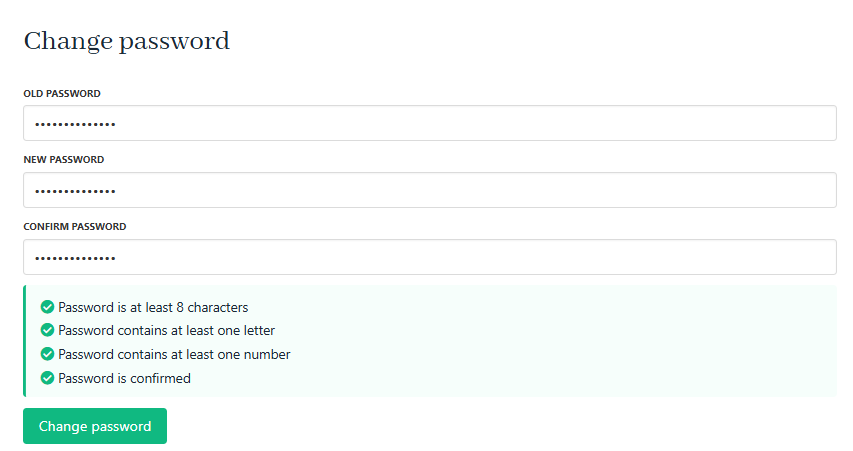
2. Enter your current and new password (minimum 8 characters, at least one letter and one number).
3. Save changes.
<Frame caption="Reset password">
  <img src="https://mintcdn.com/upmind/Dgjmf3QWYVBR40cE/images/fb/62b483ac1c2c16df.png?fit=max&auto=format&n=Dgjmf3QWYVBR40cE&q=85&s=5b36aeecae438839d2469deea6ff4ca6" alt="Reset password" className="mx-auto" style={{ width:"99%" }} width="853" height="451" data-path="images/fb/62b483ac1c2c16df.png" />

  <img src="https://mintcdn.com/upmind/Dgjmf3QWYVBR40cE/images/fb/62b483ac1c2c16df.png?fit=max&auto=format&n=Dgjmf3QWYVBR40cE&q=85&s=5b36aeecae438839d2469deea6ff4ca6" alt="Reset password" className="mx-auto" style={{ width:"99%" }} width="853" height="451" data-path="images/fb/62b483ac1c2c16df.png" />
</Frame>

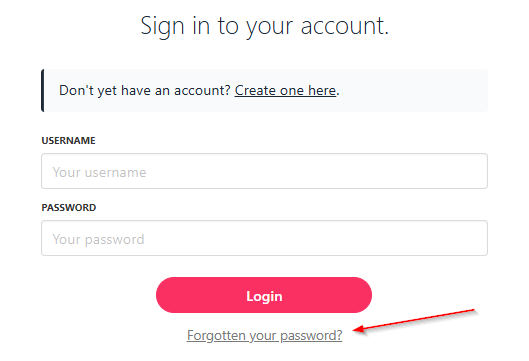
If you **forgot your password** and can’t log in to Upmind, you can request a password reset on the login page:

1. On the login page, click **Forgot your password?**
2. Enter your email/username and request a reset link.
3. Follow the email instructions to set a new password.
<Frame caption="Forgotten password">
  <img src="https://mintcdn.com/upmind/6knUVC8F1nK4E5CY/images/fb/c276f75b03350b6d.png?fit=max&auto=format&n=6knUVC8F1nK4E5CY&q=85&s=a385a9613a83677a5c83e9ae512c0e6a" alt="Forgotten password" className="mx-auto" style={{ width:"99%" }} width="529" height="361" data-path="images/fb/c276f75b03350b6d.png" />

  <img src="https://mintcdn.com/upmind/6knUVC8F1nK4E5CY/images/fb/c276f75b03350b6d.png?fit=max&auto=format&n=6knUVC8F1nK4E5CY&q=85&s=a385a9613a83677a5c83e9ae512c0e6a" alt="Forgotten password" className="mx-auto" style={{ width:"99%" }} width="529" height="361" data-path="images/fb/c276f75b03350b6d.png" />
</Frame>

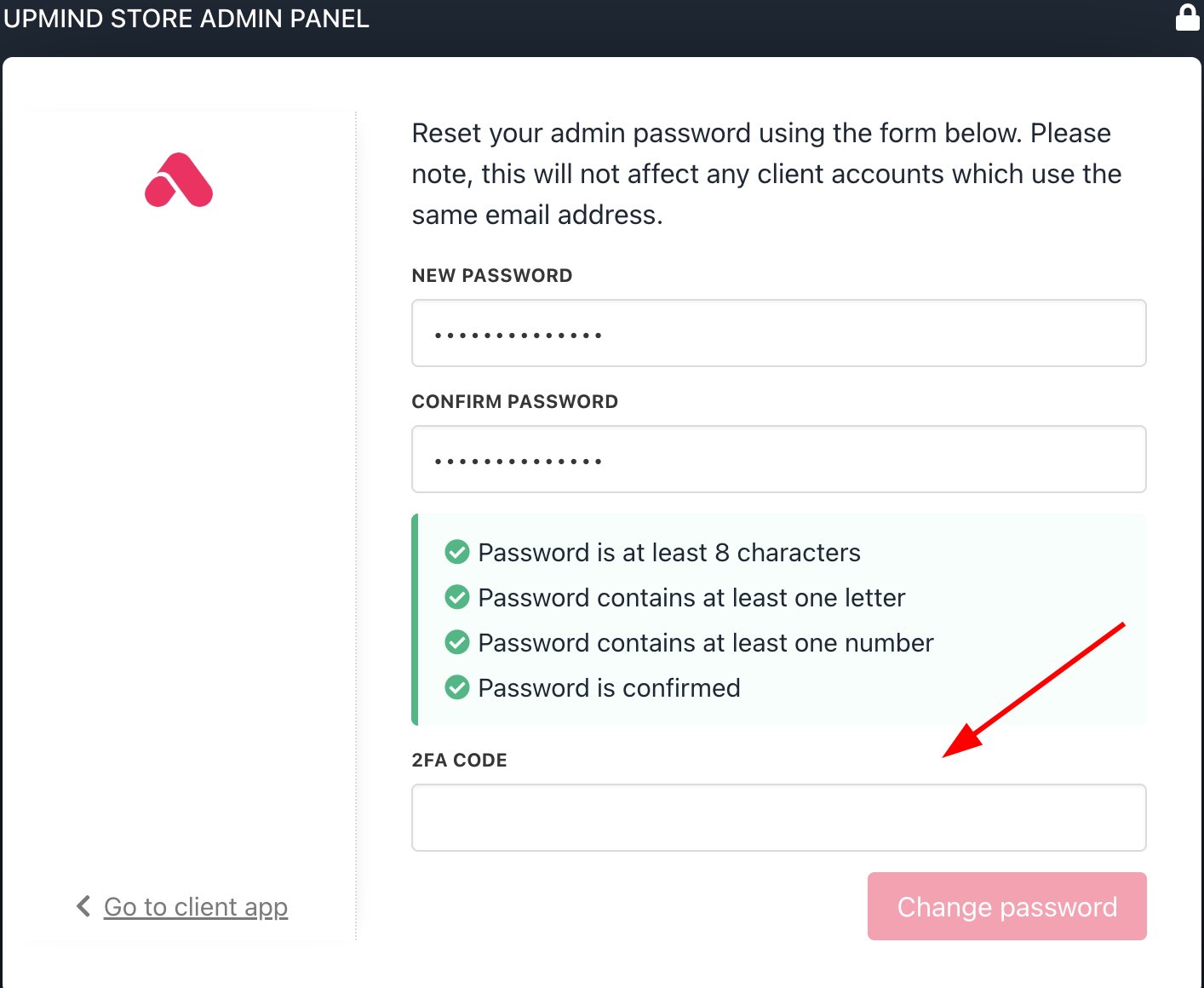
If 2FA is enabled, you will need to provide the code when resetting your password.
<Frame caption="2FA code required">
  <img src="https://mintcdn.com/upmind/ObllJJl59DabnmMn/images/fb/cbd7b1bf326de148.png?fit=max&auto=format&n=ObllJJl59DabnmMn&q=85&s=733cd3b3938d18e9bf891d0e4719be16" alt="2FA code required" className="mx-auto" style={{ width:"96%" }} width="1414" height="1160" data-path="images/fb/cbd7b1bf326de148.png" />

  <img src="https://mintcdn.com/upmind/ObllJJl59DabnmMn/images/fb/cbd7b1bf326de148.png?fit=max&auto=format&n=ObllJJl59DabnmMn&q=85&s=733cd3b3938d18e9bf891d0e4719be16" alt="2FA code required" className="mx-auto" style={{ width:"96%" }} width="1414" height="1160" data-path="images/fb/cbd7b1bf326de148.png" />
</Frame>

## **Secure link sharing**

You can manage shared resource links. Set default expiration (in days) for shared links to protect sensitive resources.

<Frame caption="Secure links">
  <img src="https://mintcdn.com/upmind/wRuKrNY12tQZY8Rr/images/fb/341231f69f1cbb50.png?fit=max&auto=format&n=wRuKrNY12tQZY8Rr&q=85&s=9e4c58d9a0858a3cad9293f473735389" alt="Secure links" className="mx-auto" style={{ width:"99%" }} width="1040" height="121" data-path="images/fb/341231f69f1cbb50.png" />

  <img src="https://mintcdn.com/upmind/wRuKrNY12tQZY8Rr/images/fb/341231f69f1cbb50.png?fit=max&auto=format&n=wRuKrNY12tQZY8Rr&q=85&s=9e4c58d9a0858a3cad9293f473735389" alt="Secure links" className="mx-auto" style={{ width:"99%" }} width="1040" height="121" data-path="images/fb/341231f69f1cbb50.png" />
</Frame>

## **How to manage upload file types**

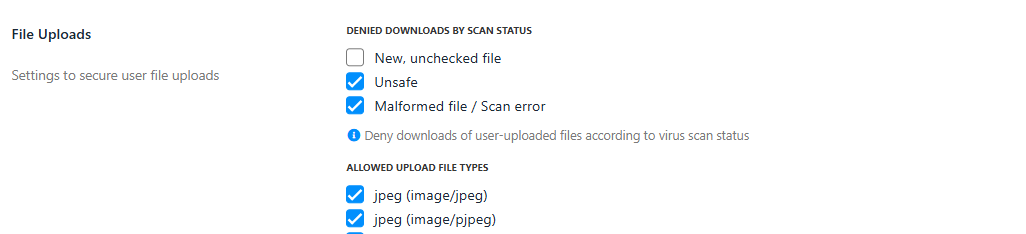
This relates to support tickets and allowed file types for attachments. Although all attachments are virus-scanned and flagged if issues arise, it’s best to restrict attachment types to those you expect to receive.

1. Go to **Settings** > **File Uploads**.
2. Select which file types are permitted for uploads in the client area (enable **Denied Download by Scan Status** by ticking the boxes).
3. All uploads are virus scanned, and suspicious files are flagged.
<Frame caption="Select file upload types">
  <img src="https://mintcdn.com/upmind/uxzVUXAKtJ2bRWCI/images/fb/6c2809f613f273de.png?fit=max&auto=format&n=uxzVUXAKtJ2bRWCI&q=85&s=671d3a71a70f074c504a4bc7e9a6fb9a" alt="Select file upload types" className="mx-auto" style={{ width:"98%" }} width="1026" height="234" data-path="images/fb/6c2809f613f273de.png" />

  <img src="https://mintcdn.com/upmind/uxzVUXAKtJ2bRWCI/images/fb/6c2809f613f273de.png?fit=max&auto=format&n=uxzVUXAKtJ2bRWCI&q=85&s=671d3a71a70f074c504a4bc7e9a6fb9a" alt="Select file upload types" className="mx-auto" style={{ width:"98%" }} width="1026" height="234" data-path="images/fb/6c2809f613f273de.png" />
</Frame>

## **General security settings**

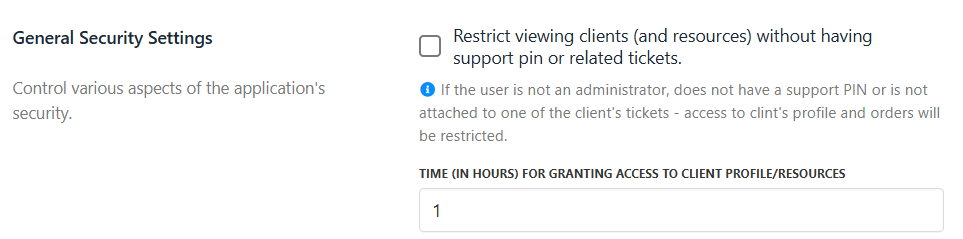
You can control various access restrictions:

* Limit viewing of client profiles and resources to users with a valid support PIN or linked tickets (non-admins only).
* Set the duration (in hours) for which access is granted after PIN entry or ticket assignment.
<Frame caption="Control application security">
  <img src="https://mintcdn.com/upmind/2ooSxDpt6PiIGMr-/images/fb/00f5b5cab779cf72.png?fit=max&auto=format&n=2ooSxDpt6PiIGMr-&q=85&s=227cac4caa9e8c61c16357c71400af79" alt="Control application security" className="mx-auto" style={{ width:"97%" }} width="963" height="239" data-path="images/fb/00f5b5cab779cf72.png" />

  <img src="https://mintcdn.com/upmind/2ooSxDpt6PiIGMr-/images/fb/00f5b5cab779cf72.png?fit=max&auto=format&n=2ooSxDpt6PiIGMr-&q=85&s=227cac4caa9e8c61c16357c71400af79" alt="Control application security" className="mx-auto" style={{ width:"97%" }} width="963" height="239" data-path="images/fb/00f5b5cab779cf72.png" />
</Frame>