> ## Documentation Index
> Fetch the complete documentation index at: https://docs.upmind.com/llms.txt
> Use this file to discover all available pages before exploring further.

# Integrating Ranking Coach to Upmind

> Connect Ranking Coach with Upmind

[<u>Ranking Coach</u>](https://www.rankingcoach.com/en-us) offers automated SEO services with rank tracking, keyword optimisation, and reporting tools, accessible through the API for reseller automation.

## How to link Ranking Coach to Upmind

1. From the Upmind dashboard, go to **Settings** > **Provision Configurations** > **Add New Configuration**.
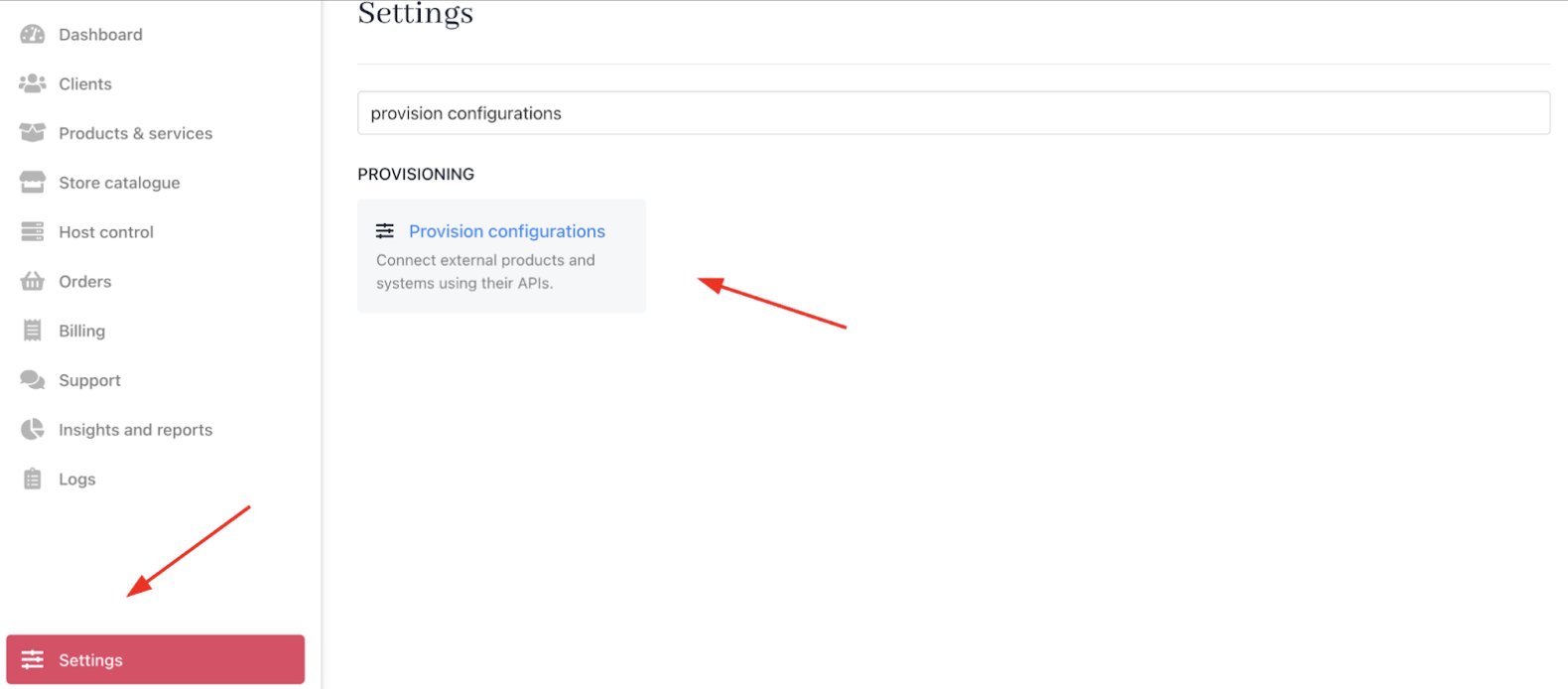
<Frame caption="Settings > Provisioning > Provision Configurations">
  <img src="https://mintcdn.com/upmind/ZsIo0APxdVb_gFS-/images/fb/24f6684f35e81453.png?fit=max&auto=format&n=ZsIo0APxdVb_gFS-&q=85&s=e680f4651262371186b8550b0204f214" alt="Settings > Provisioning > Provision Configurations" data-og-width="1580" width="1580" data-og-height="694" height="694" data-path="images/fb/24f6684f35e81453.png" data-optimize="true" data-opv="3" srcset="https://mintcdn.com/upmind/ZsIo0APxdVb_gFS-/images/fb/24f6684f35e81453.png?w=280&fit=max&auto=format&n=ZsIo0APxdVb_gFS-&q=85&s=7c974c98a58d69a158af01185d615520 280w, https://mintcdn.com/upmind/ZsIo0APxdVb_gFS-/images/fb/24f6684f35e81453.png?w=560&fit=max&auto=format&n=ZsIo0APxdVb_gFS-&q=85&s=b3aaa21e6f55389f39da50c336501aed 560w, https://mintcdn.com/upmind/ZsIo0APxdVb_gFS-/images/fb/24f6684f35e81453.png?w=840&fit=max&auto=format&n=ZsIo0APxdVb_gFS-&q=85&s=35e4a726bfcf8fd9ae549b9ff1eb48be 840w, https://mintcdn.com/upmind/ZsIo0APxdVb_gFS-/images/fb/24f6684f35e81453.png?w=1100&fit=max&auto=format&n=ZsIo0APxdVb_gFS-&q=85&s=9b2f6167a129b11362baeeb8819d3770 1100w, https://mintcdn.com/upmind/ZsIo0APxdVb_gFS-/images/fb/24f6684f35e81453.png?w=1650&fit=max&auto=format&n=ZsIo0APxdVb_gFS-&q=85&s=c928ad610f52bc5ec278adab419e2c53 1650w, https://mintcdn.com/upmind/ZsIo0APxdVb_gFS-/images/fb/24f6684f35e81453.png?w=2500&fit=max&auto=format&n=ZsIo0APxdVb_gFS-&q=85&s=068e6f99b16d1894f152308e8f8b90c1 2500w" />
</Frame>

2. Choose **SEO** from the service type dropdown.

3. Select **Ranking Coach** from the available providers list.
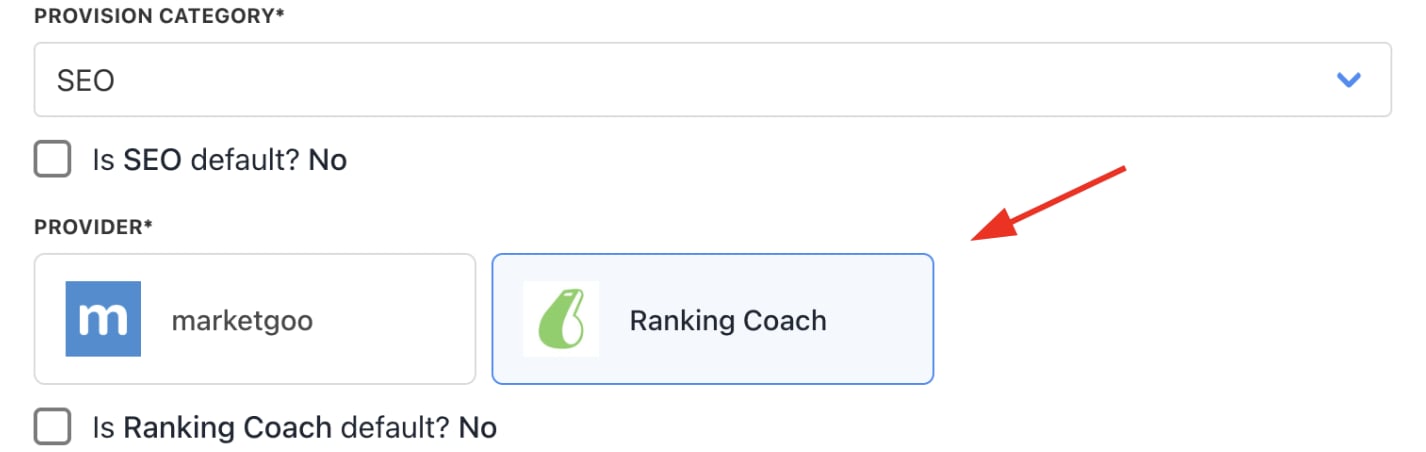
<Frame caption="Choose Ranking Coach">
  <img src="https://mintcdn.com/upmind/z5ofg3t7by4uN44v/images/fb/e8eccfe798a0041a.png?fit=max&auto=format&n=z5ofg3t7by4uN44v&q=85&s=98b13d678a118fbb9d60d2b397e13e4f" alt="Choose Ranking Coach" width="1426" height="452" data-path="images/fb/e8eccfe798a0041a.png" />
</Frame>

4. Input your **Ranking Coach** **username** and **password**.
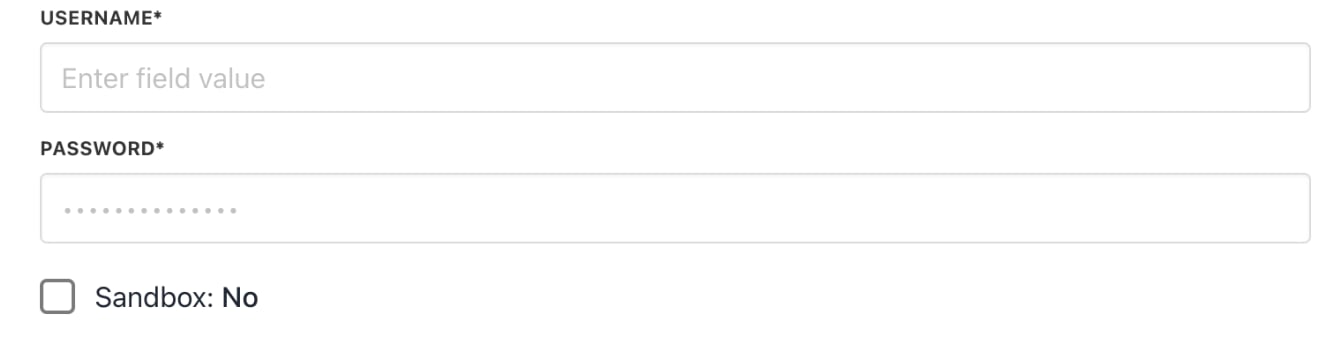
<Frame caption="Enter credentials">
  <img src="https://mintcdn.com/upmind/92wYnpdR_k6AjH3x/images/fb/58a19fbf2d961fa8.png?fit=max&auto=format&n=92wYnpdR_k6AjH3x&q=85&s=fe92ace2b97038bd65755502bea5ae6e" alt="Enter credentials" width="1328" height="340" data-path="images/fb/58a19fbf2d961fa8.png" />
</Frame>

5. Click **Create** to complete the setup.
