> ## Documentation Index
> Fetch the complete documentation index at: https://docs.upmind.com/llms.txt
> Use this file to discover all available pages before exploring further.

# How to Sell Webuzo Hosting

> Configure and sell Webuzo hosting products with Upmind.

[Webuzo](https://webuzo.com/) is a multi-user control panel that simplifies server management for cloud and dedicated servers.

## Getting Webuzo credentials

1. To generate an API Key, go to **Settings** > **API Keys**.

2. Click **Add New**.
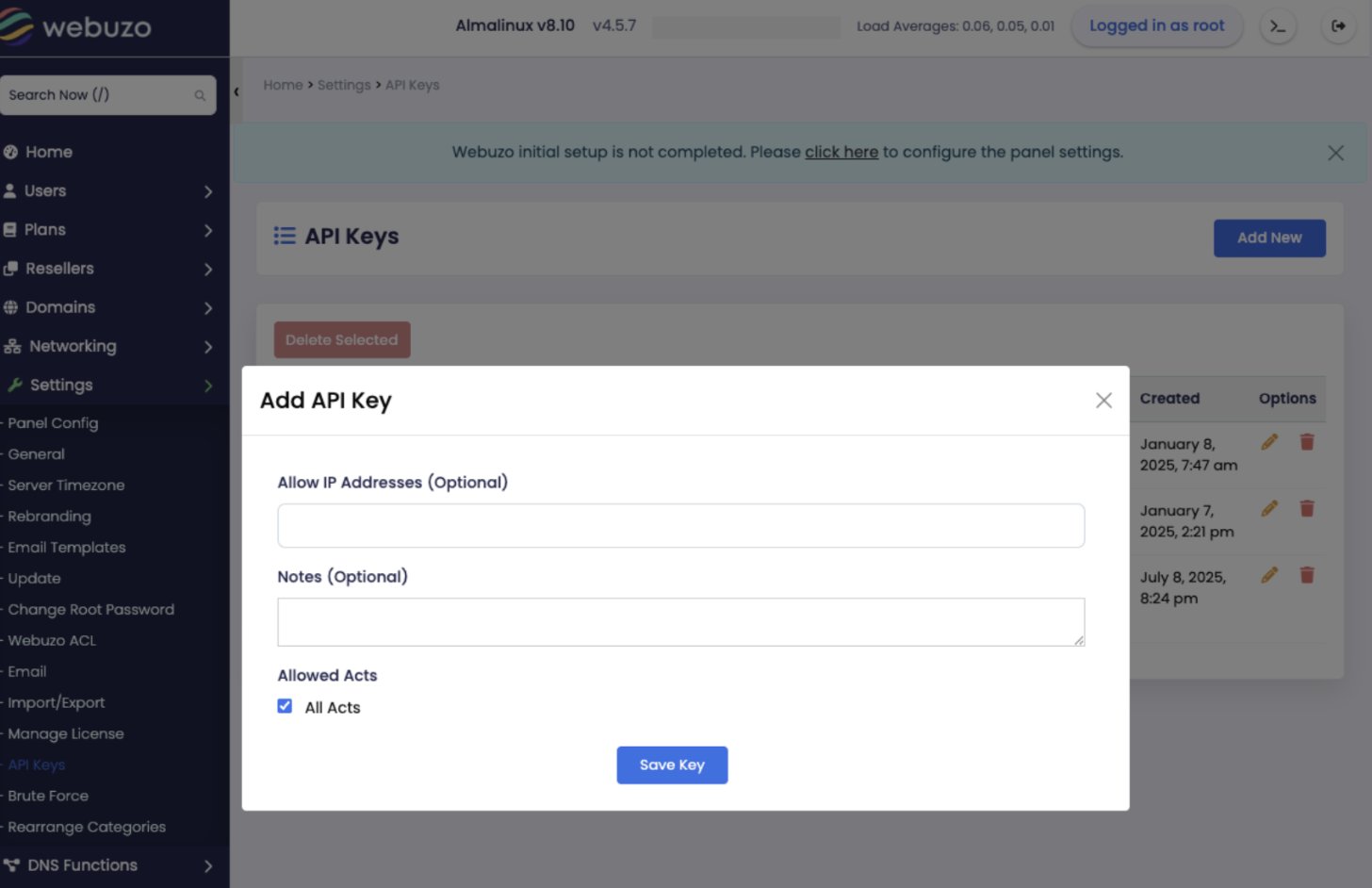
<Frame caption="Add API key">
  <img src="https://mintcdn.com/upmind/FQ1NhxALxjSHvvWW/images/fb/ad0ba1d5eff72c3f.png?fit=max&auto=format&n=FQ1NhxALxjSHvvWW&q=85&s=9a8029afd30e53aa996f5521a7e26a57" alt="Add API key" width="1456" height="942" data-path="images/fb/ad0ba1d5eff72c3f.png" />
</Frame>

## Configuring Webuzo provisioning in Upmind

1. In Upmind, go to **Settings** > **Provision Configurations**.
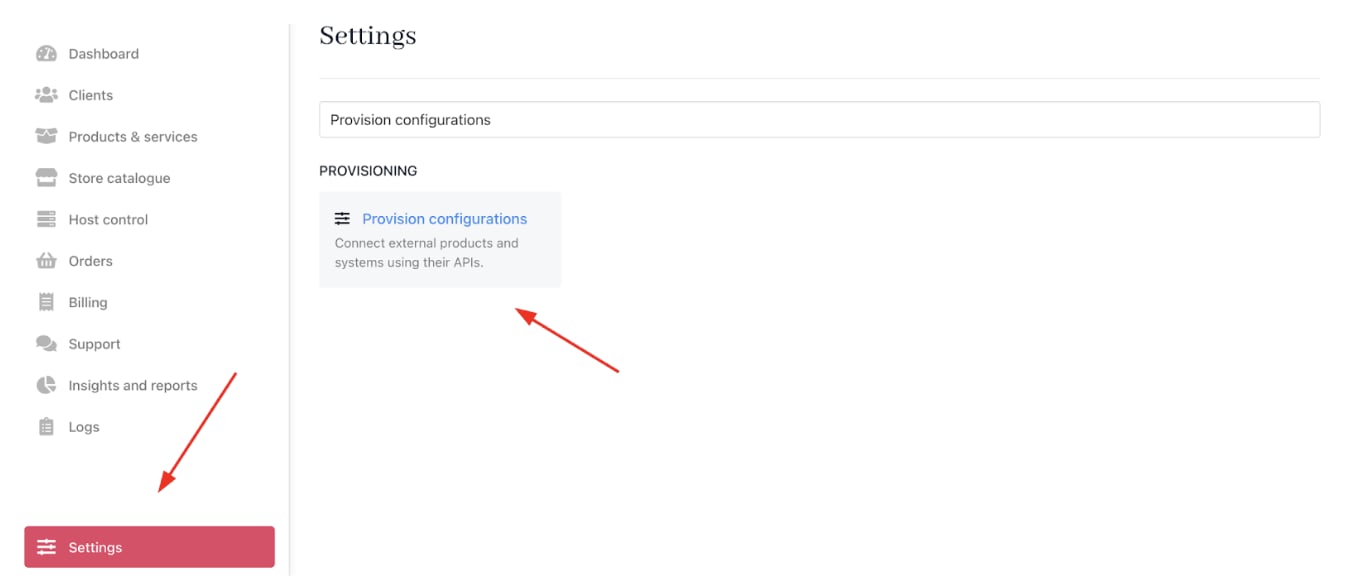
<Frame caption="Settings > Provision configurations">
  <img src="https://mintcdn.com/upmind/Dgjmf3QWYVBR40cE/images/fb/64407b6cd445285e.png?fit=max&auto=format&n=Dgjmf3QWYVBR40cE&q=85&s=ed2c927ea897e80a30320550e8d392b0" alt="Settings > Provision configurations" data-og-width="1354" width="1354" data-og-height="586" height="586" data-path="images/fb/64407b6cd445285e.png" data-optimize="true" data-opv="3" srcset="https://mintcdn.com/upmind/Dgjmf3QWYVBR40cE/images/fb/64407b6cd445285e.png?w=280&fit=max&auto=format&n=Dgjmf3QWYVBR40cE&q=85&s=eb6de7136bd2ea59bac69764c92ff5a7 280w, https://mintcdn.com/upmind/Dgjmf3QWYVBR40cE/images/fb/64407b6cd445285e.png?w=560&fit=max&auto=format&n=Dgjmf3QWYVBR40cE&q=85&s=0d64ef1535d9caeca0261de4472db175 560w, https://mintcdn.com/upmind/Dgjmf3QWYVBR40cE/images/fb/64407b6cd445285e.png?w=840&fit=max&auto=format&n=Dgjmf3QWYVBR40cE&q=85&s=bac9fc0c611a3c9654b46143fd98955e 840w, https://mintcdn.com/upmind/Dgjmf3QWYVBR40cE/images/fb/64407b6cd445285e.png?w=1100&fit=max&auto=format&n=Dgjmf3QWYVBR40cE&q=85&s=2b7482c55aad186023b7ef34ae870962 1100w, https://mintcdn.com/upmind/Dgjmf3QWYVBR40cE/images/fb/64407b6cd445285e.png?w=1650&fit=max&auto=format&n=Dgjmf3QWYVBR40cE&q=85&s=eeedb94a14f5dc5b4390a3f738683d6a 1650w, https://mintcdn.com/upmind/Dgjmf3QWYVBR40cE/images/fb/64407b6cd445285e.png?w=2500&fit=max&auto=format&n=Dgjmf3QWYVBR40cE&q=85&s=2d142ea87206fc1bcd12f910be1f71dd 2500w" />
</Frame>

2. Click on **Add New Configuration**.

<Frame caption="Add new configuration">
  <img src="https://mintcdn.com/upmind/1-uICsJi9zYpvJVH/images/fb/883adb80fd27f3fd.png?fit=max&auto=format&n=1-uICsJi9zYpvJVH&q=85&s=8a263f19ec3b18c54467863a9dc5024f" alt="Add new configuration" width="1468" height="212" data-path="images/fb/883adb80fd27f3fd.png" />
</Frame>

3. Provide a **Name** (e.g., Webuzo Hosting Provision).

4. Select **Web Hosting** as the product type.

5. Choose **Webuzo** as the provisioning provider.
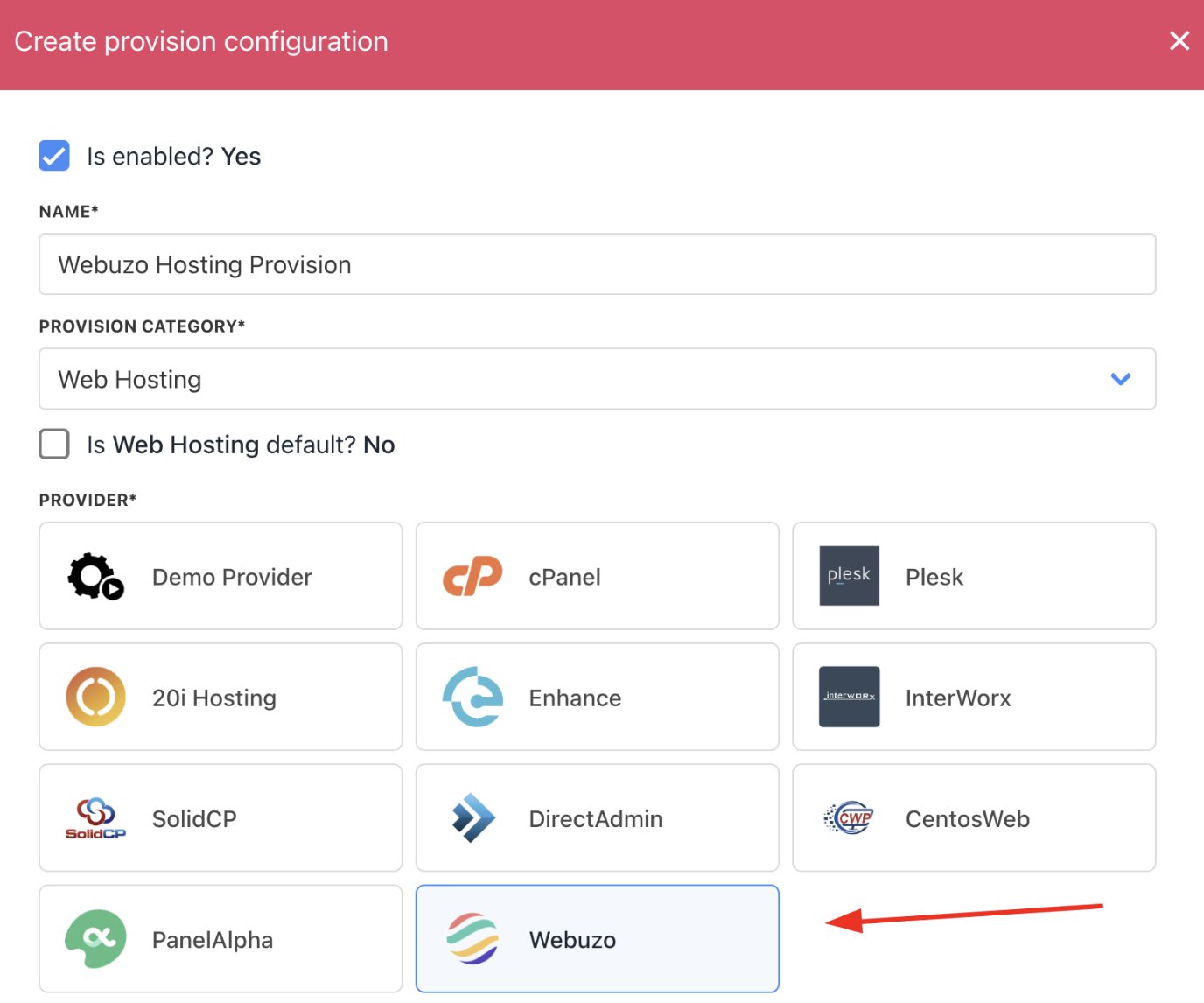
<Frame caption="Choose Webuzo">
  <img src="https://mintcdn.com/upmind/FQ1NhxALxjSHvvWW/images/fb/b058911c3a014925.png?fit=max&auto=format&n=FQ1NhxALxjSHvvWW&q=85&s=7a1ac8fb5256117ec2342902216a5703" alt="Choose Webuzo" width="1376" height="1146" data-path="images/fb/b058911c3a014925.png" />
</Frame>

6. Complete the following details:

* Choose the **Authentication type**.

* Your server’s **Hostname** and **Username**.

* Paste the **API Key** obtained from **Webuzo** and the **Password**.

* Fill in any **Configuration Attributes**, such as **location** and **hosting provider**.

* Set whether to accept new accounts.

7. Click **Create**.
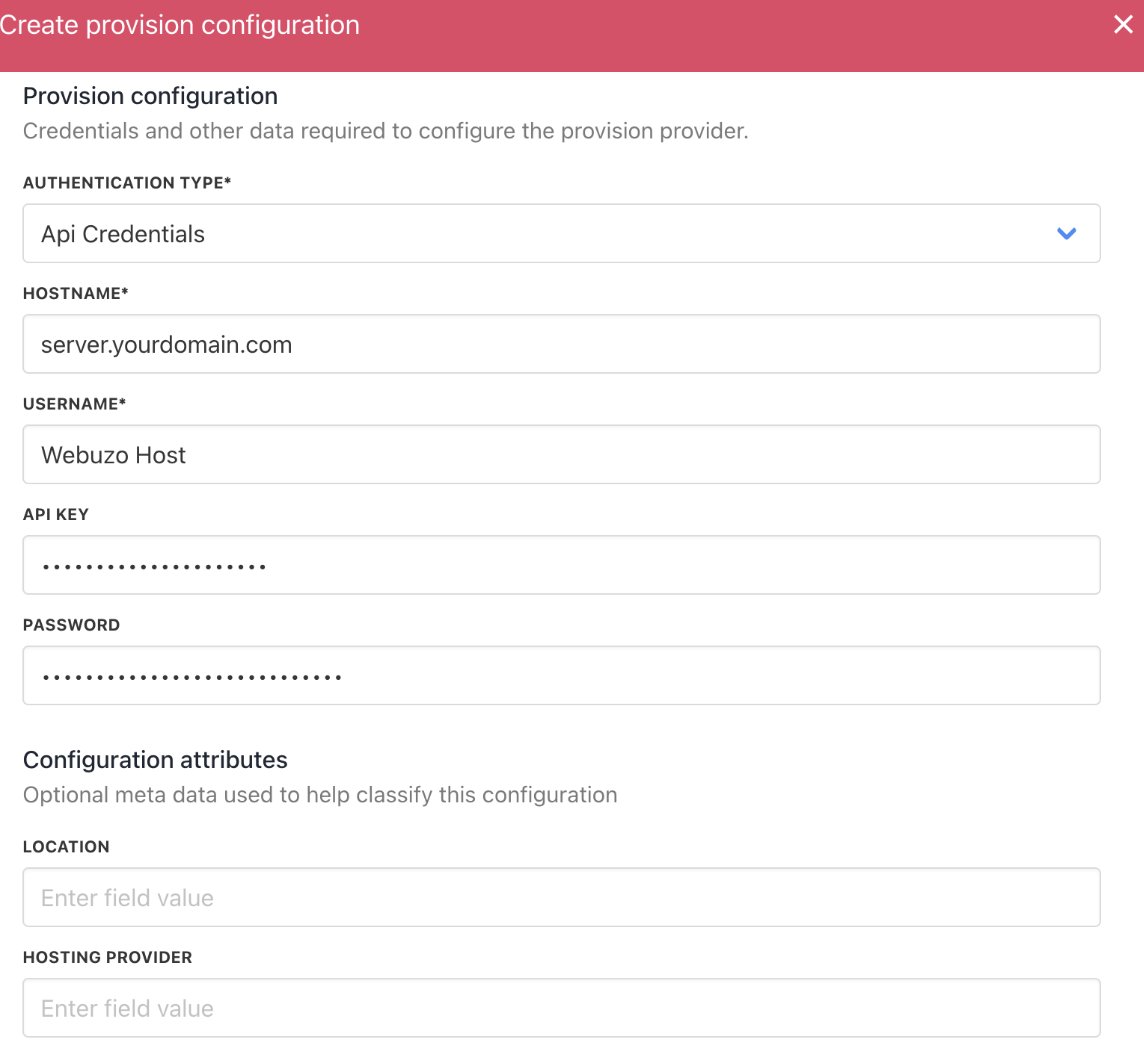
<Frame caption="Enter provision configurations">
  <img src="https://mintcdn.com/upmind/FQ1NhxALxjSHvvWW/images/fb/b395940bd477d1b5.png?fit=max&auto=format&n=FQ1NhxALxjSHvvWW&q=85&s=388d6483916fed08972c4aceb77dbcba" alt="Enter provision configurations" width="1144" height="1052" data-path="images/fb/b395940bd477d1b5.png" />
</Frame>

## Setting up Webuzo products

When you create hosting packages in Upmind, you can now choose Webuzo as a provision provider. You will be asked for the Package Identifier.

It's recommended to use the Webuzo package name (case sensitive).

1. Log in to the `Webuzo` admin dashboard.

2. Navigate to **Plans** > **List Plans**.

3. Copy the **Package Identifier** underneath the package name.

4. In Upmind, when creating a product, use this **Package Identifier** in the provisioning settings to match the `Webuzo package`.
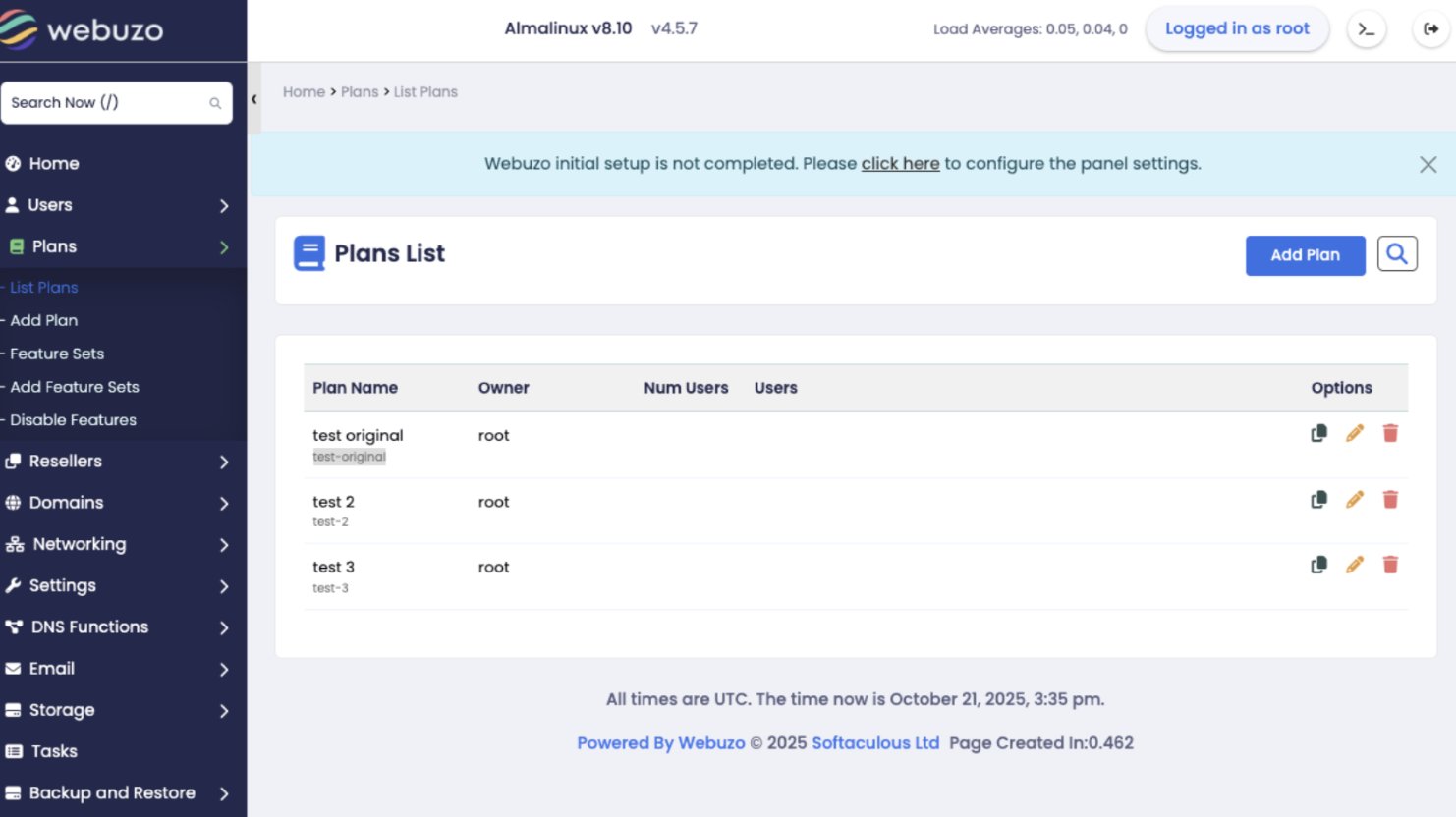
<Frame caption="Plans > List plans">
  <img src="https://mintcdn.com/upmind/5gi4DQpw4X76kT6T/images/fb/b78d8756acd9632f.png?fit=max&auto=format&n=5gi4DQpw4X76kT6T&q=85&s=4b9ee6b3219959253c3cae00b0ba5f7d" alt="Plans > List plans" data-og-width="1482" width="1482" data-og-height="832" height="832" data-path="images/fb/b78d8756acd9632f.png" data-optimize="true" data-opv="3" srcset="https://mintcdn.com/upmind/5gi4DQpw4X76kT6T/images/fb/b78d8756acd9632f.png?w=280&fit=max&auto=format&n=5gi4DQpw4X76kT6T&q=85&s=3510a8fcfc86d5cd518c89f9d2c17094 280w, https://mintcdn.com/upmind/5gi4DQpw4X76kT6T/images/fb/b78d8756acd9632f.png?w=560&fit=max&auto=format&n=5gi4DQpw4X76kT6T&q=85&s=451f692cb3c4f9e897cba93691b78958 560w, https://mintcdn.com/upmind/5gi4DQpw4X76kT6T/images/fb/b78d8756acd9632f.png?w=840&fit=max&auto=format&n=5gi4DQpw4X76kT6T&q=85&s=8f08590056629b7c27c456fb6eca8e2e 840w, https://mintcdn.com/upmind/5gi4DQpw4X76kT6T/images/fb/b78d8756acd9632f.png?w=1100&fit=max&auto=format&n=5gi4DQpw4X76kT6T&q=85&s=0e3e9b52aaaf603bb1e9d7e8bbf03e49 1100w, https://mintcdn.com/upmind/5gi4DQpw4X76kT6T/images/fb/b78d8756acd9632f.png?w=1650&fit=max&auto=format&n=5gi4DQpw4X76kT6T&q=85&s=93ff740aa2b2c6e667c718f9610f2382 1650w, https://mintcdn.com/upmind/5gi4DQpw4X76kT6T/images/fb/b78d8756acd9632f.png?w=2500&fit=max&auto=format&n=5gi4DQpw4X76kT6T&q=85&s=dcbc529702053c401d0ba7d25e939618 2500w" />
</Frame>

## Creating Webuzo hosting products in Upmind

1. Go to **Host Control** > **Web Hosting** in Upmind.
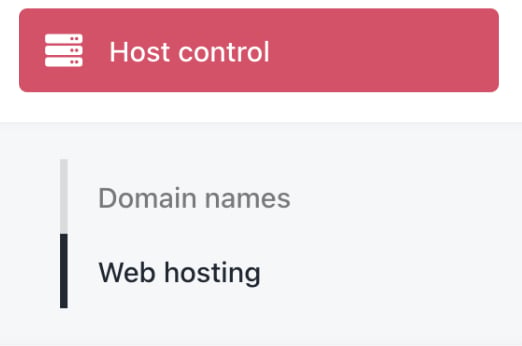
<Frame caption="Host control > Web hosting">
  <img src="https://mintcdn.com/upmind/h8h5zREaX7k8Y-3x/images/fb/0fb6c34c1a31ce22.png?fit=max&auto=format&n=h8h5zREaX7k8Y-3x&q=85&s=bfa2bfcca6a32e3a22cd11ba135dc626" alt="Host control > Web hosting" data-og-width="522" width="522" data-og-height="346" height="346" data-path="images/fb/0fb6c34c1a31ce22.png" data-optimize="true" data-opv="3" srcset="https://mintcdn.com/upmind/h8h5zREaX7k8Y-3x/images/fb/0fb6c34c1a31ce22.png?w=280&fit=max&auto=format&n=h8h5zREaX7k8Y-3x&q=85&s=25aed163c4e3a3f947f9abc6c977cc50 280w, https://mintcdn.com/upmind/h8h5zREaX7k8Y-3x/images/fb/0fb6c34c1a31ce22.png?w=560&fit=max&auto=format&n=h8h5zREaX7k8Y-3x&q=85&s=34ff147f0d3cc7ff4b12ebbd24669527 560w, https://mintcdn.com/upmind/h8h5zREaX7k8Y-3x/images/fb/0fb6c34c1a31ce22.png?w=840&fit=max&auto=format&n=h8h5zREaX7k8Y-3x&q=85&s=2cb5f486f21603545ded4efb7305dd15 840w, https://mintcdn.com/upmind/h8h5zREaX7k8Y-3x/images/fb/0fb6c34c1a31ce22.png?w=1100&fit=max&auto=format&n=h8h5zREaX7k8Y-3x&q=85&s=f597b49da1d8e6e6d8c464356c321330 1100w, https://mintcdn.com/upmind/h8h5zREaX7k8Y-3x/images/fb/0fb6c34c1a31ce22.png?w=1650&fit=max&auto=format&n=h8h5zREaX7k8Y-3x&q=85&s=09114b4f34c6e909e254d2a7acdffff0 1650w, https://mintcdn.com/upmind/h8h5zREaX7k8Y-3x/images/fb/0fb6c34c1a31ce22.png?w=2500&fit=max&auto=format&n=h8h5zREaX7k8Y-3x&q=85&s=cf562d3af2ec65d102248b4214c6b585 2500w" />
</Frame>

2. Click **Add New**.

<Frame caption="Add new">
  <img src="https://mintcdn.com/upmind/z5ofg3t7by4uN44v/images/fb/f49616b342b05c0a.png?fit=max&auto=format&n=z5ofg3t7by4uN44v&q=85&s=65ba45380607fad17ea465f2f317f280" alt="Add new" width="1672" height="242" data-path="images/fb/f49616b342b05c0a.png" />
</Frame>

3. Choose a category and fill in the details. Then click **Create**.
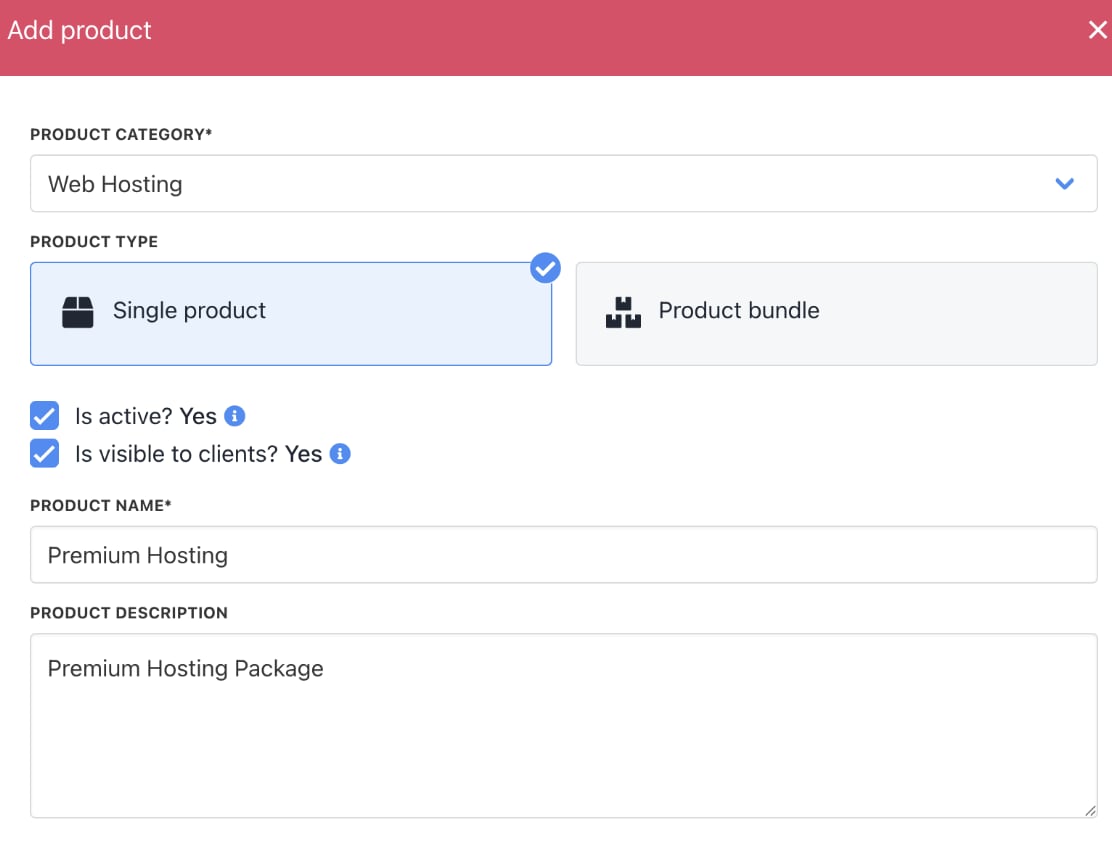
<Frame caption="Fill in product details">
  <img src="https://mintcdn.com/upmind/ZsIo0APxdVb_gFS-/images/fb/2a9c3e61cb843dce.png?fit=max&auto=format&n=ZsIo0APxdVb_gFS-&q=85&s=8419fb4721ffdef3d10b38cf10e8f2ce" alt="Fill in product details" width="1112" height="842" data-path="images/fb/2a9c3e61cb843dce.png" />
</Frame>

4. On **Provisioning**, set the **Provision Provider** to **Webuzo**.

5. Choose the **Configuration Mode** and **Provider Configuration**.
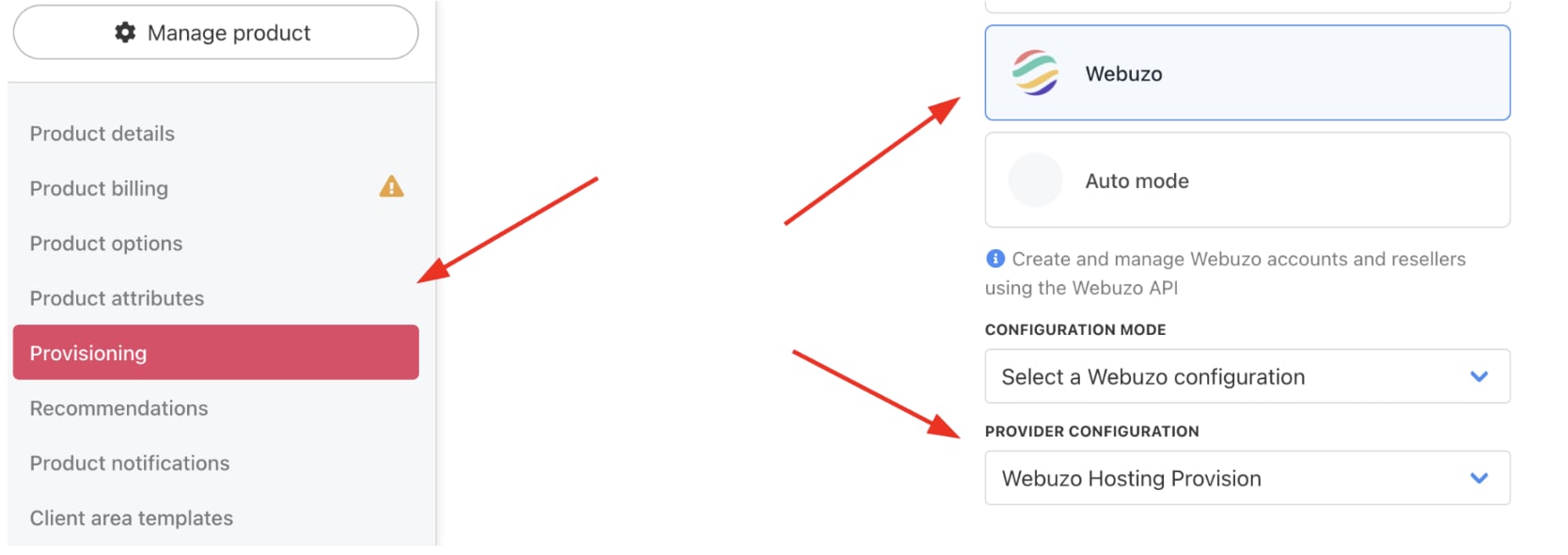
<Frame caption="Set provision provider">
  <img src="https://mintcdn.com/upmind/Lh8hC132BWHpvRbz/images/fb/4dfbc154a8157771.png?fit=max&auto=format&n=Lh8hC132BWHpvRbz&q=85&s=cdf63b5ea8f7ee7be60684545463eaf2" alt="Set provision provider" width="1668" height="590" data-path="images/fb/4dfbc154a8157771.png" />
</Frame>

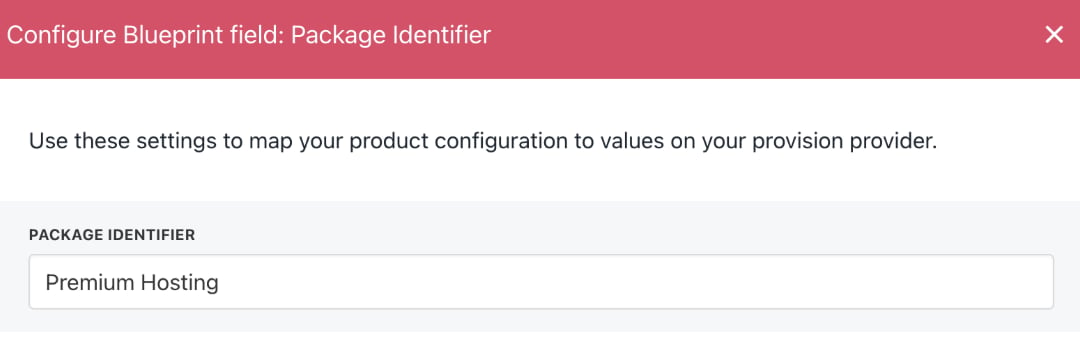
6. Enter the **Package Identifier** exactly as it appears in **Webuzo** (matching the plan name or ID).

7. Complete other product details like name, pricing, billing cycle, and permissions.
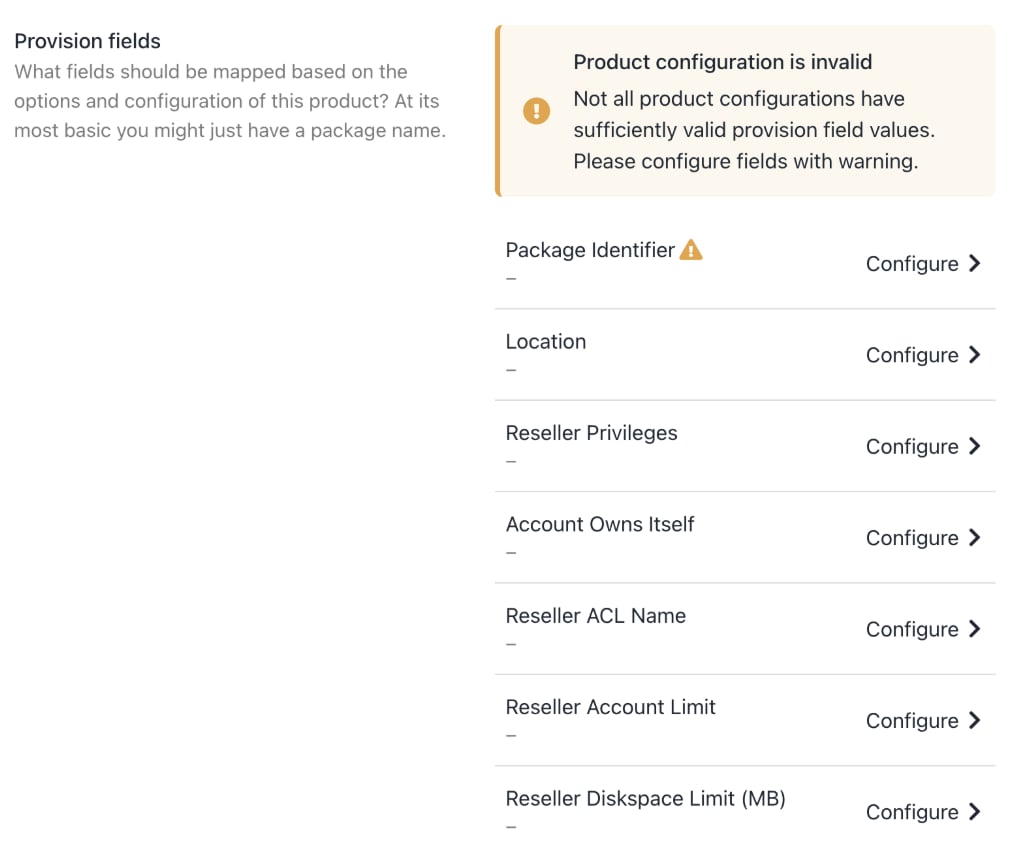
<Frame caption="Complete other product details">
  <img src="https://mintcdn.com/upmind/VnCXiz5rboywDnvn/images/fb/dd03eba34de1af99.png?fit=max&auto=format&n=VnCXiz5rboywDnvn&q=85&s=68fa18a6112b6e64928fce129a304d3f" alt="Complete other product details" width="1022" height="844" data-path="images/fb/dd03eba34de1af99.png" />
</Frame>

<Frame caption="Enter package identifier">
  <img src="https://mintcdn.com/upmind/VnCXiz5rboywDnvn/images/fb/d9441411c0af6b7f.png?fit=max&auto=format&n=VnCXiz5rboywDnvn&q=85&s=c8d2771bf192dfdefb8d978fc12aec2a" alt="Enter package identifier" width="1080" height="362" data-path="images/fb/d9441411c0af6b7f.png" />
</Frame>

8. **Save** the product.