> ## Documentation Index
> Fetch the complete documentation index at: https://docs.upmind.com/llms.txt
> Use this file to discover all available pages before exploring further.

# How to Sell PanelAlpha Hosting

> Configure and sell PanelAlpha hosting products with Upmind.

[PanelAlpha](https://www.panelalpha.com/) is a web hosting control panel that offers management of hosting accounts, packages, and server configurations. Integrating PanelAlpha with Upmind allows you to automate provisioning, billing, and client management efficiently.

## Getting PanelAlpha credentials

1. Within the PanelAlpha admin dashboard, go to **Configuration** > **Admins**.

2. Click to enable **API Access** and copy the displayed API token.
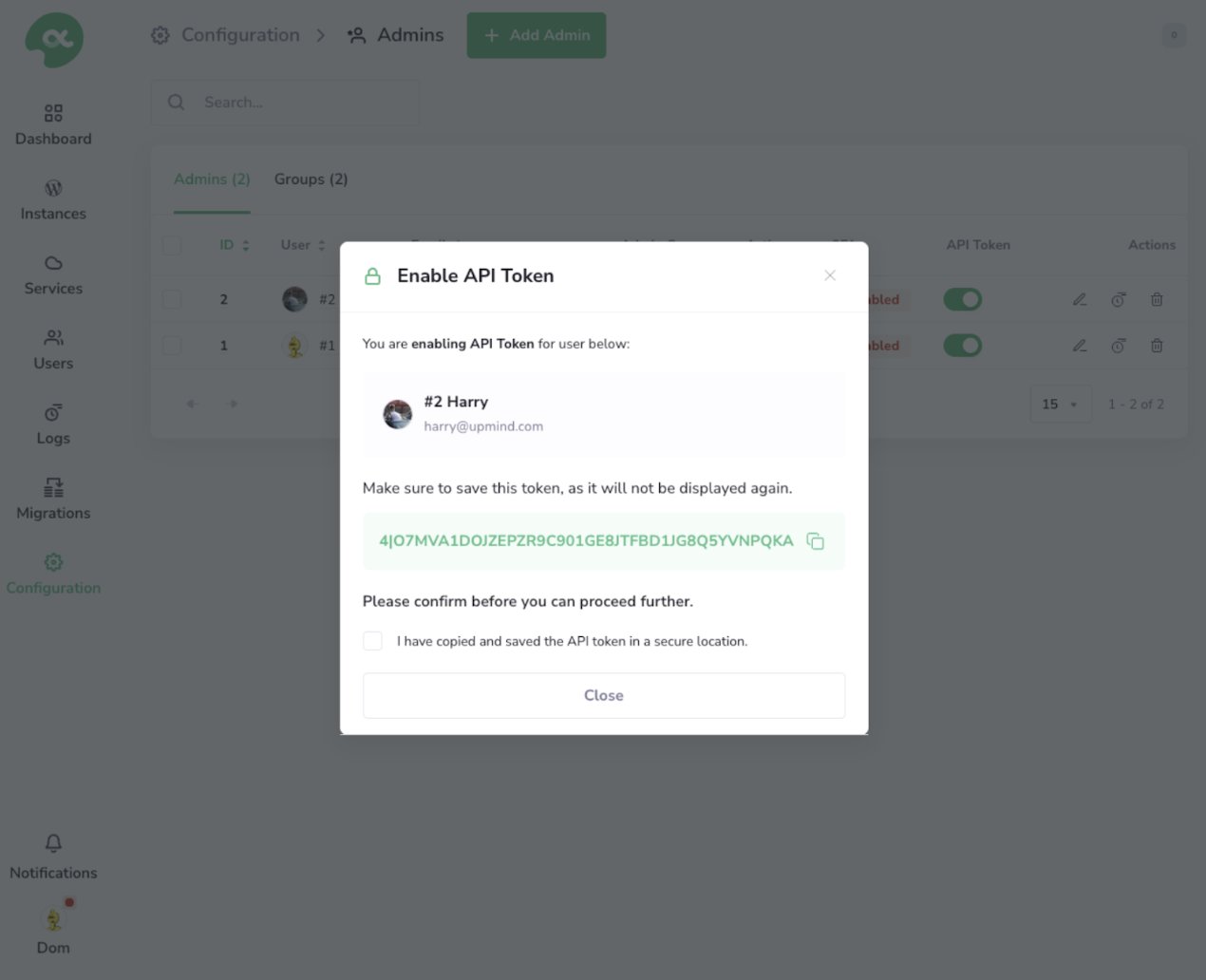
<Frame caption="Enable API token">
  <img src="https://mintcdn.com/upmind/z5ofg3t7by4uN44v/images/fb/ec9c8f83265691d3.png?fit=max&auto=format&n=z5ofg3t7by4uN44v&q=85&s=08d1b41b165842bbd71e57b4e42277c4" alt="Enable API token" width="1270" height="1032" data-path="images/fb/ec9c8f83265691d3.png" />
</Frame>

## Configuring PanelAlpha provisioning in Upmind

1. In Upmind, go to **Settings** > **Provision Configurations**.
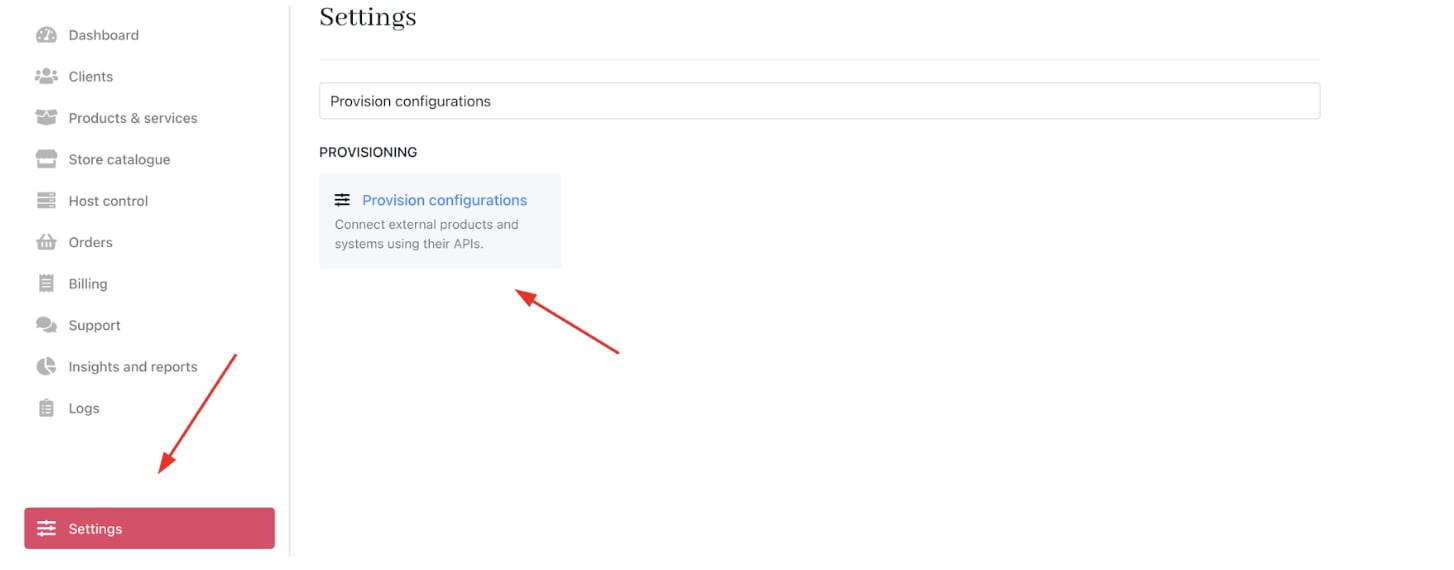
<Frame caption="Settings > Provision configurations">
  <img src="https://mintcdn.com/upmind/c5sDUwEs8YpzGbjA/images/fb/970ef1804fd95132.png?fit=max&auto=format&n=c5sDUwEs8YpzGbjA&q=85&s=32725ea6e4475cdebcb8e57e6a9a48a8" alt="Settings > Provision configurations" data-og-width="1454" width="1454" data-og-height="570" height="570" data-path="images/fb/970ef1804fd95132.png" data-optimize="true" data-opv="3" srcset="https://mintcdn.com/upmind/c5sDUwEs8YpzGbjA/images/fb/970ef1804fd95132.png?w=280&fit=max&auto=format&n=c5sDUwEs8YpzGbjA&q=85&s=0720b30350640c531a3dc847c2aec64c 280w, https://mintcdn.com/upmind/c5sDUwEs8YpzGbjA/images/fb/970ef1804fd95132.png?w=560&fit=max&auto=format&n=c5sDUwEs8YpzGbjA&q=85&s=dc163e9e9e4e8f2623e4972c031a441e 560w, https://mintcdn.com/upmind/c5sDUwEs8YpzGbjA/images/fb/970ef1804fd95132.png?w=840&fit=max&auto=format&n=c5sDUwEs8YpzGbjA&q=85&s=d9f478957a0b9a27152737faeec12f6c 840w, https://mintcdn.com/upmind/c5sDUwEs8YpzGbjA/images/fb/970ef1804fd95132.png?w=1100&fit=max&auto=format&n=c5sDUwEs8YpzGbjA&q=85&s=f86bdea0d158b98ca2a91209e2cdbc2e 1100w, https://mintcdn.com/upmind/c5sDUwEs8YpzGbjA/images/fb/970ef1804fd95132.png?w=1650&fit=max&auto=format&n=c5sDUwEs8YpzGbjA&q=85&s=1ec53d0c4e8d3b2f731c888b6727624c 1650w, https://mintcdn.com/upmind/c5sDUwEs8YpzGbjA/images/fb/970ef1804fd95132.png?w=2500&fit=max&auto=format&n=c5sDUwEs8YpzGbjA&q=85&s=270f8a0f9eb80eddc298cad430699d42 2500w" />
</Frame>

2. Click on **Add New Configuration**.

<Frame caption="Add new configuration">
  <img src="https://mintcdn.com/upmind/ObllJJl59DabnmMn/images/fb/cd7e1ff56a9a5d16.png?fit=max&auto=format&n=ObllJJl59DabnmMn&q=85&s=2e921fb1fb956407055c9b3dd7a64ed5" alt="Add new configuration" width="1448" height="232" data-path="images/fb/cd7e1ff56a9a5d16.png" />
</Frame>

3. Provide a **Name** (e.g., PanelAlpha Hosting Provision).

4. Select **Web Hosting** as the product type.

5. Choose **PanelAlpha** as the provisioning provider.
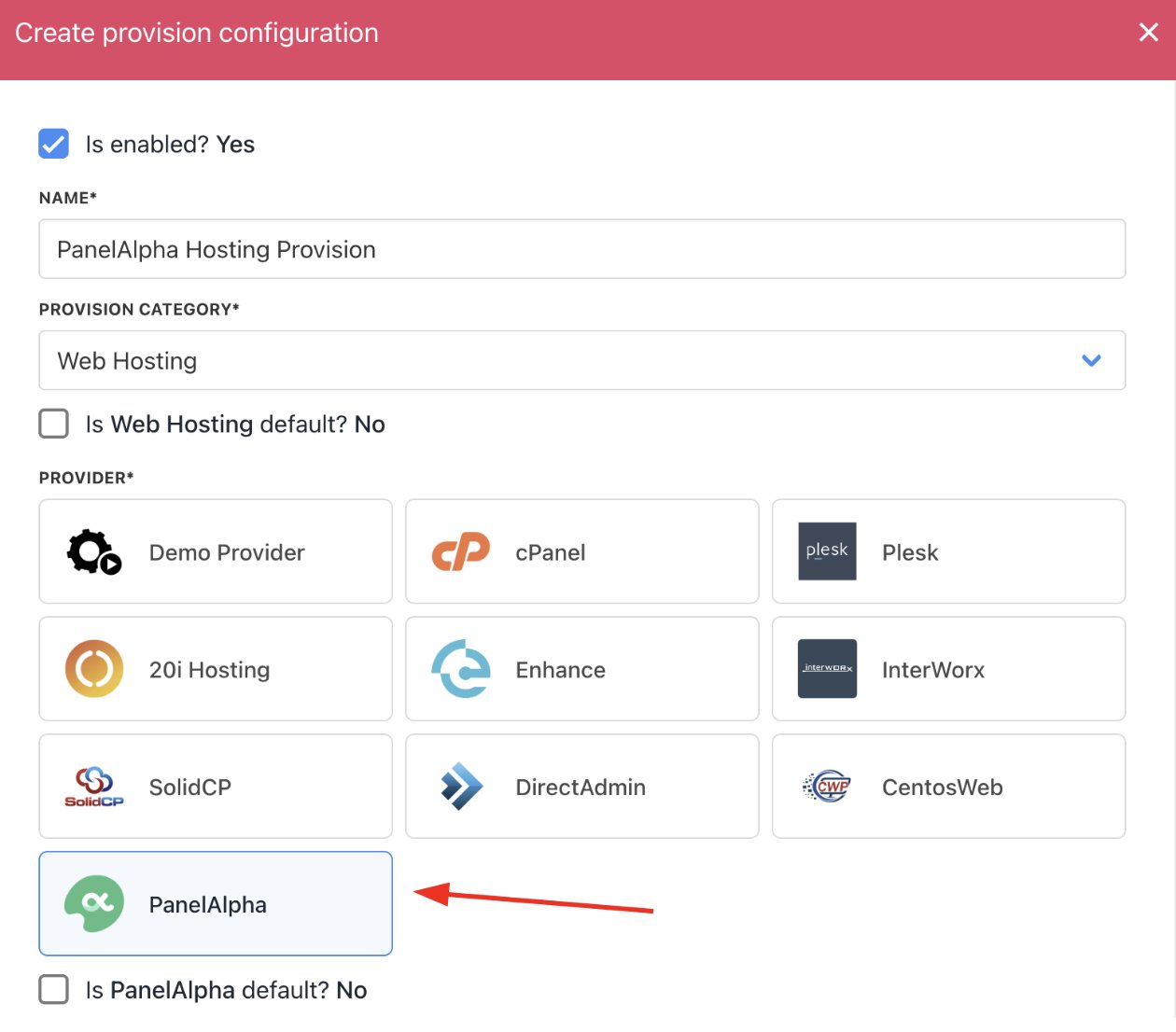
<Frame caption="Choose PanelAlpha">
  <img src="https://mintcdn.com/upmind/pcUdSuxUJ6LgBXnd/images/fb/a2b2218f35f4e048.png?fit=max&auto=format&n=pcUdSuxUJ6LgBXnd&q=85&s=077c2f6b4d55f68b12e4c73d3db0265e" alt="Choose PanelAlpha" width="1260" height="1106" data-path="images/fb/a2b2218f35f4e048.png" />
</Frame>

6. Complete the following details:

* Your server’s **Hostname** and **Port**.

* Paste the **API token** obtained from **PanelAlpha**.

* Fill in any **Configuration Attributes**, such as hosting **location** and **hosting provider**.

* Set whether to accept new accounts.

7. Click **Create**.
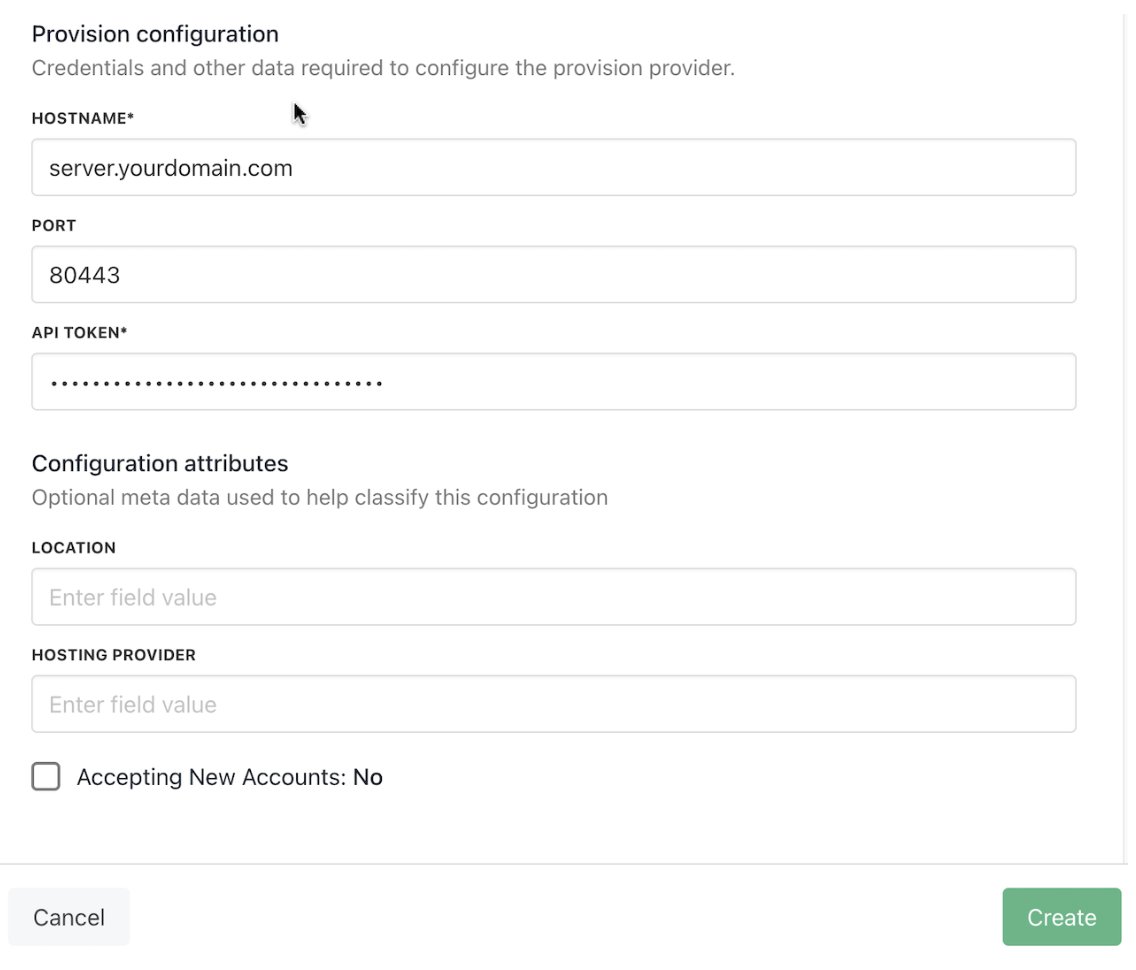
<Frame caption="Enter provision configurations">
  <img src="https://mintcdn.com/upmind/1xguIfYUrfespmVI/images/fb/8498a8a19b11436f.png?fit=max&auto=format&n=1xguIfYUrfespmVI&q=85&s=0e91ed81a733a3f9acddc946a0e2d64c" alt="Enter provision configurations" width="1136" height="970" data-path="images/fb/8498a8a19b11436f.png" />
</Frame>

## Setting up PanelAlpha products

1. Log in to the **PanelAlpha** admin dashboard.

2. Navigate to **Configuration** > **Plans**.

3. Identify the hosting packages you want to sell. Note the **ID** or **Name** of each package.

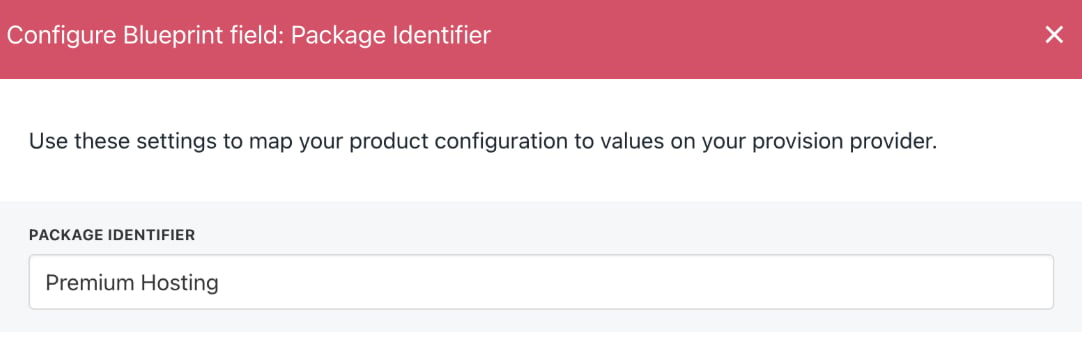
4. In Upmind, when creating a product, use this **Package Identifier** in the provisioning settings to match the **PanelAlpha package**.
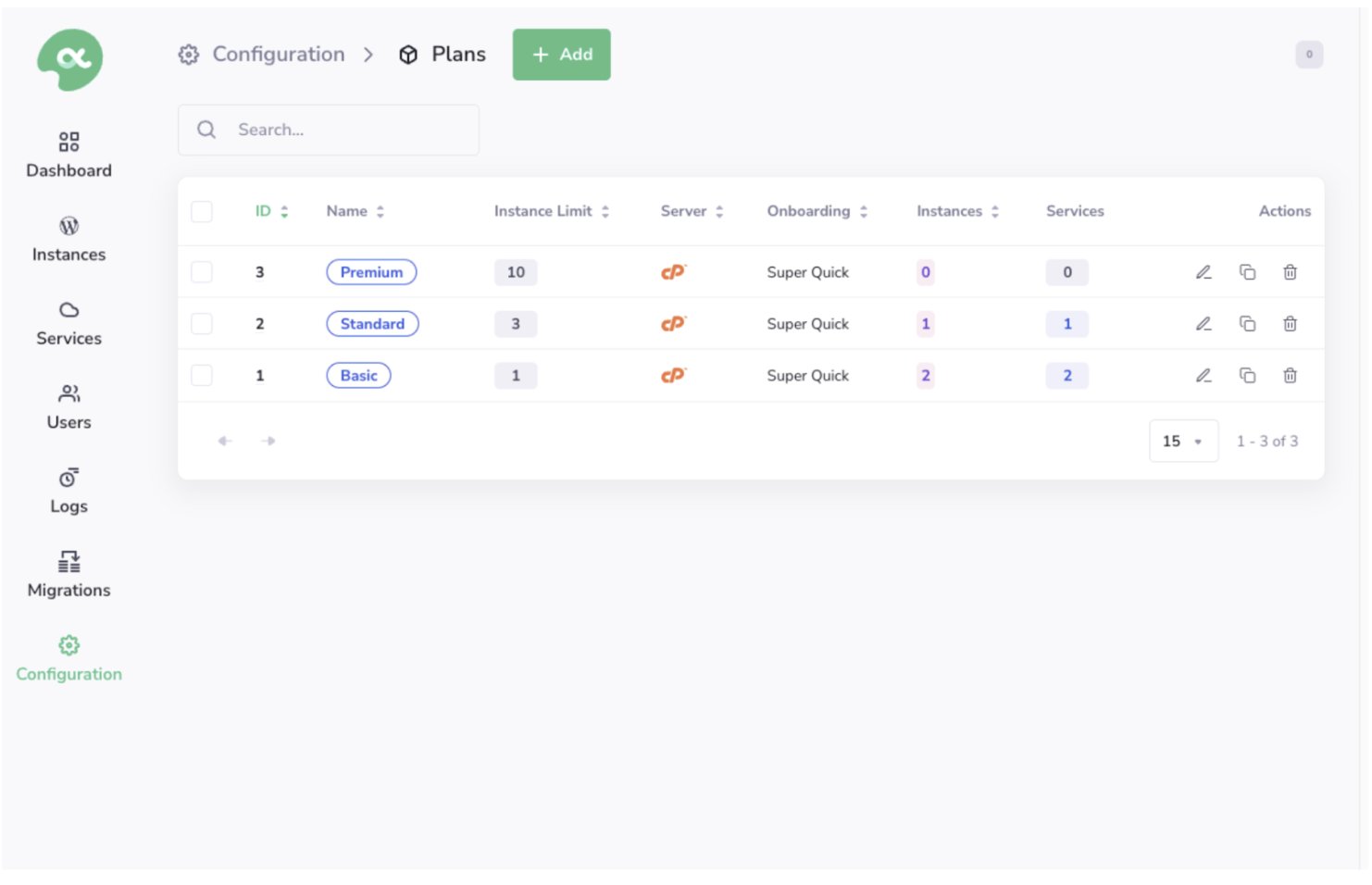
<Frame caption="Configuration > Plans">
  <img src="https://mintcdn.com/upmind/wRuKrNY12tQZY8Rr/images/fb/39100c0237f17268.png?fit=max&auto=format&n=wRuKrNY12tQZY8Rr&q=85&s=791a290a8670fdb9f18569a67ded1c21" alt="Configuration > Plans" data-og-width="1482" width="1482" data-og-height="956" height="956" data-path="images/fb/39100c0237f17268.png" data-optimize="true" data-opv="3" srcset="https://mintcdn.com/upmind/wRuKrNY12tQZY8Rr/images/fb/39100c0237f17268.png?w=280&fit=max&auto=format&n=wRuKrNY12tQZY8Rr&q=85&s=60f85b48914b22f16ab61ae01ce3a183 280w, https://mintcdn.com/upmind/wRuKrNY12tQZY8Rr/images/fb/39100c0237f17268.png?w=560&fit=max&auto=format&n=wRuKrNY12tQZY8Rr&q=85&s=3bd143a8dbcc55990ad8c4157e2f3be2 560w, https://mintcdn.com/upmind/wRuKrNY12tQZY8Rr/images/fb/39100c0237f17268.png?w=840&fit=max&auto=format&n=wRuKrNY12tQZY8Rr&q=85&s=9652263bcb7b937d9ac1e72b7b07fe80 840w, https://mintcdn.com/upmind/wRuKrNY12tQZY8Rr/images/fb/39100c0237f17268.png?w=1100&fit=max&auto=format&n=wRuKrNY12tQZY8Rr&q=85&s=251b7817b75380edfae1c2dfc317853a 1100w, https://mintcdn.com/upmind/wRuKrNY12tQZY8Rr/images/fb/39100c0237f17268.png?w=1650&fit=max&auto=format&n=wRuKrNY12tQZY8Rr&q=85&s=2220d9904d208ec92fa7924b3400db23 1650w, https://mintcdn.com/upmind/wRuKrNY12tQZY8Rr/images/fb/39100c0237f17268.png?w=2500&fit=max&auto=format&n=wRuKrNY12tQZY8Rr&q=85&s=388197fb7ed7b80b3f662d1530f56b97 2500w" />
</Frame>

## Creating PanelAlpha hosting products in Upmind

1. Go to **Host Control** > **Web Hosting** in Upmind.
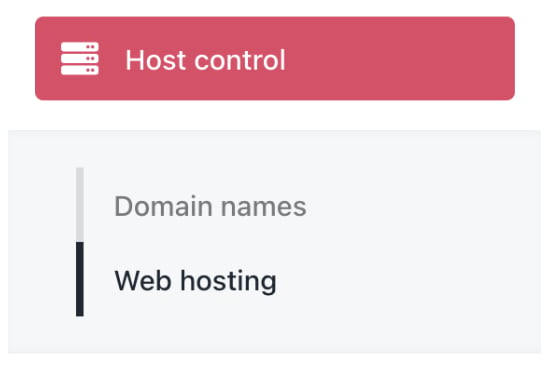
<Frame caption="Host control > Web hosting">
  <img src="https://mintcdn.com/upmind/kXD0Ya8PpcxxNm6Q/images/fb/3f012ac21e5b36ad.png?fit=max&auto=format&n=kXD0Ya8PpcxxNm6Q&q=85&s=301c443e6cf172e3f1fbf8bc9e95e9f0" alt="Host control > Web hosting" data-og-width="546" width="546" data-og-height="372" height="372" data-path="images/fb/3f012ac21e5b36ad.png" data-optimize="true" data-opv="3" srcset="https://mintcdn.com/upmind/kXD0Ya8PpcxxNm6Q/images/fb/3f012ac21e5b36ad.png?w=280&fit=max&auto=format&n=kXD0Ya8PpcxxNm6Q&q=85&s=2039387308aecff78eff140ca9158de8 280w, https://mintcdn.com/upmind/kXD0Ya8PpcxxNm6Q/images/fb/3f012ac21e5b36ad.png?w=560&fit=max&auto=format&n=kXD0Ya8PpcxxNm6Q&q=85&s=471cbf6d3b199b89cc96380eaf0771bb 560w, https://mintcdn.com/upmind/kXD0Ya8PpcxxNm6Q/images/fb/3f012ac21e5b36ad.png?w=840&fit=max&auto=format&n=kXD0Ya8PpcxxNm6Q&q=85&s=224795e6b27c49c9807d26880228e76c 840w, https://mintcdn.com/upmind/kXD0Ya8PpcxxNm6Q/images/fb/3f012ac21e5b36ad.png?w=1100&fit=max&auto=format&n=kXD0Ya8PpcxxNm6Q&q=85&s=bb8f01ba58da853a50fcce16687f43fe 1100w, https://mintcdn.com/upmind/kXD0Ya8PpcxxNm6Q/images/fb/3f012ac21e5b36ad.png?w=1650&fit=max&auto=format&n=kXD0Ya8PpcxxNm6Q&q=85&s=e4f49f24c0840fb0d85fbaa39f56d012 1650w, https://mintcdn.com/upmind/kXD0Ya8PpcxxNm6Q/images/fb/3f012ac21e5b36ad.png?w=2500&fit=max&auto=format&n=kXD0Ya8PpcxxNm6Q&q=85&s=c59eed51926981a37b078aa439fa8991 2500w" />
</Frame>

2. Click **Add New**.

<Frame caption="Add new">
  <img src="https://mintcdn.com/upmind/ZsIo0APxdVb_gFS-/images/fb/282a9a12311e261b.png?fit=max&auto=format&n=ZsIo0APxdVb_gFS-&q=85&s=cdc6be16368d0c934468c2a76d056659" alt="Add new" width="1692" height="266" data-path="images/fb/282a9a12311e261b.png" />
</Frame>

3. Choose a category and fill in the details. Then click **Create**.
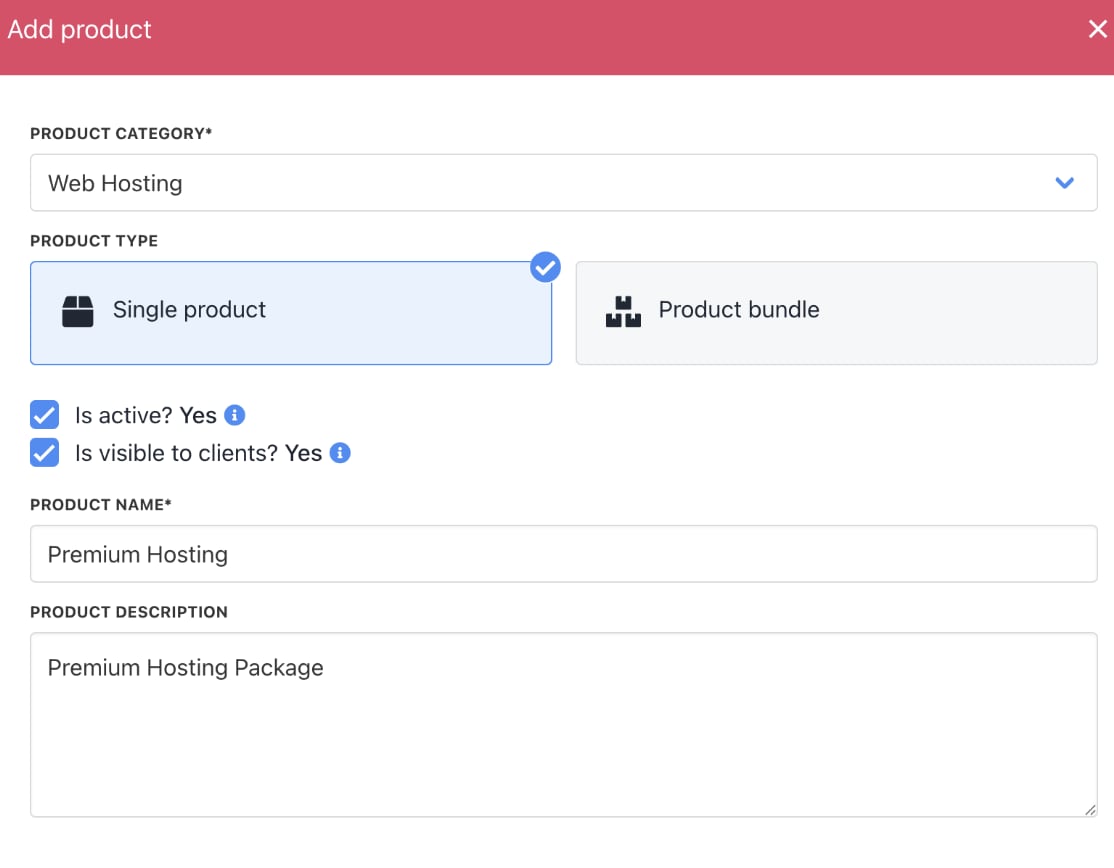
<Frame caption="Fill in product details">
  <img src="https://mintcdn.com/upmind/ZsIo0APxdVb_gFS-/images/fb/24677e123dac960b.png?fit=max&auto=format&n=ZsIo0APxdVb_gFS-&q=85&s=36d27d9304b61c84946788d724f2e63e" alt="Fill in product details" width="1114" height="868" data-path="images/fb/24677e123dac960b.png" />
</Frame>

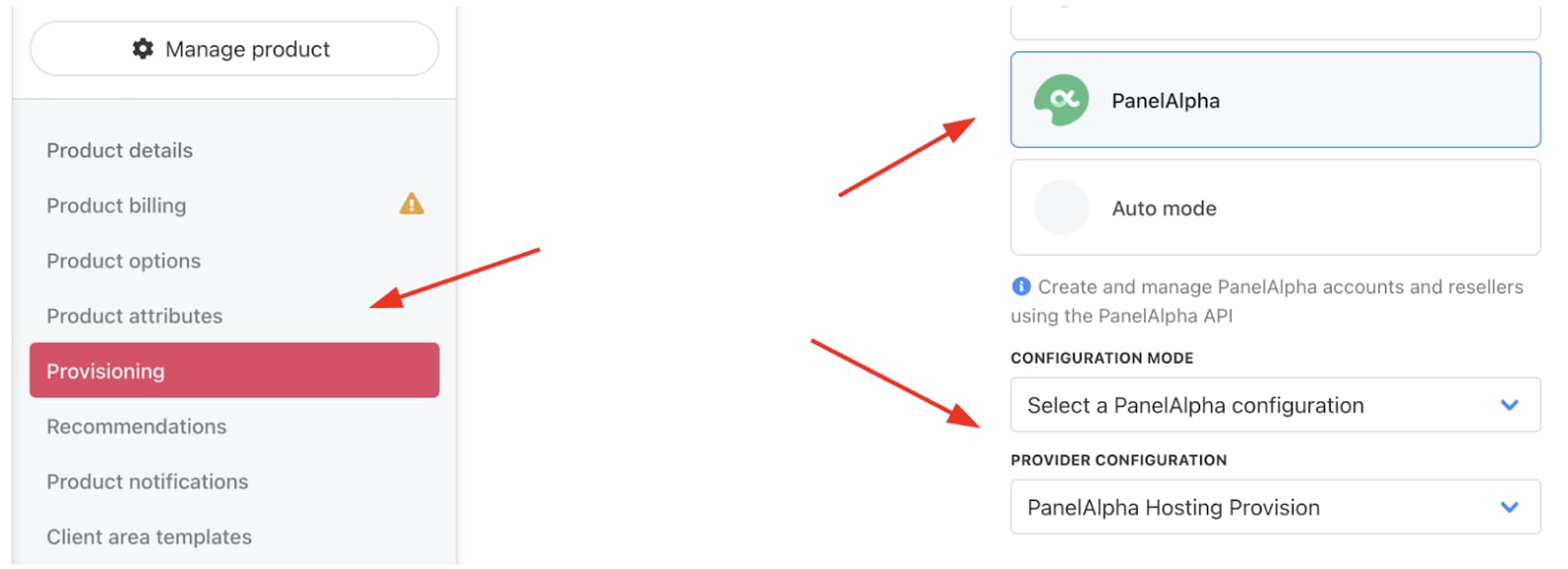
4. On **Provisioning**, set the **Provision Provider** to **PanelAlpha**.

5. Choose the **Configuration Mode** and **Provider Configuration**.
<Frame caption="Set provision provider">
  <img src="https://mintcdn.com/upmind/z5ofg3t7by4uN44v/images/fb/f09cc8219f34cff3.png?fit=max&auto=format&n=z5ofg3t7by4uN44v&q=85&s=f07a09211349d7c67595c3e46e59ad4e" alt="Set provision provider" width="1586" height="576" data-path="images/fb/f09cc8219f34cff3.png" />
</Frame>

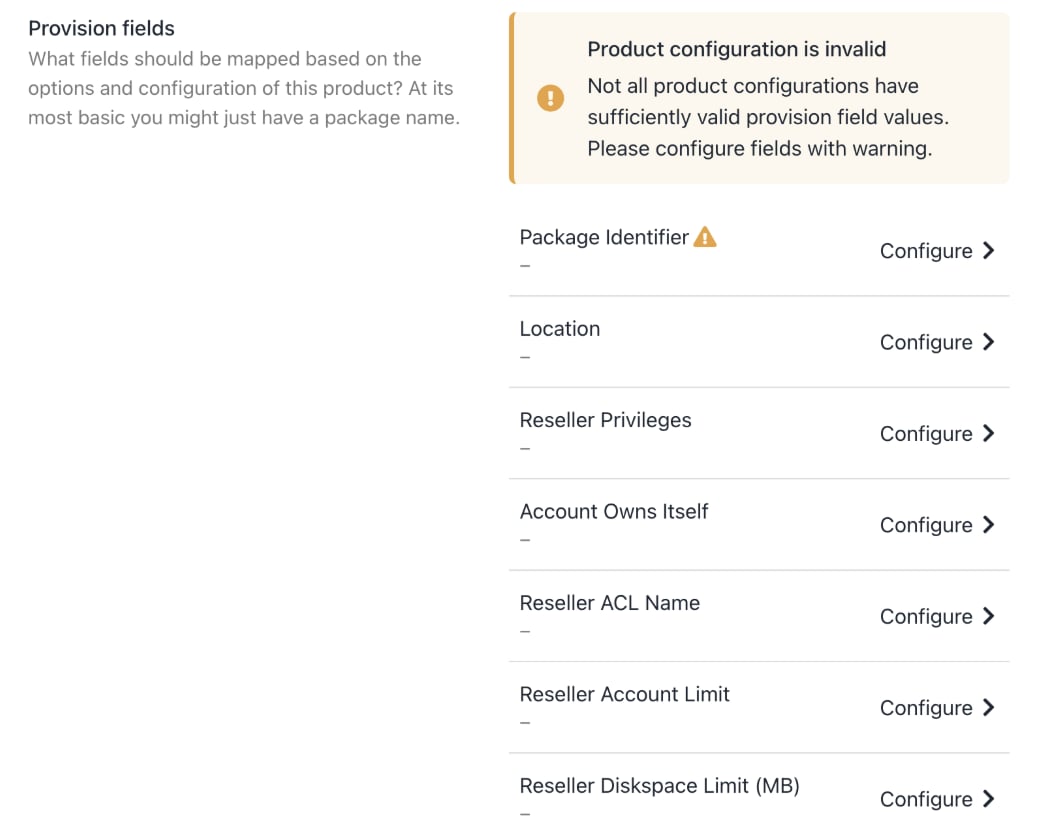
6. Enter the **Package Identifier** exactly as it appears in **PanelAlpha** (matching the plan name or ID).

7. Complete other product details like name, pricing, billing cycle, and permissions.
<Frame caption="Complete other product details">
  <img src="https://mintcdn.com/upmind/pcUdSuxUJ6LgBXnd/images/fb/a0d8a2b33ecd4c79.png?fit=max&auto=format&n=pcUdSuxUJ6LgBXnd&q=85&s=ba60aaf48694ac55439831ee5df4b884" alt="Complete other product details" width="1040" height="832" data-path="images/fb/a0d8a2b33ecd4c79.png" />
</Frame>

<Frame caption="Enter package identifier">
  <img src="https://mintcdn.com/upmind/z5ofg3t7by4uN44v/images/fb/e8de2cec1e81c5a1.png?fit=max&auto=format&n=z5ofg3t7by4uN44v&q=85&s=604e67a9efccbf7a55c224d4e48699e4" alt="Enter package identifier" width="1082" height="348" data-path="images/fb/e8de2cec1e81c5a1.png" />
</Frame>

8. **Save** the product.