> ## Documentation Index
> Fetch the complete documentation index at: https://docs.upmind.com/llms.txt
> Use this file to discover all available pages before exploring further.

# How to sell Direct Admin hosting

> Configure and sell DirectAdmin hosting products with Upmind.

DirectAdmin is a web hosting control panel for Linux-based servers. It is an alternative to [cPanel](https://upmind.featurebase.app/help/articles/7103793-how-to-sell-whmcpanel-hosting) or [Enhance](https://upmind.featurebase.app/help/articles/6982515-how-to-sell-enhance-hosting).

## Linking Direct Admin to Upmind

You should add each DirectAdmin server as a separate provision configuration to Upmind

* On the sidebar, click **Host Control** > **Web Servers**> **Add New.** You can also select it from below.
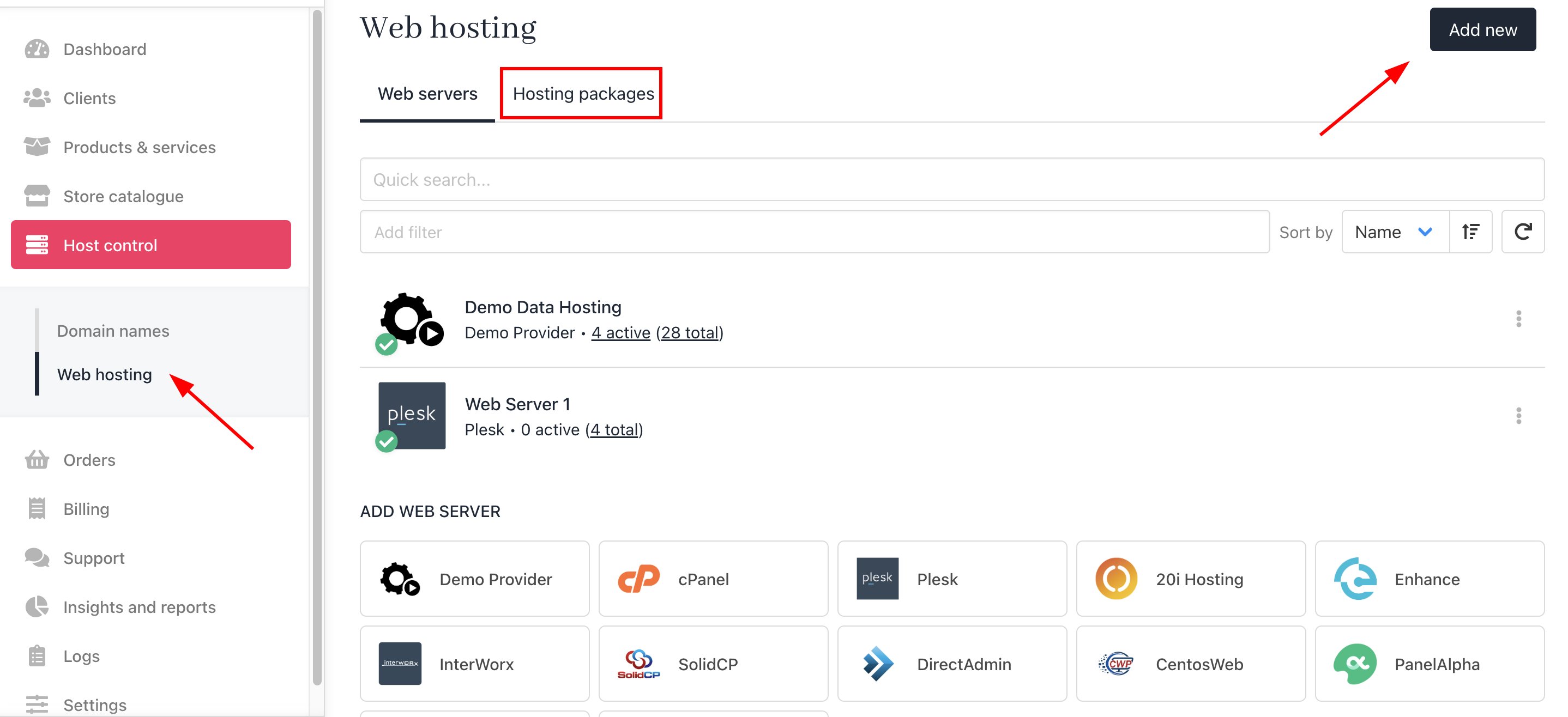
<Frame caption="Host Control > Web Servers> Add New">
  <img src="https://mintcdn.com/upmind/h8h5zREaX7k8Y-3x/images/fb/117ee5abc9803c81.png?fit=max&auto=format&n=h8h5zREaX7k8Y-3x&q=85&s=6672be9d147b2c1a874a288ac1f33421" alt="Host Control > Web Servers> Add New" data-og-width="2876" width="2876" data-og-height="1316" height="1316" data-path="images/fb/117ee5abc9803c81.png" data-optimize="true" data-opv="3" srcset="https://mintcdn.com/upmind/h8h5zREaX7k8Y-3x/images/fb/117ee5abc9803c81.png?w=280&fit=max&auto=format&n=h8h5zREaX7k8Y-3x&q=85&s=01cb3df704751cac0cc1608391a36af7 280w, https://mintcdn.com/upmind/h8h5zREaX7k8Y-3x/images/fb/117ee5abc9803c81.png?w=560&fit=max&auto=format&n=h8h5zREaX7k8Y-3x&q=85&s=eb6aff3d5bb06a8869a5782c3d26fc2d 560w, https://mintcdn.com/upmind/h8h5zREaX7k8Y-3x/images/fb/117ee5abc9803c81.png?w=840&fit=max&auto=format&n=h8h5zREaX7k8Y-3x&q=85&s=254118a4ca63783f79a29d0be331ad12 840w, https://mintcdn.com/upmind/h8h5zREaX7k8Y-3x/images/fb/117ee5abc9803c81.png?w=1100&fit=max&auto=format&n=h8h5zREaX7k8Y-3x&q=85&s=660cae819e97c8b460a73aa4097cb593 1100w, https://mintcdn.com/upmind/h8h5zREaX7k8Y-3x/images/fb/117ee5abc9803c81.png?w=1650&fit=max&auto=format&n=h8h5zREaX7k8Y-3x&q=85&s=83310af13bfd45d1a5914a978a14bd32 1650w, https://mintcdn.com/upmind/h8h5zREaX7k8Y-3x/images/fb/117ee5abc9803c81.png?w=2500&fit=max&auto=format&n=h8h5zREaX7k8Y-3x&q=85&s=755ef51b56096ddf95c1ecc4c9693634 2500w" />
</Frame>

* On the sidebar, go to **Settings** > **Provision Configurations** > **Add New Configuration.**
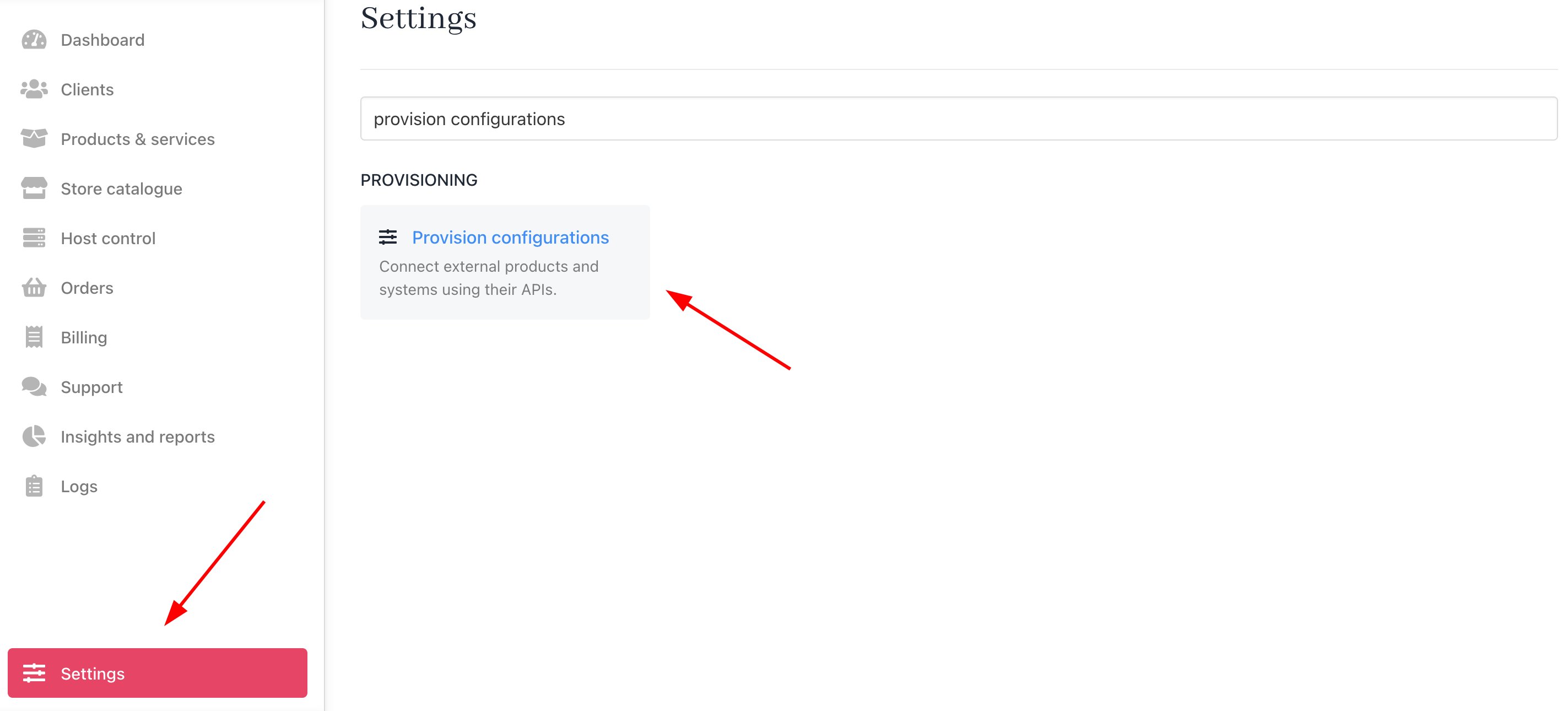
<Frame caption="Settings > Provision Configurations > Add New Configuration">
  <img src="https://mintcdn.com/upmind/kAlrCUxI2nwYz4_i/images/fb/1e683bcae05b6731.png?fit=max&auto=format&n=kAlrCUxI2nwYz4_i&q=85&s=047db815588bc0923f35240b8beb029d" alt="Settings > Provision Configurations > Add New Configuration" data-og-width="2846" width="2846" data-og-height="1290" height="1290" data-path="images/fb/1e683bcae05b6731.png" data-optimize="true" data-opv="3" srcset="https://mintcdn.com/upmind/kAlrCUxI2nwYz4_i/images/fb/1e683bcae05b6731.png?w=280&fit=max&auto=format&n=kAlrCUxI2nwYz4_i&q=85&s=37314c84d46787143a0723c885ce73c0 280w, https://mintcdn.com/upmind/kAlrCUxI2nwYz4_i/images/fb/1e683bcae05b6731.png?w=560&fit=max&auto=format&n=kAlrCUxI2nwYz4_i&q=85&s=65c5bf84a19f20dcf1faac535b794ce6 560w, https://mintcdn.com/upmind/kAlrCUxI2nwYz4_i/images/fb/1e683bcae05b6731.png?w=840&fit=max&auto=format&n=kAlrCUxI2nwYz4_i&q=85&s=eb61a6e73093f6f10effbed64a2e42a5 840w, https://mintcdn.com/upmind/kAlrCUxI2nwYz4_i/images/fb/1e683bcae05b6731.png?w=1100&fit=max&auto=format&n=kAlrCUxI2nwYz4_i&q=85&s=1e6c428330090beb58c1fca0438def33 1100w, https://mintcdn.com/upmind/kAlrCUxI2nwYz4_i/images/fb/1e683bcae05b6731.png?w=1650&fit=max&auto=format&n=kAlrCUxI2nwYz4_i&q=85&s=fa6195a332dbb98d9e502619fd36aaea 1650w, https://mintcdn.com/upmind/kAlrCUxI2nwYz4_i/images/fb/1e683bcae05b6731.png?w=2500&fit=max&auto=format&n=kAlrCUxI2nwYz4_i&q=85&s=bb1497dc20cd6f75a945ef9fdaeb5db3 2500w" />
</Frame>

You should fill it out as follows:

1. Enter a server name. You may just want to use the DirectAdmin control server name or give it a more familiar name.

2. Under the Provision Category of **Web Hosting**, choose DirectAdmin as the hosting panel type.
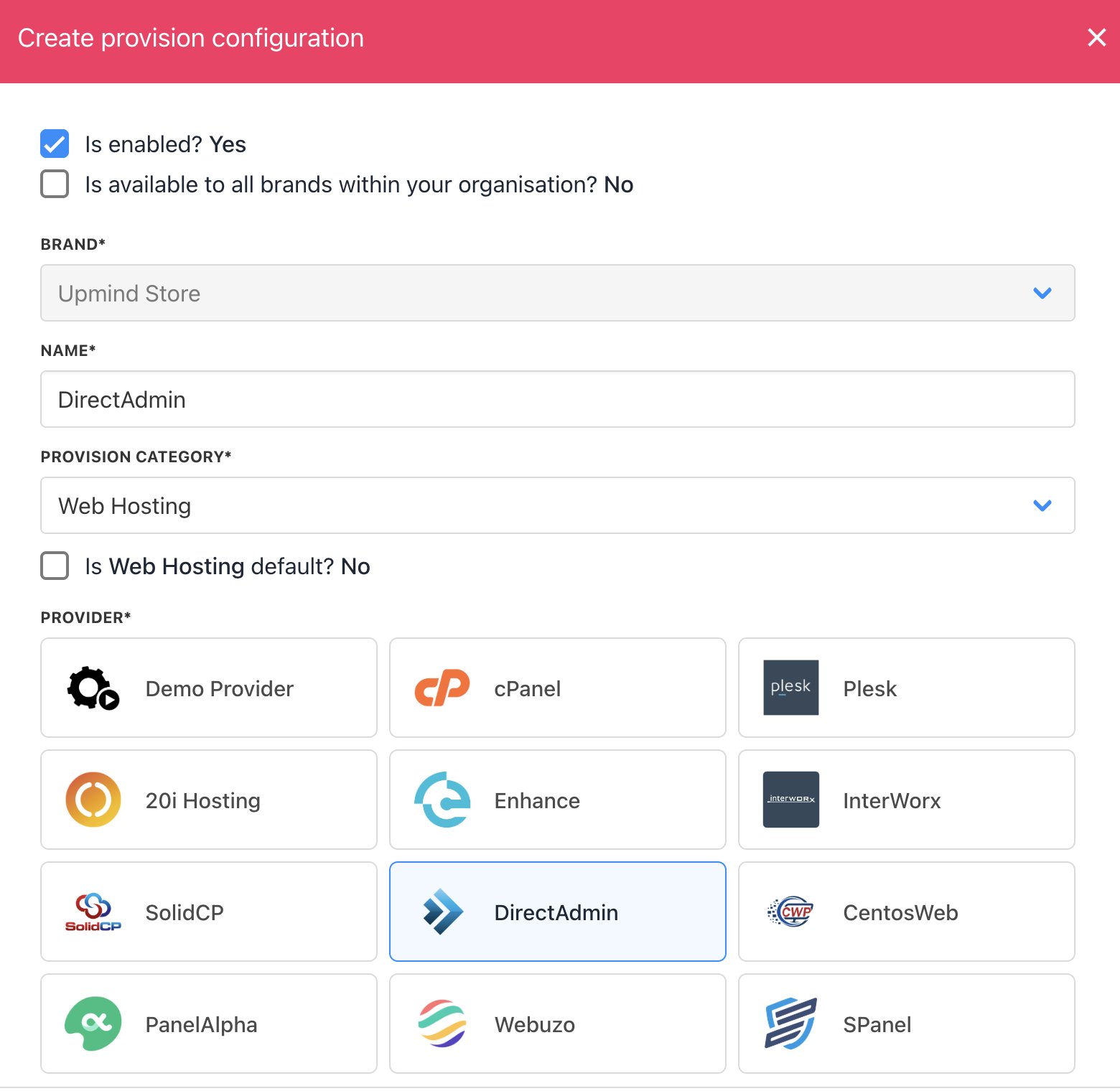
<Frame caption="Enter name">
  <img src="https://mintcdn.com/upmind/1-uICsJi9zYpvJVH/images/fb/89e3b7945e1a289e.png?fit=max&auto=format&n=1-uICsJi9zYpvJVH&q=85&s=897eb9caa98334b64a63edf40b767790" alt="Enter name" width="1560" height="1520" data-path="images/fb/89e3b7945e1a289e.png" />
</Frame>

3. Enter your **Hostname**, **Username,** and **Password.**

4. Click **Create**.
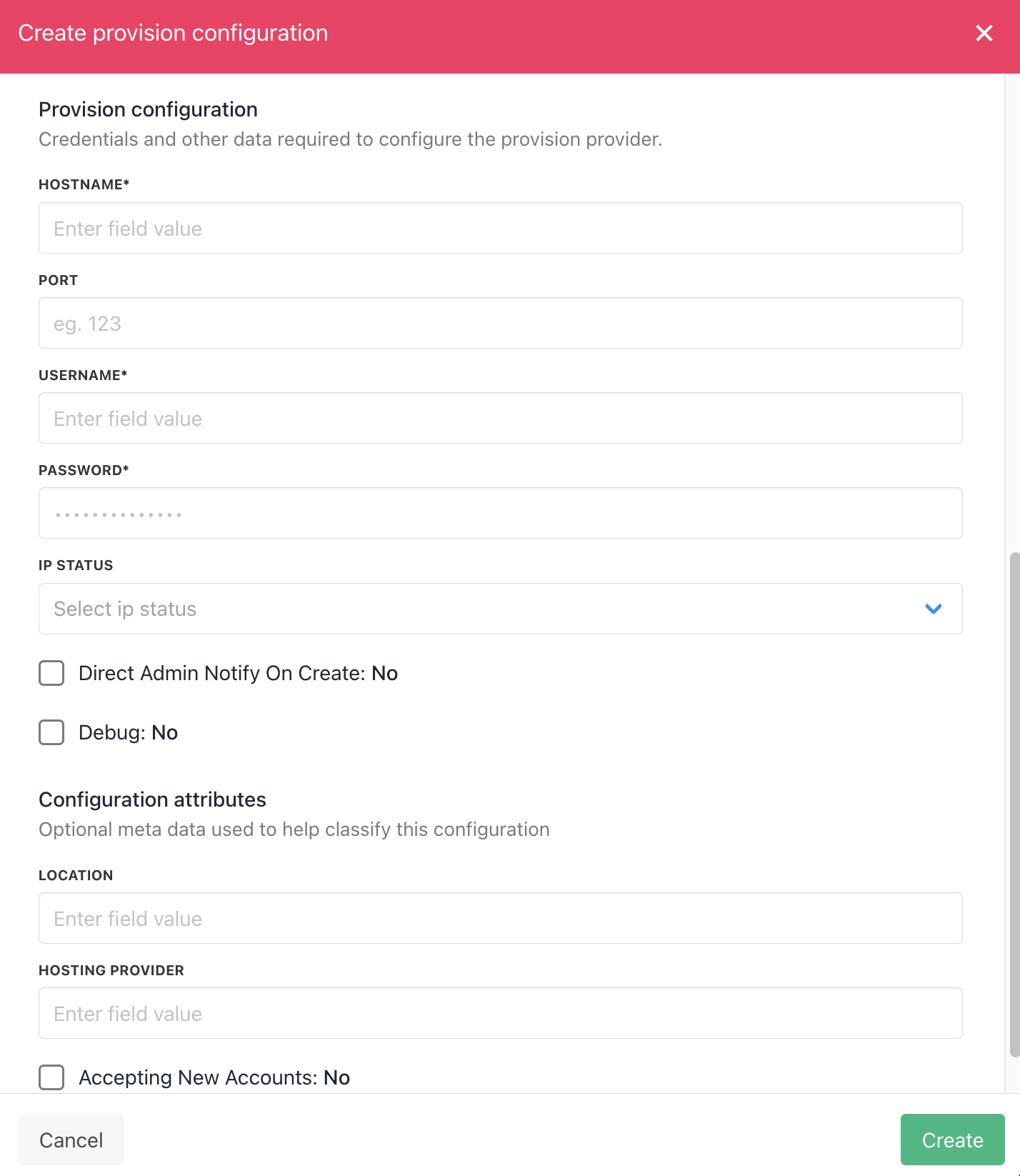
<Frame caption="Enter details">
  <img src="https://mintcdn.com/upmind/Lh8hC132BWHpvRbz/images/fb/4c93f1e52c3d1023.png?fit=max&auto=format&n=Lh8hC132BWHpvRbz&q=85&s=b668a688ed1ceaa449551b0bc670ebcf" alt="Enter details" width="1428" height="1646" data-path="images/fb/4c93f1e52c3d1023.png" />
</Frame>

## Creating packages in DirectAdmin

You need to add a Package in DirectAdmin and add this as your package identifier in Upmind. To create a package on the DirectAdmin. You need to log in and follow this guide

1. Select **Manage User Packages** under the **Account Manager** option.
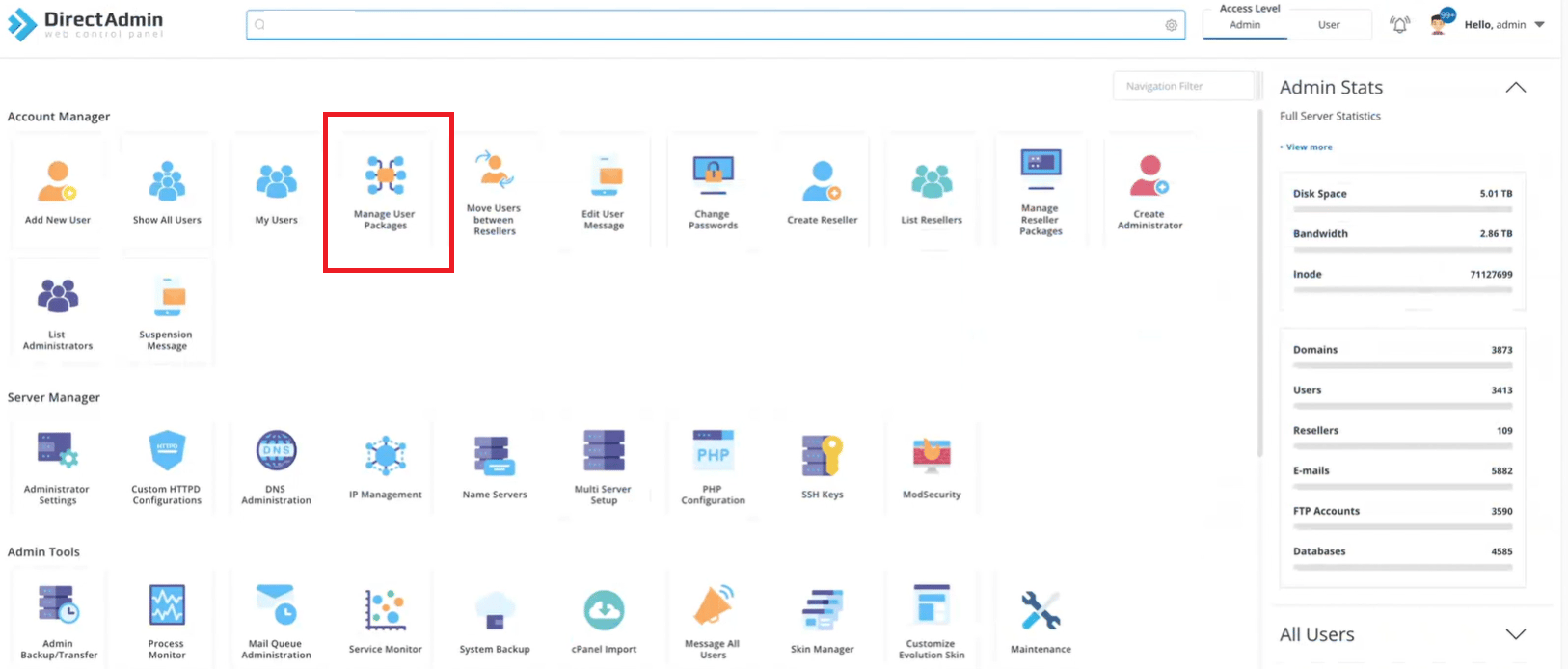
<Frame caption="Create Package on DirectAdmin">
  <img src="https://mintcdn.com/upmind/kXD0Ya8PpcxxNm6Q/images/fb/3b2520fab1de6630.png?fit=max&auto=format&n=kXD0Ya8PpcxxNm6Q&q=85&s=8e6971bcc604479e760ee56cd11ba979" alt="Create Package on DirectAdmin" width="1626" height="694" data-path="images/fb/3b2520fab1de6630.png" />
</Frame>

2. Then click **Add Package** in the right corner.

<Frame caption="Manage User Package > Add Package">
  <img src="https://mintcdn.com/upmind/ZsIo0APxdVb_gFS-/images/fb/25ee4efc04c173cb.png?fit=max&auto=format&n=ZsIo0APxdVb_gFS-&q=85&s=ead451528456ec6089cd6f48a45bd201" alt="Manage User Package -> Add Package" data-og-width="1164" width="1164" data-og-height="221" height="221" data-path="images/fb/25ee4efc04c173cb.png" data-optimize="true" data-opv="3" srcset="https://mintcdn.com/upmind/ZsIo0APxdVb_gFS-/images/fb/25ee4efc04c173cb.png?w=280&fit=max&auto=format&n=ZsIo0APxdVb_gFS-&q=85&s=07ac0918fe1c036cf208edf247ac5169 280w, https://mintcdn.com/upmind/ZsIo0APxdVb_gFS-/images/fb/25ee4efc04c173cb.png?w=560&fit=max&auto=format&n=ZsIo0APxdVb_gFS-&q=85&s=d9fa967b98b607b263ae17c5e22fd851 560w, https://mintcdn.com/upmind/ZsIo0APxdVb_gFS-/images/fb/25ee4efc04c173cb.png?w=840&fit=max&auto=format&n=ZsIo0APxdVb_gFS-&q=85&s=805f2a822b09f9229166f8b4d0bab5f6 840w, https://mintcdn.com/upmind/ZsIo0APxdVb_gFS-/images/fb/25ee4efc04c173cb.png?w=1100&fit=max&auto=format&n=ZsIo0APxdVb_gFS-&q=85&s=5c6812739cc9f061fcfb1fc7f4e54cf5 1100w, https://mintcdn.com/upmind/ZsIo0APxdVb_gFS-/images/fb/25ee4efc04c173cb.png?w=1650&fit=max&auto=format&n=ZsIo0APxdVb_gFS-&q=85&s=492f8fae76eddcd739837f28fff870df 1650w, https://mintcdn.com/upmind/ZsIo0APxdVb_gFS-/images/fb/25ee4efc04c173cb.png?w=2500&fit=max&auto=format&n=ZsIo0APxdVb_gFS-&q=85&s=1731ccfc6a001d855cffb78098368a89 2500w" />
</Frame>

3. Specify the limitation, set the package name, and click **Save**.
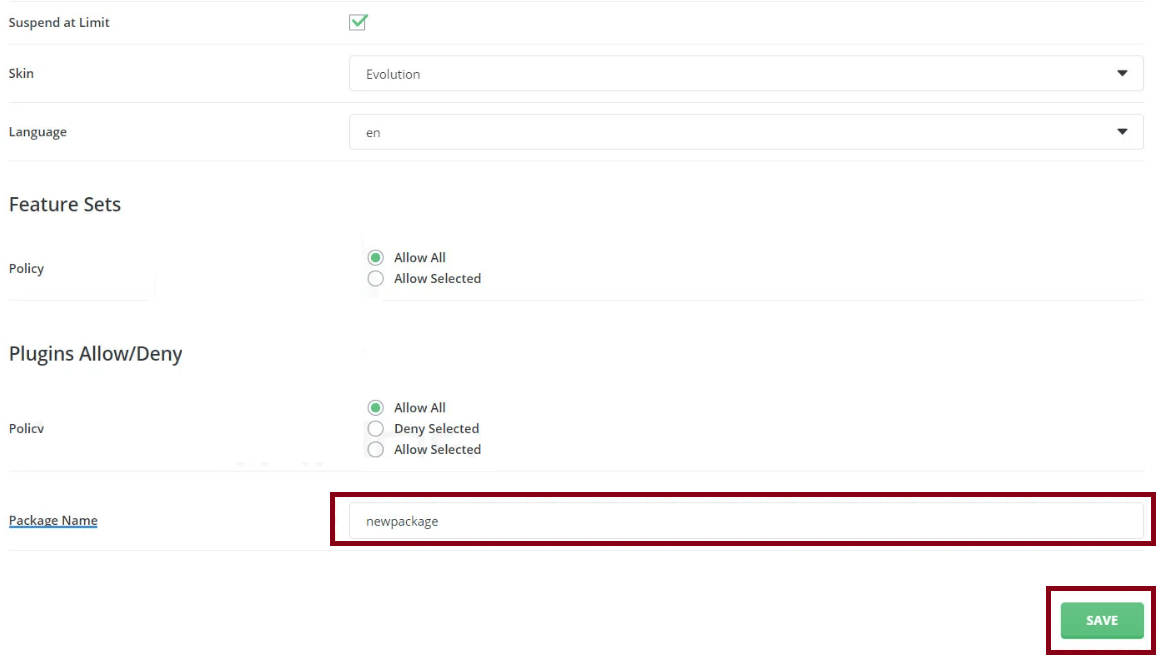
<Frame caption="Set the Limitation and Package Name">
  <img src="https://mintcdn.com/upmind/z5ofg3t7by4uN44v/images/fb/e984454fedc99b26.png?fit=max&auto=format&n=z5ofg3t7by4uN44v&q=85&s=2651936487bb76fac4e696e5b64d235f" alt="Set the Limitation and Package Name" width="1167" height="666" data-path="images/fb/e984454fedc99b26.png" />
</Frame>

### Configure Upmind products

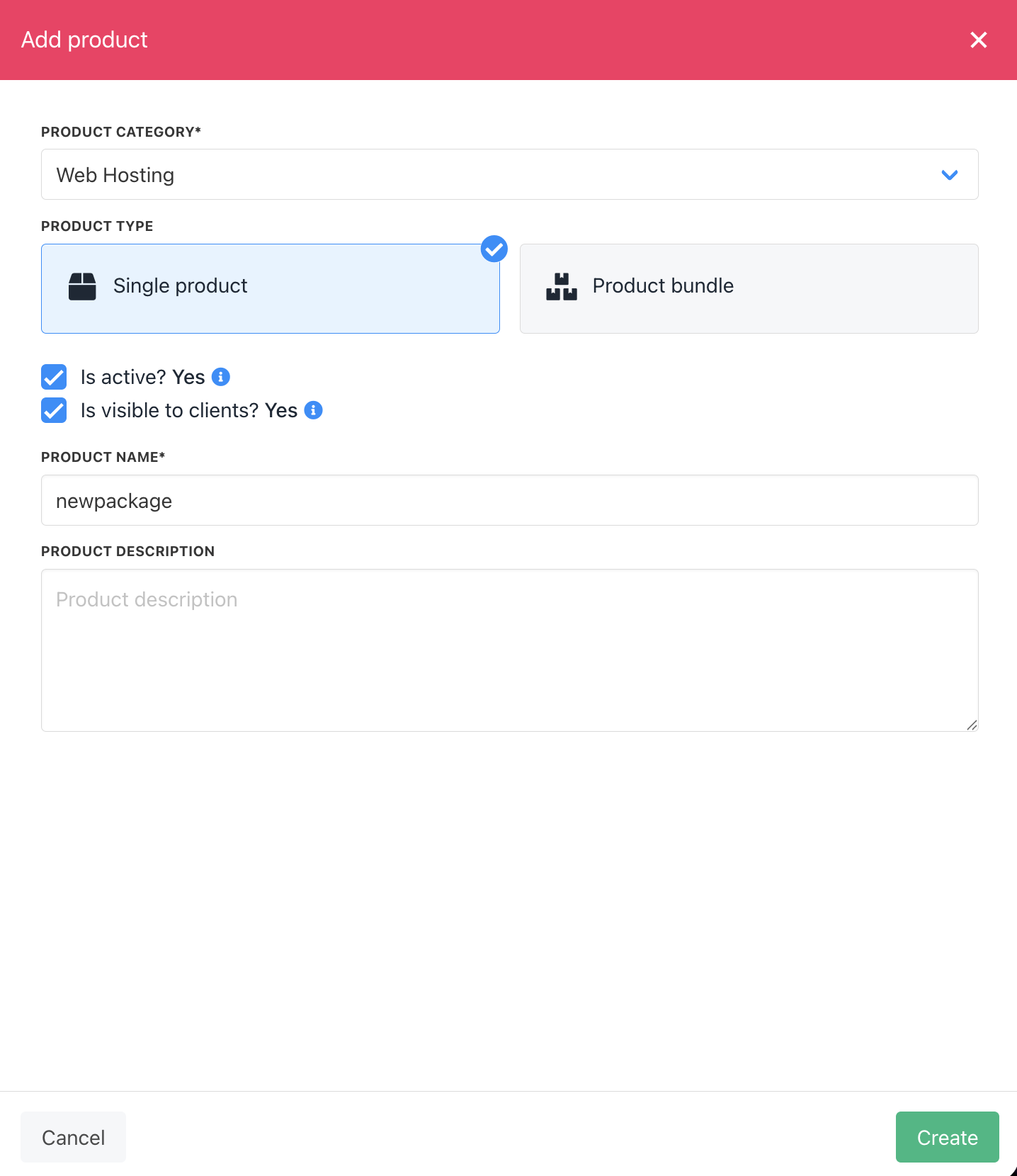
In your Upmind admin area, under **Host control** > **Web hosting,** click on the **Hosting packages** tab and click the **Add new** button to start configuring a new hosting package.
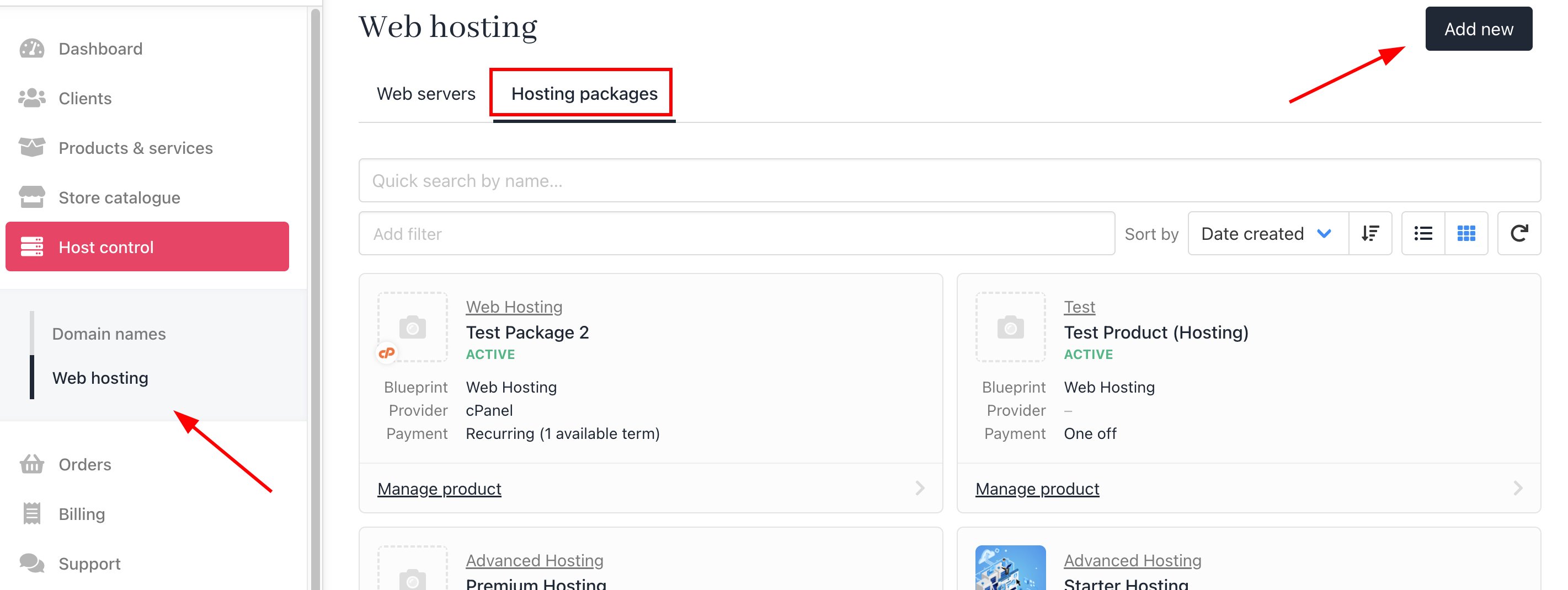
<Frame caption="Host control > Web hosting > Add new">
  <img src="https://mintcdn.com/upmind/JUoAg6onJmXk_-rR/images/fb/e4fdc9eb20b53287.png?fit=max&auto=format&n=JUoAg6onJmXk_-rR&q=85&s=5583f7d1b6f58fe2584e3576a6fbc08b" alt="Host control > Web hosting > Add new" data-og-width="2842" width="2842" data-og-height="1070" height="1070" data-path="images/fb/e4fdc9eb20b53287.png" data-optimize="true" data-opv="3" srcset="https://mintcdn.com/upmind/JUoAg6onJmXk_-rR/images/fb/e4fdc9eb20b53287.png?w=280&fit=max&auto=format&n=JUoAg6onJmXk_-rR&q=85&s=4e6f780efeb257051cb02e376b6a6d05 280w, https://mintcdn.com/upmind/JUoAg6onJmXk_-rR/images/fb/e4fdc9eb20b53287.png?w=560&fit=max&auto=format&n=JUoAg6onJmXk_-rR&q=85&s=34bf28b1e6176eb34c8dc2ac11a11e9a 560w, https://mintcdn.com/upmind/JUoAg6onJmXk_-rR/images/fb/e4fdc9eb20b53287.png?w=840&fit=max&auto=format&n=JUoAg6onJmXk_-rR&q=85&s=9a7093352ee8232c7ad1273a30223127 840w, https://mintcdn.com/upmind/JUoAg6onJmXk_-rR/images/fb/e4fdc9eb20b53287.png?w=1100&fit=max&auto=format&n=JUoAg6onJmXk_-rR&q=85&s=0a7c11d68922f6e3ee7349992a5f6d53 1100w, https://mintcdn.com/upmind/JUoAg6onJmXk_-rR/images/fb/e4fdc9eb20b53287.png?w=1650&fit=max&auto=format&n=JUoAg6onJmXk_-rR&q=85&s=6784d6195003d42784fd6e527d23e62c 1650w, https://mintcdn.com/upmind/JUoAg6onJmXk_-rR/images/fb/e4fdc9eb20b53287.png?w=2500&fit=max&auto=format&n=JUoAg6onJmXk_-rR&q=85&s=17057e6e1eb8dcdddd88ef229dd2e3fe 2500w" />
</Frame>

<Frame caption="Create package">
  <img src="https://mintcdn.com/upmind/1-uICsJi9zYpvJVH/images/fb/8e22cc83eb8f33f2.png?fit=max&auto=format&n=1-uICsJi9zYpvJVH&q=85&s=79b8bcb98f6c9b2087a71bcf0ea94685" alt="Create package" width="1436" height="1660" data-path="images/fb/8e22cc83eb8f33f2.png" />
</Frame>

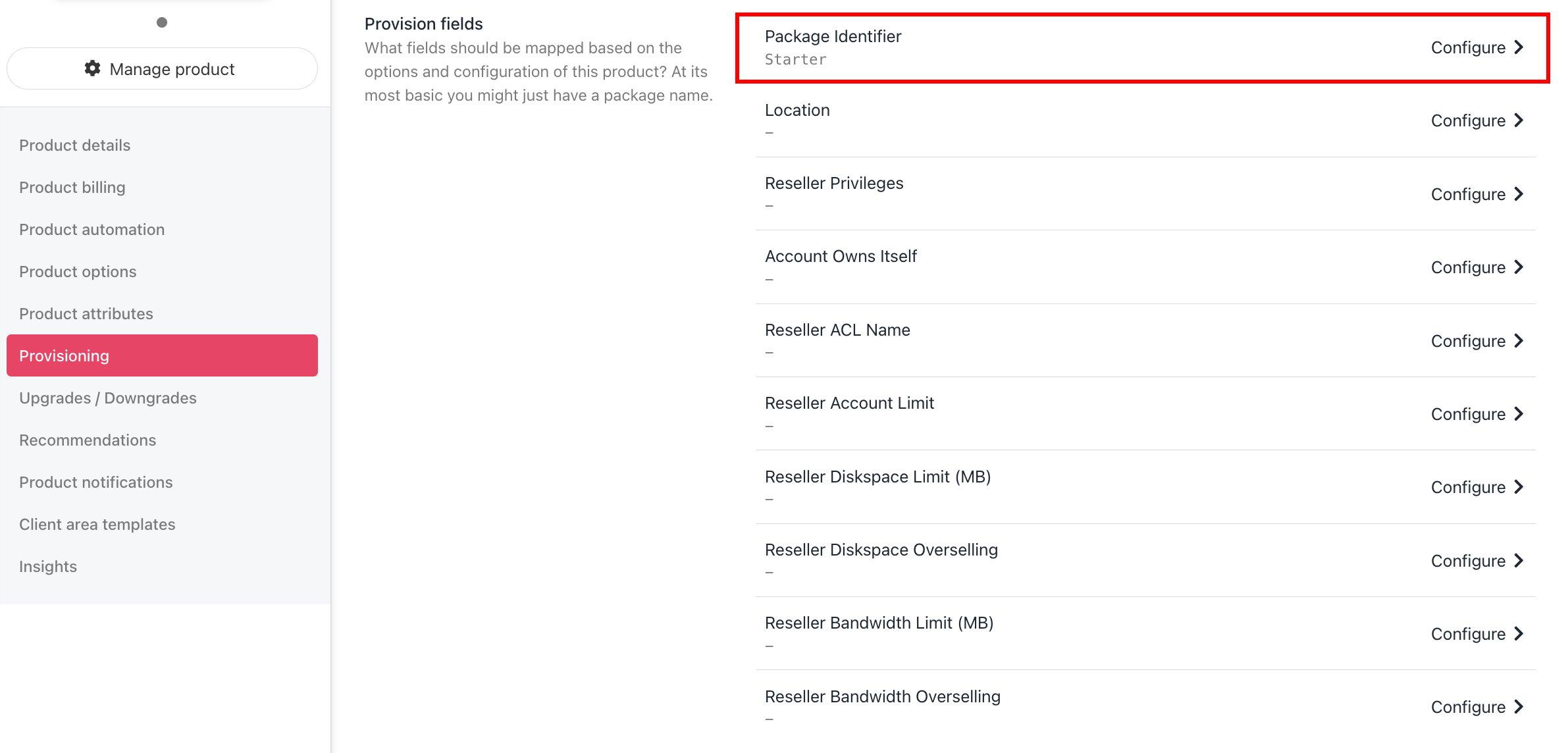
Now go to the product's Provisioning page and set the **Provision provider** to DirectAdmin, and set the **Package Identifier** provision field to match your DirectAdmin package **name** or **ID**.
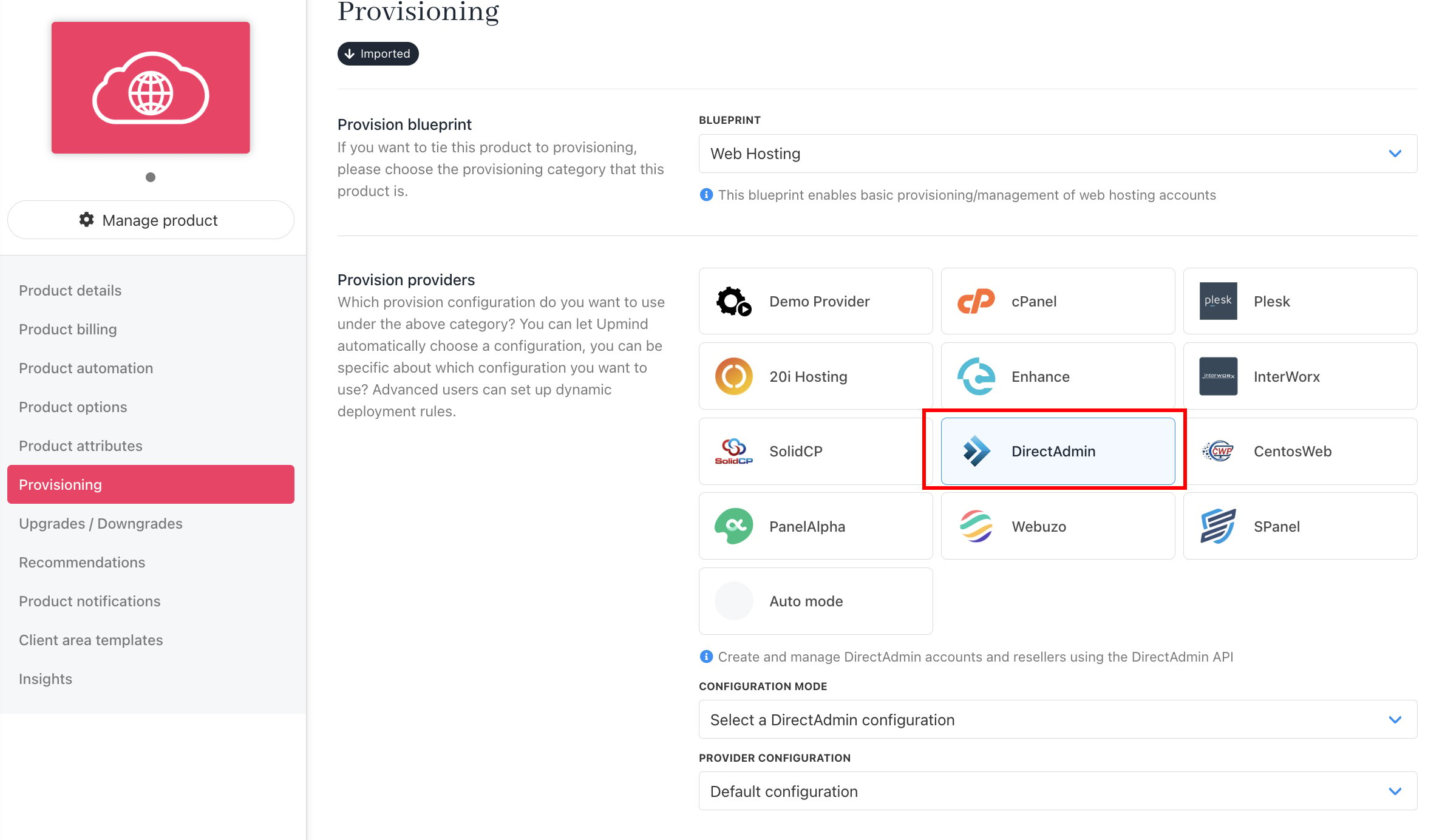
<Frame caption="Set provision provider">
  <img src="https://mintcdn.com/upmind/JUoAg6onJmXk_-rR/images/fb/e7f09d392b1a14b8.png?fit=max&auto=format&n=JUoAg6onJmXk_-rR&q=85&s=13b2e2a86ade3ea04ada9afbc0722a70" alt="Set provision provider" width="2380" height="1384" data-path="images/fb/e7f09d392b1a14b8.png" />
</Frame>

<Frame caption="Set package identifier">
  <img src="https://mintcdn.com/upmind/z5ofg3t7by4uN44v/images/fb/f23803d124a874c4.png?fit=max&auto=format&n=z5ofg3t7by4uN44v&q=85&s=dc3cfd26449ccf3521b9bf914f493e6e" alt="Set package identifier" width="2382" height="1144" data-path="images/fb/f23803d124a874c4.png" />
</Frame>

Package identifier must match the package name.

At this point, your DirectAdmin product provisioning is all set up and ready to go. For more information on setting up and selling hosting products in Upmind, refer to our first step and [Web Hosting Quick Start](/for-web-hosts/quick-start-guide-for-hosting-companies-or-resellers) guides.
