> ## Documentation Index
> Fetch the complete documentation index at: https://docs.upmind.com/llms.txt
> Use this file to discover all available pages before exploring further.

# How to Link OpusDNS to Upmind

> Integrate OpusDNS domain registrar with Upmind.

[OpusDNS](https://www.opusdns.com/) is a DNS management platform that allows you to manage DNS zones, records, and configurations for domains.

## Acquiring credentials

1. Log in at [app.opusdns.com](http://app.opusdns.com).

2. Go to **Developer** > **API Credentials** and click **New API Credential**.
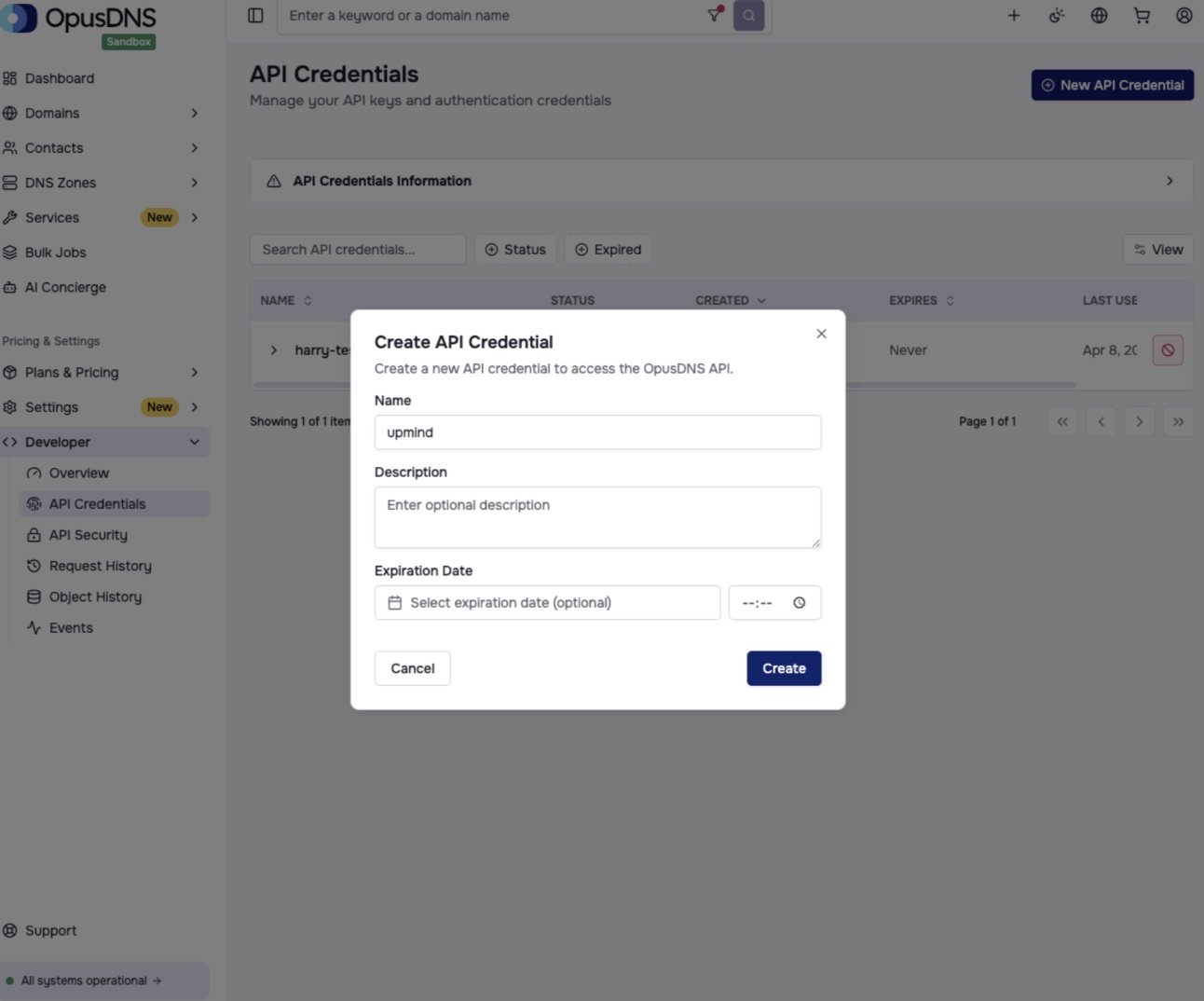
<Frame caption="Developer > API Credentials">
  <img src="https://mintcdn.com/upmind/6knUVC8F1nK4E5CY/images/fb/c5f46c21c530e80f.png?fit=max&auto=format&n=6knUVC8F1nK4E5CY&q=85&s=7986f81f67b65f753da97e781789dab4" alt="Developer > API Credentials" data-og-width="1292" width="1292" data-og-height="1074" height="1074" data-path="images/fb/c5f46c21c530e80f.png" data-optimize="true" data-opv="3" srcset="https://mintcdn.com/upmind/6knUVC8F1nK4E5CY/images/fb/c5f46c21c530e80f.png?w=280&fit=max&auto=format&n=6knUVC8F1nK4E5CY&q=85&s=1cd6480e81e422ccef37a78798ad61f1 280w, https://mintcdn.com/upmind/6knUVC8F1nK4E5CY/images/fb/c5f46c21c530e80f.png?w=560&fit=max&auto=format&n=6knUVC8F1nK4E5CY&q=85&s=76b099225436efc71ada7941356d6b54 560w, https://mintcdn.com/upmind/6knUVC8F1nK4E5CY/images/fb/c5f46c21c530e80f.png?w=840&fit=max&auto=format&n=6knUVC8F1nK4E5CY&q=85&s=516bad0ea6b688321e86809c89ab79df 840w, https://mintcdn.com/upmind/6knUVC8F1nK4E5CY/images/fb/c5f46c21c530e80f.png?w=1100&fit=max&auto=format&n=6knUVC8F1nK4E5CY&q=85&s=6ae30ed7115fd2446c9ac86922b31cee 1100w, https://mintcdn.com/upmind/6knUVC8F1nK4E5CY/images/fb/c5f46c21c530e80f.png?w=1650&fit=max&auto=format&n=6knUVC8F1nK4E5CY&q=85&s=4366493c78819b65d9d680f9b23fbb3f 1650w, https://mintcdn.com/upmind/6knUVC8F1nK4E5CY/images/fb/c5f46c21c530e80f.png?w=2500&fit=max&auto=format&n=6knUVC8F1nK4E5CY&q=85&s=224d155c82a08011d3fc334afa06655b 2500w" />
</Frame>

3. Click **Create** and copy the **API Key**.
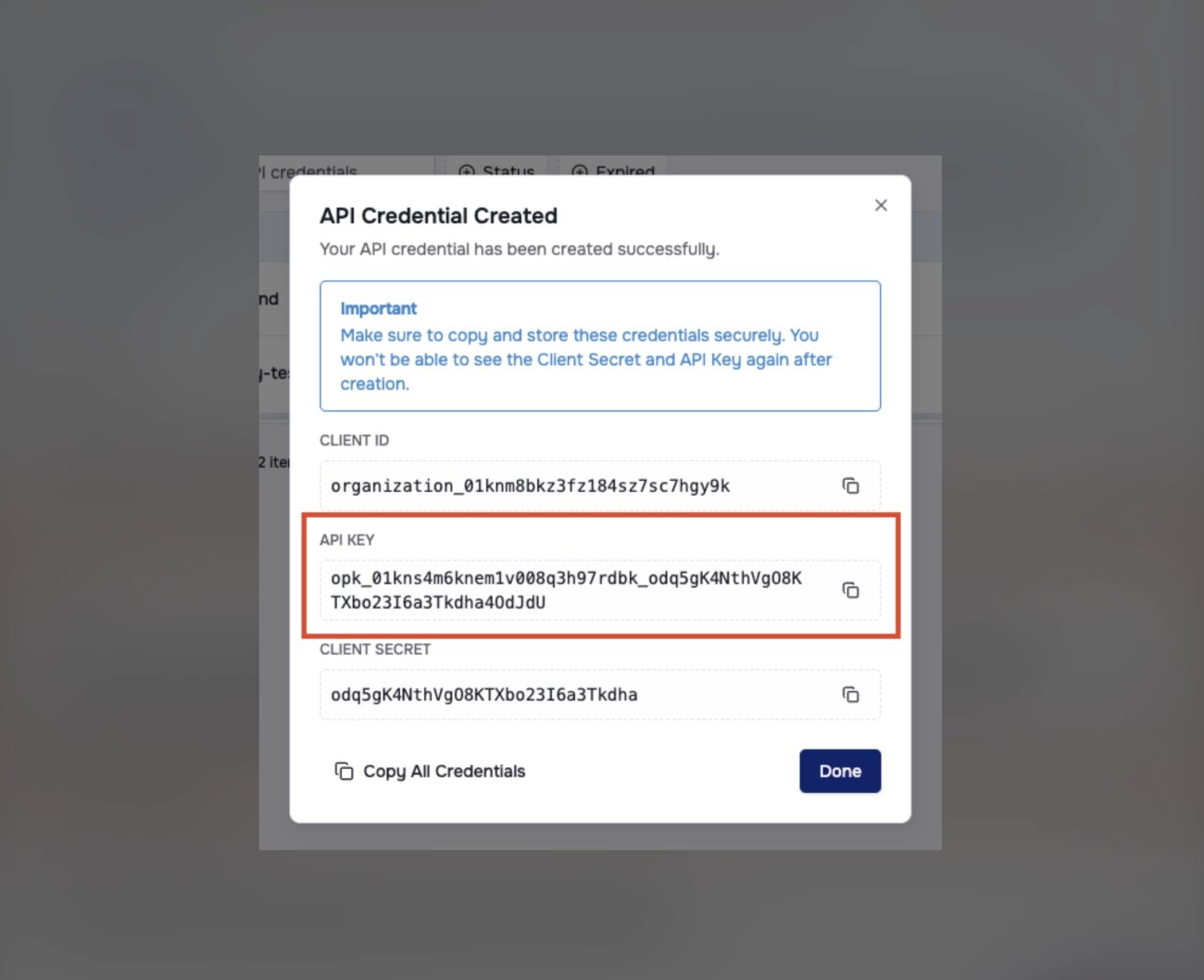
<Frame caption="Copy API key">
  <img src="https://mintcdn.com/upmind/5gi4DQpw4X76kT6T/images/fb/bbd550c04d2d4224.png?fit=max&auto=format&n=5gi4DQpw4X76kT6T&q=85&s=f2f905fb839d35d2f0c91def7d67fa31" alt="Copy API key" width="1300" height="1058" data-path="images/fb/bbd550c04d2d4224.png" />
</Frame>

## **Linking to OpusDNS**

1. In Upmind, navigate to **Host Control** > **Domain names** > **Registrars**.

2. Click on **OpusDNS**.
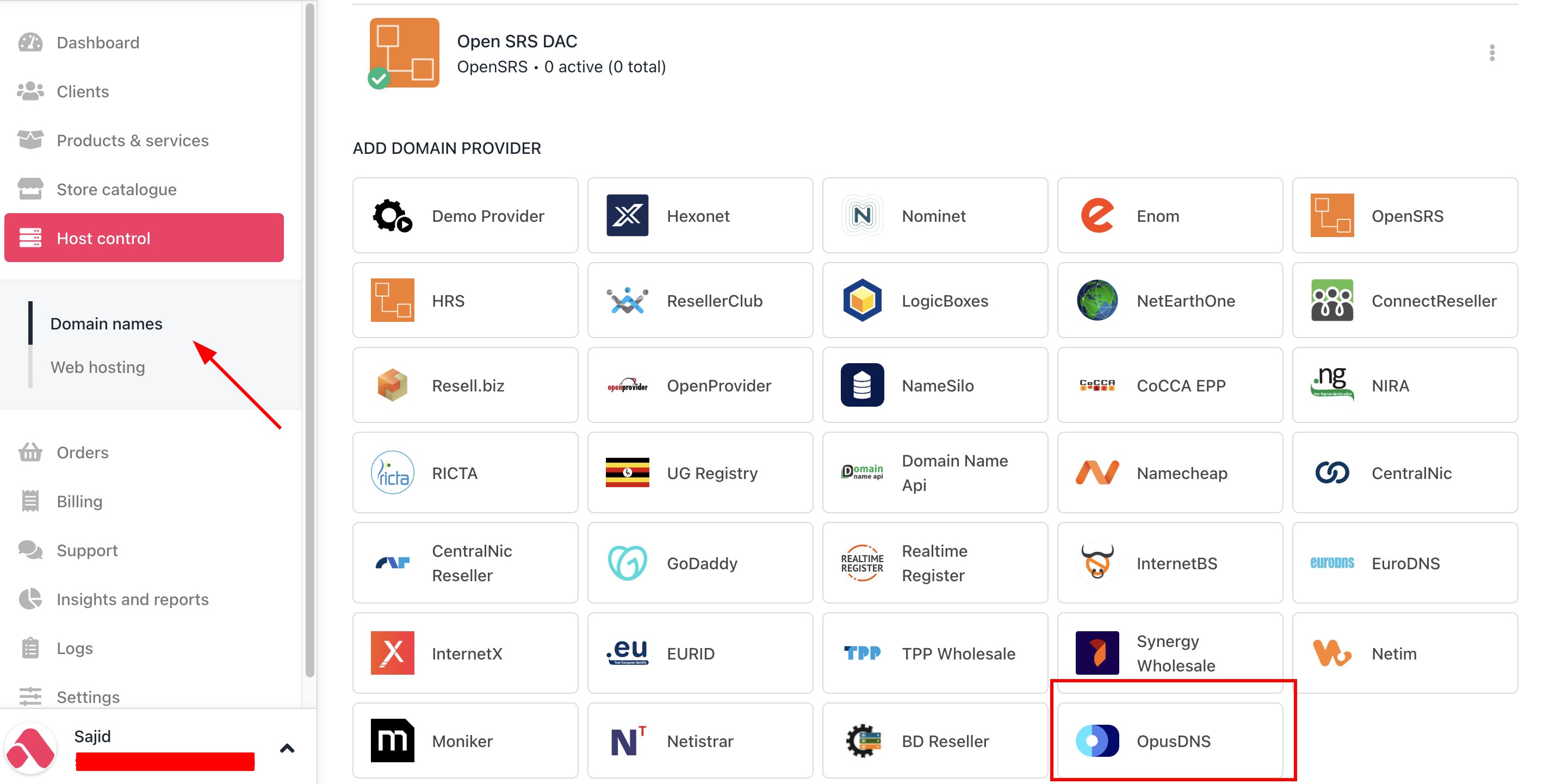
<Frame caption="Host Control > Domain names > Registrars">
  <img src="https://mintcdn.com/upmind/1-uICsJi9zYpvJVH/images/fb/8c39654e58767eac.png?fit=max&auto=format&n=1-uICsJi9zYpvJVH&q=85&s=2ea6a01b9a82ecd3232c1558aef524ad" alt="Host Control > Domain names > Registrars" data-og-width="2850" width="2850" data-og-height="1442" height="1442" data-path="images/fb/8c39654e58767eac.png" data-optimize="true" data-opv="3" srcset="https://mintcdn.com/upmind/1-uICsJi9zYpvJVH/images/fb/8c39654e58767eac.png?w=280&fit=max&auto=format&n=1-uICsJi9zYpvJVH&q=85&s=9142720a03e5ac64036ad721e8048935 280w, https://mintcdn.com/upmind/1-uICsJi9zYpvJVH/images/fb/8c39654e58767eac.png?w=560&fit=max&auto=format&n=1-uICsJi9zYpvJVH&q=85&s=d7536ff62387ce2d1368136633a25dcb 560w, https://mintcdn.com/upmind/1-uICsJi9zYpvJVH/images/fb/8c39654e58767eac.png?w=840&fit=max&auto=format&n=1-uICsJi9zYpvJVH&q=85&s=c7de6e92872eaa45c645a2c57a22c3bb 840w, https://mintcdn.com/upmind/1-uICsJi9zYpvJVH/images/fb/8c39654e58767eac.png?w=1100&fit=max&auto=format&n=1-uICsJi9zYpvJVH&q=85&s=d014e2b52d718e27a5ca70efb5659763 1100w, https://mintcdn.com/upmind/1-uICsJi9zYpvJVH/images/fb/8c39654e58767eac.png?w=1650&fit=max&auto=format&n=1-uICsJi9zYpvJVH&q=85&s=8e574d9a6e87a96c100e072b9ae94360 1650w, https://mintcdn.com/upmind/1-uICsJi9zYpvJVH/images/fb/8c39654e58767eac.png?w=2500&fit=max&auto=format&n=1-uICsJi9zYpvJVH&q=85&s=5d60519dc794fb0a59227dafeb0b7010 2500w" />
</Frame>

3. Enter a **Name**. This identifier is not visible to clients. We recommend entering the name **OpusDNS** unless you have two separate accounts that you want to label differently.
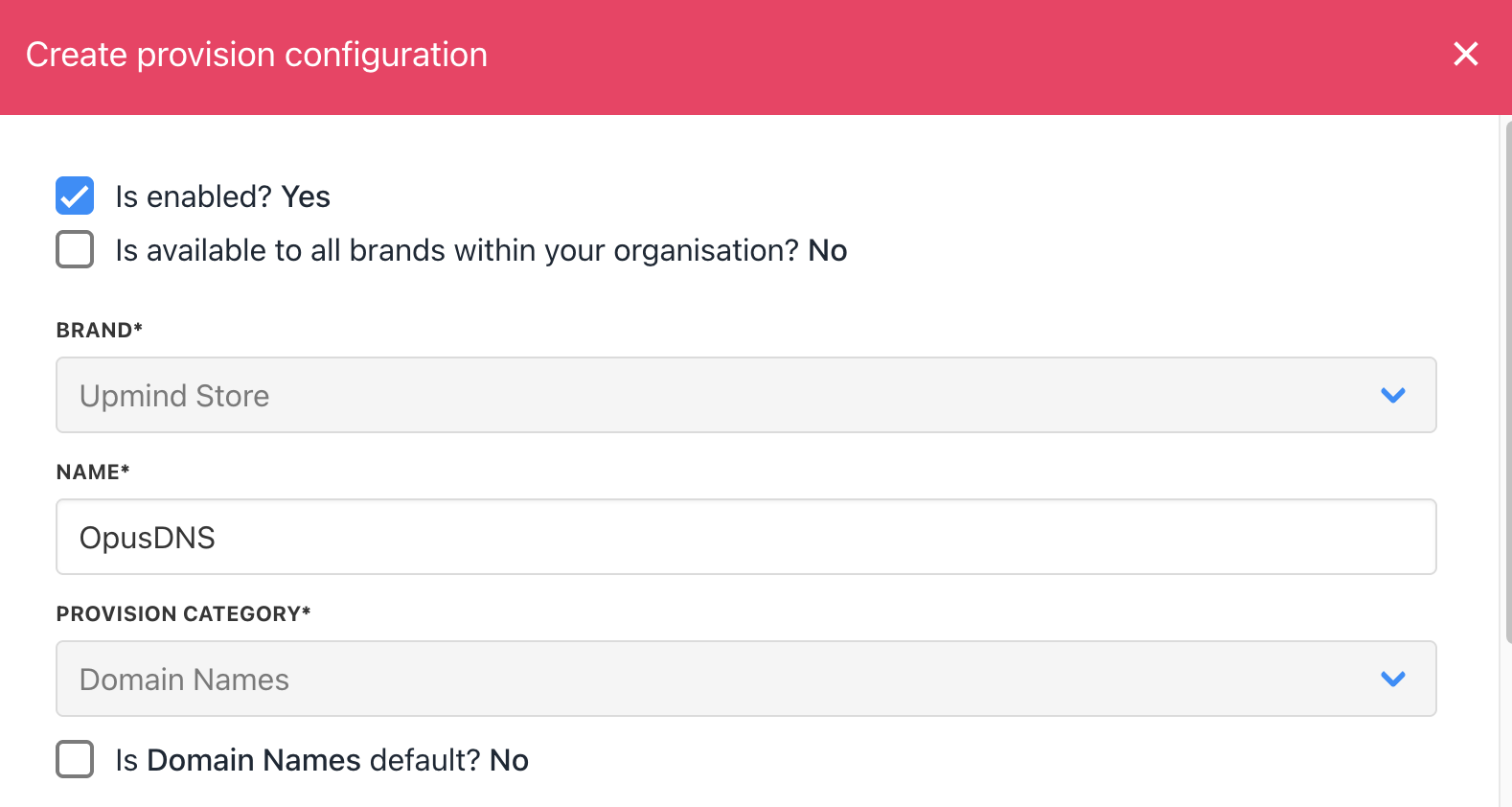
<Frame caption="Enter name">
  <img src="https://mintcdn.com/upmind/5gi4DQpw4X76kT6T/images/fb/b672e76c83173bf2.png?fit=max&auto=format&n=5gi4DQpw4X76kT6T&q=85&s=b12e71224397b87cd20ca2e91c23173d" alt="Enter name" width="1578" height="842" data-path="images/fb/b672e76c83173bf2.png" />
</Frame>

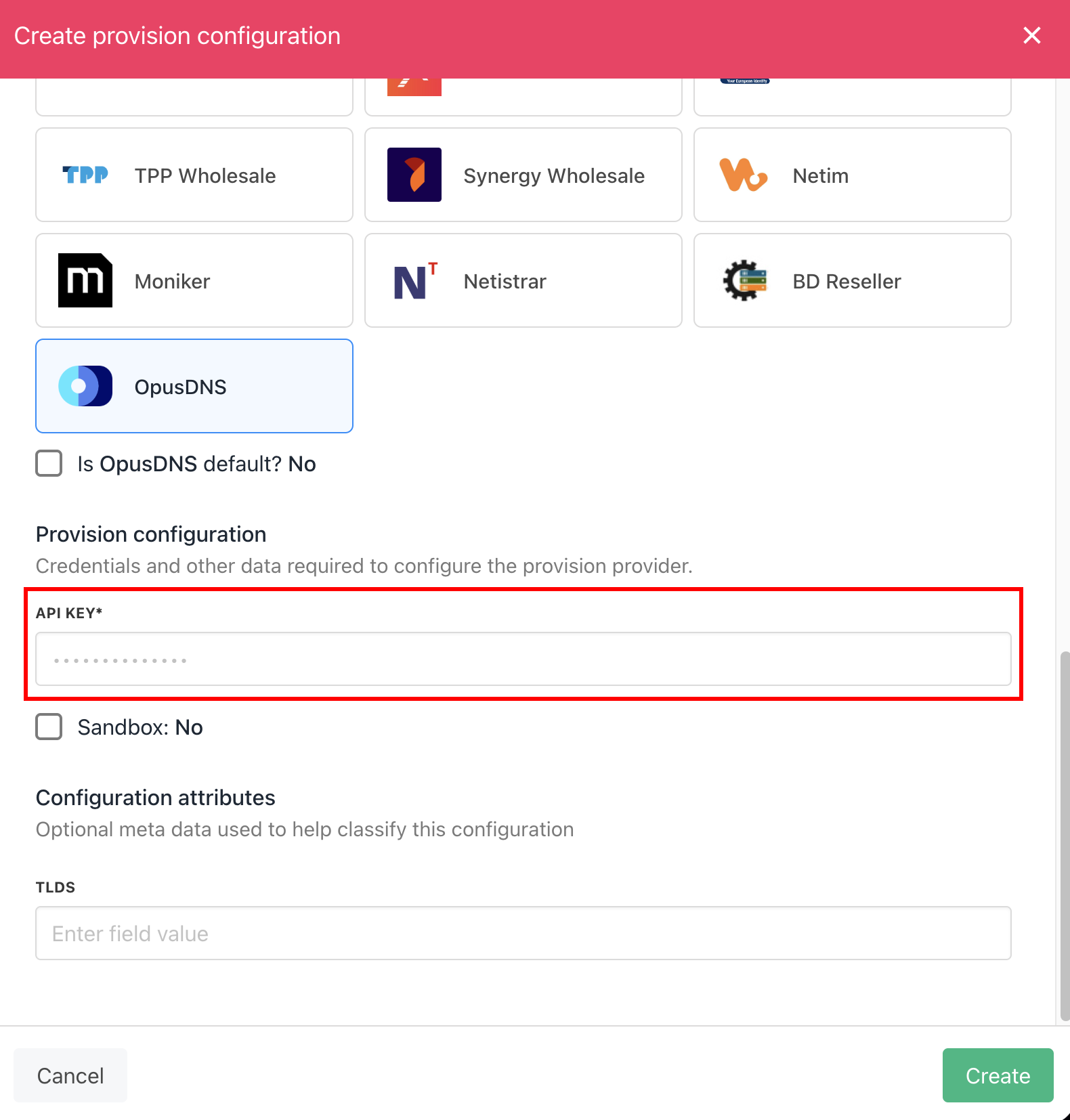
4. Enter the **API Key**.

<Frame caption="Enter details">
  <img src="https://mintcdn.com/upmind/Lh8hC132BWHpvRbz/images/fb/4a3ffa1691274c2f.png?fit=max&auto=format&n=Lh8hC132BWHpvRbz&q=85&s=478230eddf1cdfe9c4fc5d15efa3a3f9" alt="Enter details" width="1580" height="1654" data-path="images/fb/4a3ffa1691274c2f.png" />
</Frame>

5. Click **Create**.

6. Verify the information on the [<u>Domain Settings</u>](/for-web-hosts/domain-names/how-to-input-domain-settings) page.

That’s it! Your account is now linked. You can now create a TLD available for sale by following this guide on [how to create TLDs](/for-web-hosts/domain-names/how-to-add-a-tld).