> ## Documentation Index
> Fetch the complete documentation index at: https://docs.upmind.com/llms.txt
> Use this file to discover all available pages before exploring further.

# How to Link Nominet with Upmind

> Integrate Nominet domain registrar with Upmind.

[Nominet](https://www.nominet.uk/) is the official registry of the **.UK** domain name and several second-level domains such as .co.uk and .net.uk.

You can sign up for a reseller account on their [website](https://www.nominet.uk/).

## Details needed

To link your account to Upmind, you will need:

* IPS tag.

* Nominet account password.

## Linking to Nominet

1. In Upmind, navigate to **Host Control** > **Domain names** > **Registrars**.

2. Click on **Nominet**.
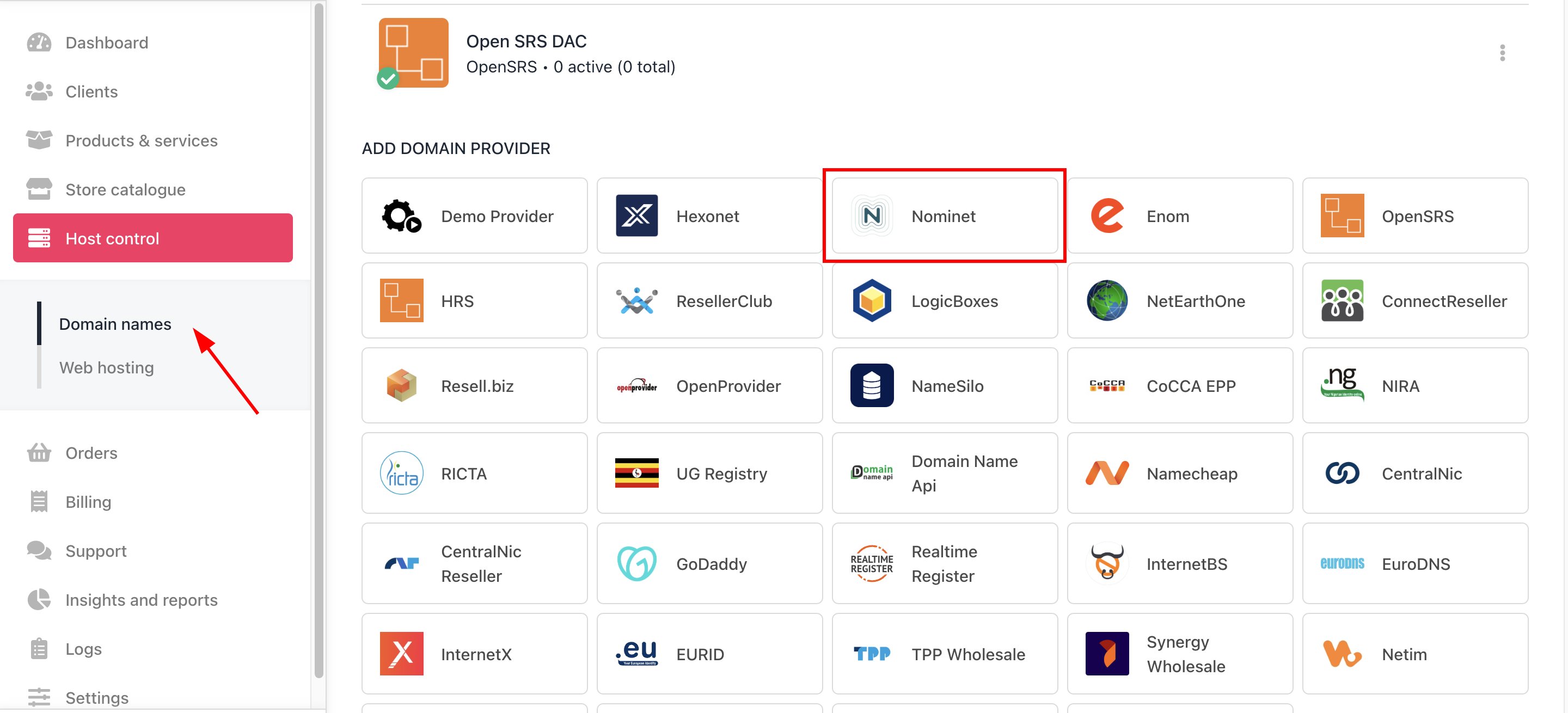
<Frame caption="Host Control > Domain names > Registrars">
  <img src="https://mintcdn.com/upmind/5gi4DQpw4X76kT6T/images/fb/b7a80149c8b6f30c.png?fit=max&auto=format&n=5gi4DQpw4X76kT6T&q=85&s=d37ee9e399dbbad40badfd3155854b74" alt="Host Control > Domain names > Registrars" data-og-width="2880" width="2880" data-og-height="1310" height="1310" data-path="images/fb/b7a80149c8b6f30c.png" data-optimize="true" data-opv="3" srcset="https://mintcdn.com/upmind/5gi4DQpw4X76kT6T/images/fb/b7a80149c8b6f30c.png?w=280&fit=max&auto=format&n=5gi4DQpw4X76kT6T&q=85&s=bfc7226218523aabae5b612ba5a4be8a 280w, https://mintcdn.com/upmind/5gi4DQpw4X76kT6T/images/fb/b7a80149c8b6f30c.png?w=560&fit=max&auto=format&n=5gi4DQpw4X76kT6T&q=85&s=b0e0fed6253c28cb7cd42982831a774a 560w, https://mintcdn.com/upmind/5gi4DQpw4X76kT6T/images/fb/b7a80149c8b6f30c.png?w=840&fit=max&auto=format&n=5gi4DQpw4X76kT6T&q=85&s=7245a8a4a4a4158a99381768f1576431 840w, https://mintcdn.com/upmind/5gi4DQpw4X76kT6T/images/fb/b7a80149c8b6f30c.png?w=1100&fit=max&auto=format&n=5gi4DQpw4X76kT6T&q=85&s=b51d0a69bf03c2b4a077deafbcad5998 1100w, https://mintcdn.com/upmind/5gi4DQpw4X76kT6T/images/fb/b7a80149c8b6f30c.png?w=1650&fit=max&auto=format&n=5gi4DQpw4X76kT6T&q=85&s=16246269126473cee696ce33a8ff7c27 1650w, https://mintcdn.com/upmind/5gi4DQpw4X76kT6T/images/fb/b7a80149c8b6f30c.png?w=2500&fit=max&auto=format&n=5gi4DQpw4X76kT6T&q=85&s=8f18e04edcb4f7780cae268394ab3f24 2500w" />
</Frame>

3. Enter a **Name**. We recommend **Nominet** unless you have two separate accounts that you want to label differently (e.g., Nominet V1 and Nominet V2).
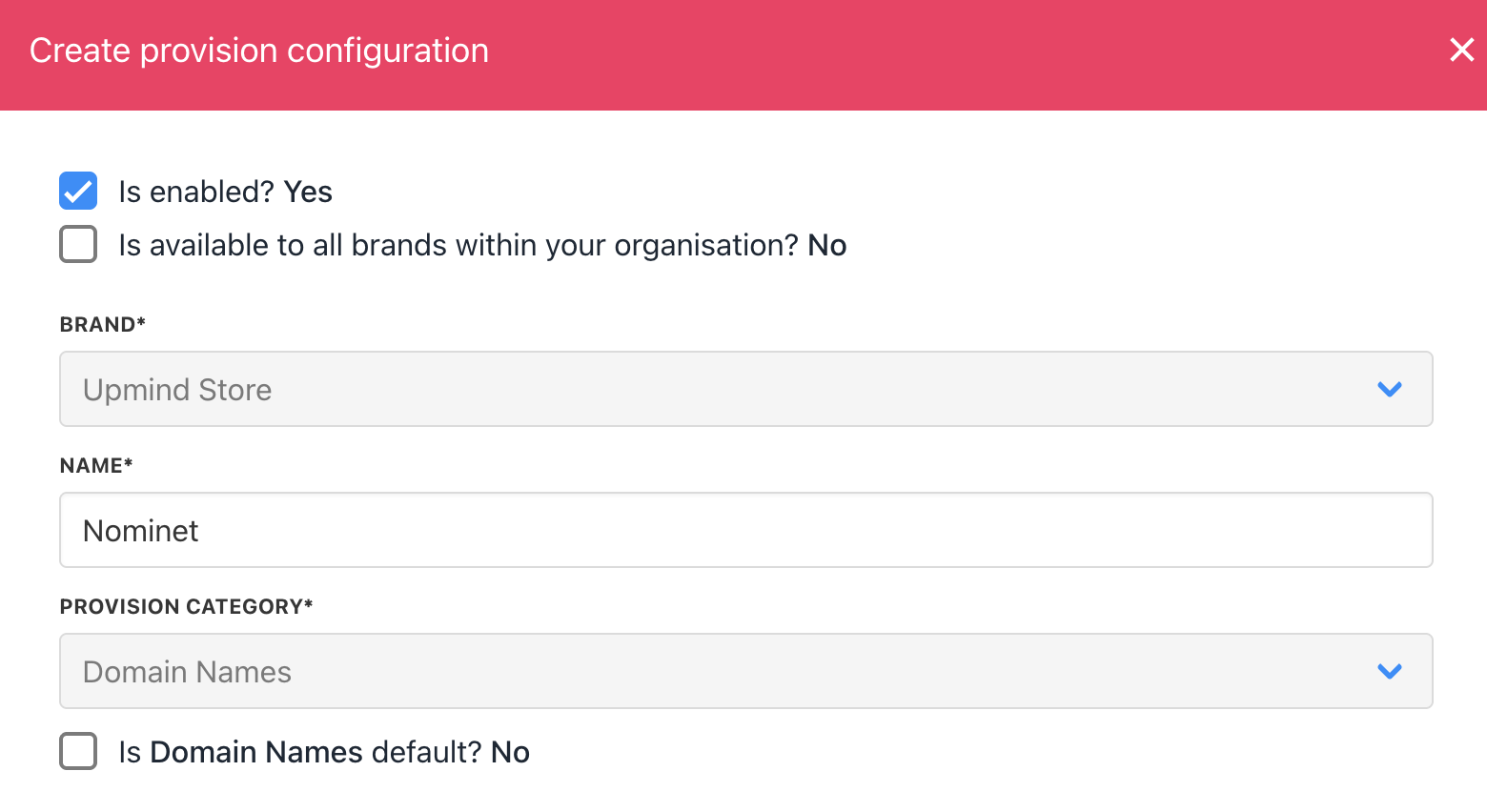
<Frame caption="Enter name">
  <img src="https://mintcdn.com/upmind/1-uICsJi9zYpvJVH/images/fb/91cb3ead9cf63491.png?fit=max&auto=format&n=1-uICsJi9zYpvJVH&q=85&s=eee884e32d8a21d28258ebdf626f977e" alt="Enter name" width="1560" height="852" data-path="images/fb/91cb3ead9cf63491.png" />
</Frame>

4. Enter your **IPS tag** and your Nominet account **password**.
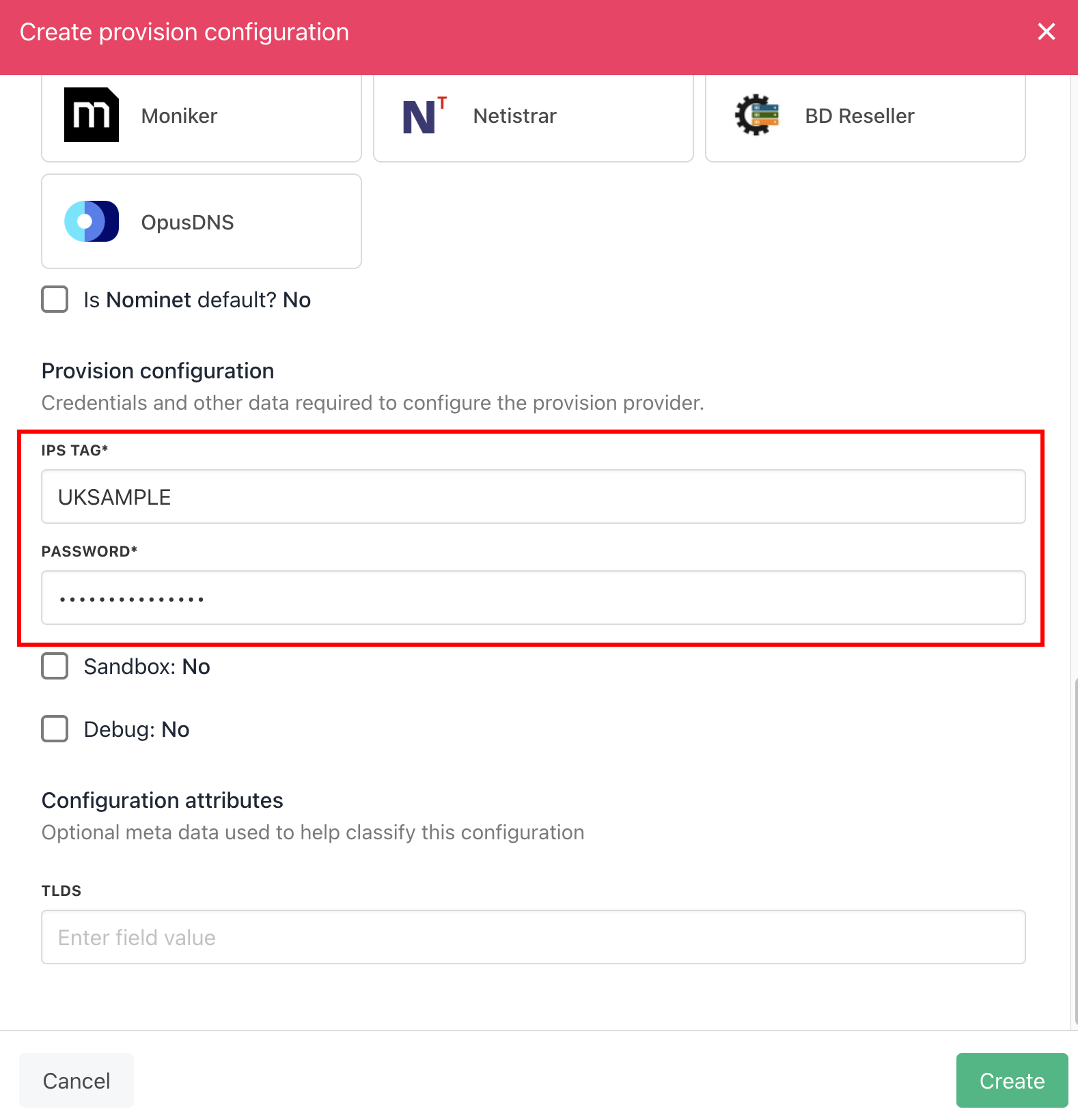
<Frame caption="Enter details">
  <img src="https://mintcdn.com/upmind/2ooSxDpt6PiIGMr-/images/fb/03e7de7451f3a681.png?fit=max&auto=format&n=2ooSxDpt6PiIGMr-&q=85&s=f3bde9df04351a6b3caf1b335a0b0718" alt="Enter details" width="1578" height="1640" data-path="images/fb/03e7de7451f3a681.png" />
</Frame>

5. Click **Create**.

6. Verify the information on the [<u>Domain Settings</u>](/for-web-hosts/domain-names/how-to-input-domain-settings) page.

That is it! Your account is now linked.
