> ## Documentation Index
> Fetch the complete documentation index at: https://docs.upmind.com/llms.txt
> Use this file to discover all available pages before exploring further.

# How to Link InterNetX with Upmind

> Integrate InterNetX domain registrar with Upmind.

InterNetX is one of the largest registrars in the global domain market, offering advanced domain management services to over 30,000 partners.

You can sign up with InterNetX on [their website](https://www.internetx.com/en/).

## Details needed

To link your InterNetX account to Upmind, you will need a username and password for your InterNetX account.

## Linking InterNetX to Upmind

1. In Upmind, navigate to **Host Control** > **Domain names** > **Registrars**.

2. **Click** on **InterNetX.**
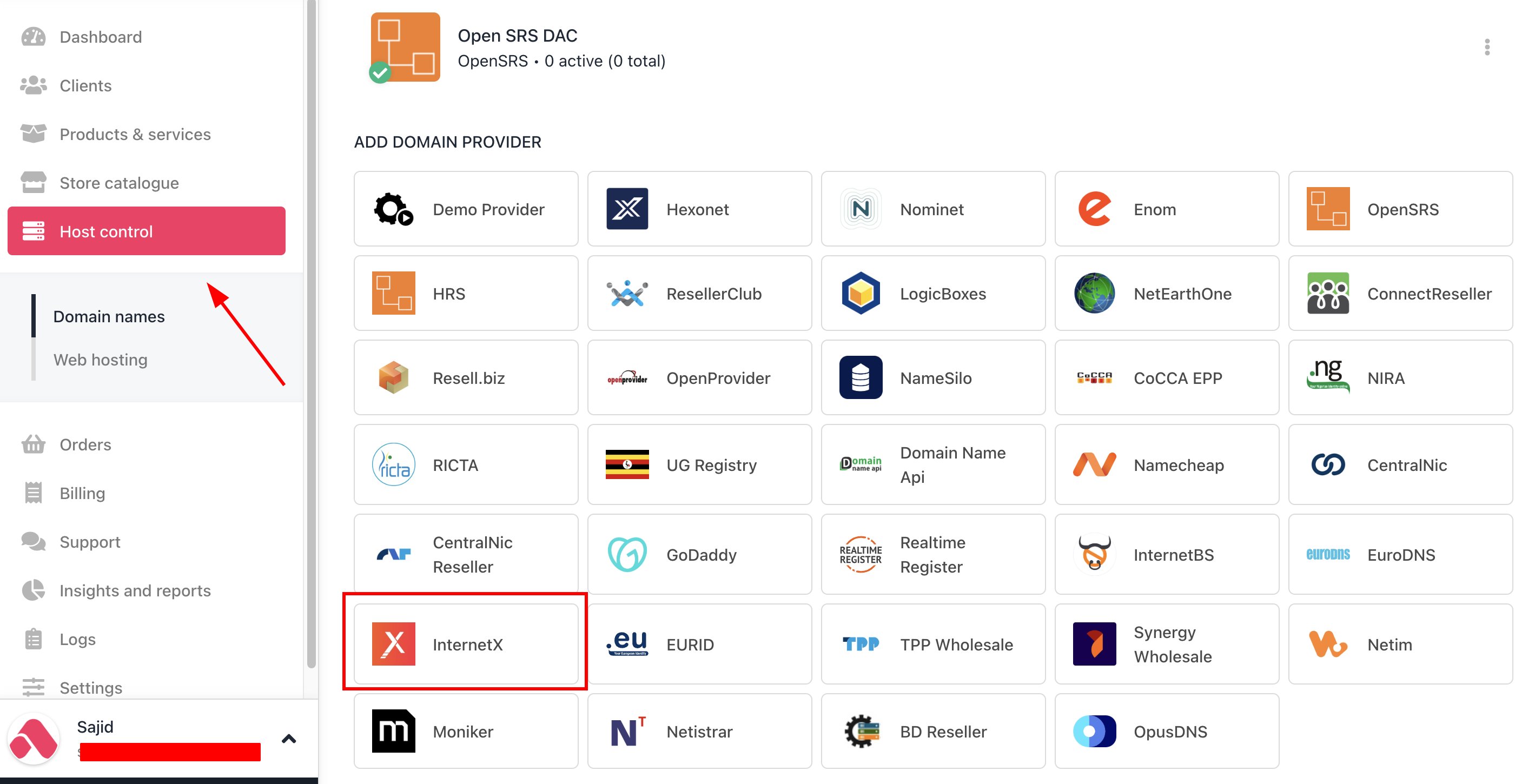
<Frame caption="Host Control > Domain names > Registrars">
  <img src="https://mintcdn.com/upmind/z5ofg3t7by4uN44v/images/fb/eb57bc1d6f8ad041.png?fit=max&auto=format&n=z5ofg3t7by4uN44v&q=85&s=33fb300e1a2fa33631de0d9e43fd5522" alt="Host Control > Domain names > Registrars" data-og-width="2838" width="2838" data-og-height="1450" height="1450" data-path="images/fb/eb57bc1d6f8ad041.png" data-optimize="true" data-opv="3" srcset="https://mintcdn.com/upmind/z5ofg3t7by4uN44v/images/fb/eb57bc1d6f8ad041.png?w=280&fit=max&auto=format&n=z5ofg3t7by4uN44v&q=85&s=0a20a2e545579dbc3565ad52664d8299 280w, https://mintcdn.com/upmind/z5ofg3t7by4uN44v/images/fb/eb57bc1d6f8ad041.png?w=560&fit=max&auto=format&n=z5ofg3t7by4uN44v&q=85&s=cde7974ec68228c8b2ecf7b0ffb34d45 560w, https://mintcdn.com/upmind/z5ofg3t7by4uN44v/images/fb/eb57bc1d6f8ad041.png?w=840&fit=max&auto=format&n=z5ofg3t7by4uN44v&q=85&s=7dea9290ab217f87853d411df3942d55 840w, https://mintcdn.com/upmind/z5ofg3t7by4uN44v/images/fb/eb57bc1d6f8ad041.png?w=1100&fit=max&auto=format&n=z5ofg3t7by4uN44v&q=85&s=c08d6a484c91d8b228506753a30e0ef1 1100w, https://mintcdn.com/upmind/z5ofg3t7by4uN44v/images/fb/eb57bc1d6f8ad041.png?w=1650&fit=max&auto=format&n=z5ofg3t7by4uN44v&q=85&s=53c4d15723ca37975aad3f7697b58f89 1650w, https://mintcdn.com/upmind/z5ofg3t7by4uN44v/images/fb/eb57bc1d6f8ad041.png?w=2500&fit=max&auto=format&n=z5ofg3t7by4uN44v&q=85&s=48f0e16805b7b6b680a1386acb7ce945 2500w" />
</Frame>

3. Enter a **Name**. This identifier is not visible to clients. We recommend entering the name InterNetX unless you have two separate accounts that you want to label differently.
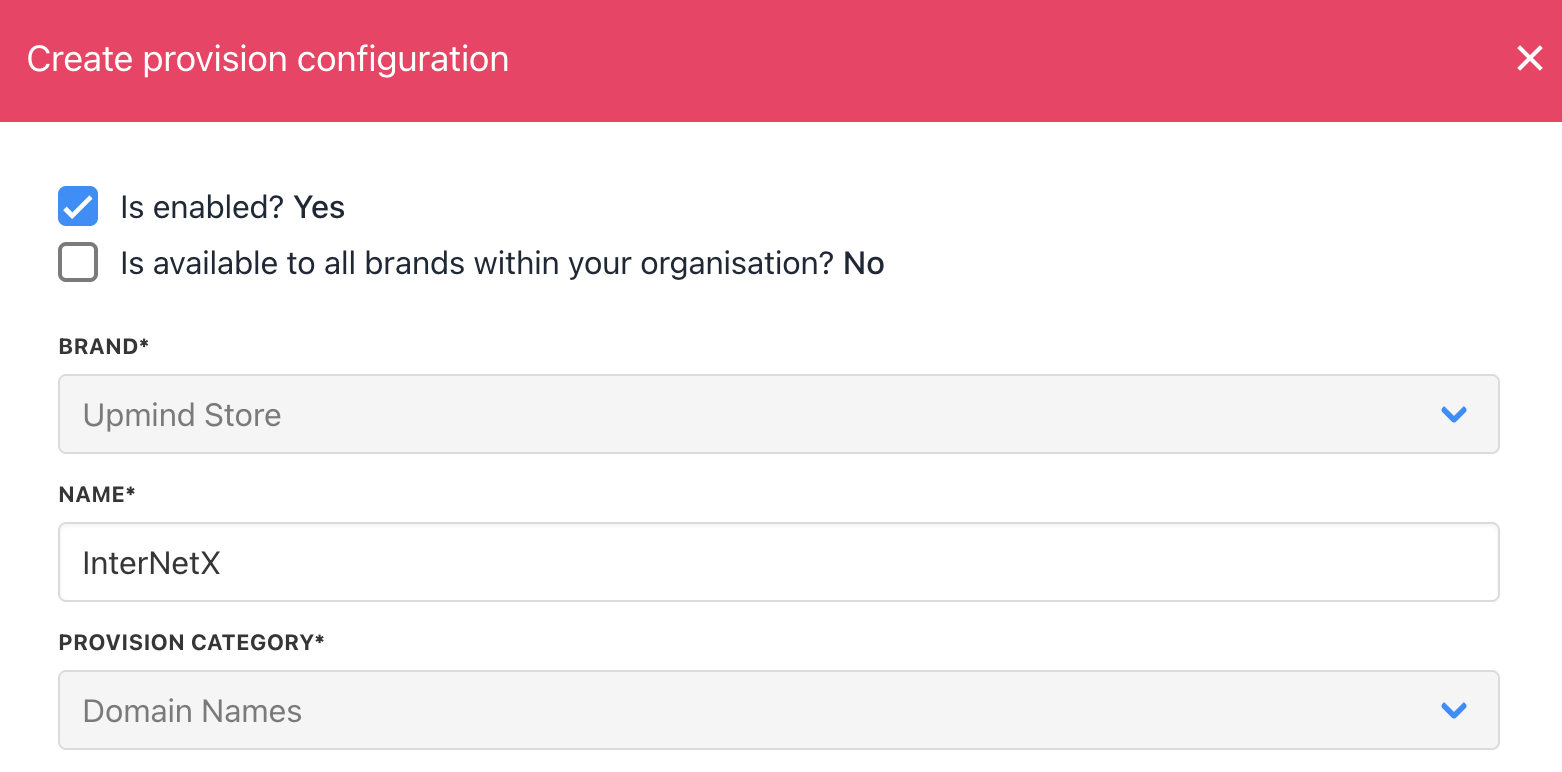
<Frame caption="Enter name">
  <img src="https://mintcdn.com/upmind/JUoAg6onJmXk_-rR/images/fb/de65a848d50b06e4.png?fit=max&auto=format&n=JUoAg6onJmXk_-rR&q=85&s=2ac22b623153d216da6ca1aa61a762ac" alt="Enter name" width="1562" height="772" data-path="images/fb/de65a848d50b06e4.png" />
</Frame>

4. Enter your InterNetX **username** and **password**.
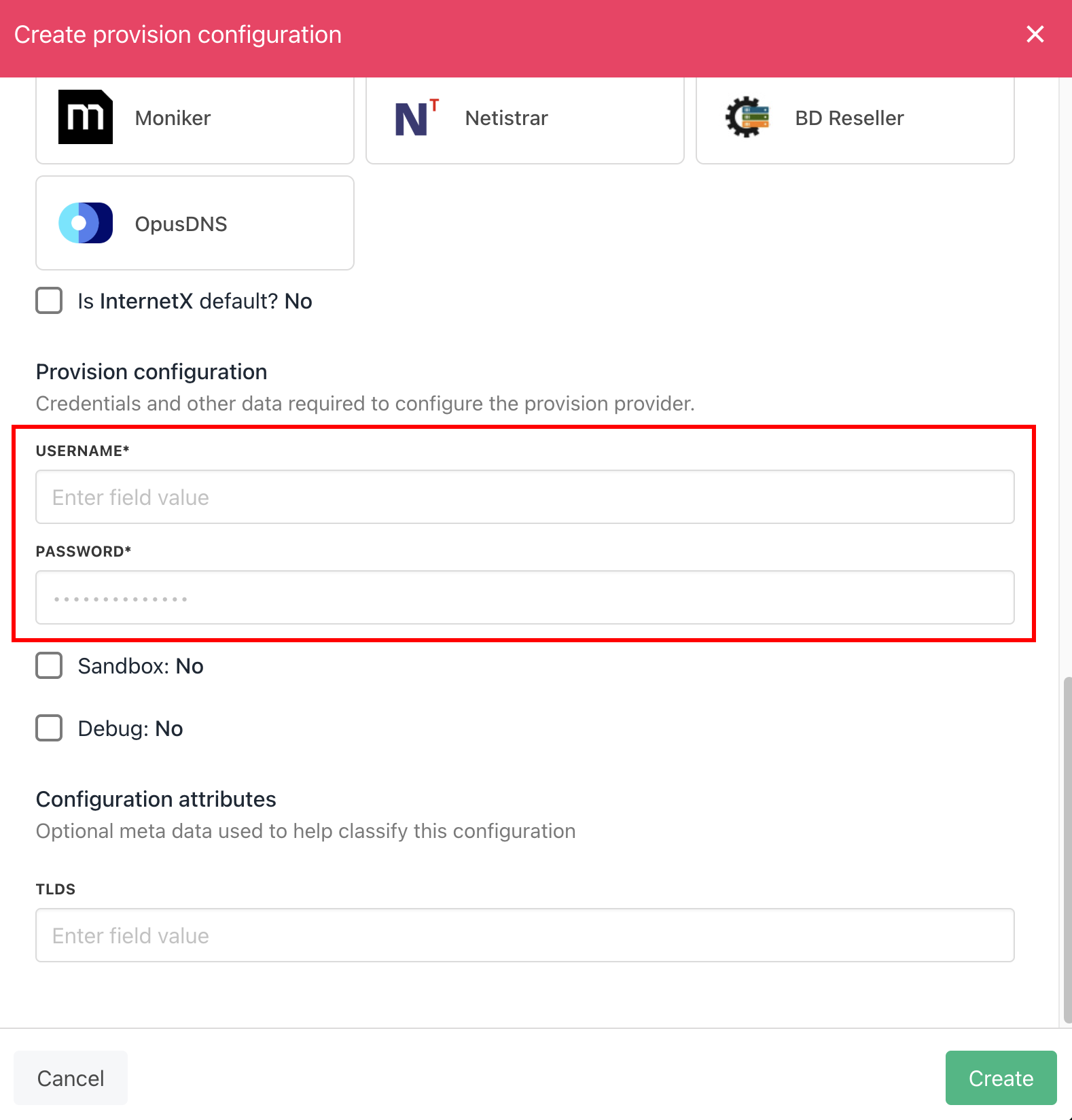
<Frame caption="Enter details">
  <img src="https://mintcdn.com/upmind/uxzVUXAKtJ2bRWCI/images/fb/6bff2e63d605fd27.png?fit=max&auto=format&n=uxzVUXAKtJ2bRWCI&q=85&s=4f47625270d7318550697469ace9a183" alt="Enter details" width="1578" height="1648" data-path="images/fb/6bff2e63d605fd27.png" />
</Frame>

5. Click the **Create** button.

6. Verify the information on the [<u>Domain Settings</u>](/for-web-hosts/domain-names/how-to-input-domain-settings) page.
