> ## Documentation Index
> Fetch the complete documentation index at: https://docs.upmind.com/llms.txt
> Use this file to discover all available pages before exploring further.

# How to Link EuroDNS with Upmind

> Integrate EuroDNS domain registrar with Upmind.

EuroDNS is a leading domain name registrar and DNS service provider. They offer free DNS, SSL certificates, and mailboxes with all domain names, along with reliable support and comprehensive management tools.

You can sign up with EuroDNS on [their website.](https://www.eurodns.com/)

## Details needed

To link your EuroDNS account to Upmind, you will need a username and password for your EuroDNS account.

## Linking EuroDNS to Upmind

1. In Upmind, navigate to **Host Control** > **Domain names** > **Registrars**.

2. **Click** on **EuroDNS.**
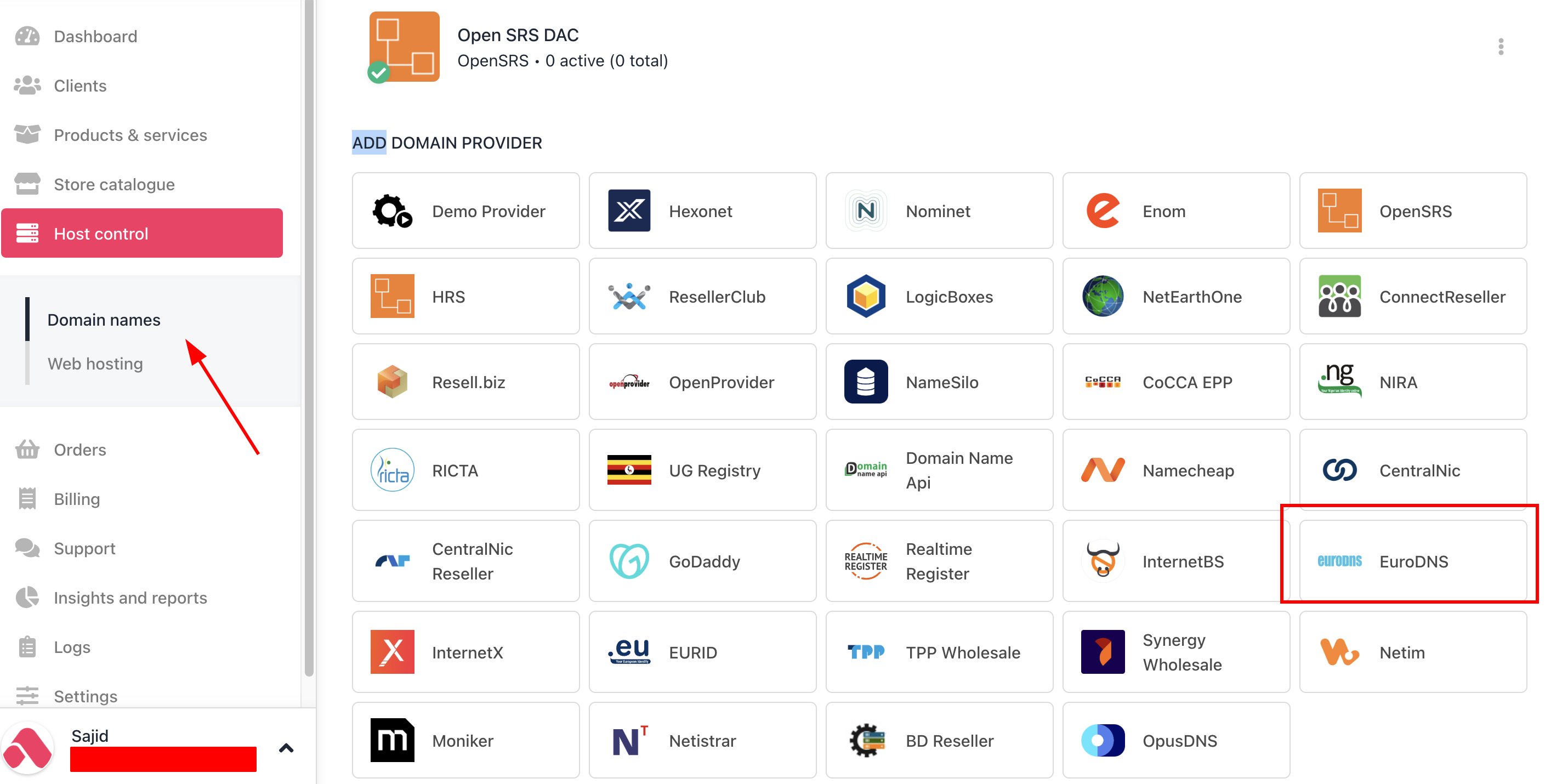
<Frame caption="Host Control > Domain names > Registrars">
  <img src="https://mintcdn.com/upmind/Lh8hC132BWHpvRbz/images/fb/4da9a694b963b4d2.png?fit=max&auto=format&n=Lh8hC132BWHpvRbz&q=85&s=f88743e081892cb81379670643ea77f1" alt="Host Control > Domain names > Registrars" data-og-width="2818" width="2818" data-og-height="1430" height="1430" data-path="images/fb/4da9a694b963b4d2.png" data-optimize="true" data-opv="3" srcset="https://mintcdn.com/upmind/Lh8hC132BWHpvRbz/images/fb/4da9a694b963b4d2.png?w=280&fit=max&auto=format&n=Lh8hC132BWHpvRbz&q=85&s=b79e05cc92daaad1d39e68b1b205de98 280w, https://mintcdn.com/upmind/Lh8hC132BWHpvRbz/images/fb/4da9a694b963b4d2.png?w=560&fit=max&auto=format&n=Lh8hC132BWHpvRbz&q=85&s=61c023d0a7370aa69156d187a504d544 560w, https://mintcdn.com/upmind/Lh8hC132BWHpvRbz/images/fb/4da9a694b963b4d2.png?w=840&fit=max&auto=format&n=Lh8hC132BWHpvRbz&q=85&s=933a9b5ac430bc83cc3d99b9807b6480 840w, https://mintcdn.com/upmind/Lh8hC132BWHpvRbz/images/fb/4da9a694b963b4d2.png?w=1100&fit=max&auto=format&n=Lh8hC132BWHpvRbz&q=85&s=672596c0ff7e22ec1a0eda861a338306 1100w, https://mintcdn.com/upmind/Lh8hC132BWHpvRbz/images/fb/4da9a694b963b4d2.png?w=1650&fit=max&auto=format&n=Lh8hC132BWHpvRbz&q=85&s=75c97308e5e61bf54ebe1422e30e2553 1650w, https://mintcdn.com/upmind/Lh8hC132BWHpvRbz/images/fb/4da9a694b963b4d2.png?w=2500&fit=max&auto=format&n=Lh8hC132BWHpvRbz&q=85&s=882941afa0d195c0cc9672d72c1f801c 2500w" />
</Frame>

3. Enter a **Name**. This identifier is not visible to clients. We recommend entering the name EuroDNS unless you have two separate accounts that you want to label differently.
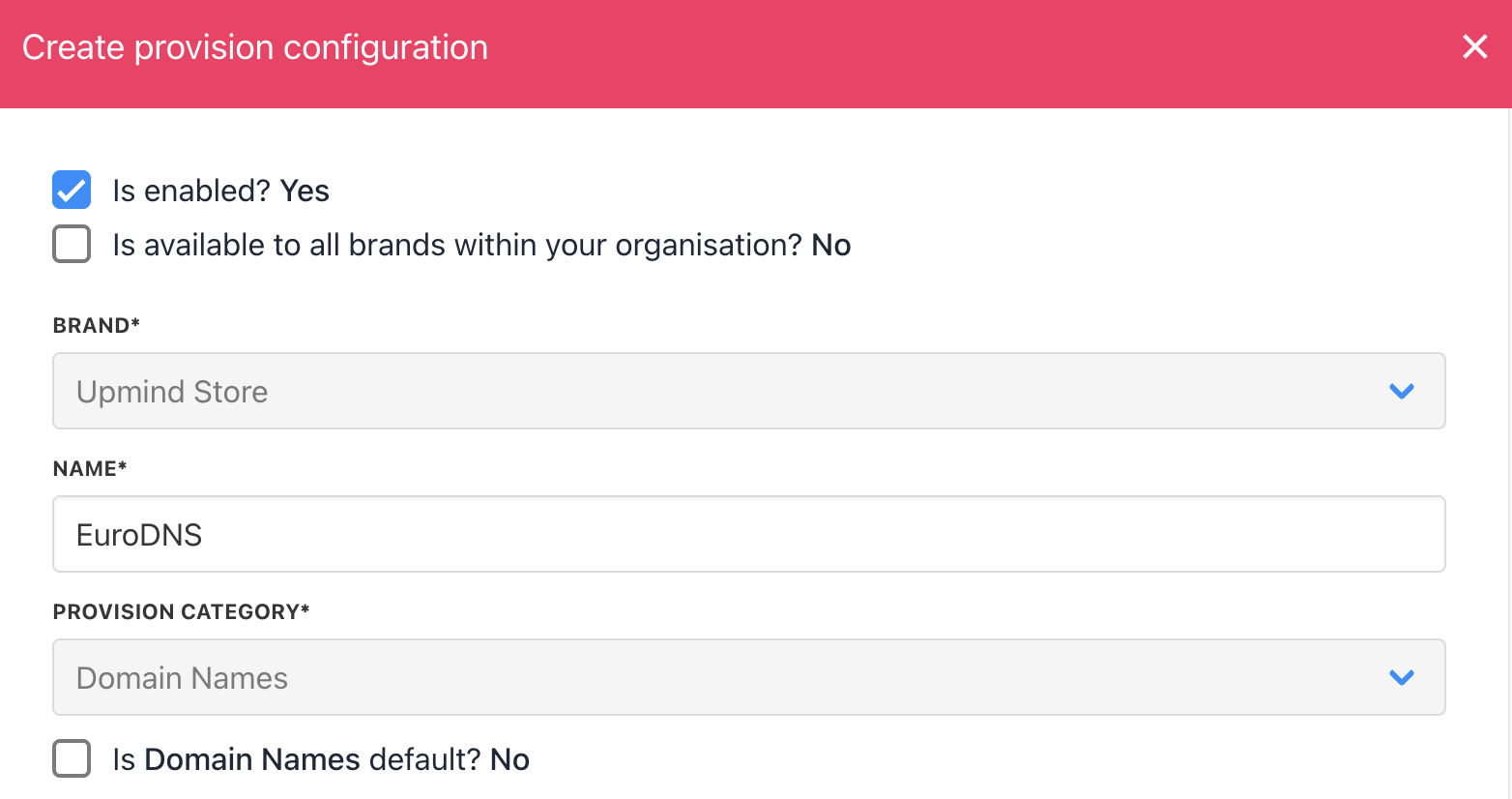
<Frame caption="Enter name">
  <img src="https://mintcdn.com/upmind/Lh8hC132BWHpvRbz/images/fb/4f0499442fa4b4c2.png?fit=max&auto=format&n=Lh8hC132BWHpvRbz&q=85&s=e351ac76f64b6abd18fa5f8fe199c552" alt="Enter name" width="1564" height="826" data-path="images/fb/4f0499442fa4b4c2.png" />
</Frame>

4. Enter your EuroDNS **username** and **password**.
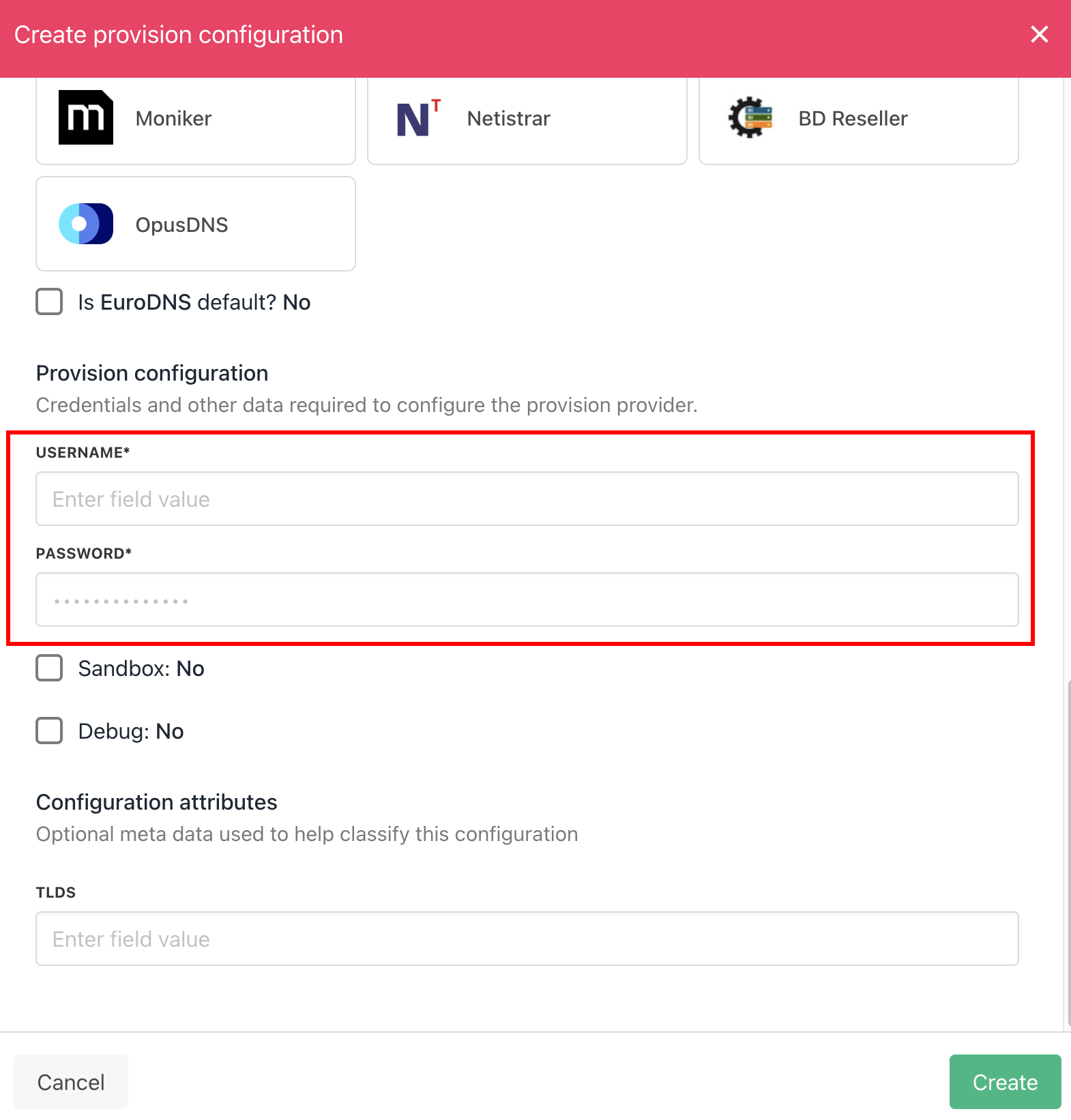
<Frame caption="Enter details">
  <img src="https://mintcdn.com/upmind/2ooSxDpt6PiIGMr-/images/fb/0748e053863f8ca2.png?fit=max&auto=format&n=2ooSxDpt6PiIGMr-&q=85&s=480940a184a5a06a4f3996d036280be8" alt="Enter details" width="1570" height="1642" data-path="images/fb/0748e053863f8ca2.png" />
</Frame>

5. Click the **Create** button.

6. Verify the information on the [<u>Domain Settings</u>](/for-web-hosts/domain-names/how-to-input-domain-settings) page.
