> ## Documentation Index
> Fetch the complete documentation index at: https://docs.upmind.com/llms.txt
> Use this file to discover all available pages before exploring further.

# How to Link EURid with Upmind

> Integrate EURid domain registrar with Upmind.

[EURid](https://eurid.eu/en/) is the European Registry for Domain Names, responsible for managing and operating the .eu top-level domain (TLD). It ensures compliance with .eu policies and provides support for domain management.

## Details needed

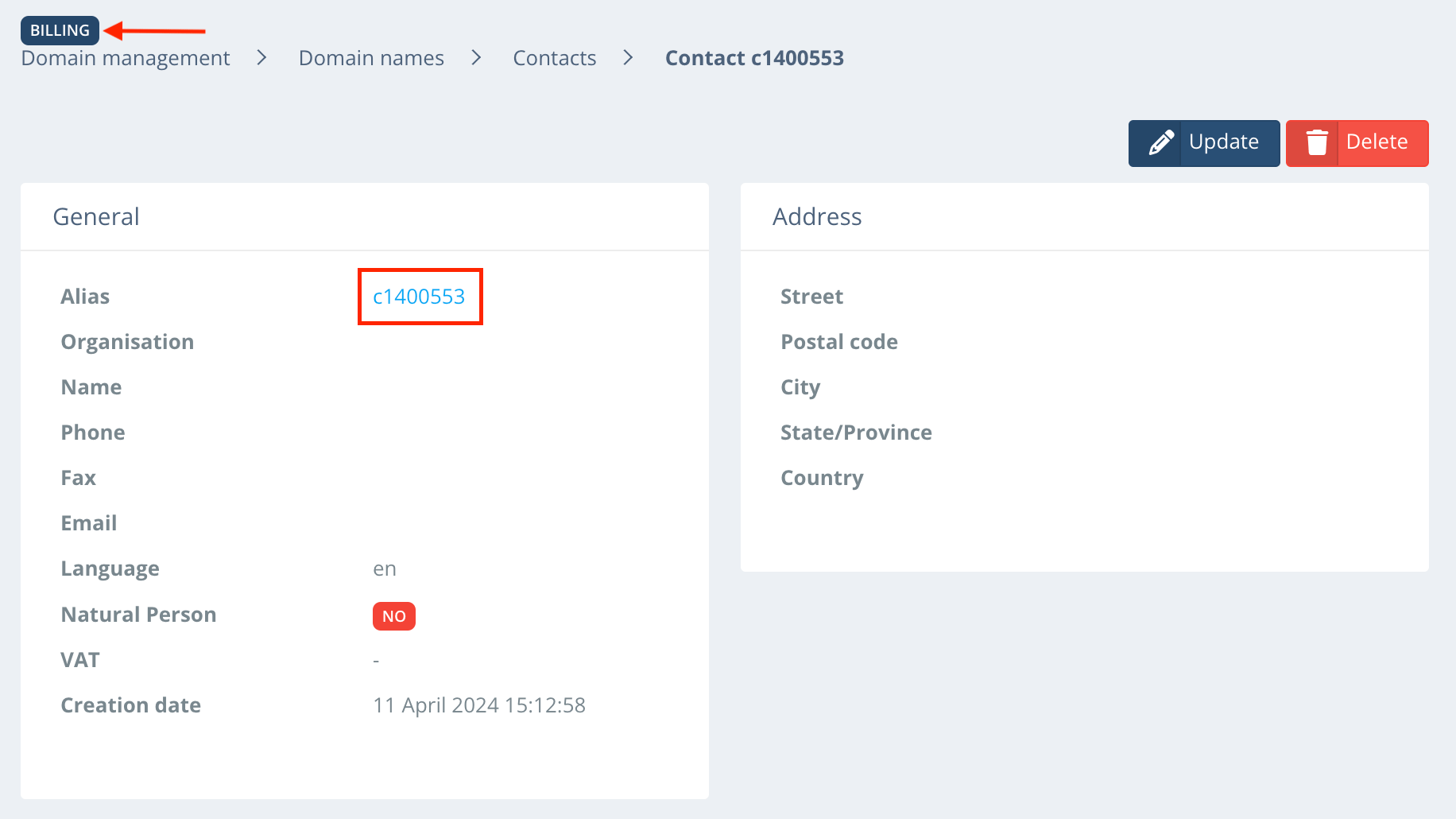
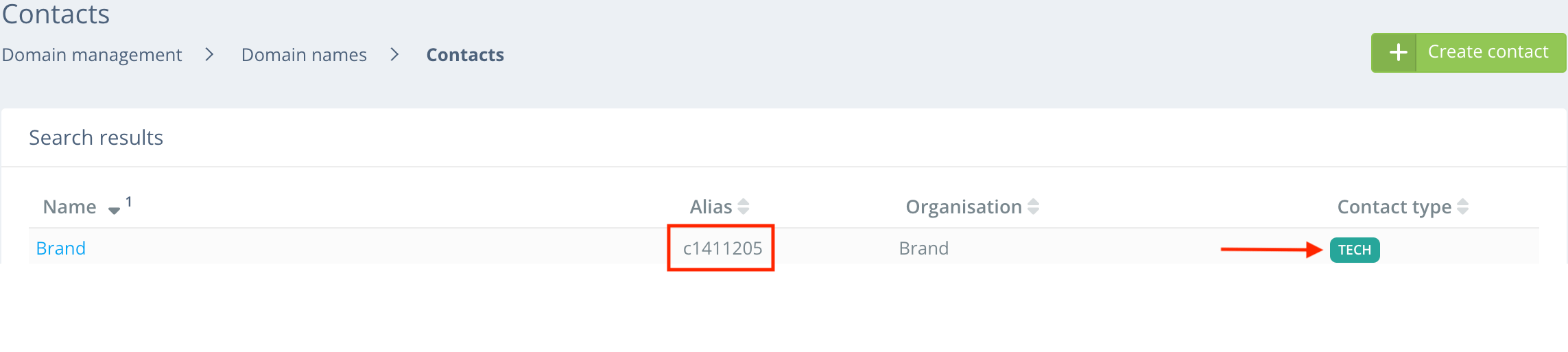
To link your EURid account to Upmind, you'll need your EURid username, password, billing contact ID, and tech contact ID. To obtain billing and tech contact IDs, follow these steps:

1. Login to your EURid account.

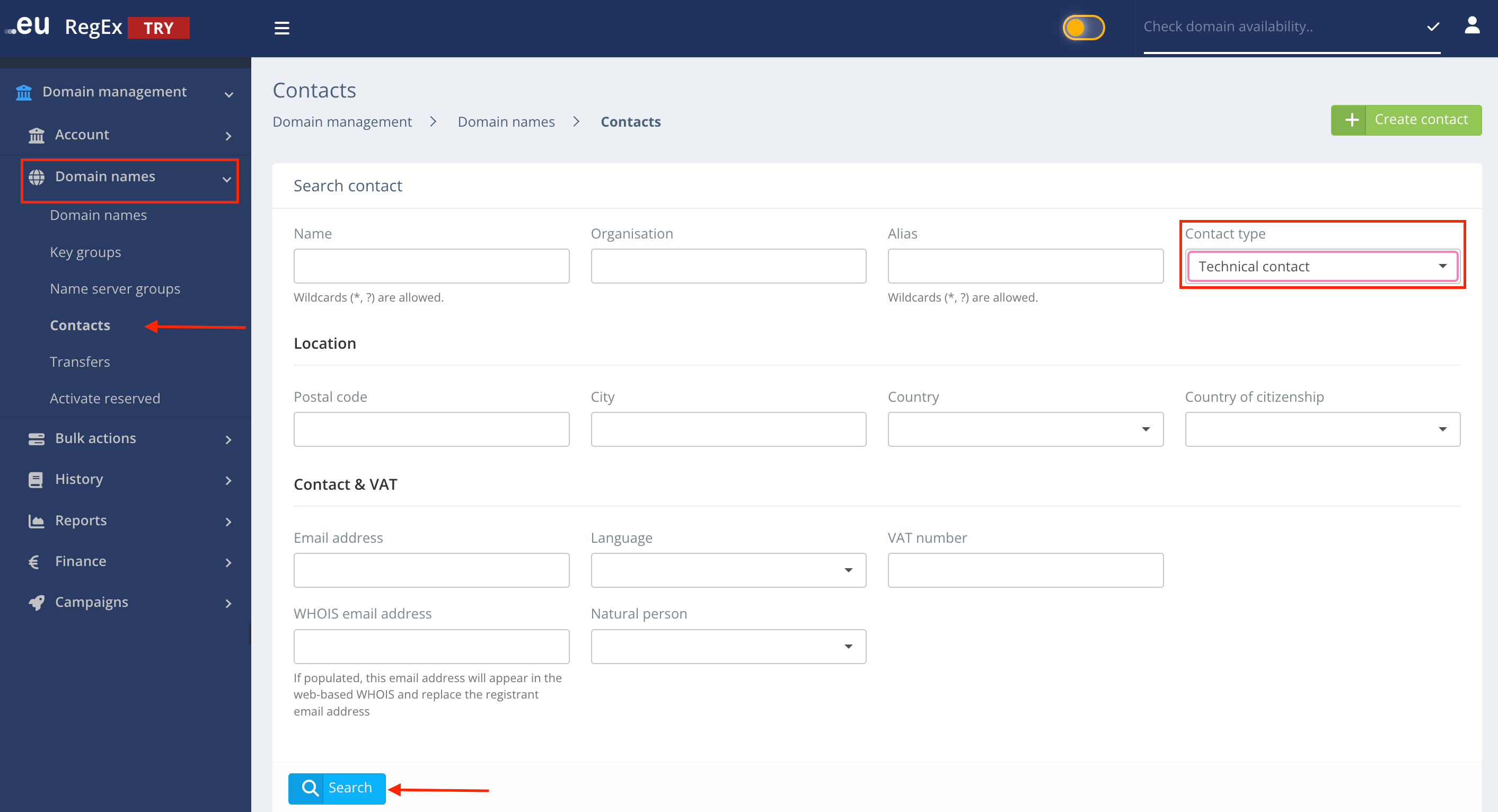
2. Click on **Domain Name Management** and select **Domain Names**.

3. Go to **Contacts** and search **Billing** and **Technical** contact.
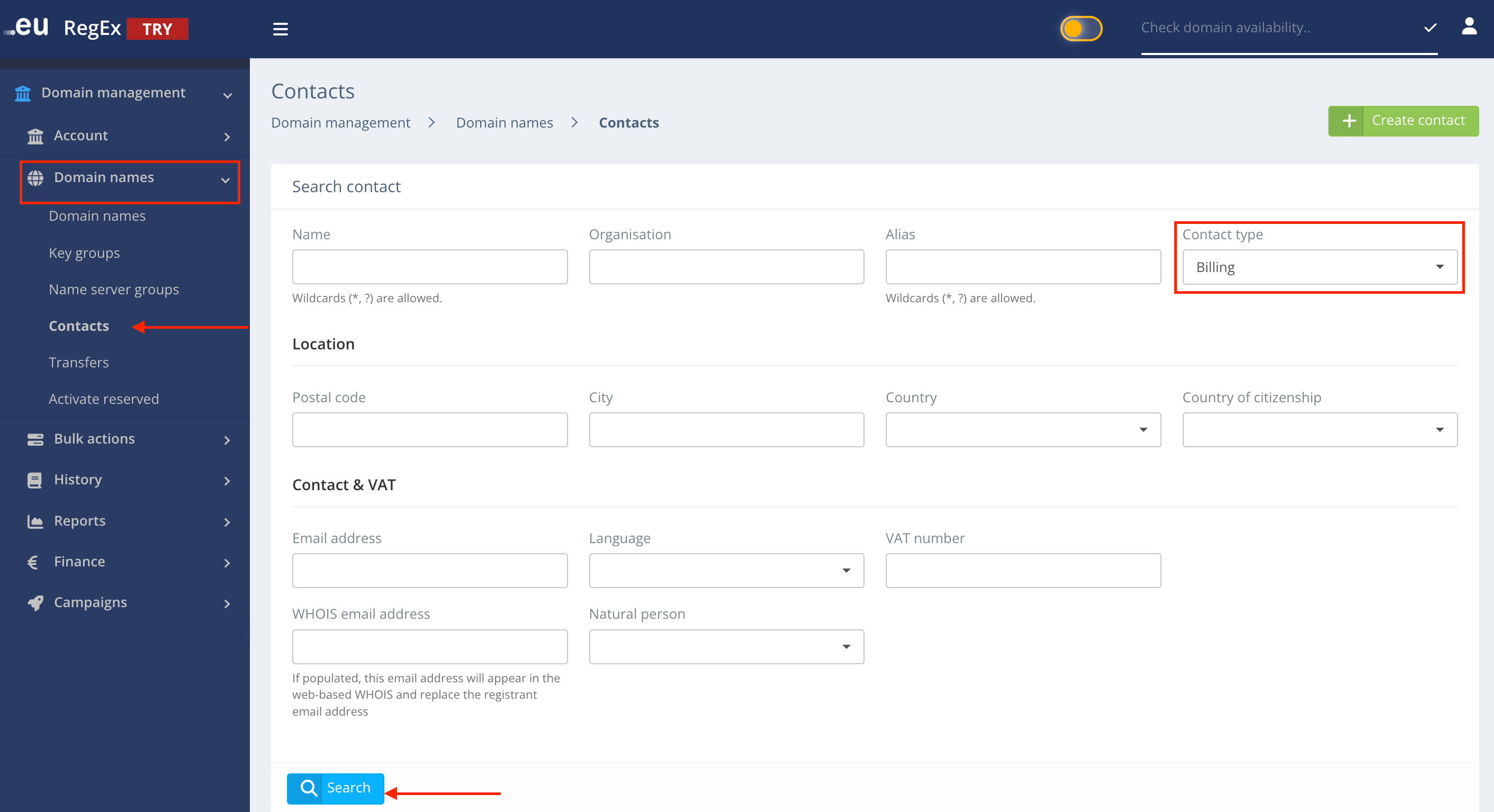
<Frame caption="Search Billing Contact ID">
  <img src="https://mintcdn.com/upmind/wRuKrNY12tQZY8Rr/images/fb/35ce024e48842fb5.png?fit=max&auto=format&n=wRuKrNY12tQZY8Rr&q=85&s=2a354f31c877457b272e6e7e1e23af5e" alt="Search Billing Contact ID" width="2822" height="1534" data-path="images/fb/35ce024e48842fb5.png" />
</Frame>

<Frame caption="Billing Contact ID">
  <img src="https://mintcdn.com/upmind/ObllJJl59DabnmMn/images/fb/cac1f704df510c92.png?fit=max&auto=format&n=ObllJJl59DabnmMn&q=85&s=b9eee30d0b47377c682b0f74767034d2" alt="Billing Contact ID" width="1832" height="1030" data-path="images/fb/cac1f704df510c92.png" />
</Frame>

<Frame caption="Search Technical Contact ID">
  <img src="https://mintcdn.com/upmind/kAlrCUxI2nwYz4_i/images/fb/238ff12e68a735d5.png?fit=max&auto=format&n=kAlrCUxI2nwYz4_i&q=85&s=f473467b37b88edb7a4bcb7598d7acc6" alt="Search Technical Contact ID" width="2826" height="1532" data-path="images/fb/238ff12e68a735d5.png" />
</Frame>

<Frame caption="Technical Contact ID">
  <img src="https://mintcdn.com/upmind/2ooSxDpt6PiIGMr-/images/fb/0950bdd127888342.png?fit=max&auto=format&n=2ooSxDpt6PiIGMr-&q=85&s=b6303a129c6798296f68fa3bb29e163e" alt="Technical Contact ID" width="2286" height="513" data-path="images/fb/0950bdd127888342.png" />
</Frame>

## Linking EURid to Upmind

1. In Upmind, navigate to **Host Control** > **Domain names** > **Registrars**.

2. **Click** on **EURid.**
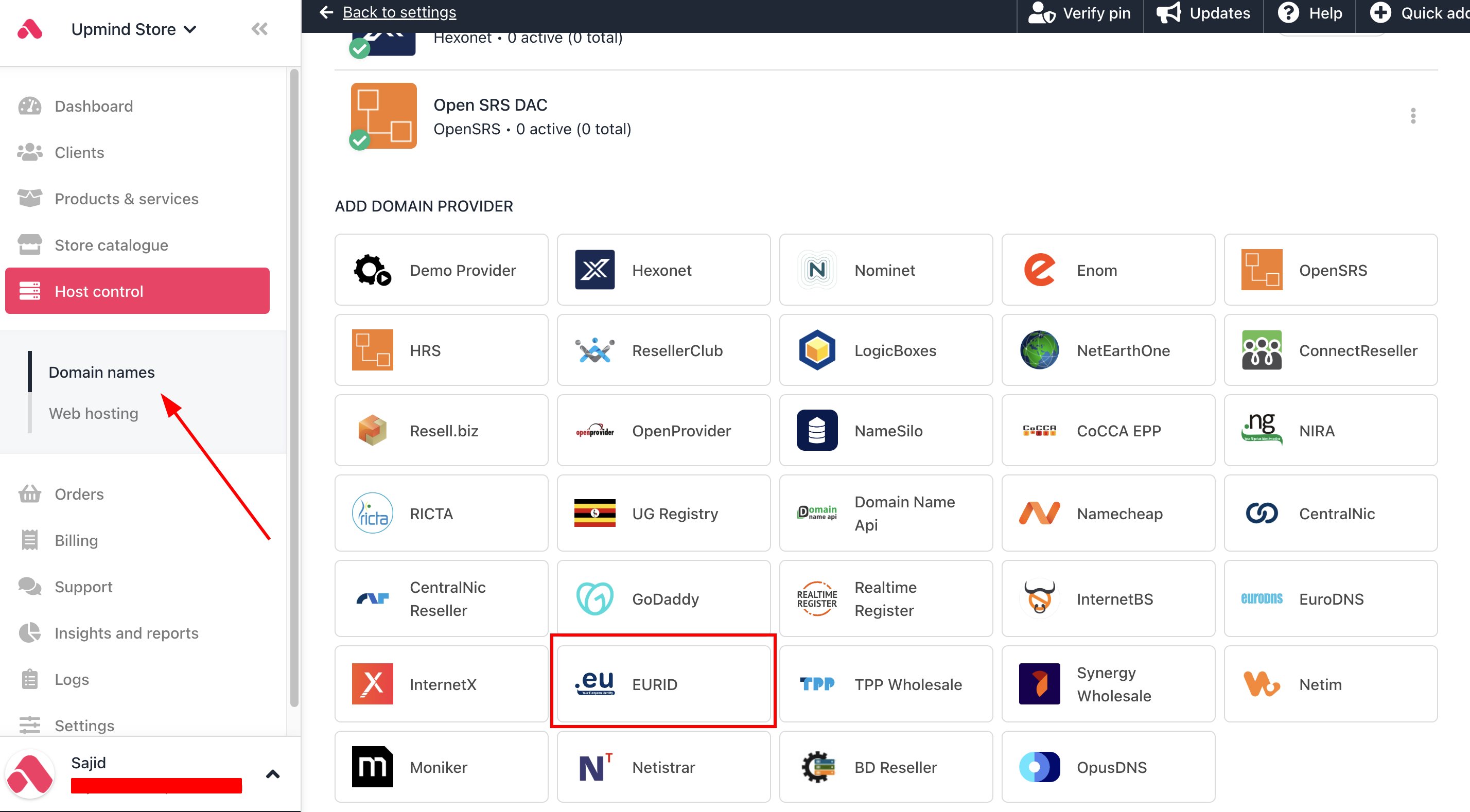
<Frame caption="Host Control > Domain names > Registrars">
  <img src="https://mintcdn.com/upmind/1-uICsJi9zYpvJVH/images/fb/8d91ad361567526e.png?fit=max&auto=format&n=1-uICsJi9zYpvJVH&q=85&s=1ce2b6fe47a6da3bc13d9876cba9e5bc" alt="Host Control > Domain names > Registrars" data-og-width="2856" width="2856" data-og-height="1578" height="1578" data-path="images/fb/8d91ad361567526e.png" data-optimize="true" data-opv="3" srcset="https://mintcdn.com/upmind/1-uICsJi9zYpvJVH/images/fb/8d91ad361567526e.png?w=280&fit=max&auto=format&n=1-uICsJi9zYpvJVH&q=85&s=628d0114153f074a92705bd41302d077 280w, https://mintcdn.com/upmind/1-uICsJi9zYpvJVH/images/fb/8d91ad361567526e.png?w=560&fit=max&auto=format&n=1-uICsJi9zYpvJVH&q=85&s=d4bab8a64bf883f3e3532bf3793ddf91 560w, https://mintcdn.com/upmind/1-uICsJi9zYpvJVH/images/fb/8d91ad361567526e.png?w=840&fit=max&auto=format&n=1-uICsJi9zYpvJVH&q=85&s=d336d981732b0c636d8c89beb0c65b7f 840w, https://mintcdn.com/upmind/1-uICsJi9zYpvJVH/images/fb/8d91ad361567526e.png?w=1100&fit=max&auto=format&n=1-uICsJi9zYpvJVH&q=85&s=0a3befbde3653be74f6d0ffacc3b37d6 1100w, https://mintcdn.com/upmind/1-uICsJi9zYpvJVH/images/fb/8d91ad361567526e.png?w=1650&fit=max&auto=format&n=1-uICsJi9zYpvJVH&q=85&s=f24b719080e435fdb12bd9a46b012467 1650w, https://mintcdn.com/upmind/1-uICsJi9zYpvJVH/images/fb/8d91ad361567526e.png?w=2500&fit=max&auto=format&n=1-uICsJi9zYpvJVH&q=85&s=ef631ed580f98958fadb931b31a50d11 2500w" />
</Frame>

3. Enter a **Name**. This identifier is not visible to clients. We recommend entering the name **EURid** unless you have two separate accounts that you want to label differently.
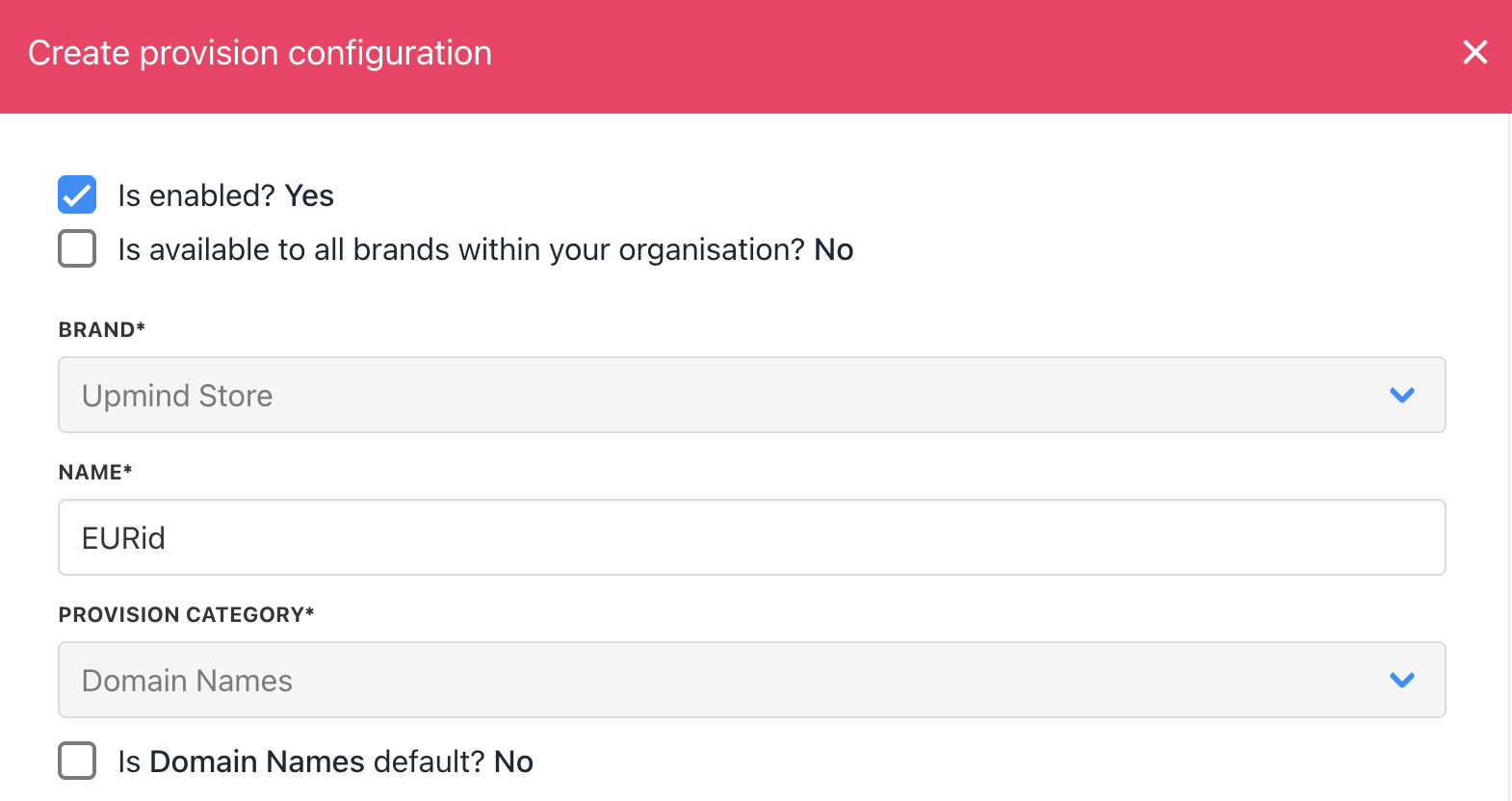
<Frame caption="Enter name">
  <img src="https://mintcdn.com/upmind/VnCXiz5rboywDnvn/images/fb/d7c5c6ae9e47dc11.png?fit=max&auto=format&n=VnCXiz5rboywDnvn&q=85&s=813a51cacb6378d9f5b527088ff3c4d3" alt="Enter name" width="1570" height="832" data-path="images/fb/d7c5c6ae9e47dc11.png" />
</Frame>

4. Enter your EURid's **username**, **password**, **billing contact ID,** and **tech contact ID** from your EURid account.
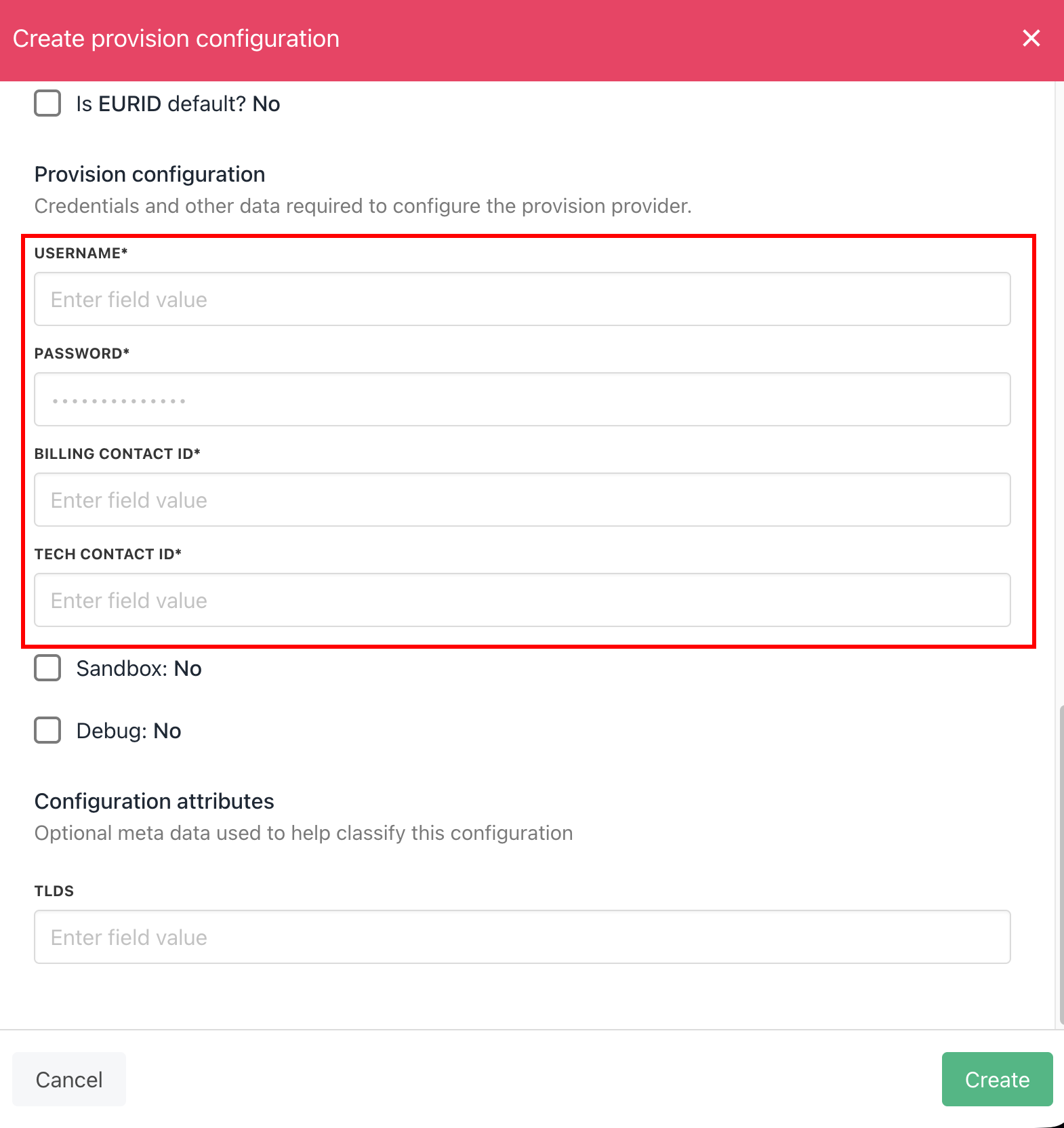
<Frame caption="Enter details">
  <img src="https://mintcdn.com/upmind/6knUVC8F1nK4E5CY/images/fb/c5b27202d30966c4.png?fit=max&auto=format&n=6knUVC8F1nK4E5CY&q=85&s=ab75979abda36d372e3388b00628bea5" alt="Enter details" width="1570" height="1664" data-path="images/fb/c5b27202d30966c4.png" />
</Frame>

5. Click the Create button.

6. Verify the information on the [<u>Domain Settings</u>](/for-web-hosts/domain-names/how-to-input-domain-settings) page.