> ## Documentation Index
> Fetch the complete documentation index at: https://docs.upmind.com/llms.txt
> Use this file to discover all available pages before exploring further.

# How to Link Domain Name API to Upmind

> Integrate Domain Name API domain registrar with Upmind.

Domain Name API is an ICANN-accredited registrar offering APIs with over 800 domain extensions, including gTLDs and ccTLDs.

You can register as a reseller on [Domain Name API website](https://www.domainnameapi.com/become-a-reseller).

## Details needed

To link your Domain Name API account to Upmind, you will need a **username** and **password** from your Domain Name API account.

## Linking Domain Name API to Upmind

1. In Upmind, navigate to **Host Control** > **Domain names** > **Registrars**.

2. **Click** on **Domain Name API.**
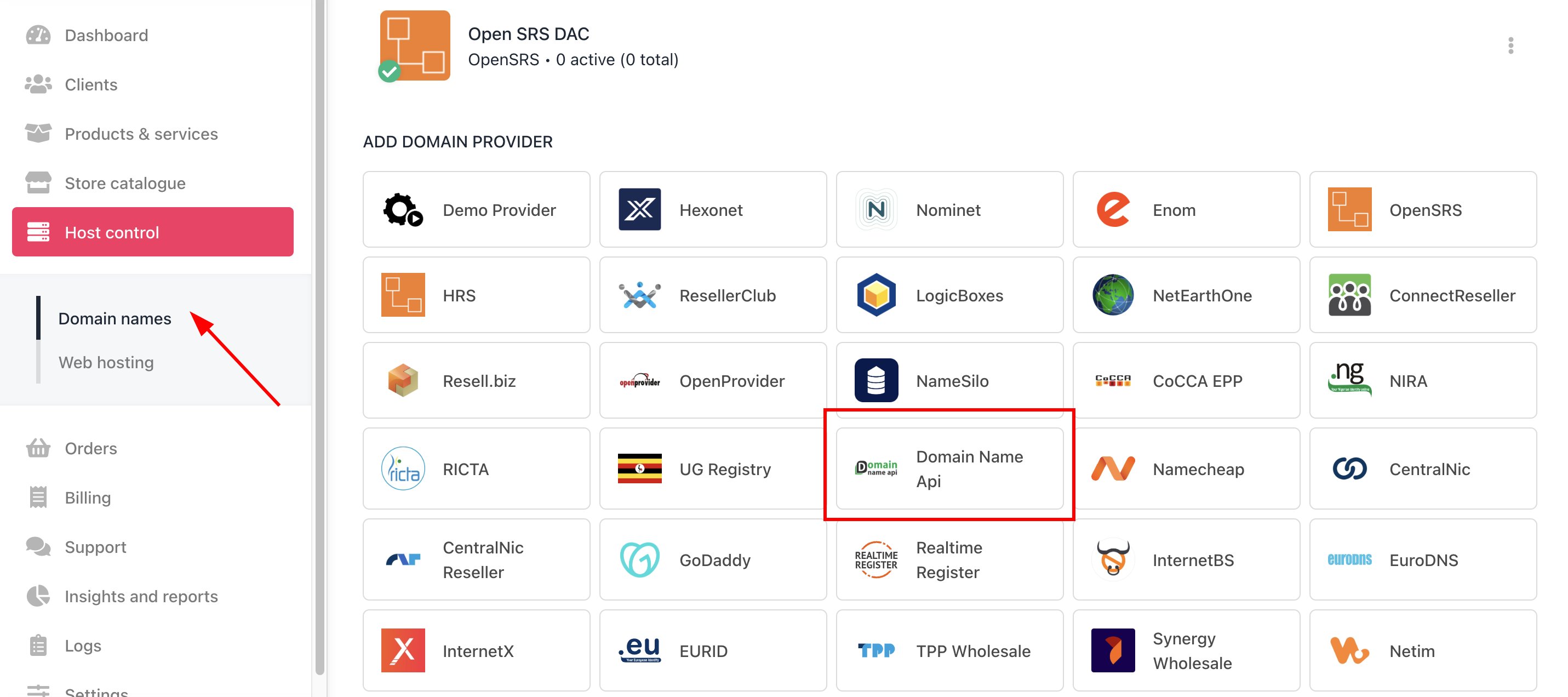
<Frame caption="Host Control > Domain names > Registrars">
  <img src="https://mintcdn.com/upmind/A-RwNPXmK_xnEEqe/images/fb/76d09853045becd9.png?fit=max&auto=format&n=A-RwNPXmK_xnEEqe&q=85&s=06dd98d9dd585bf613d1245202884398" alt="Host Control > Domain names > Registrars" data-og-width="2862" width="2862" data-og-height="1272" height="1272" data-path="images/fb/76d09853045becd9.png" data-optimize="true" data-opv="3" srcset="https://mintcdn.com/upmind/A-RwNPXmK_xnEEqe/images/fb/76d09853045becd9.png?w=280&fit=max&auto=format&n=A-RwNPXmK_xnEEqe&q=85&s=bf89b20730bf5dcee384f6c256072a52 280w, https://mintcdn.com/upmind/A-RwNPXmK_xnEEqe/images/fb/76d09853045becd9.png?w=560&fit=max&auto=format&n=A-RwNPXmK_xnEEqe&q=85&s=40f6e3ffa36842ebffd71feb9541e1d2 560w, https://mintcdn.com/upmind/A-RwNPXmK_xnEEqe/images/fb/76d09853045becd9.png?w=840&fit=max&auto=format&n=A-RwNPXmK_xnEEqe&q=85&s=ce6f1843474dc5693f1f5d2fbc0331f9 840w, https://mintcdn.com/upmind/A-RwNPXmK_xnEEqe/images/fb/76d09853045becd9.png?w=1100&fit=max&auto=format&n=A-RwNPXmK_xnEEqe&q=85&s=0067d225db38c85b3dfb4ef906842258 1100w, https://mintcdn.com/upmind/A-RwNPXmK_xnEEqe/images/fb/76d09853045becd9.png?w=1650&fit=max&auto=format&n=A-RwNPXmK_xnEEqe&q=85&s=4caee2afce8229178828a8f469a40c9c 1650w, https://mintcdn.com/upmind/A-RwNPXmK_xnEEqe/images/fb/76d09853045becd9.png?w=2500&fit=max&auto=format&n=A-RwNPXmK_xnEEqe&q=85&s=624d8d0495153b54ad1c02aa62d09a8f 2500w" />
</Frame>

3. Enter a **Name**. This identifier is not visible to clients. We recommend entering the name **Domain Name API** unless you have two separate accounts that you want to label differently.
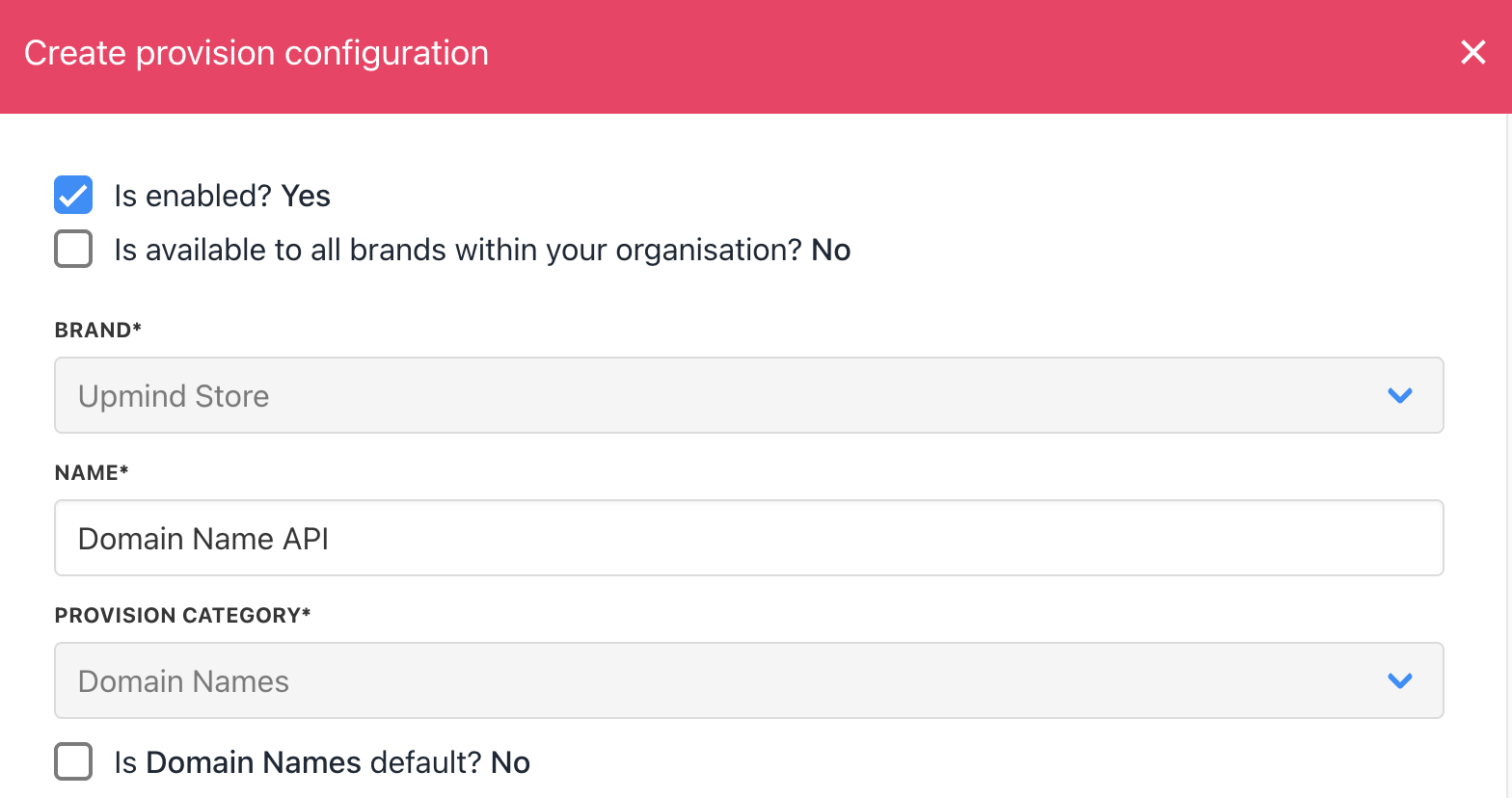
<Frame caption="Enter name">
  <img src="https://mintcdn.com/upmind/bPO2bBzOxYQR4tYr/images/fb/fa24ffa6c6f21080.png?fit=max&auto=format&n=bPO2bBzOxYQR4tYr&q=85&s=9a98c1892902fca21ca542e5ce734259" alt="Enter name" width="1568" height="828" data-path="images/fb/fa24ffa6c6f21080.png" />
</Frame>

4. Enter your Domain Name API **username** and **password**.
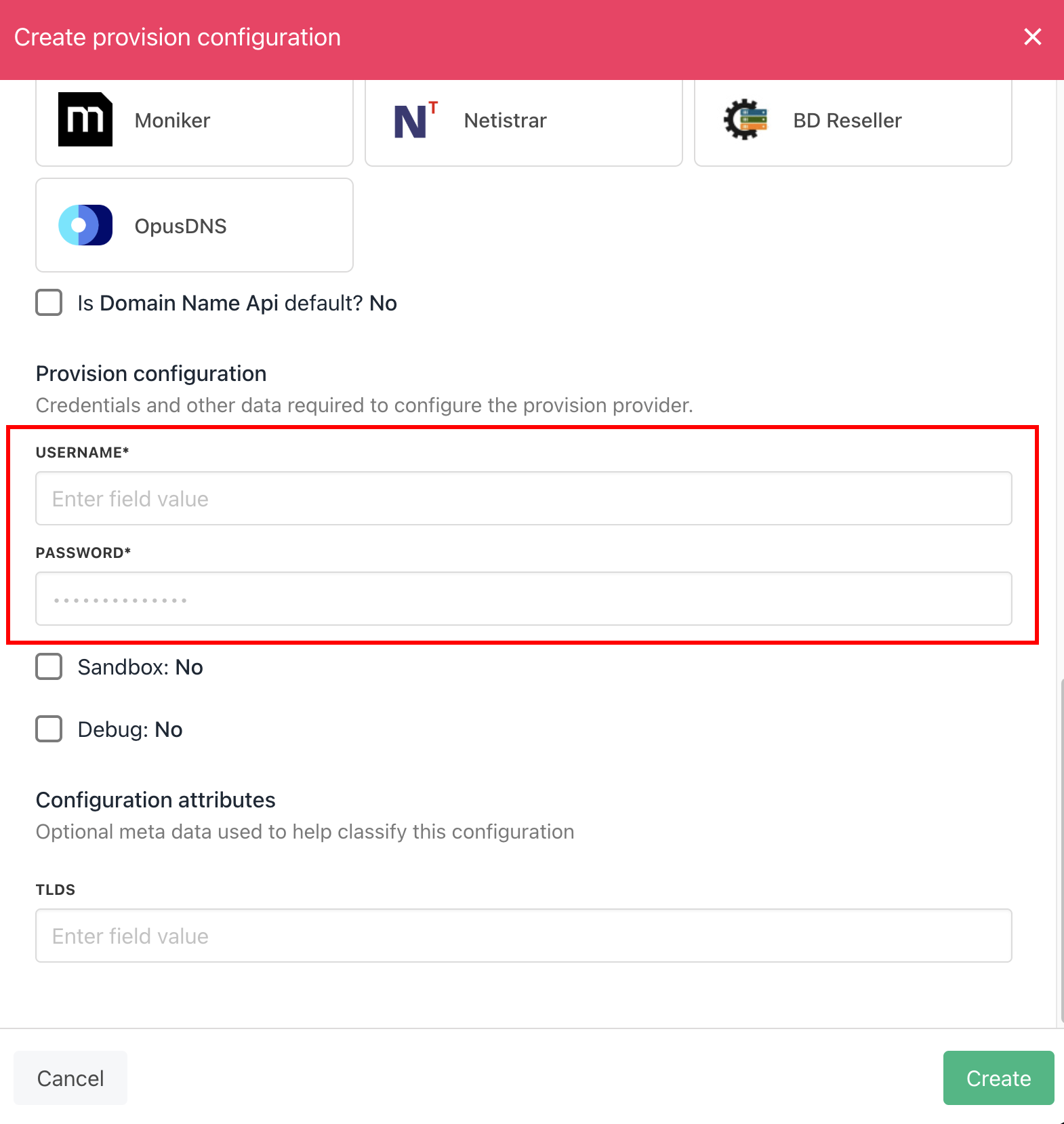
<Frame caption="Enter details">
  <img src="https://mintcdn.com/upmind/FQ1NhxALxjSHvvWW/images/fb/afa3b028a4ed1da9.png?fit=max&auto=format&n=FQ1NhxALxjSHvvWW&q=85&s=5f0c064f6c40782cde5c9a4949d88038" alt="Enter details" width="1570" height="1658" data-path="images/fb/afa3b028a4ed1da9.png" />
</Frame>

5. Click the **Create** button.

6. Verify the information on the [<u>Domain Settings</u>](/for-web-hosts/domain-names/how-to-input-domain-settings) page.
