> ## Documentation Index
> Fetch the complete documentation index at: https://docs.upmind.com/llms.txt
> Use this file to discover all available pages before exploring further.

# Quick Start Guide for Hosting Companies or Resellers

> Get your hosting business up and running fast with Upmind’s automation platform.

Upmind automates billing, provisioning, client management, and support for hosting companies and resellers.

This guide provides a practical step-by-step onboarding process to quickly set up and manage your hosting business using Upmind’s platform. You will need to do the following:

1. **Create and configure your Upmind account**

2. **Verify your account**

3. **Log into the admin panel**

4. **Configure your domain**

5. **Change organisation name display**

6. **Set store currency**

7. **Create a web server**

8. **Set up billing and payment processing**

9. **Add hosting products and packages**

10. **Connect domain registrar providers**

11. **Manage client accounts and support**

12. **Launch your online store**

13. **Use analytics and reporting to optimise your business**

You can also follow this [<u>guide</u>](/getting-started/how-to-create-an-upmind-account) to create your own profile.

## **Create and configure your Upmind account**

1. Go to [<u>Upmind.com</u>](http://Upmind.com).

2. Click on Start for free.

<Frame caption="Start for free">
  <img src="https://mintcdn.com/upmind/92wYnpdR_k6AjH3x/images/fb/5616ac73ec249b2b.png?fit=max&auto=format&n=92wYnpdR_k6AjH3x&q=85&s=1ef3067f9a86cb8ded42e0ee2ac3a639" alt="Start for free" width="1538" height="128" data-path="images/fb/5616ac73ec249b2b.png" />
</Frame>

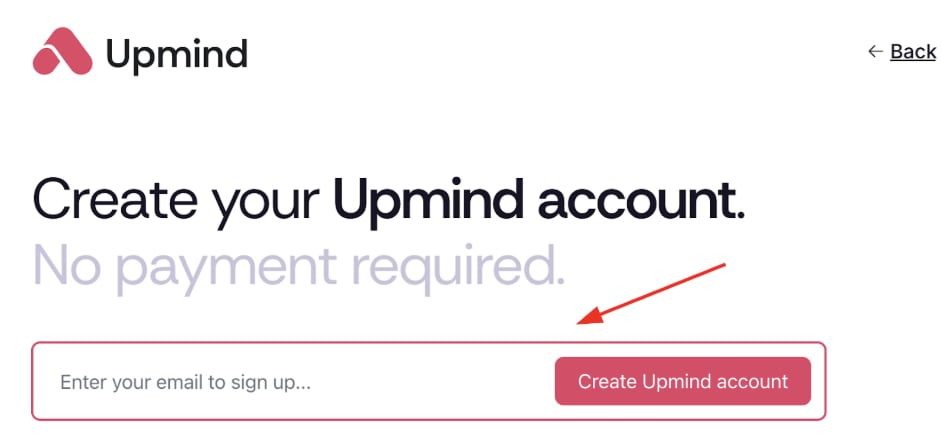
3. Enter your email and sign up.

<Frame caption="Sign up">
  <img src="https://mintcdn.com/upmind/92wYnpdR_k6AjH3x/images/fb/5707aa1c09d3979a.png?fit=max&auto=format&n=92wYnpdR_k6AjH3x&q=85&s=07ac3d8e023a575469528ff4e7cd6862" alt="Sign up" width="942" height="446" data-path="images/fb/5707aa1c09d3979a.png" />
</Frame>

## **Verify your account**

1. Check your email (and spam) for Upmind’s verification link within 5 minutes.

2. Click the link to open your organisation’s admin dashboard. Your account is now live.

## **Log into the admin panel**

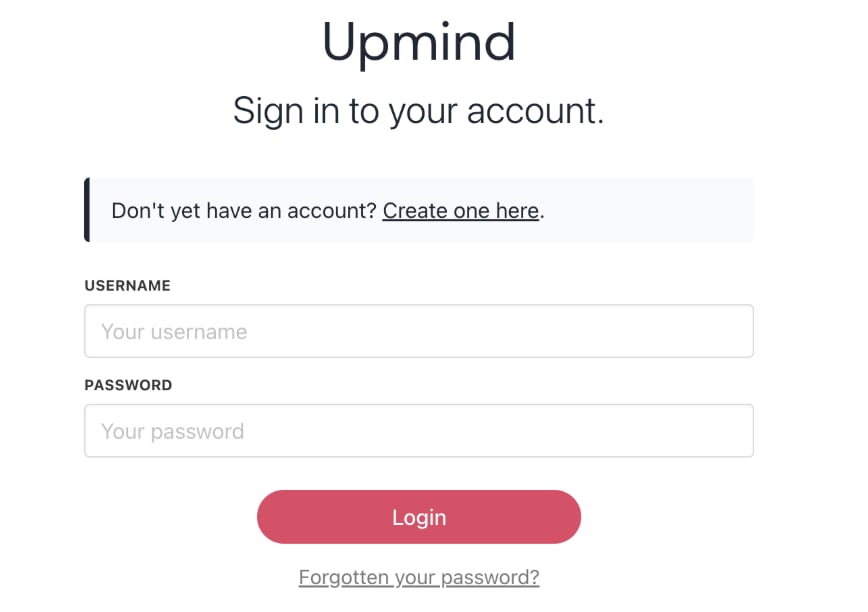
1. Visit your `Admin Panel` login page at [<u>https://my.upmind.com/login</u>](https://my.upmind.com/login).

2. Enter your credentials to log in.
<Frame caption="Log in panel">
  <img src="https://mintcdn.com/upmind/c5sDUwEs8YpzGbjA/images/fb/927a2115686d99b7.png?fit=max&auto=format&n=c5sDUwEs8YpzGbjA&q=85&s=8862db55bc0bbd349155692ff179db45" alt="Log in panel" width="868" height="612" data-path="images/fb/927a2115686d99b7.png" />
</Frame>

## **Configure your domain**

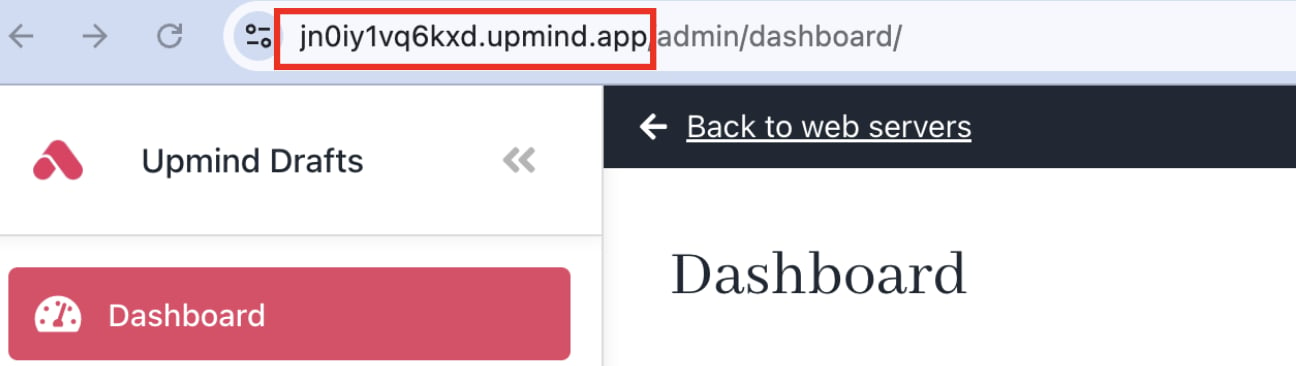
1. Upmind creates a unique subdomain for your store ending with .[upmind.app](http://upmind.app).

2. After setup, [<u>configure your own domain</u>](/setup-and-configuration/branding/how-to-add-a-custom-domain-name) (e.g., [yourdomain.com](http://yourdomain.com) or [clientarea.yourdomain.com](http://clientarea.yourdomain.com)).
<Frame caption="Unique subdomain">
  <img src="https://mintcdn.com/upmind/Dgjmf3QWYVBR40cE/images/fb/5c3ed1d5bec15547.png?fit=max&auto=format&n=Dgjmf3QWYVBR40cE&q=85&s=b1643e741af4abe0d5475a665fd8095b" alt="Unique subdomain" width="1296" height="366" data-path="images/fb/5c3ed1d5bec15547.png" />
</Frame>

## **Change organisation name display**

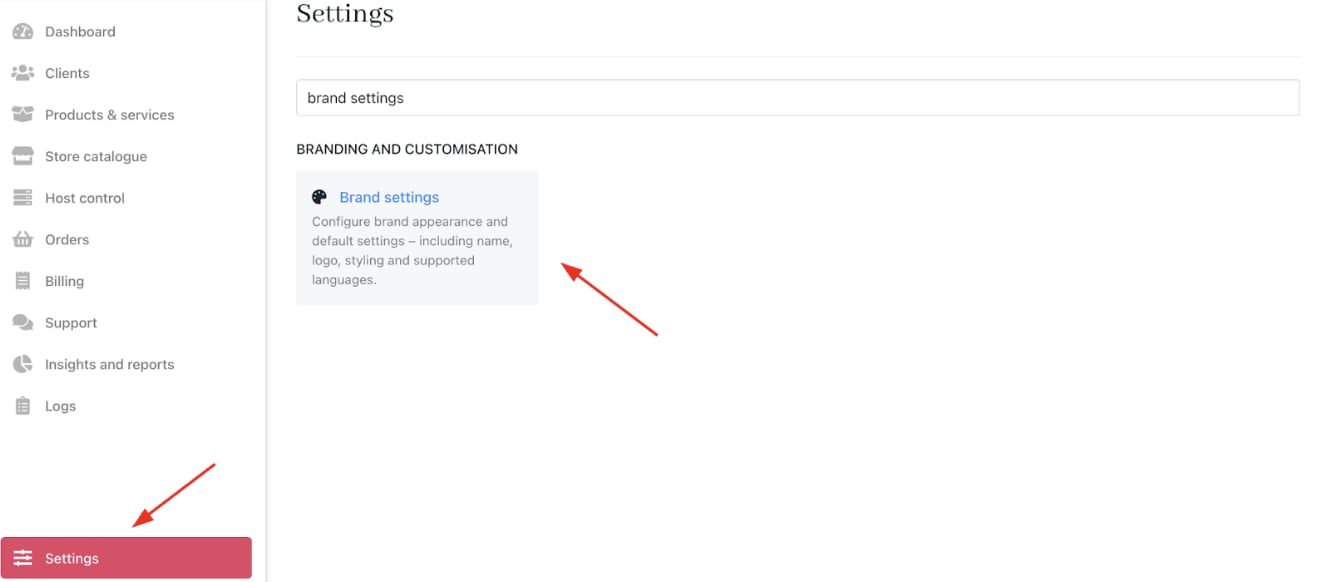
1. Go to **Settings** > **Brand Settings** under **Branding and Customisation**.
<Frame caption="Settings > Branding and Customisation > Brand Settings">
  <img src="https://mintcdn.com/upmind/JUoAg6onJmXk_-rR/images/fb/e618b45df23adc6b.png?fit=max&auto=format&n=JUoAg6onJmXk_-rR&q=85&s=7a7ac69a703fcd8efd8b8b59515d5e80" alt="Settings > Branding and Customisation > Brand Settings" data-og-width="1324" width="1324" data-og-height="582" height="582" data-path="images/fb/e618b45df23adc6b.png" data-optimize="true" data-opv="3" srcset="https://mintcdn.com/upmind/JUoAg6onJmXk_-rR/images/fb/e618b45df23adc6b.png?w=280&fit=max&auto=format&n=JUoAg6onJmXk_-rR&q=85&s=b66a49ffab7269ae231badab2aa1fa93 280w, https://mintcdn.com/upmind/JUoAg6onJmXk_-rR/images/fb/e618b45df23adc6b.png?w=560&fit=max&auto=format&n=JUoAg6onJmXk_-rR&q=85&s=ffd0744223858ee637af0dab571c8379 560w, https://mintcdn.com/upmind/JUoAg6onJmXk_-rR/images/fb/e618b45df23adc6b.png?w=840&fit=max&auto=format&n=JUoAg6onJmXk_-rR&q=85&s=0b3cf4d54ae2b60c205c4cb2c4154842 840w, https://mintcdn.com/upmind/JUoAg6onJmXk_-rR/images/fb/e618b45df23adc6b.png?w=1100&fit=max&auto=format&n=JUoAg6onJmXk_-rR&q=85&s=8d7b5091c277b8410d4f879ba32add52 1100w, https://mintcdn.com/upmind/JUoAg6onJmXk_-rR/images/fb/e618b45df23adc6b.png?w=1650&fit=max&auto=format&n=JUoAg6onJmXk_-rR&q=85&s=8093f0e4ddefb4e97b30b0bad385f073 1650w, https://mintcdn.com/upmind/JUoAg6onJmXk_-rR/images/fb/e618b45df23adc6b.png?w=2500&fit=max&auto=format&n=JUoAg6onJmXk_-rR&q=85&s=a4edd4ace90d0821536922e664a1fce4 2500w" />
</Frame>

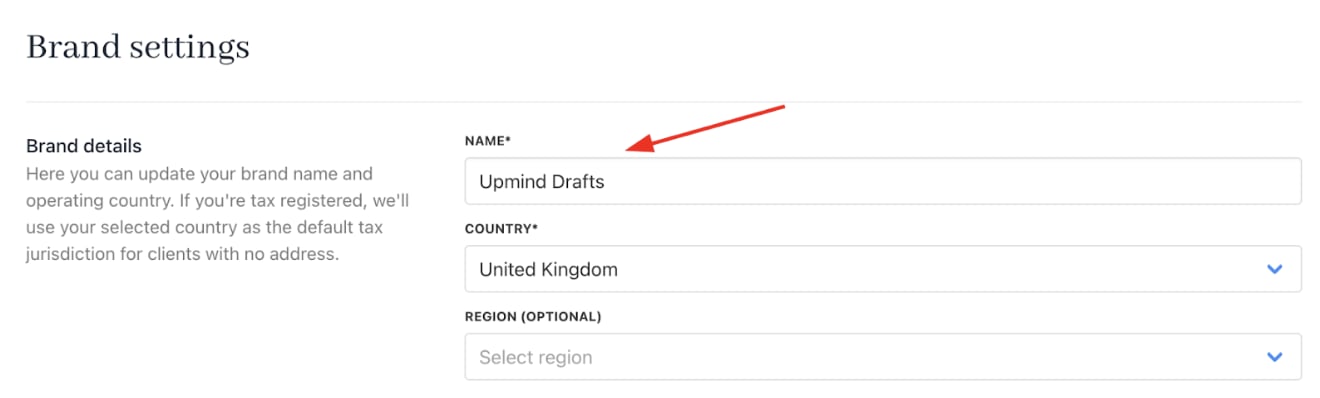
2. Enter a new name and click **Save**.
<Frame caption="New brand name">
  <img src="https://mintcdn.com/upmind/pcUdSuxUJ6LgBXnd/images/fb/a66ea30863db6188.png?fit=max&auto=format&n=pcUdSuxUJ6LgBXnd&q=85&s=b78be732f9efda1d3c641d72e6d7200b" alt="New brand name" width="1320" height="398" data-path="images/fb/a66ea30863db6188.png" />
</Frame>

Upmind updates the [<u>organisation</u>](/setup-and-configuration/branding/what-is-an-organisation) name on screen, but not the domain name.

<Note>
  An Upmind account is an organisation that can include multiple brands configured on the brand page. If you manage several businesses under the same legal entity, use multi-brand mode within one organisation. Or you can create separate organisations for distinct legal entities.
</Note>

## **Set store currency**

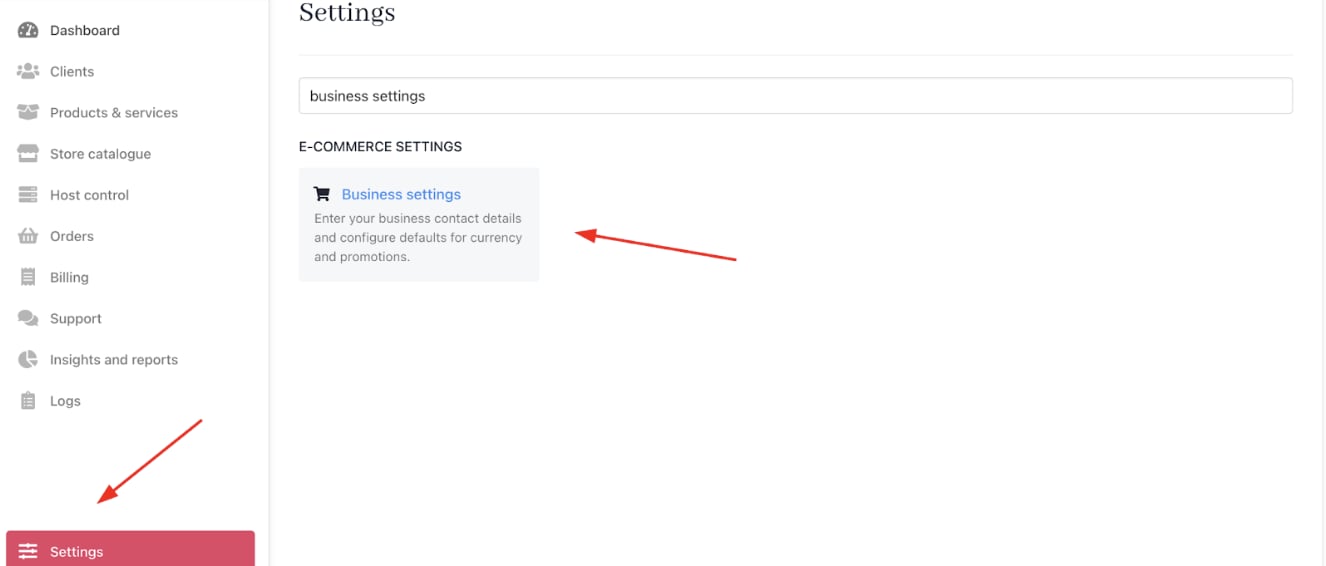
1. Go to **Settings** > **Business Settings** under **E-commerce Settings**.
<Frame caption="Settings > E-commerce Settings > Business Settings">
  <img src="https://mintcdn.com/upmind/ZsIo0APxdVb_gFS-/images/fb/2d55270f30644655.png?fit=max&auto=format&n=ZsIo0APxdVb_gFS-&q=85&s=536b225668c085ee3e14b8806045499b" alt="Settings > E-commerce Settings > Business Settings" data-og-width="1326" width="1326" data-og-height="566" height="566" data-path="images/fb/2d55270f30644655.png" data-optimize="true" data-opv="3" srcset="https://mintcdn.com/upmind/ZsIo0APxdVb_gFS-/images/fb/2d55270f30644655.png?w=280&fit=max&auto=format&n=ZsIo0APxdVb_gFS-&q=85&s=99102a2f7d2249c2483040ebce1efa1c 280w, https://mintcdn.com/upmind/ZsIo0APxdVb_gFS-/images/fb/2d55270f30644655.png?w=560&fit=max&auto=format&n=ZsIo0APxdVb_gFS-&q=85&s=812fdef60a4dcce52625be3618b18b3a 560w, https://mintcdn.com/upmind/ZsIo0APxdVb_gFS-/images/fb/2d55270f30644655.png?w=840&fit=max&auto=format&n=ZsIo0APxdVb_gFS-&q=85&s=ba4db60a2976a3cd94cb39e2e1de6dd3 840w, https://mintcdn.com/upmind/ZsIo0APxdVb_gFS-/images/fb/2d55270f30644655.png?w=1100&fit=max&auto=format&n=ZsIo0APxdVb_gFS-&q=85&s=8a2bf66c330f9523dc94cd7a6b453add 1100w, https://mintcdn.com/upmind/ZsIo0APxdVb_gFS-/images/fb/2d55270f30644655.png?w=1650&fit=max&auto=format&n=ZsIo0APxdVb_gFS-&q=85&s=b1f00df7d913afe7ba053f30cec0419a 1650w, https://mintcdn.com/upmind/ZsIo0APxdVb_gFS-/images/fb/2d55270f30644655.png?w=2500&fit=max&auto=format&n=ZsIo0APxdVb_gFS-&q=85&s=afd88503699b0a8b64f83900dd6586a9 2500w" />
</Frame>

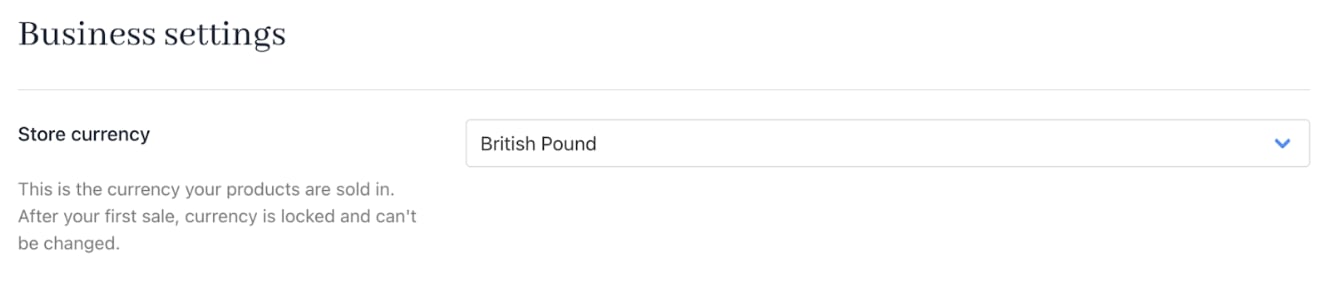
2. Set your **Store Currency**, which will be the primary currency.
<Frame caption="Store currency">
  <img src="https://mintcdn.com/upmind/92wYnpdR_k6AjH3x/images/fb/564bf8bd89e934eb.png?fit=max&auto=format&n=92wYnpdR_k6AjH3x&q=85&s=b731305fc12aa8025414808ed8993b0f" alt="Store currency" width="1324" height="282" data-path="images/fb/564bf8bd89e934eb.png" />
</Frame>

Upmind supports [<u>multiple currencies</u>](/using-upmind/invoicing-and-taxes/about-multi-currency), but your primary (base) currency is fixed once you record your first transaction. This base currency drives all reporting and conversions and cannot be changed afterwards, so choose it carefully.

## **Create a web server**

1. If you don’t already have one, create an account with any web hosting service, such as **Plesk**.

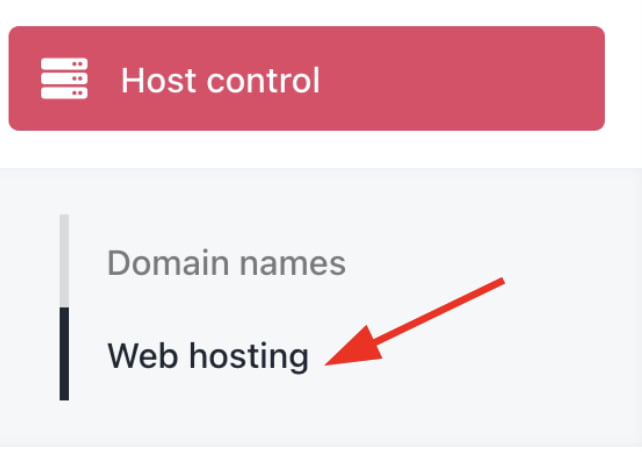
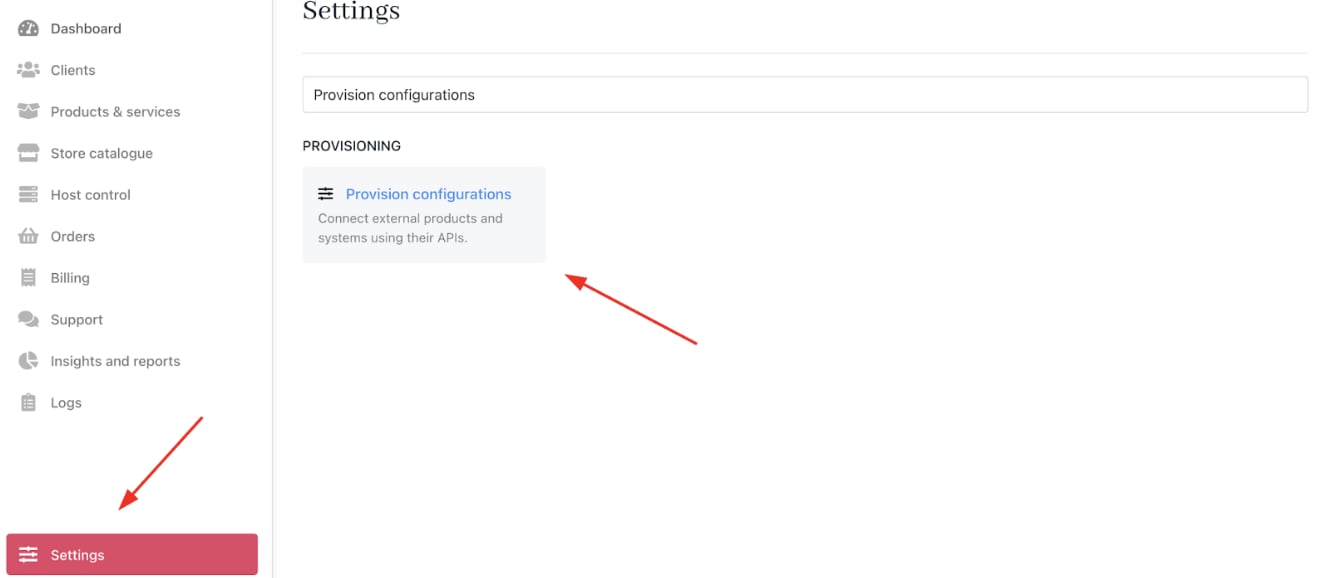
2. You can create and provision a **Web Hosting** service on **Host Control** > **Web Hosting** from the **Admin Dashboard** or **Settings** > **Provision Configurations** under **Provisioning**.
<Frame caption="Host Control > Web Hosting">
  <img src="https://mintcdn.com/upmind/1xguIfYUrfespmVI/images/fb/7bf470d271469fef.png?fit=max&auto=format&n=1xguIfYUrfespmVI&q=85&s=8a0cb6726d667039d04f2851bb288ad5" alt="Host Control > Web Hosting" data-og-width="642" width="642" data-og-height="452" height="452" data-path="images/fb/7bf470d271469fef.png" data-optimize="true" data-opv="3" srcset="https://mintcdn.com/upmind/1xguIfYUrfespmVI/images/fb/7bf470d271469fef.png?w=280&fit=max&auto=format&n=1xguIfYUrfespmVI&q=85&s=75806153be29e28ccccc69ed22c7f947 280w, https://mintcdn.com/upmind/1xguIfYUrfespmVI/images/fb/7bf470d271469fef.png?w=560&fit=max&auto=format&n=1xguIfYUrfespmVI&q=85&s=e76c9de35762808301408bf0fa28e445 560w, https://mintcdn.com/upmind/1xguIfYUrfespmVI/images/fb/7bf470d271469fef.png?w=840&fit=max&auto=format&n=1xguIfYUrfespmVI&q=85&s=bd09b7472c90abeb0cfe6356df5b545d 840w, https://mintcdn.com/upmind/1xguIfYUrfespmVI/images/fb/7bf470d271469fef.png?w=1100&fit=max&auto=format&n=1xguIfYUrfespmVI&q=85&s=11a13312450da9b4b87cce394f170c93 1100w, https://mintcdn.com/upmind/1xguIfYUrfespmVI/images/fb/7bf470d271469fef.png?w=1650&fit=max&auto=format&n=1xguIfYUrfespmVI&q=85&s=cace985da68eaea7d677ec0d3c3c5c4d 1650w, https://mintcdn.com/upmind/1xguIfYUrfespmVI/images/fb/7bf470d271469fef.png?w=2500&fit=max&auto=format&n=1xguIfYUrfespmVI&q=85&s=167f6740cee1732ea417fe4a21a68640 2500w" />
</Frame>

<Frame caption="Settings > Provisioning > Provision Configurations">
  <img src="https://mintcdn.com/upmind/ZsIo0APxdVb_gFS-/images/fb/27b71e052afee779.png?fit=max&auto=format&n=ZsIo0APxdVb_gFS-&q=85&s=8994fef4674050309a706e7a3b51d1f1" alt="Settings > Provisioning > Provision Configurations" data-og-width="1324" width="1324" data-og-height="578" height="578" data-path="images/fb/27b71e052afee779.png" data-optimize="true" data-opv="3" srcset="https://mintcdn.com/upmind/ZsIo0APxdVb_gFS-/images/fb/27b71e052afee779.png?w=280&fit=max&auto=format&n=ZsIo0APxdVb_gFS-&q=85&s=84c3cbbf6a6f7a43780ccd26081307cf 280w, https://mintcdn.com/upmind/ZsIo0APxdVb_gFS-/images/fb/27b71e052afee779.png?w=560&fit=max&auto=format&n=ZsIo0APxdVb_gFS-&q=85&s=1140760e35928ae37a8d7663379ef130 560w, https://mintcdn.com/upmind/ZsIo0APxdVb_gFS-/images/fb/27b71e052afee779.png?w=840&fit=max&auto=format&n=ZsIo0APxdVb_gFS-&q=85&s=1d036754f1f701208279c808d4b12b3c 840w, https://mintcdn.com/upmind/ZsIo0APxdVb_gFS-/images/fb/27b71e052afee779.png?w=1100&fit=max&auto=format&n=ZsIo0APxdVb_gFS-&q=85&s=eb953eba7af687351e98c3ed7b7a2f55 1100w, https://mintcdn.com/upmind/ZsIo0APxdVb_gFS-/images/fb/27b71e052afee779.png?w=1650&fit=max&auto=format&n=ZsIo0APxdVb_gFS-&q=85&s=be1cd7fddffd3679c2214f22eb4c2048 1650w, https://mintcdn.com/upmind/ZsIo0APxdVb_gFS-/images/fb/27b71e052afee779.png?w=2500&fit=max&auto=format&n=ZsIo0APxdVb_gFS-&q=85&s=f13346a0098859a999c152aa8bf74199 2500w" />
</Frame>

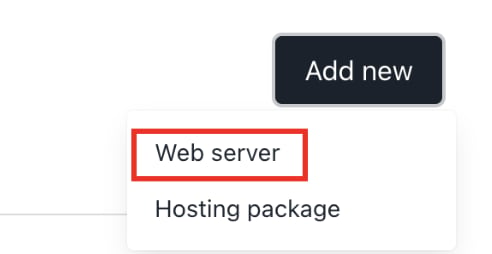
3. Click on **Add New** and select **Web Server**.
<Frame caption="Add new > Web server">
  <img src="https://mintcdn.com/upmind/A-RwNPXmK_xnEEqe/images/fb/709ea49a82d06cee.png?fit=max&auto=format&n=A-RwNPXmK_xnEEqe&q=85&s=1cd76d4d3195d90493de346997674abc" alt="Add new > Web server" data-og-width="492" width="492" data-og-height="254" height="254" data-path="images/fb/709ea49a82d06cee.png" data-optimize="true" data-opv="3" srcset="https://mintcdn.com/upmind/A-RwNPXmK_xnEEqe/images/fb/709ea49a82d06cee.png?w=280&fit=max&auto=format&n=A-RwNPXmK_xnEEqe&q=85&s=ad6494629b05b298d5660480f1d39557 280w, https://mintcdn.com/upmind/A-RwNPXmK_xnEEqe/images/fb/709ea49a82d06cee.png?w=560&fit=max&auto=format&n=A-RwNPXmK_xnEEqe&q=85&s=4944982b2bd5d33221205660b9cd4d3a 560w, https://mintcdn.com/upmind/A-RwNPXmK_xnEEqe/images/fb/709ea49a82d06cee.png?w=840&fit=max&auto=format&n=A-RwNPXmK_xnEEqe&q=85&s=824392fb81c3899aa38265ccb98370b9 840w, https://mintcdn.com/upmind/A-RwNPXmK_xnEEqe/images/fb/709ea49a82d06cee.png?w=1100&fit=max&auto=format&n=A-RwNPXmK_xnEEqe&q=85&s=7d770fa9ee75db6aa5528d2a4f2120a0 1100w, https://mintcdn.com/upmind/A-RwNPXmK_xnEEqe/images/fb/709ea49a82d06cee.png?w=1650&fit=max&auto=format&n=A-RwNPXmK_xnEEqe&q=85&s=258339a4ed96146be092468f84769c6b 1650w, https://mintcdn.com/upmind/A-RwNPXmK_xnEEqe/images/fb/709ea49a82d06cee.png?w=2500&fit=max&auto=format&n=A-RwNPXmK_xnEEqe&q=85&s=f62efcd69688a1b2afb1c3c5155c14ca 2500w" />
</Frame>

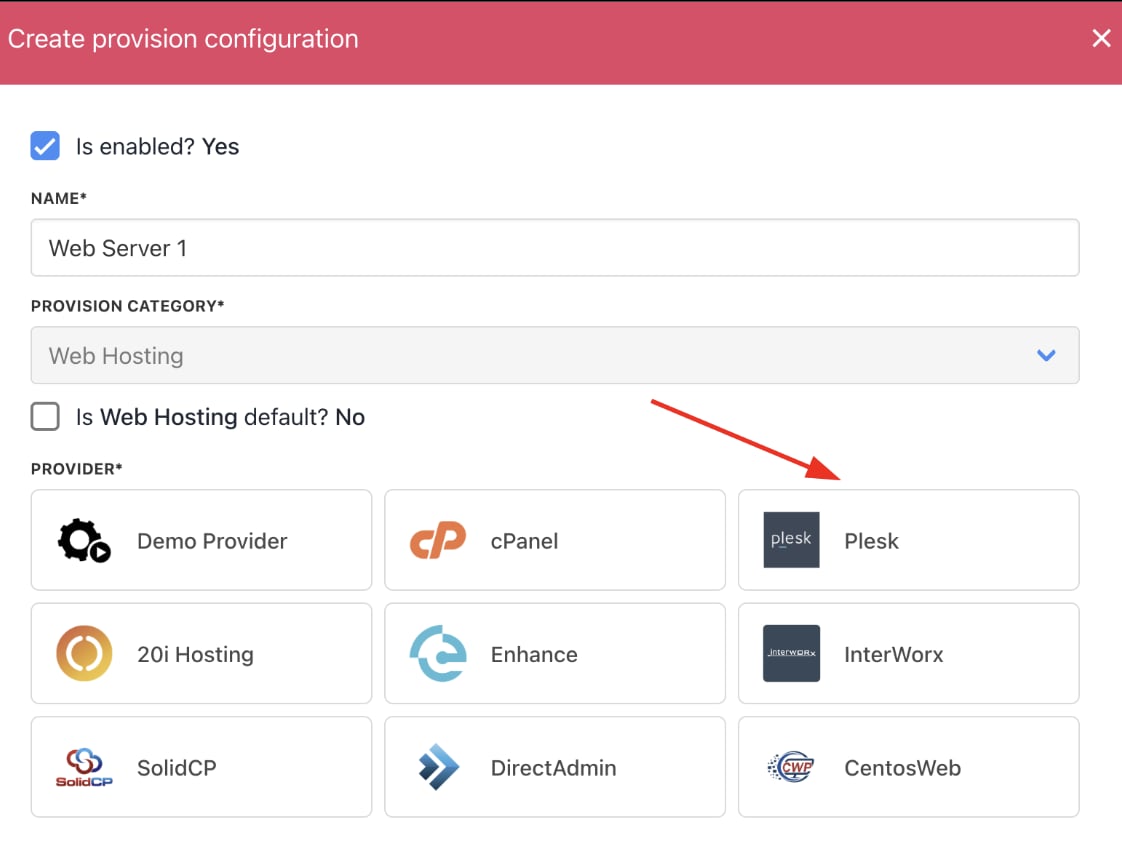
4. Type your **Web Hosting service** name and choose **Plesk**.
<Frame caption="Choose provider">
  <img src="https://mintcdn.com/upmind/bPO2bBzOxYQR4tYr/images/fb/ffc6f6283c90dea3.png?fit=max&auto=format&n=bPO2bBzOxYQR4tYr&q=85&s=85704513d3268c30be1ab835496b0b75" alt="Choose provider" width="1122" height="848" data-path="images/fb/ffc6f6283c90dea3.png" />
</Frame>

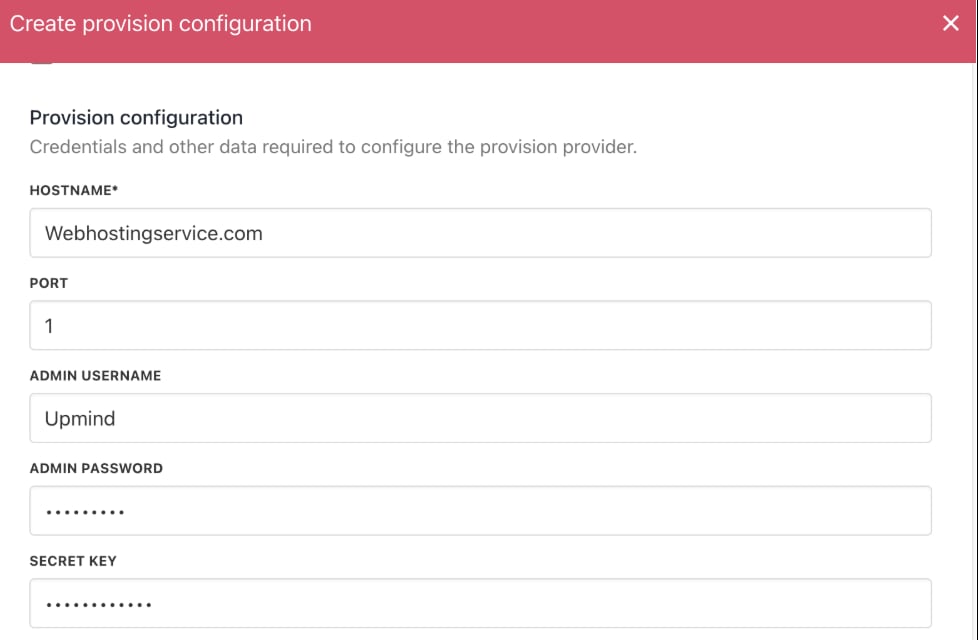
5. Add all the necessary **Provision Configurations**, such as **Host Name**, **Admin User Name**, and **Admin Password**. All of the information can be found on your panel.
<Frame caption="Enter provisioning details">
  <img src="https://mintcdn.com/upmind/A-RwNPXmK_xnEEqe/images/fb/7376d5a976c351d3.png?fit=max&auto=format&n=A-RwNPXmK_xnEEqe&q=85&s=357f11b43efb46ec1c8895a49768e44a" alt="Enter provisioning details" width="978" height="640" data-path="images/fb/7376d5a976c351d3.png" />
</Frame>

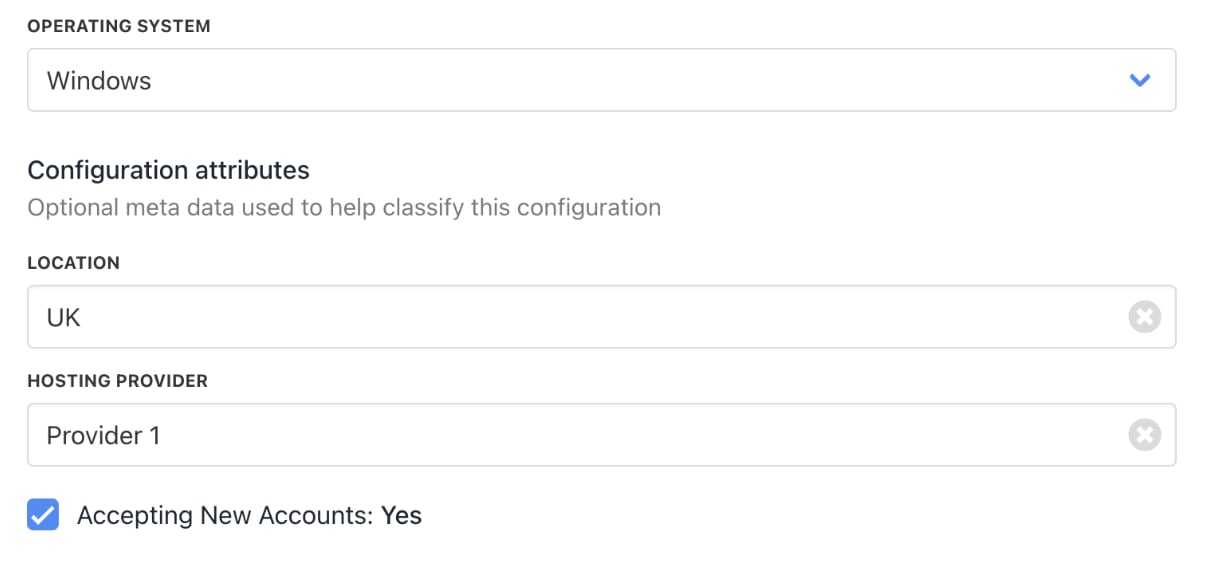
6. Afterwards, choose your operating system, fill in the optional configuration attributes, and then click **Create**.
<Frame caption="Enter configuration attributes">
  <img src="https://mintcdn.com/upmind/A-RwNPXmK_xnEEqe/images/fb/78c49b96afb6f224.png?fit=max&auto=format&n=A-RwNPXmK_xnEEqe&q=85&s=5fb434a69cc025530d15df6dc62b53b5" alt="Enter configuration attributes" width="1208" height="576" data-path="images/fb/78c49b96afb6f224.png" />
</Frame>

## **Set up billing and payment processing**

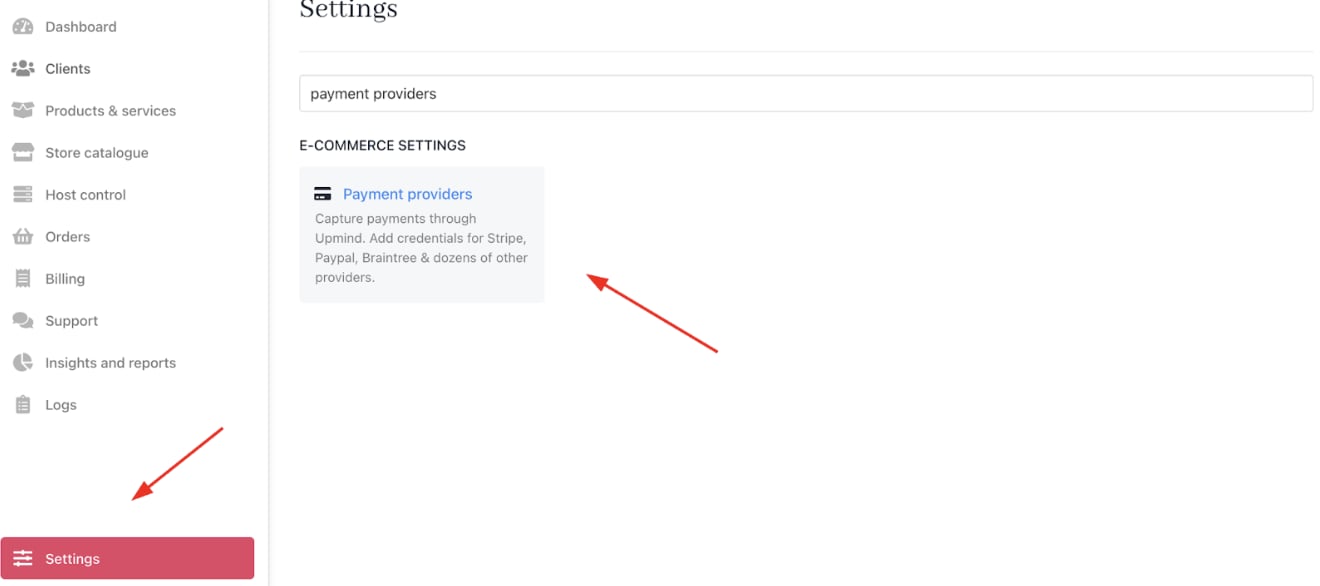
1. Go to **Settings** > **Payment Providers** under **E-commerce Settings**.
<Frame caption="Settings > E-commerce Settings > Payment Providers">
  <img src="https://mintcdn.com/upmind/JUoAg6onJmXk_-rR/images/fb/de0ee77c121de6d9.png?fit=max&auto=format&n=JUoAg6onJmXk_-rR&q=85&s=86d625320f7439b5a32f4037c0534e0e" alt="Settings > E-commerce Settings > Payment Providers" data-og-width="1320" width="1320" data-og-height="586" height="586" data-path="images/fb/de0ee77c121de6d9.png" data-optimize="true" data-opv="3" srcset="https://mintcdn.com/upmind/JUoAg6onJmXk_-rR/images/fb/de0ee77c121de6d9.png?w=280&fit=max&auto=format&n=JUoAg6onJmXk_-rR&q=85&s=6a1d19afa0dcfba3422f2f4db8094399 280w, https://mintcdn.com/upmind/JUoAg6onJmXk_-rR/images/fb/de0ee77c121de6d9.png?w=560&fit=max&auto=format&n=JUoAg6onJmXk_-rR&q=85&s=0d869592412ef833c0ddef95522dbbfc 560w, https://mintcdn.com/upmind/JUoAg6onJmXk_-rR/images/fb/de0ee77c121de6d9.png?w=840&fit=max&auto=format&n=JUoAg6onJmXk_-rR&q=85&s=88e6bf58c86db492b5fe8efbd59ed3d7 840w, https://mintcdn.com/upmind/JUoAg6onJmXk_-rR/images/fb/de0ee77c121de6d9.png?w=1100&fit=max&auto=format&n=JUoAg6onJmXk_-rR&q=85&s=b3b584dd5edf2fbe77feb0c890dbf76c 1100w, https://mintcdn.com/upmind/JUoAg6onJmXk_-rR/images/fb/de0ee77c121de6d9.png?w=1650&fit=max&auto=format&n=JUoAg6onJmXk_-rR&q=85&s=dfbae2d15fcfece27c69aafcc88102fc 1650w, https://mintcdn.com/upmind/JUoAg6onJmXk_-rR/images/fb/de0ee77c121de6d9.png?w=2500&fit=max&auto=format&n=JUoAg6onJmXk_-rR&q=85&s=22c76f376c0a567396354a82150ac55b 2500w" />
</Frame>

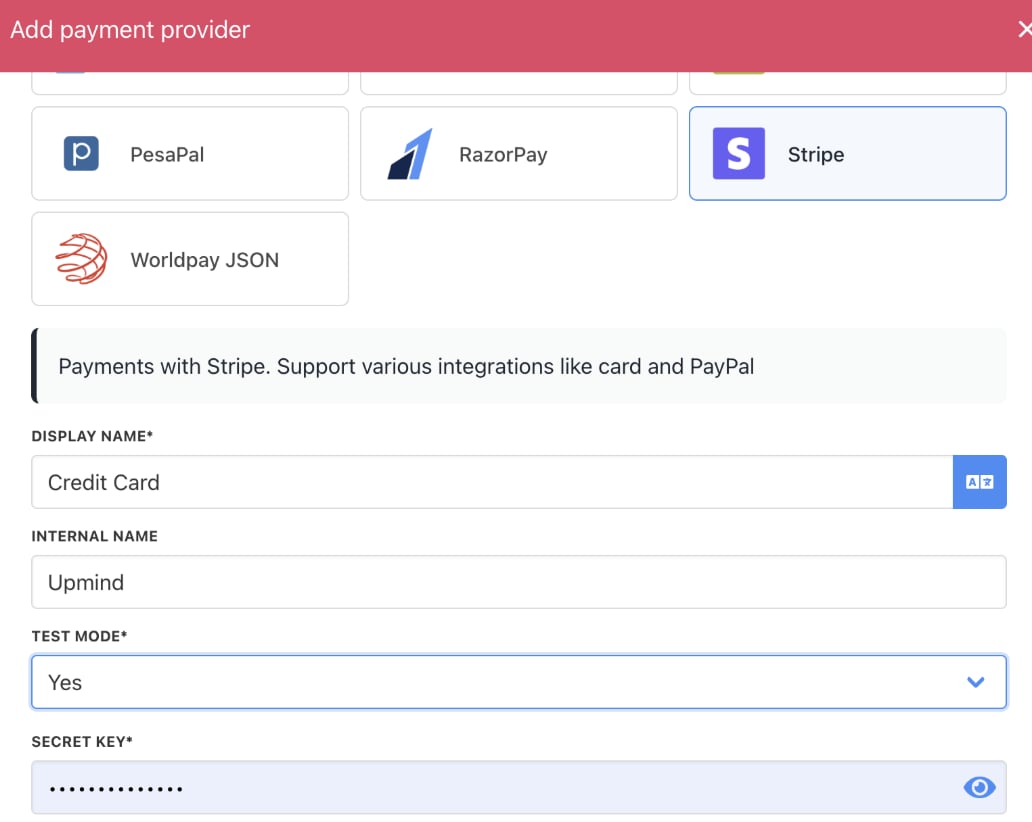
2. Click **Add payment provider** and configure [<u>payment gateways</u>](/using-upmind/payment-methods/payments-in-upmind/available-payment-gateways) like Stripe, PayPal, or offline payment methods.

<Frame caption="Add payment provider">
  <img src="https://mintcdn.com/upmind/uxzVUXAKtJ2bRWCI/images/fb/69ff6db441cd92a3.png?fit=max&auto=format&n=uxzVUXAKtJ2bRWCI&q=85&s=3cd2d905c6d4abc1cba6a65be90235d2" alt="Add payment provider" width="1318" height="114" data-path="images/fb/69ff6db441cd92a3.png" />
</Frame>

<Frame caption="Enter payment provider details">
  <img src="https://mintcdn.com/upmind/A-RwNPXmK_xnEEqe/images/fb/74a27cc141d720a4.png?fit=max&auto=format&n=A-RwNPXmK_xnEEqe&q=85&s=6a3c9977936b854a824d527ff8335c6b" alt="Enter payment provider details" width="1032" height="822" data-path="images/fb/74a27cc141d720a4.png" />
</Frame>

## **Add hosting products and packages**

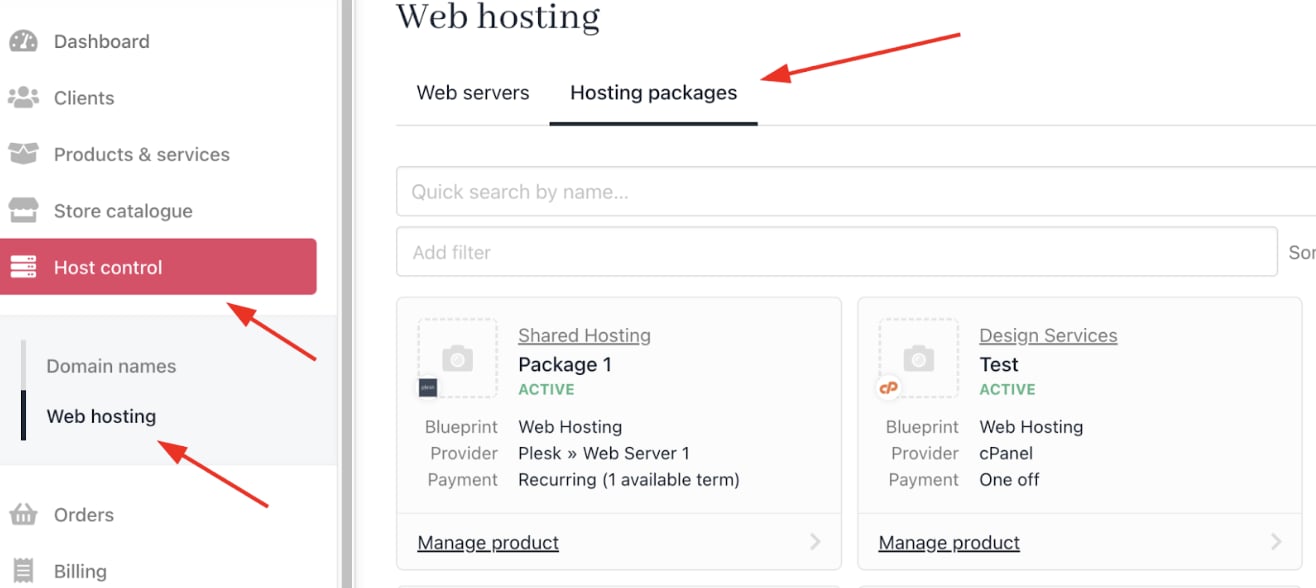
1. Go to **Host Control** > **Web Hosting** > **Hosting Packages**.
<Frame caption="Host Control > Web Hosting > Hosting Packages">
  <img src="https://mintcdn.com/upmind/ZsIo0APxdVb_gFS-/images/fb/240bb2a3b309049d.png?fit=max&auto=format&n=ZsIo0APxdVb_gFS-&q=85&s=8664245a7dc4fe1ee85b20a0fc950c02" alt="Host Control > Web Hosting > Hosting Packages" data-og-width="1316" width="1316" data-og-height="588" height="588" data-path="images/fb/240bb2a3b309049d.png" data-optimize="true" data-opv="3" srcset="https://mintcdn.com/upmind/ZsIo0APxdVb_gFS-/images/fb/240bb2a3b309049d.png?w=280&fit=max&auto=format&n=ZsIo0APxdVb_gFS-&q=85&s=d27af1a5807c03093b64f187da8ff913 280w, https://mintcdn.com/upmind/ZsIo0APxdVb_gFS-/images/fb/240bb2a3b309049d.png?w=560&fit=max&auto=format&n=ZsIo0APxdVb_gFS-&q=85&s=dfad7daef04d1c46eb43133360037021 560w, https://mintcdn.com/upmind/ZsIo0APxdVb_gFS-/images/fb/240bb2a3b309049d.png?w=840&fit=max&auto=format&n=ZsIo0APxdVb_gFS-&q=85&s=e653739ee475afd5e170ed4a0c55be91 840w, https://mintcdn.com/upmind/ZsIo0APxdVb_gFS-/images/fb/240bb2a3b309049d.png?w=1100&fit=max&auto=format&n=ZsIo0APxdVb_gFS-&q=85&s=456c3e105b7d600d737ce32118eccf10 1100w, https://mintcdn.com/upmind/ZsIo0APxdVb_gFS-/images/fb/240bb2a3b309049d.png?w=1650&fit=max&auto=format&n=ZsIo0APxdVb_gFS-&q=85&s=f88e441fcfd6e4b1c94609a1c07effe6 1650w, https://mintcdn.com/upmind/ZsIo0APxdVb_gFS-/images/fb/240bb2a3b309049d.png?w=2500&fit=max&auto=format&n=ZsIo0APxdVb_gFS-&q=85&s=eb923ae252d4ffa81257af07e26fab59 2500w" />
</Frame>

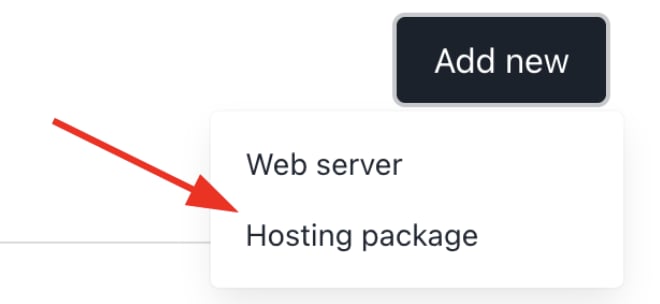
2. Click **Add New** to create hosting plans (e.g., shared hosting, VPS, dedicated servers).
<Frame caption="Add new > Hosting package">
  <img src="https://mintcdn.com/upmind/kAlrCUxI2nwYz4_i/images/fb/1a639fdafe14ec8b.png?fit=max&auto=format&n=kAlrCUxI2nwYz4_i&q=85&s=0b259a3d77c6db0e1053569e2fcc0dd2" alt="Add new > Hosting package" data-og-width="660" width="660" data-og-height="304" height="304" data-path="images/fb/1a639fdafe14ec8b.png" data-optimize="true" data-opv="3" srcset="https://mintcdn.com/upmind/kAlrCUxI2nwYz4_i/images/fb/1a639fdafe14ec8b.png?w=280&fit=max&auto=format&n=kAlrCUxI2nwYz4_i&q=85&s=de7e4dfd05fa6969379c272f52a7eef5 280w, https://mintcdn.com/upmind/kAlrCUxI2nwYz4_i/images/fb/1a639fdafe14ec8b.png?w=560&fit=max&auto=format&n=kAlrCUxI2nwYz4_i&q=85&s=4bc50c06290837af31e9dca301eca6ad 560w, https://mintcdn.com/upmind/kAlrCUxI2nwYz4_i/images/fb/1a639fdafe14ec8b.png?w=840&fit=max&auto=format&n=kAlrCUxI2nwYz4_i&q=85&s=2d9ba063e7bf0ec2ada8b0543deba40a 840w, https://mintcdn.com/upmind/kAlrCUxI2nwYz4_i/images/fb/1a639fdafe14ec8b.png?w=1100&fit=max&auto=format&n=kAlrCUxI2nwYz4_i&q=85&s=6c209fe425949d6aca0a7c765b8ca620 1100w, https://mintcdn.com/upmind/kAlrCUxI2nwYz4_i/images/fb/1a639fdafe14ec8b.png?w=1650&fit=max&auto=format&n=kAlrCUxI2nwYz4_i&q=85&s=bc4ca279a7c8f3d2d1e00ee2a12cd1c3 1650w, https://mintcdn.com/upmind/kAlrCUxI2nwYz4_i/images/fb/1a639fdafe14ec8b.png?w=2500&fit=max&auto=format&n=kAlrCUxI2nwYz4_i&q=85&s=f99fdf3385cd2d7262fe5207ff3da0dd 2500w" />
</Frame>

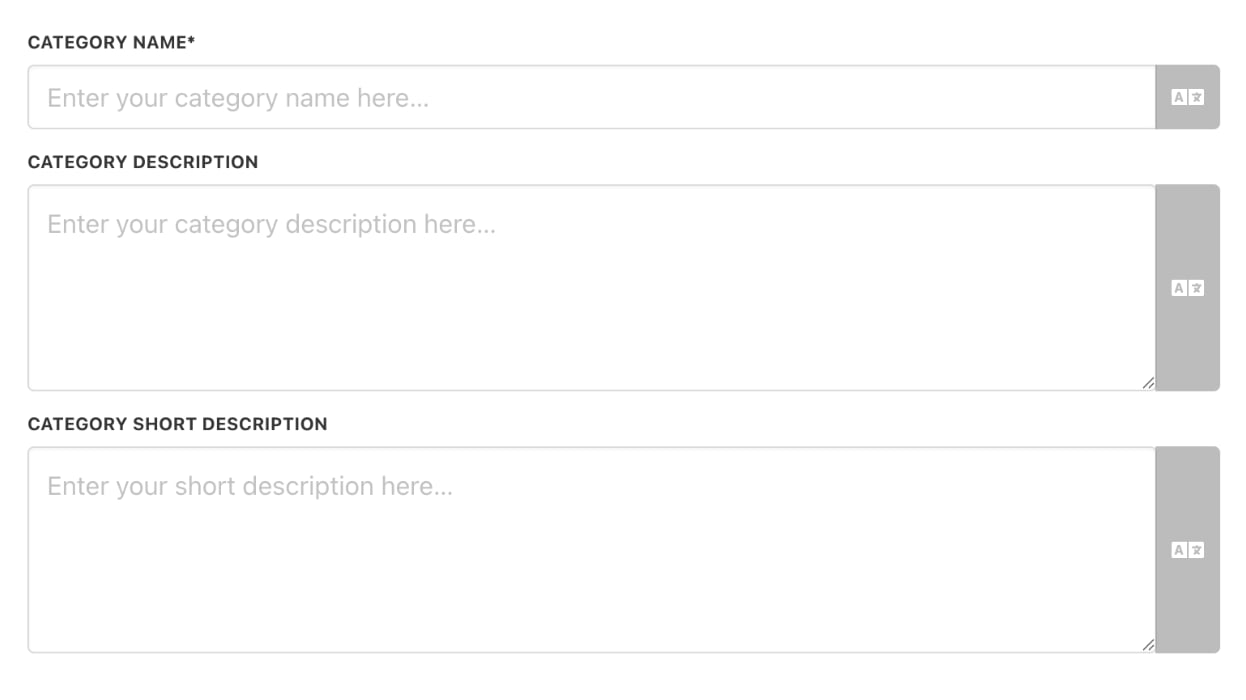
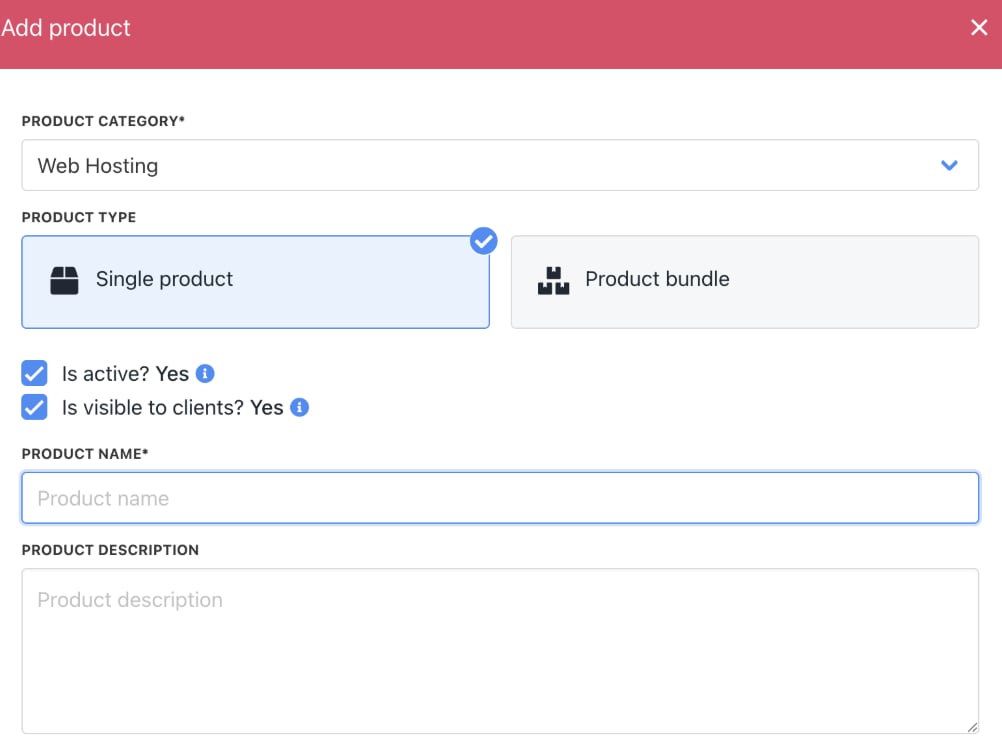
3. Create a new **Product Category** or choose an existing one. Then choose product type, product name, and a description.
<Frame caption="Enter product category details">
  <img src="https://mintcdn.com/upmind/Lh8hC132BWHpvRbz/images/fb/4c5eb8ece07188cd.png?fit=max&auto=format&n=Lh8hC132BWHpvRbz&q=85&s=54b19405401e77273a9d5c7d7c219173" alt="Enter product category details" width="1246" height="700" data-path="images/fb/4c5eb8ece07188cd.png" />
</Frame>

<Frame caption="Enter product details">
  <img src="https://mintcdn.com/upmind/kAlrCUxI2nwYz4_i/images/fb/1f83ac8706ea979a.png?fit=max&auto=format&n=kAlrCUxI2nwYz4_i&q=85&s=fc8eccba73fd8b52f1ece32560543ff3" alt="Enter product details" width="1002" height="756" data-path="images/fb/1f83ac8706ea979a.png" />
</Frame>

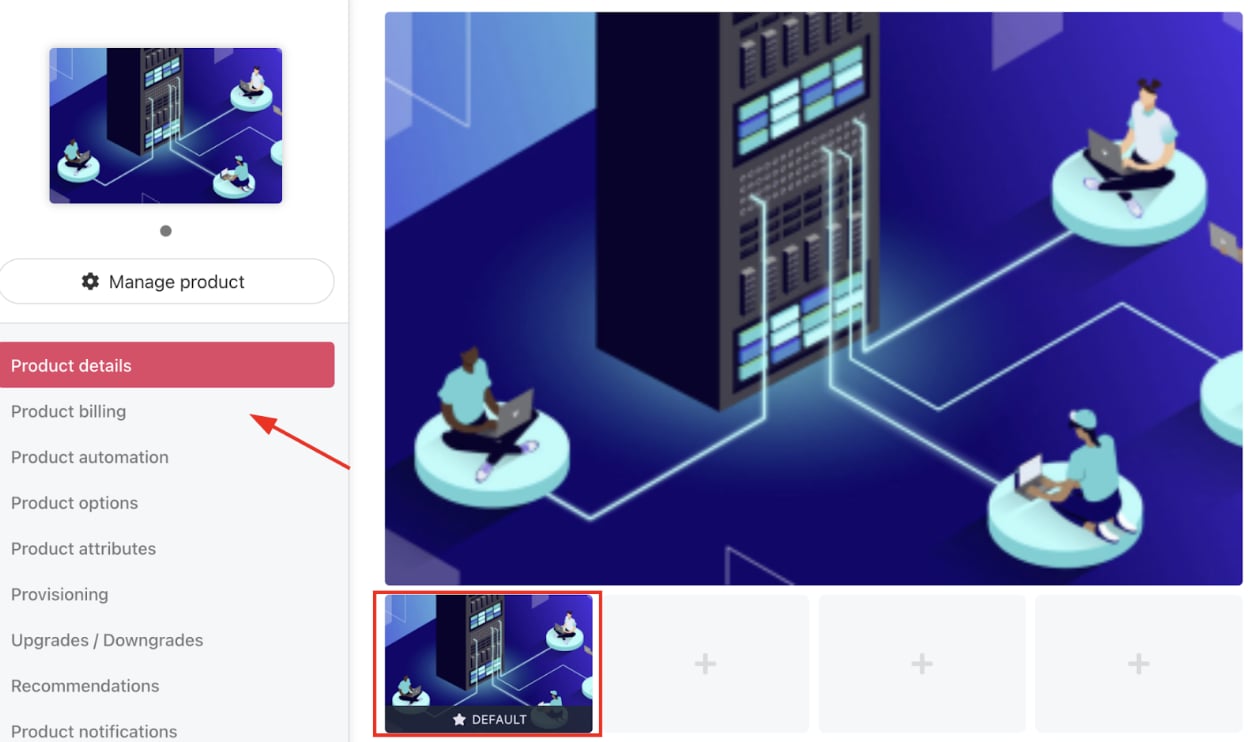
4. Go to **Product Details** to add an image.
<Frame caption="Add product image">
  <img src="https://mintcdn.com/upmind/A-RwNPXmK_xnEEqe/images/fb/7082762fa4daa9d0.png?fit=max&auto=format&n=A-RwNPXmK_xnEEqe&q=85&s=db85970e398595bb33f287a4a47cd998" alt="Add product image" width="1252" height="742" data-path="images/fb/7082762fa4daa9d0.png" />
</Frame>

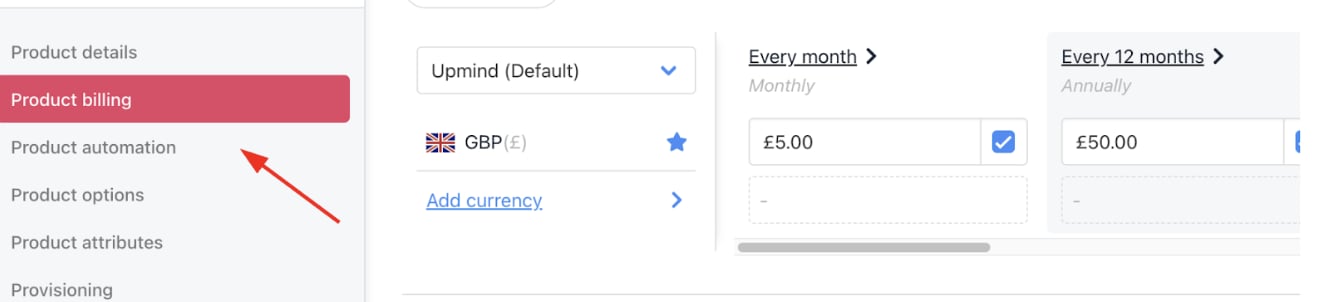
5. Go to **Product Billing** to include pricing and billing cycles (monthly, quarterly, annually).
<Frame caption="Add product pricing">
  <img src="https://mintcdn.com/upmind/92wYnpdR_k6AjH3x/images/fb/4fdce210c93a4183.png?fit=max&auto=format&n=92wYnpdR_k6AjH3x&q=85&s=2092af63279bdafd086c7f4f8f23694c" alt="Add product pricing" width="1320" height="302" data-path="images/fb/4fdce210c93a4183.png" />
</Frame>

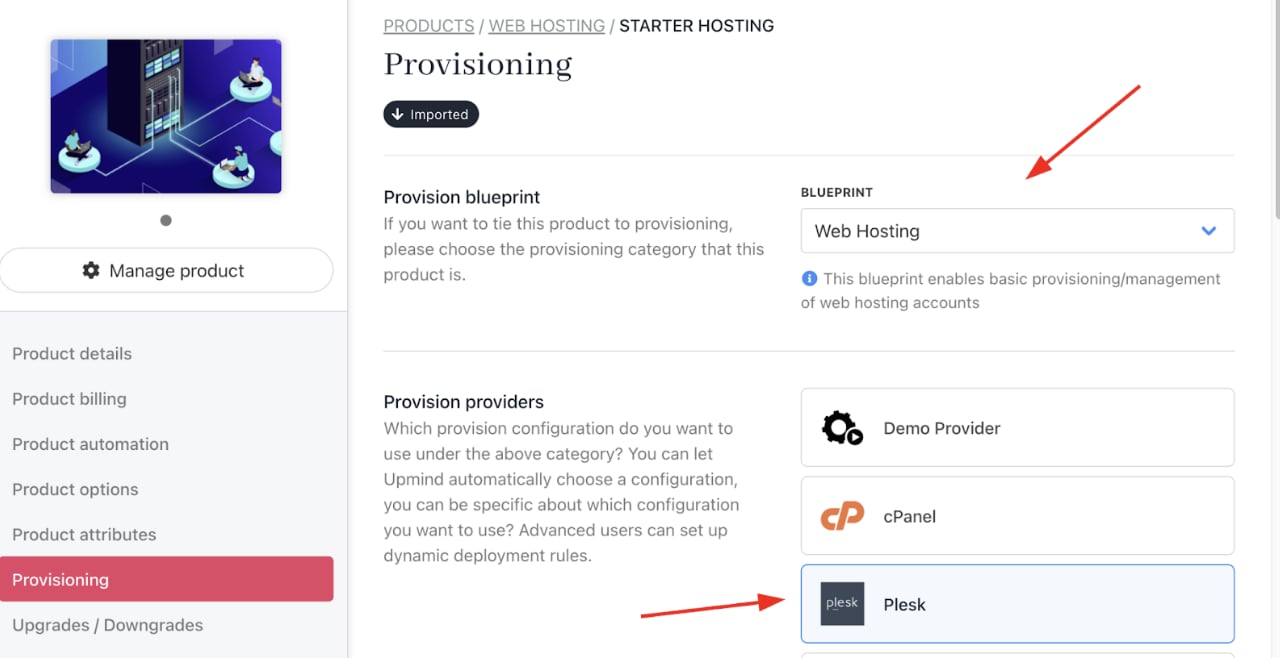
6. Go to **Provisioning** to choose your **Provision Blueprint** and **Provider**.
<Frame caption="Choose provision blueprint and provider">
  <img src="https://mintcdn.com/upmind/FQ1NhxALxjSHvvWW/images/fb/adfa9eeb23e93f13.png?fit=max&auto=format&n=FQ1NhxALxjSHvvWW&q=85&s=c0690c9d0f86382251075b3a0b22e00b" alt="Choose provision blueprint and provider" width="1280" height="658" data-path="images/fb/adfa9eeb23e93f13.png" />
</Frame>

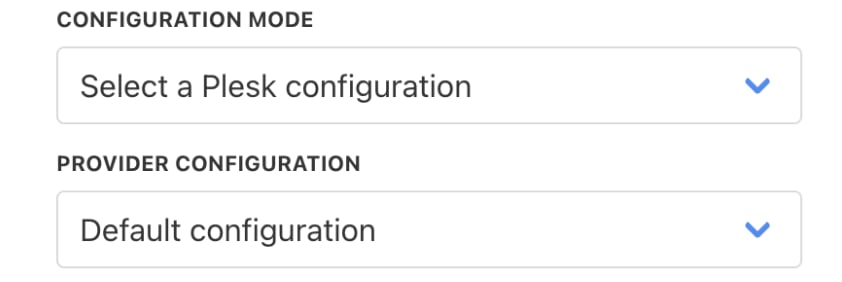
7. Select the **Configuration Mode** and choose your **Provider Configuration** (the Web Hosting that you created).
<Frame caption="Choose configuration mode">
  <img src="https://mintcdn.com/upmind/ZsIo0APxdVb_gFS-/images/fb/2c2d6ca26acaab0d.png?fit=max&auto=format&n=ZsIo0APxdVb_gFS-&q=85&s=79886923de1bb411dc96dd44674f17bc" alt="Choose configuration mode" width="842" height="282" data-path="images/fb/2c2d6ca26acaab0d.png" />
</Frame>

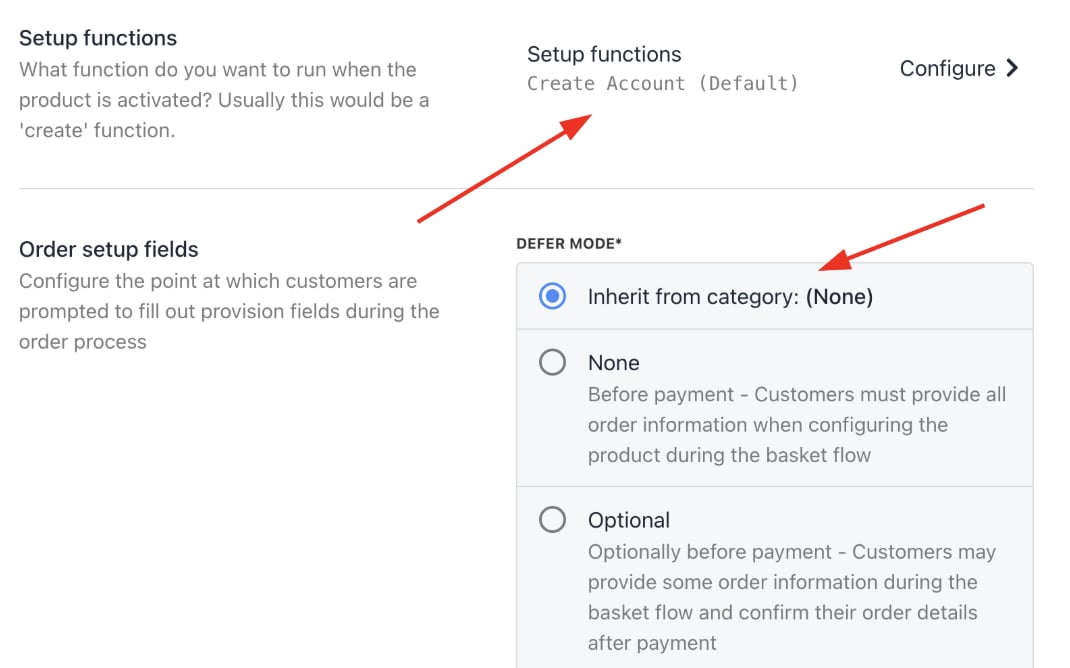
8. You can keep the **Setup Functions** as **Default**, and **Order Setup Fields** as **Inherit from Category**.
<Frame caption="Setup functions and order setup fields">
  <img src="https://mintcdn.com/upmind/2ooSxDpt6PiIGMr-/images/fb/063c35c354279898.png?fit=max&auto=format&n=2ooSxDpt6PiIGMr-&q=85&s=5cb08ee8eda4827c46d0e451bf42de0e" alt="Setup functions and order setup fields" width="1070" height="668" data-path="images/fb/063c35c354279898.png" />
</Frame>

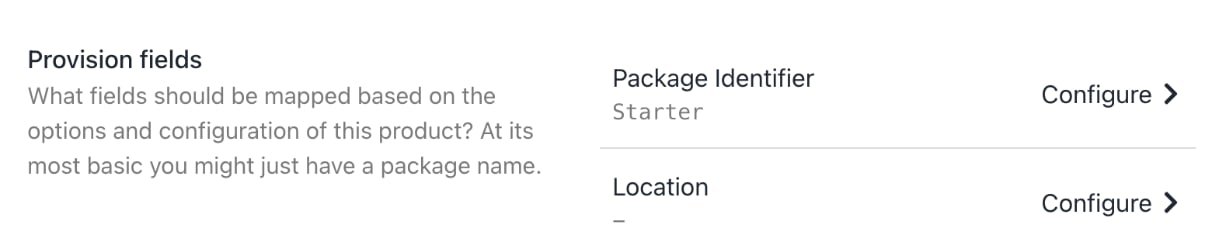
9. Under **Provision Fields**, you need to configure your **Package Identifier**. You can create the **Package** with all the details (for example, disk space, monthly bandwidth limit, etc.) from your panel. Add the **Package Name** to the **Package Identifier**.
<Frame caption="Package identifier">
  <img src="https://mintcdn.com/upmind/wRuKrNY12tQZY8Rr/images/fb/376c85d0575f1e5e.png?fit=max&auto=format&n=wRuKrNY12tQZY8Rr&q=85&s=42df3c228b38f8315705f72e44c135c1" alt="Package identifier" width="1226" height="246" data-path="images/fb/376c85d0575f1e5e.png" />
</Frame>

The product should now be set up and live.

## **Connect domain registrar providers**

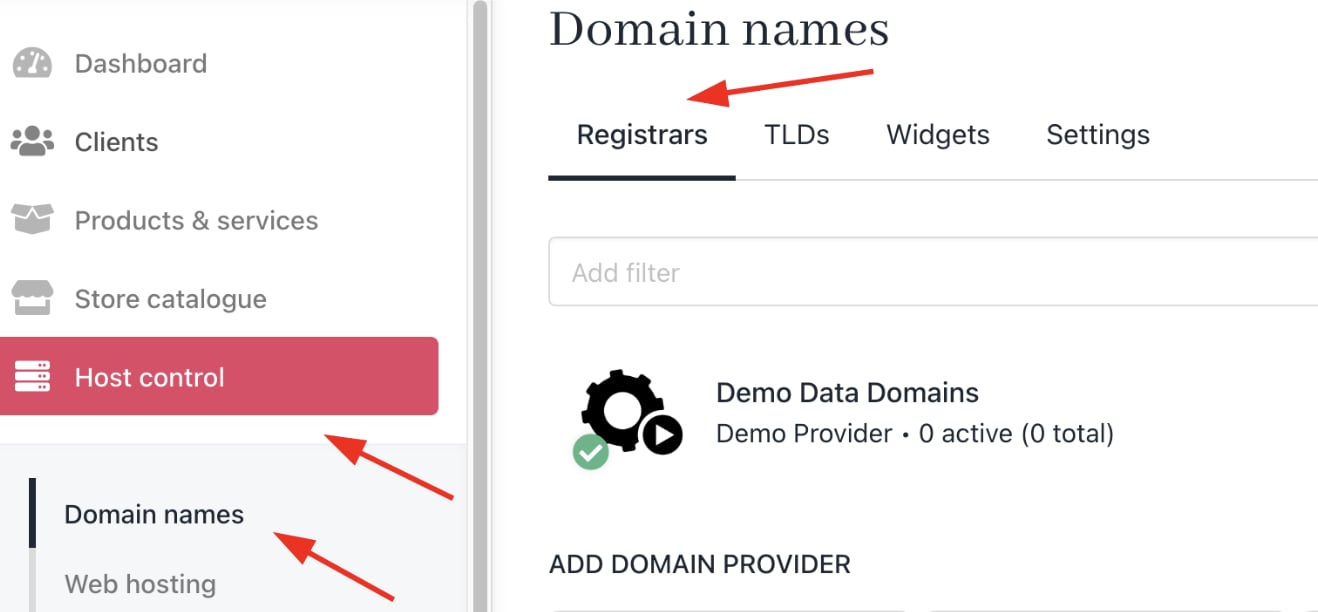
1. Navigate to **Host Control** > **Domain Names** > **Registrars**.
<Frame caption="Host Control > Domain Names > Registrars">
  <img src="https://mintcdn.com/upmind/uxzVUXAKtJ2bRWCI/images/fb/6e9ddbf6e20e3707.png?fit=max&auto=format&n=uxzVUXAKtJ2bRWCI&q=85&s=b15e5e9b788a93f9ed36106fa8d76056" alt="Host Control > Domain Names > Registrars" data-og-width="1318" width="1318" data-og-height="612" height="612" data-path="images/fb/6e9ddbf6e20e3707.png" data-optimize="true" data-opv="3" srcset="https://mintcdn.com/upmind/uxzVUXAKtJ2bRWCI/images/fb/6e9ddbf6e20e3707.png?w=280&fit=max&auto=format&n=uxzVUXAKtJ2bRWCI&q=85&s=035786c0aa1d25380d6f4a55ca83c617 280w, https://mintcdn.com/upmind/uxzVUXAKtJ2bRWCI/images/fb/6e9ddbf6e20e3707.png?w=560&fit=max&auto=format&n=uxzVUXAKtJ2bRWCI&q=85&s=ade88316c09883676ef03cb34ee7e079 560w, https://mintcdn.com/upmind/uxzVUXAKtJ2bRWCI/images/fb/6e9ddbf6e20e3707.png?w=840&fit=max&auto=format&n=uxzVUXAKtJ2bRWCI&q=85&s=0459f8fa4b7205c70f03fcd0ba080ef2 840w, https://mintcdn.com/upmind/uxzVUXAKtJ2bRWCI/images/fb/6e9ddbf6e20e3707.png?w=1100&fit=max&auto=format&n=uxzVUXAKtJ2bRWCI&q=85&s=b5e4a0a974f68e98e967439b26dea407 1100w, https://mintcdn.com/upmind/uxzVUXAKtJ2bRWCI/images/fb/6e9ddbf6e20e3707.png?w=1650&fit=max&auto=format&n=uxzVUXAKtJ2bRWCI&q=85&s=11da5594649645925beac2181c2c486f 1650w, https://mintcdn.com/upmind/uxzVUXAKtJ2bRWCI/images/fb/6e9ddbf6e20e3707.png?w=2500&fit=max&auto=format&n=uxzVUXAKtJ2bRWCI&q=85&s=8442fb8a6443a1c0801dd2cba297da1f 2500w" />
</Frame>

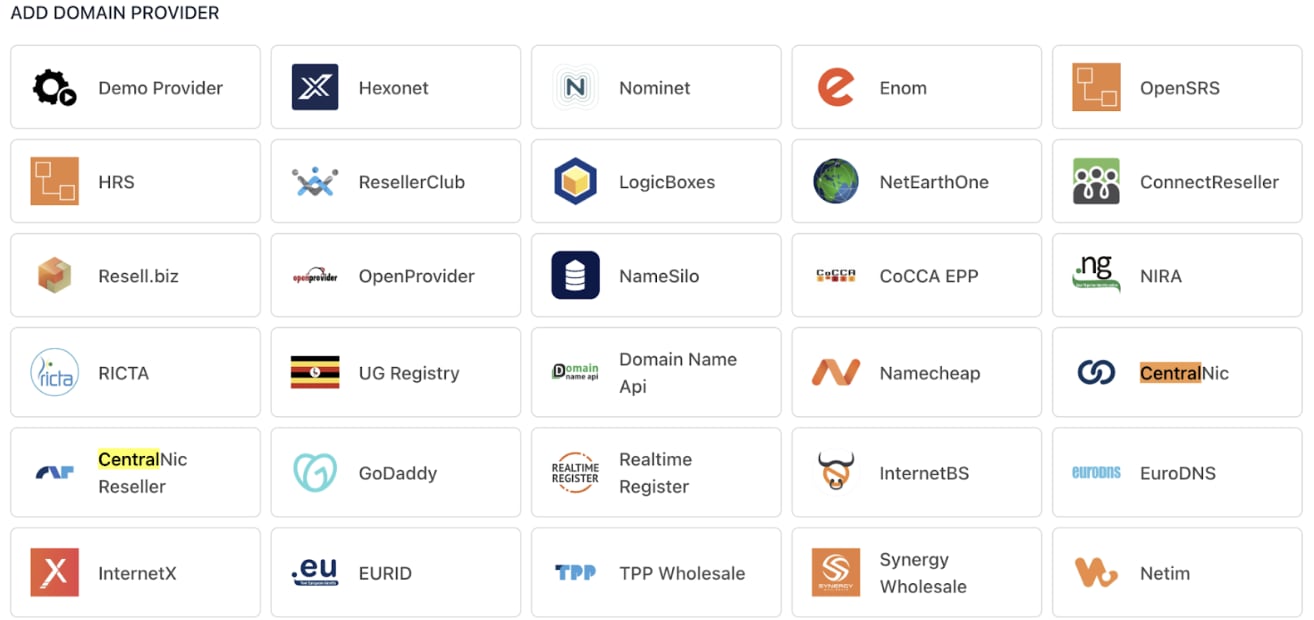
2. Add **Registrar Providers** you work with (e.g., Hexonet, CentralNic, ConnectReseller).
<Frame caption="Domain provider">
  <img src="https://mintcdn.com/upmind/wRuKrNY12tQZY8Rr/images/fb/3681f83844da9dfd.png?fit=max&auto=format&n=wRuKrNY12tQZY8Rr&q=85&s=0097f7e132b41e9f2b429a1268472e86" alt="Domain provider" width="1314" height="620" data-path="images/fb/3681f83844da9dfd.png" />
</Frame>

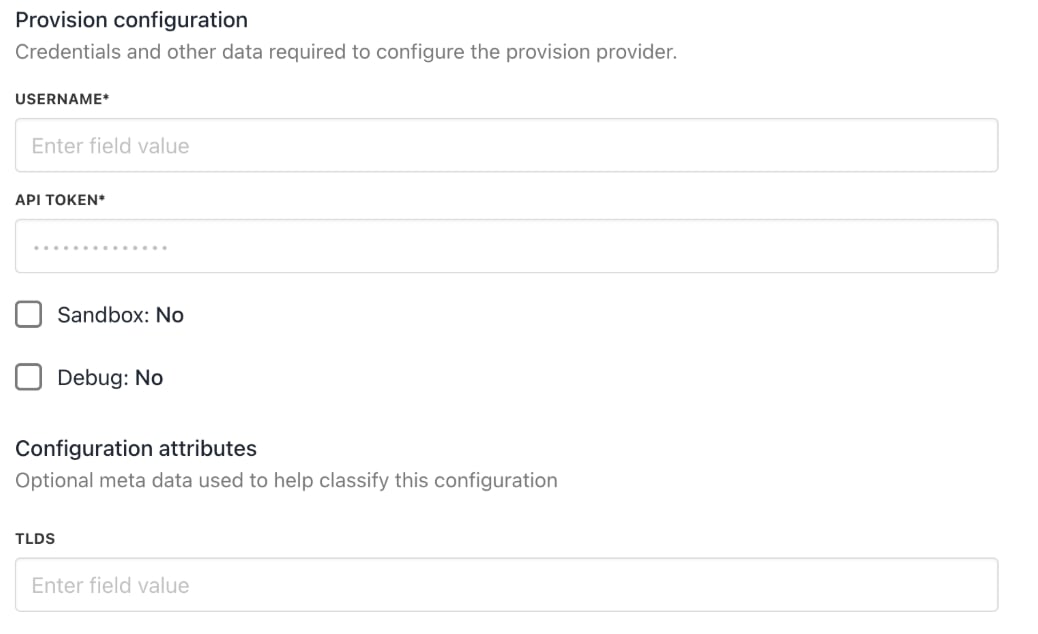
3. Enter **Provision Configurations**, such as account credentials and API keys, to enable automated domain registration and management within Upmind.
<Frame caption="Provision configurations">
  <img src="https://mintcdn.com/upmind/6knUVC8F1nK4E5CY/images/fb/c2e4b43a7da3af2b.png?fit=max&auto=format&n=6knUVC8F1nK4E5CY&q=85&s=c54d02a8f46adcb1b67846275faf8c33" alt="Provision configurations" width="1038" height="634" data-path="images/fb/c2e4b43a7da3af2b.png" />
</Frame>

## **Manage client accounts and support**

1. Add clients manually under **Clients** > **Add New**.

<Frame caption="Clients > Add New">
  <img src="https://mintcdn.com/upmind/z5ofg3t7by4uN44v/images/fb/ef6f71b261899dd9.png?fit=max&auto=format&n=z5ofg3t7by4uN44v&q=85&s=38eaa636e351103cba3ac1cba527cb0e" alt="Clients > Add New" data-og-width="1324" width="1324" data-og-height="174" height="174" data-path="images/fb/ef6f71b261899dd9.png" data-optimize="true" data-opv="3" srcset="https://mintcdn.com/upmind/z5ofg3t7by4uN44v/images/fb/ef6f71b261899dd9.png?w=280&fit=max&auto=format&n=z5ofg3t7by4uN44v&q=85&s=2ab157f34185c9d6e9174e59d8df848c 280w, https://mintcdn.com/upmind/z5ofg3t7by4uN44v/images/fb/ef6f71b261899dd9.png?w=560&fit=max&auto=format&n=z5ofg3t7by4uN44v&q=85&s=91ede268154d6a07a4bddba6875037a0 560w, https://mintcdn.com/upmind/z5ofg3t7by4uN44v/images/fb/ef6f71b261899dd9.png?w=840&fit=max&auto=format&n=z5ofg3t7by4uN44v&q=85&s=1dda7aebd46289c3a49ab1aef2be5fa9 840w, https://mintcdn.com/upmind/z5ofg3t7by4uN44v/images/fb/ef6f71b261899dd9.png?w=1100&fit=max&auto=format&n=z5ofg3t7by4uN44v&q=85&s=639bcbc766193d3575d5d9ce31382ec0 1100w, https://mintcdn.com/upmind/z5ofg3t7by4uN44v/images/fb/ef6f71b261899dd9.png?w=1650&fit=max&auto=format&n=z5ofg3t7by4uN44v&q=85&s=f759eaf57afcc983ab76045f5f66f9fc 1650w, https://mintcdn.com/upmind/z5ofg3t7by4uN44v/images/fb/ef6f71b261899dd9.png?w=2500&fit=max&auto=format&n=z5ofg3t7by4uN44v&q=85&s=e99d89e0c887e5128418e0f66092fb44 2500w" />
</Frame>

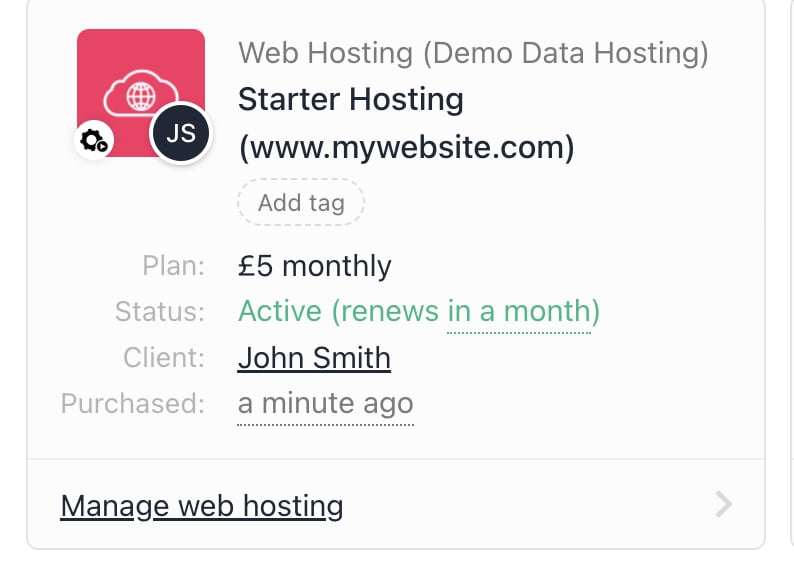
2. Associate clients with hosting packages and contracts to trigger correct billing and provisioning.
<Frame caption="Client association">
  <img src="https://mintcdn.com/upmind/bPO2bBzOxYQR4tYr/images/fb/fdb3295596f4515a.png?fit=max&auto=format&n=bPO2bBzOxYQR4tYr&q=85&s=314aad0ec2c55c0bd93619c48340fe23" alt="Client association" width="794" height="572" data-path="images/fb/fdb3295596f4515a.png" />
</Frame>

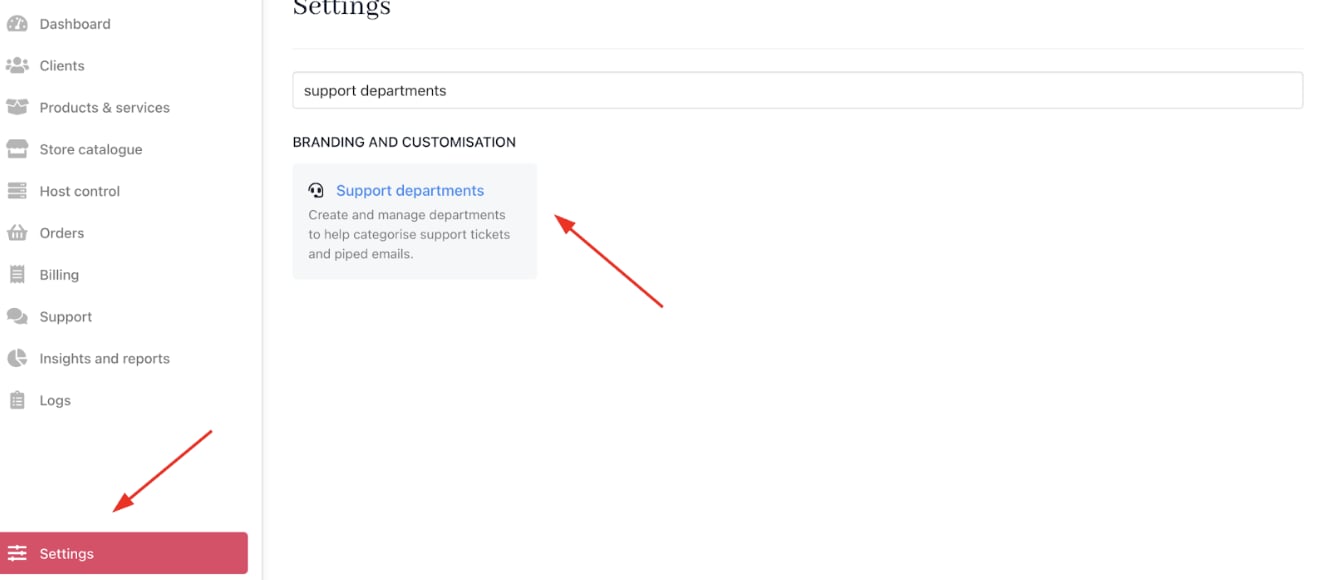
3. You can configure [<u>email piping</u>](/setup-and-configuration/email-configuring-and-sending/how-does-email-work-in-upmind) for support tickets by going to **Settings** > **Support Departments** under **Branding and Customisation**.

You can get more information on support departments in this [<u>guide</u>](/using-upmind/service-desk/how-to-create-support-department).
<Frame caption="Settings > Branding and Customisation > Support Departments">
  <img src="https://mintcdn.com/upmind/uxzVUXAKtJ2bRWCI/images/fb/64fc6364e7a7099c.png?fit=max&auto=format&n=uxzVUXAKtJ2bRWCI&q=85&s=87710f1163599160b60996a5e735b38f" alt="Settings > Branding and Customisation > Support Departments" data-og-width="1318" width="1318" data-og-height="580" height="580" data-path="images/fb/64fc6364e7a7099c.png" data-optimize="true" data-opv="3" srcset="https://mintcdn.com/upmind/uxzVUXAKtJ2bRWCI/images/fb/64fc6364e7a7099c.png?w=280&fit=max&auto=format&n=uxzVUXAKtJ2bRWCI&q=85&s=81a2afe756120b43d7f25caf66e53b52 280w, https://mintcdn.com/upmind/uxzVUXAKtJ2bRWCI/images/fb/64fc6364e7a7099c.png?w=560&fit=max&auto=format&n=uxzVUXAKtJ2bRWCI&q=85&s=c0a5077d0df3635ff578453af0a0cecf 560w, https://mintcdn.com/upmind/uxzVUXAKtJ2bRWCI/images/fb/64fc6364e7a7099c.png?w=840&fit=max&auto=format&n=uxzVUXAKtJ2bRWCI&q=85&s=7ac0dab82f4456021e7e5006196e4cb3 840w, https://mintcdn.com/upmind/uxzVUXAKtJ2bRWCI/images/fb/64fc6364e7a7099c.png?w=1100&fit=max&auto=format&n=uxzVUXAKtJ2bRWCI&q=85&s=7d377781b4e4917b8f2d44f72b972127 1100w, https://mintcdn.com/upmind/uxzVUXAKtJ2bRWCI/images/fb/64fc6364e7a7099c.png?w=1650&fit=max&auto=format&n=uxzVUXAKtJ2bRWCI&q=85&s=66f23a84073e907a833f72e3bc6608ff 1650w, https://mintcdn.com/upmind/uxzVUXAKtJ2bRWCI/images/fb/64fc6364e7a7099c.png?w=2500&fit=max&auto=format&n=uxzVUXAKtJ2bRWCI&q=85&s=a3056747dab746b4bdd0d343fec93c5c 2500w" />
</Frame>

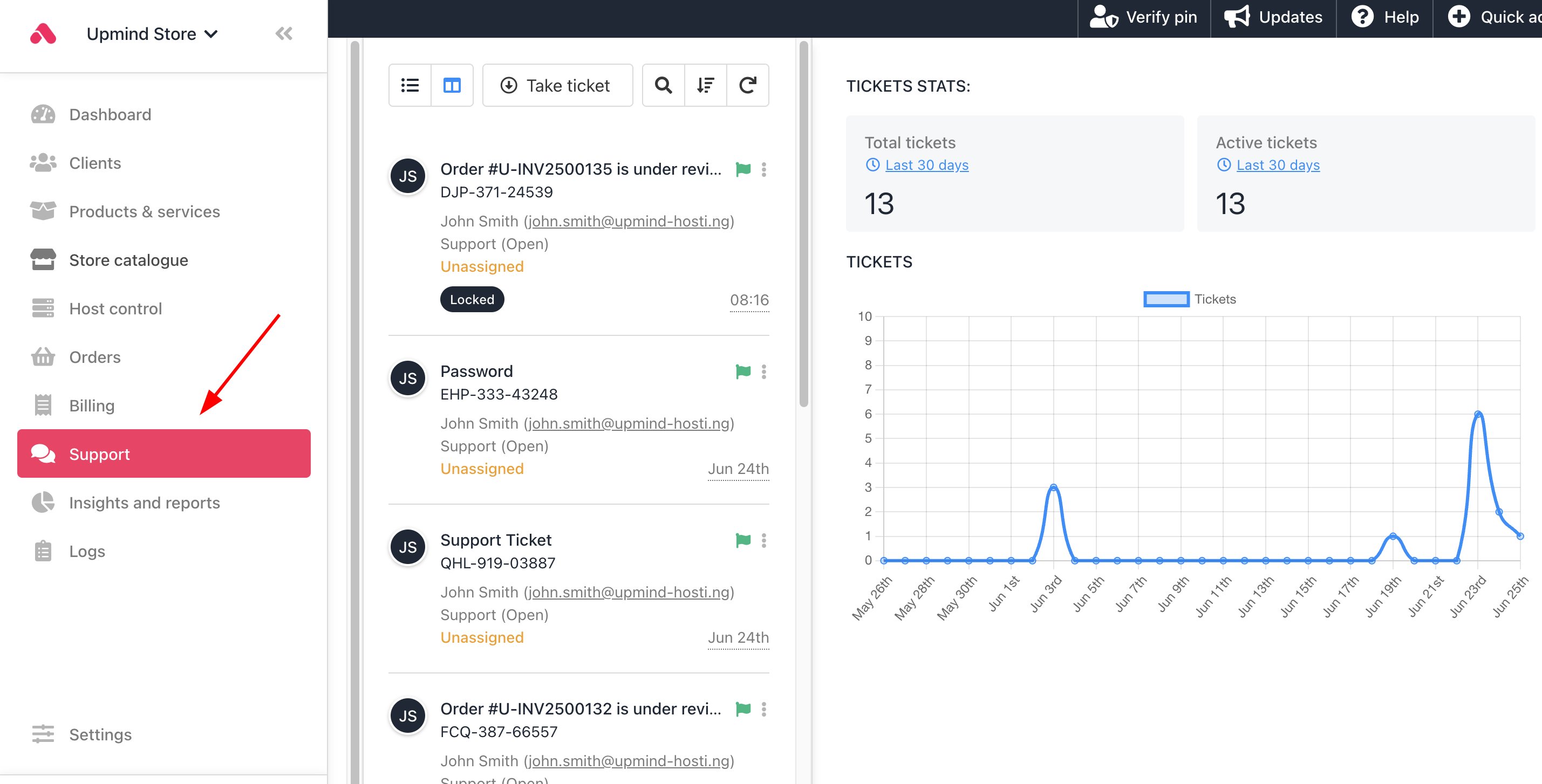
4. You can also implement Upmind’s built-in ticketing system to handle customer inquiries or technical support. [<u>Tickets</u>](/using-upmind/service-desk/how-to-create-a-ticket) link to client records for holistic case management.
<Frame caption="Support tickets">
  <img src="https://mintcdn.com/upmind/kAlrCUxI2nwYz4_i/images/fb/1e9f4a8794ebb5a8.png?fit=max&auto=format&n=kAlrCUxI2nwYz4_i&q=85&s=6a4dc2d543c43465cee871dba700dc83" alt="Support tickets" width="2858" height="1454" data-path="images/fb/1e9f4a8794ebb5a8.png" />
</Frame>

## **Launch your online store**

1. List hosting packages and additional services for customer self-service ordering.

2. Customise pricing, offers, and promotions to attract new customers.

3. Configure checkout flow, payment options, and communication templates.

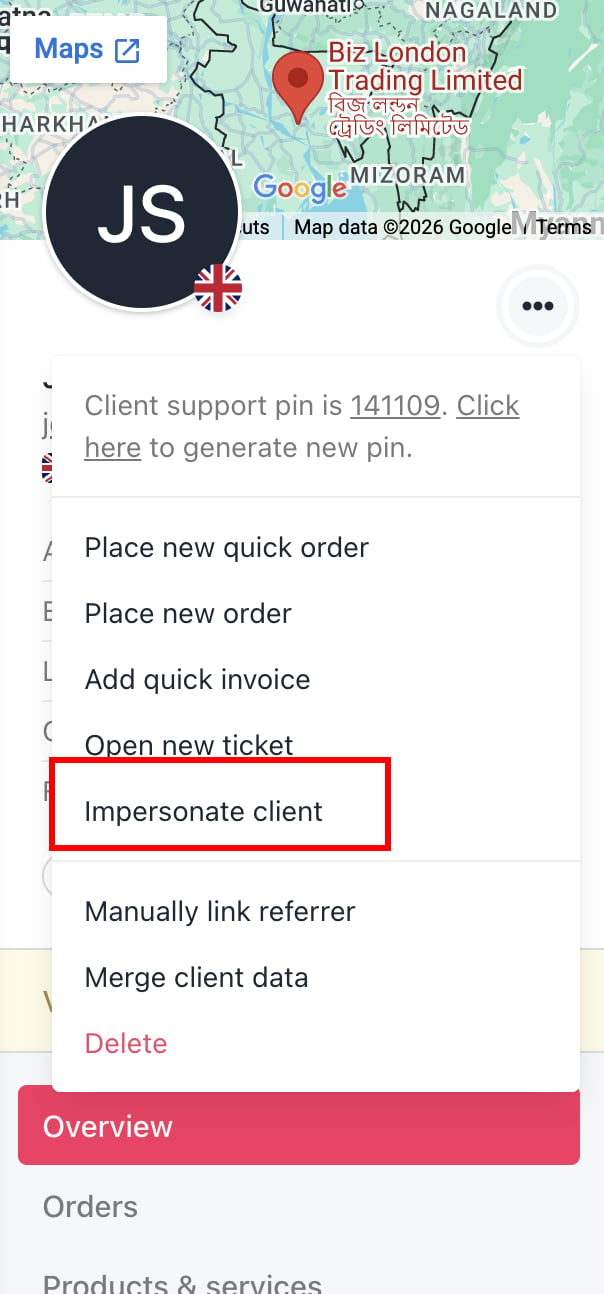
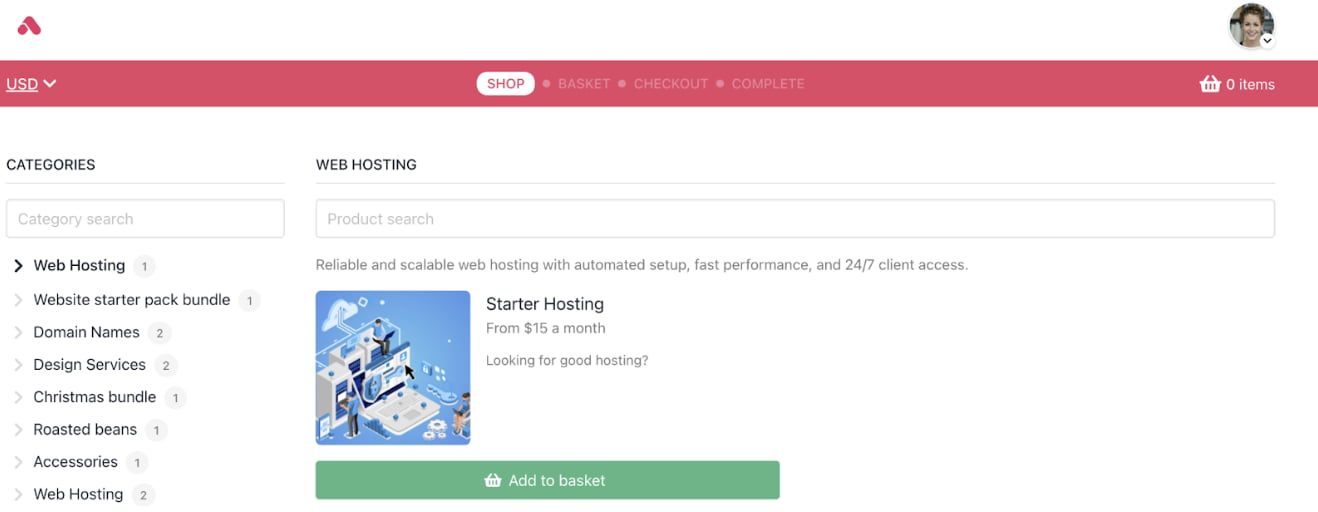
4. You can check the customer journey by [<u>impersonating a client</u>](/using-upmind/client-management/how-impersonating-a-client-works) and seeing the purchase process.
<Frame caption="Impersonate clients">
  <img src="https://mintcdn.com/upmind/z5ofg3t7by4uN44v/images/fb/ed86638faa9e9a57.png?fit=max&auto=format&n=z5ofg3t7by4uN44v&q=85&s=596510b13289e7d6dacb6435f9cd3dbc" alt="Impersonate clients" width="604" height="1294" data-path="images/fb/ed86638faa9e9a57.png" />
</Frame>

<Frame caption="Customer journey">
  <img src="https://mintcdn.com/upmind/h8h5zREaX7k8Y-3x/images/fb/1480654598c26aeb.png?fit=max&auto=format&n=h8h5zREaX7k8Y-3x&q=85&s=5f7004cc6f345cf2944d47b74a66f119" alt="Customer journey" width="1318" height="512" data-path="images/fb/1480654598c26aeb.png" />
</Frame>

## **Use analytics and reporting to optimise your business**

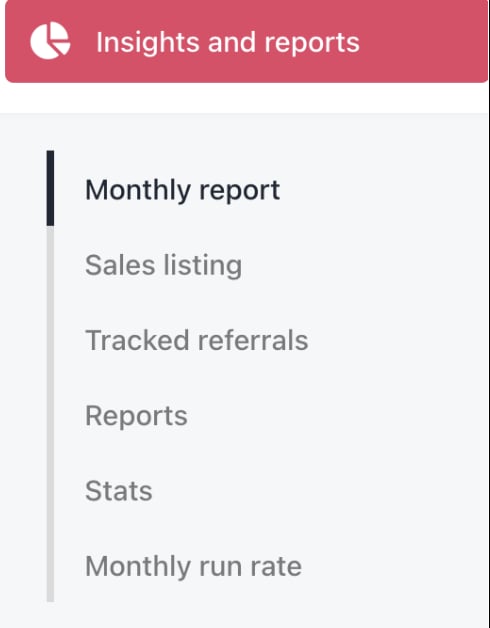
1. Review [<u>Insights and Reports</u>](/using-upmind/reporting/about-insights-and-reports) to track sales, client growth, revenue by product, churn, and LTV.
<Frame caption="Insights and reports">
  <img src="https://mintcdn.com/upmind/z5ofg3t7by4uN44v/images/fb/f0be74bddee8999c.png?fit=max&auto=format&n=z5ofg3t7by4uN44v&q=85&s=fa494f03c8f5fc0d217019d9fbe19f5e" alt="Insights and reports" width="490" height="628" data-path="images/fb/f0be74bddee8999c.png" />
</Frame>

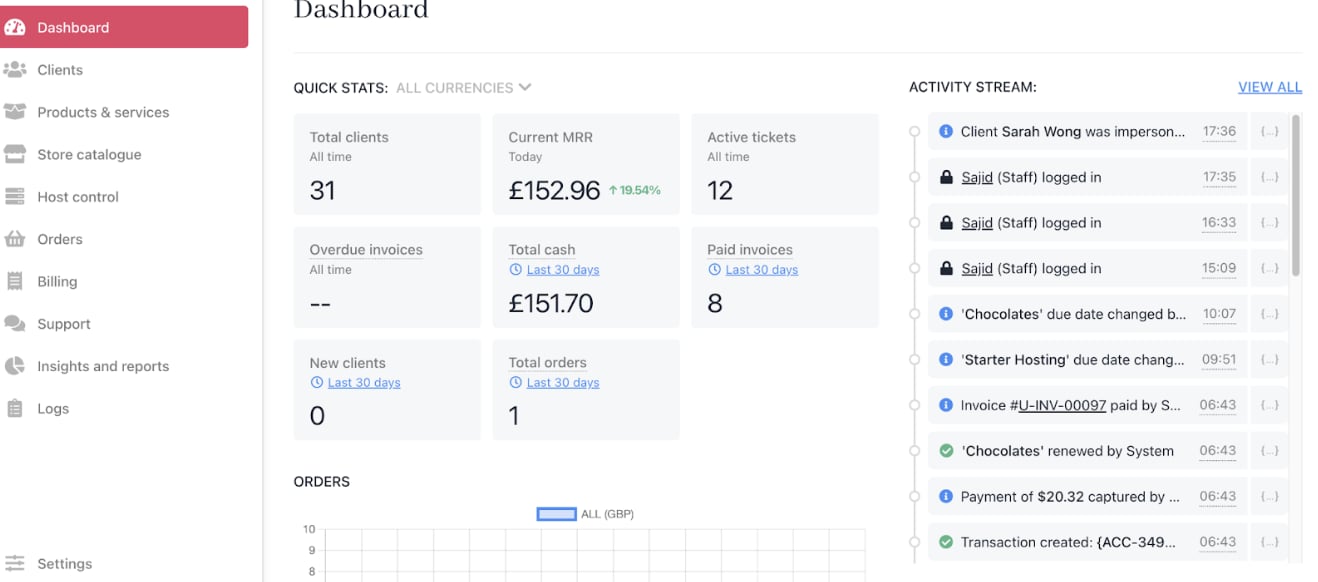
2. Monitor billing performance and customer payment behaviour from the **Admin Dashboard**.
<Frame caption="Admin dashboard">
  <img src="https://mintcdn.com/upmind/92wYnpdR_k6AjH3x/images/fb/521f54e97d75e6c6.png?fit=max&auto=format&n=92wYnpdR_k6AjH3x&q=85&s=89090ce1519e20d8351691c5a2a4587a" alt="Admin dashboard" width="1318" height="582" data-path="images/fb/521f54e97d75e6c6.png" />
</Frame>

3. Use [<u>Google Analytics</u>](/using-upmind/reporting/how-to-set-up-google-analytics-with-upmind) and [<u>Tag Manager</u>](/using-upmind/reporting/how-to-set-up-google-tag-manager-with-upmind) integrations to gain website and portal insights.

4. Adjust pricing, marketing, or support strategies based on data.