> ## Documentation Index
> Fetch the complete documentation index at: https://docs.upmind.com/llms.txt
> Use this file to discover all available pages before exploring further.

# How to Sell Domain Names

> Learn all about how to sell domain names in Upmind.

To sell domain names, you need to have an account with a domain wholesaler. Upmind is provider agnostic and supports multiple integrations with 26+ domain providers, including Enom, OpenSRS, Hexonet, ResellerClub, and NetEarthOne. More are being added.

Below is the guide on How to Sell Domain Names, or you may watch the Upmind YouTube Video [here](https://www.youtube.com/watch?v=blfYVGiXEbM).

Once you have signed up for an account with a domain provider, you need to add your credentials to Upmind.

1. Go to **Host Control.**

2. Under the **Registrar** tab, click the provider you want to add.
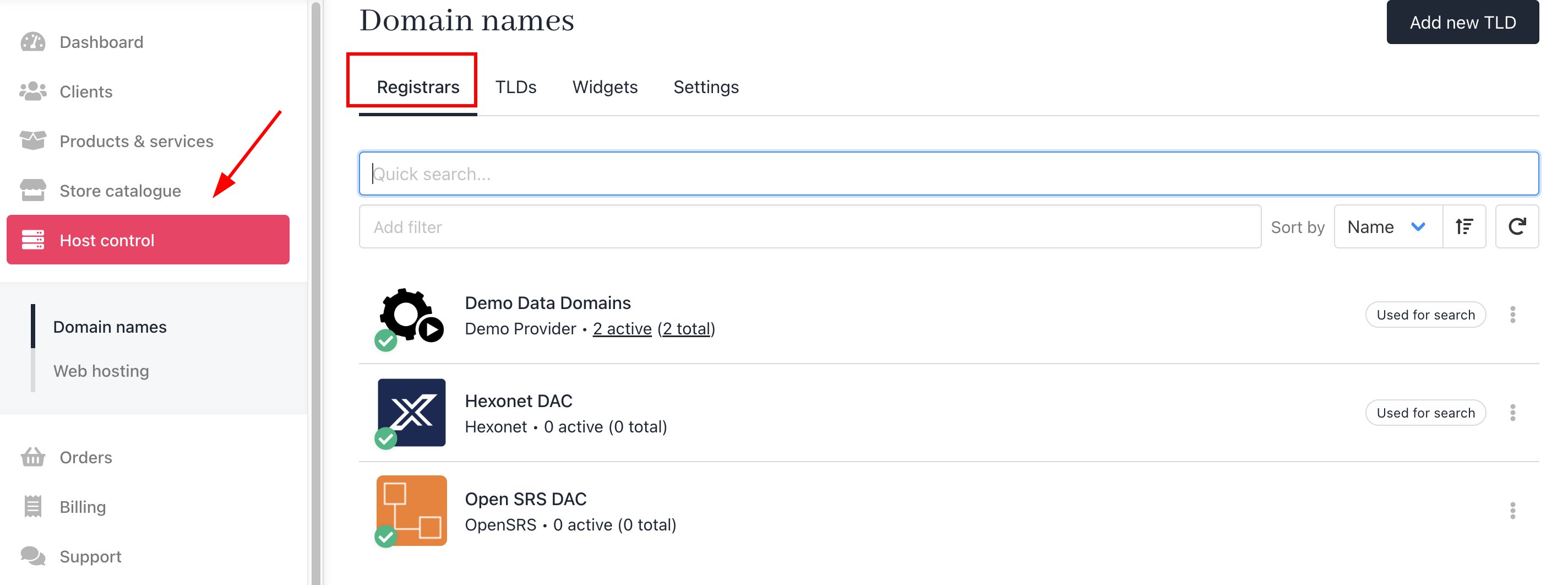
<Frame caption="Host Control > Registrar">
  <img src="https://mintcdn.com/upmind/wRuKrNY12tQZY8Rr/images/fb/35806746b0c4fcbb.png?fit=max&auto=format&n=wRuKrNY12tQZY8Rr&q=85&s=c5d245ba302aa781a8ac2417463df5d3" alt="Host Control > Registrar" data-og-width="2848" width="2848" data-og-height="1062" height="1062" data-path="images/fb/35806746b0c4fcbb.png" data-optimize="true" data-opv="3" srcset="https://mintcdn.com/upmind/wRuKrNY12tQZY8Rr/images/fb/35806746b0c4fcbb.png?w=280&fit=max&auto=format&n=wRuKrNY12tQZY8Rr&q=85&s=dc9bd5373ccce4723f1c1ce4425ea858 280w, https://mintcdn.com/upmind/wRuKrNY12tQZY8Rr/images/fb/35806746b0c4fcbb.png?w=560&fit=max&auto=format&n=wRuKrNY12tQZY8Rr&q=85&s=1956a3219ba299a9ac59a69d6fc27c80 560w, https://mintcdn.com/upmind/wRuKrNY12tQZY8Rr/images/fb/35806746b0c4fcbb.png?w=840&fit=max&auto=format&n=wRuKrNY12tQZY8Rr&q=85&s=dfd41626abc5d08f4b0c06fdbeb28233 840w, https://mintcdn.com/upmind/wRuKrNY12tQZY8Rr/images/fb/35806746b0c4fcbb.png?w=1100&fit=max&auto=format&n=wRuKrNY12tQZY8Rr&q=85&s=47da9a28179c4140e86747df6e532d1b 1100w, https://mintcdn.com/upmind/wRuKrNY12tQZY8Rr/images/fb/35806746b0c4fcbb.png?w=1650&fit=max&auto=format&n=wRuKrNY12tQZY8Rr&q=85&s=8dbb10ecfec71a9f8658f6861c2619d5 1650w, https://mintcdn.com/upmind/wRuKrNY12tQZY8Rr/images/fb/35806746b0c4fcbb.png?w=2500&fit=max&auto=format&n=wRuKrNY12tQZY8Rr&q=85&s=bbe306e56b854414cd56b7ac16480e5b 2500w" />
</Frame>

3. Enter a name for the configuration. This can be anything, but typically you would give it the same name as the registrar. This will not be visible to your clients.

**Example**: Hexonet
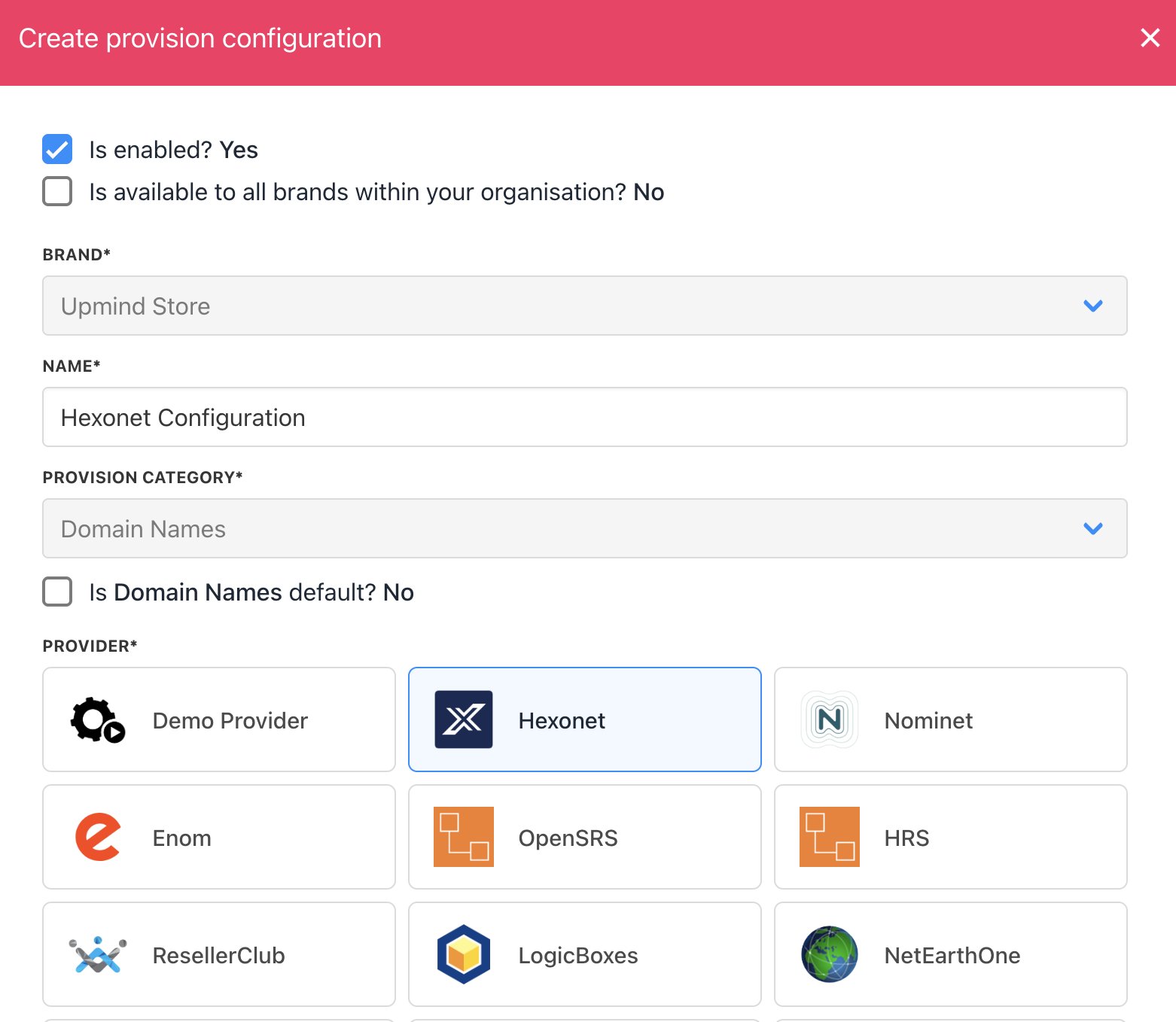
<Frame caption="Enter name for the configuration">
  <img src="https://mintcdn.com/upmind/kXD0Ya8PpcxxNm6Q/images/fb/4148af547cbe4698.png?fit=max&auto=format&n=kXD0Ya8PpcxxNm6Q&q=85&s=7584ef7cbd80355907ac3203376d3293" alt="Enter name for the configuration" width="1562" height="1358" data-path="images/fb/4148af547cbe4698.png" />
</Frame>

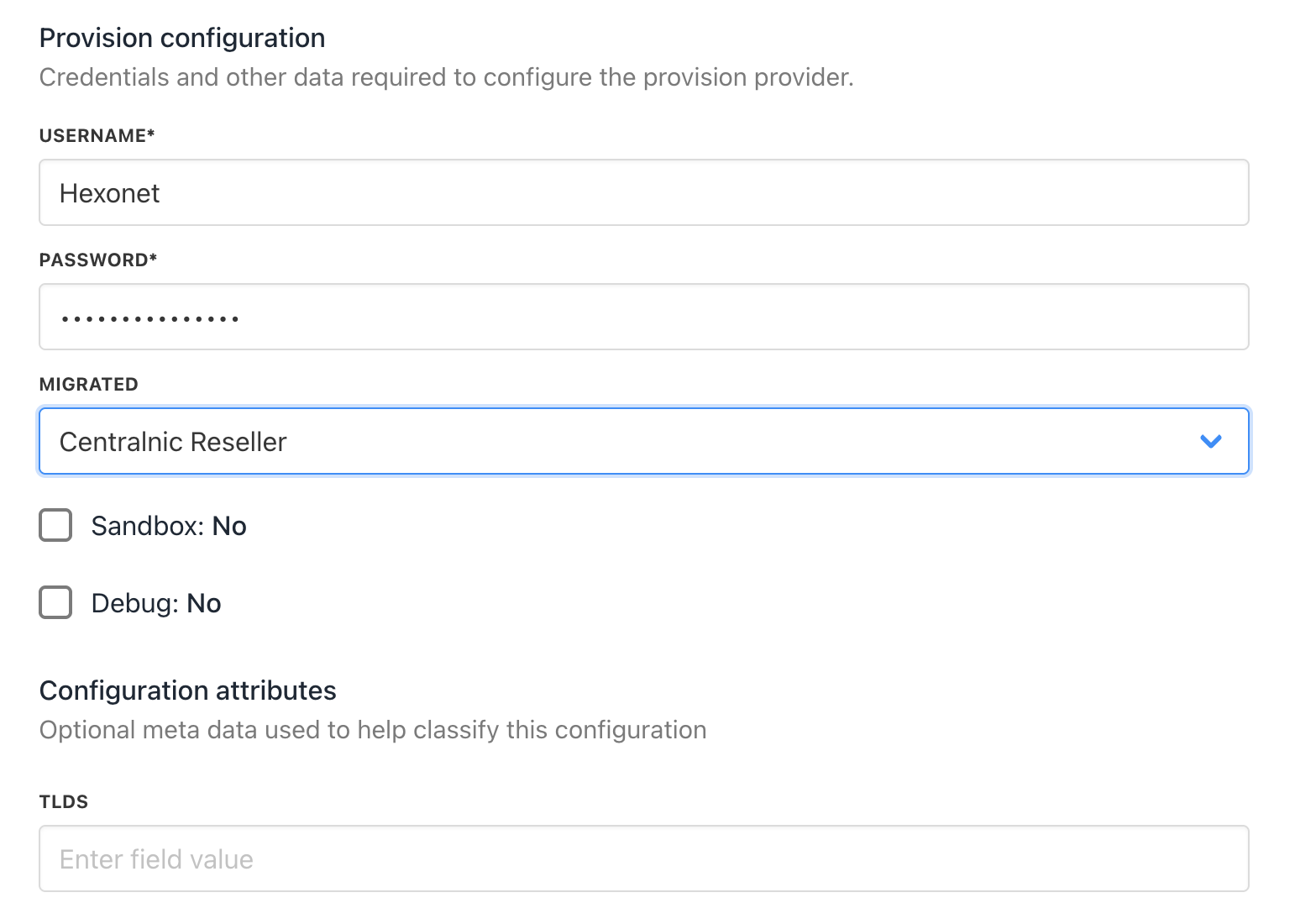
4. Enter your credentials.

<Frame caption="Enter credentials">
  <img src="https://mintcdn.com/upmind/uxzVUXAKtJ2bRWCI/images/fb/6c101130590c2e49.png?fit=max&auto=format&n=uxzVUXAKtJ2bRWCI&q=85&s=d3d6fec0c7e94cf5f24380a2809d0c2a" alt="Enter credentialls" width="1542" height="1100" data-path="images/fb/6c101130590c2e49.png" />
</Frame>

5. Hit Save.

That's it. Now you can add the TLDs you wish to offer.