> ## Documentation Index
> Fetch the complete documentation index at: https://docs.upmind.com/llms.txt
> Use this file to discover all available pages before exploring further.

# How to Configure SpamExperts for Upmind

> Configure and sell SpamExperts auto login product with Upmind.

[SpamExperts](https://www.spamexperts.com/) is an email security platform that filters incoming and outgoing mail to block spam, phishing attempts, malware, and other email-based threats. It sits in front of your mail server, scanning mail flows and quarantining suspicious messages while letting legitimate email pass through.

## **Prerequisites**

Before connecting SpamExperts to Upmind, make sure you have an active SpamExperts (or N-able Mail Assure) account.

## **Configuring SpamExperts provisioning in Upmind**

1. In Upmind, go to **Settings** > **Provision Configurations**
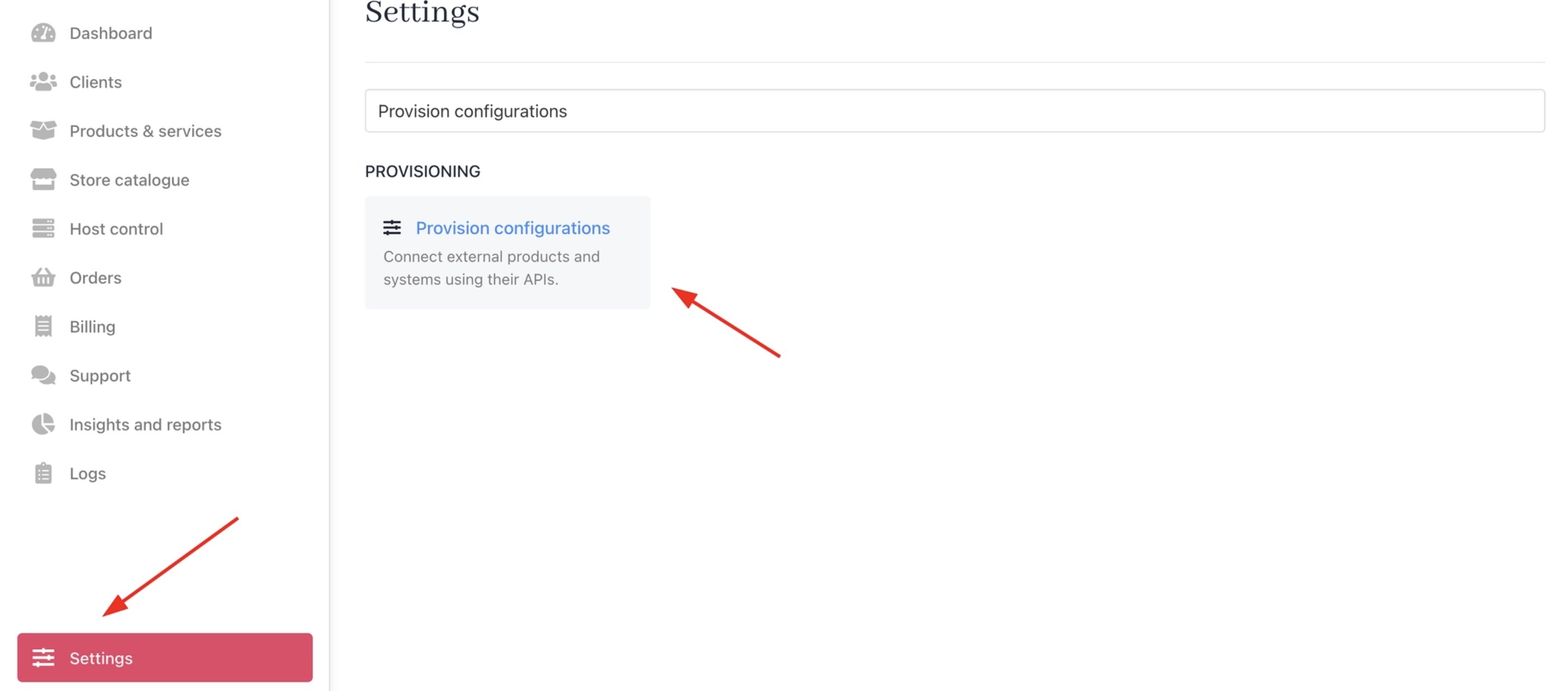
<Frame caption="Settings > Provision configurations">
  <img src="https://mintcdn.com/upmind/92wYnpdR_k6AjH3x/images/fb/5494878a55775ba2.png?fit=max&auto=format&n=92wYnpdR_k6AjH3x&q=85&s=877c1d7b1e7787c6a64f6a8022fca7a0" alt="Settings > Provision configurations" data-og-width="2802" width="2802" data-og-height="1234" height="1234" data-path="images/fb/5494878a55775ba2.png" data-optimize="true" data-opv="3" srcset="https://mintcdn.com/upmind/92wYnpdR_k6AjH3x/images/fb/5494878a55775ba2.png?w=280&fit=max&auto=format&n=92wYnpdR_k6AjH3x&q=85&s=039bbf1ef798bac5736744ff16b2c7c8 280w, https://mintcdn.com/upmind/92wYnpdR_k6AjH3x/images/fb/5494878a55775ba2.png?w=560&fit=max&auto=format&n=92wYnpdR_k6AjH3x&q=85&s=f6f89efa3a346a88c3353917c878e97b 560w, https://mintcdn.com/upmind/92wYnpdR_k6AjH3x/images/fb/5494878a55775ba2.png?w=840&fit=max&auto=format&n=92wYnpdR_k6AjH3x&q=85&s=fe6cd34642a464b453708e42f3470efa 840w, https://mintcdn.com/upmind/92wYnpdR_k6AjH3x/images/fb/5494878a55775ba2.png?w=1100&fit=max&auto=format&n=92wYnpdR_k6AjH3x&q=85&s=d12b0b7a42d36a9d27d4e3dfa87298f2 1100w, https://mintcdn.com/upmind/92wYnpdR_k6AjH3x/images/fb/5494878a55775ba2.png?w=1650&fit=max&auto=format&n=92wYnpdR_k6AjH3x&q=85&s=0a26e4aa7a062d51f78439408c94b4c9 1650w, https://mintcdn.com/upmind/92wYnpdR_k6AjH3x/images/fb/5494878a55775ba2.png?w=2500&fit=max&auto=format&n=92wYnpdR_k6AjH3x&q=85&s=0ec479cb0b0b0801156c71d4fe33c478 2500w" />
</Frame>

2. Click on **Add New Configuration**.

<Frame caption="Add new configuration">
  <img src="https://mintcdn.com/upmind/kXD0Ya8PpcxxNm6Q/images/fb/3c5db5e73dd7fb7c.png?fit=max&auto=format&n=kXD0Ya8PpcxxNm6Q&q=85&s=be3f105bbade0b76286abe9b8256ac3b" alt="Add new configuration" width="2800" height="218" data-path="images/fb/3c5db5e73dd7fb7c.png" />
</Frame>

3. Provide a **Name** (e.g., SpamExperts Provision).

4. Select **Auto Login** as the product type.

5. Choose **SpamExperts** as the provisioning provider.
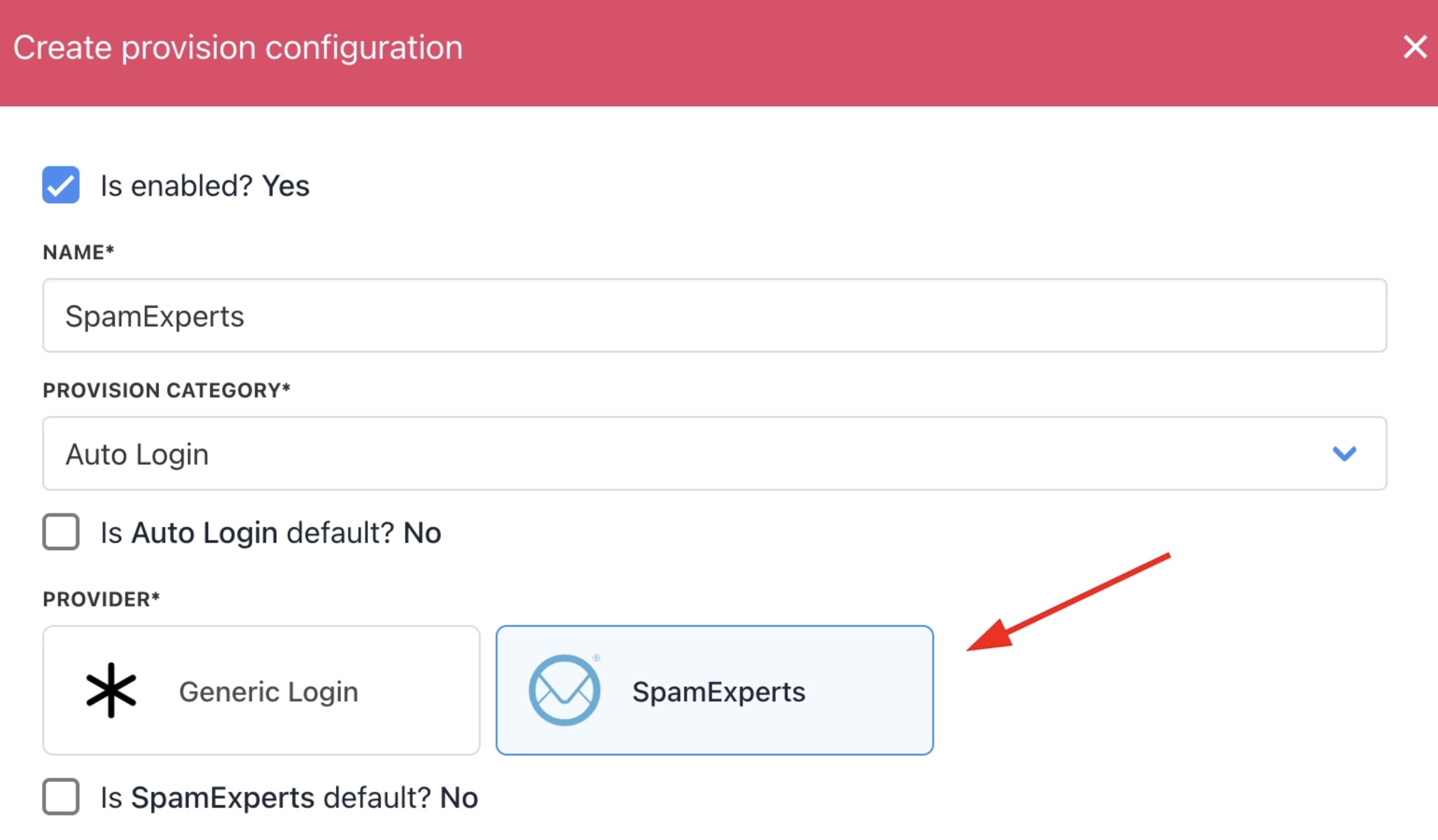
<Frame caption="Choose SpamExperts">
  <img src="https://mintcdn.com/upmind/ZsIo0APxdVb_gFS-/images/fb/273f00c7281c1efd.png?fit=max&auto=format&n=ZsIo0APxdVb_gFS-&q=85&s=dfb8b92652efda3362c8c05e487931b5" alt="Choose SpamExperts" width="2598" height="1518" data-path="images/fb/273f00c7281c1efd.png" />
</Frame>

### **Provision configuration settings**

* Dashboard URL: Customer login portal for SpamExperts. You can use the default `https://login.antispamcloud.com/` (product login) for the cloud version or enter your specific deployment URL for on-premises or partner-hosted setups.

* Username: Admin or domain-level username for API access and service provisioning. Matches your SpamExperts control panel login.

* Password: Password paired with the username for authentication.
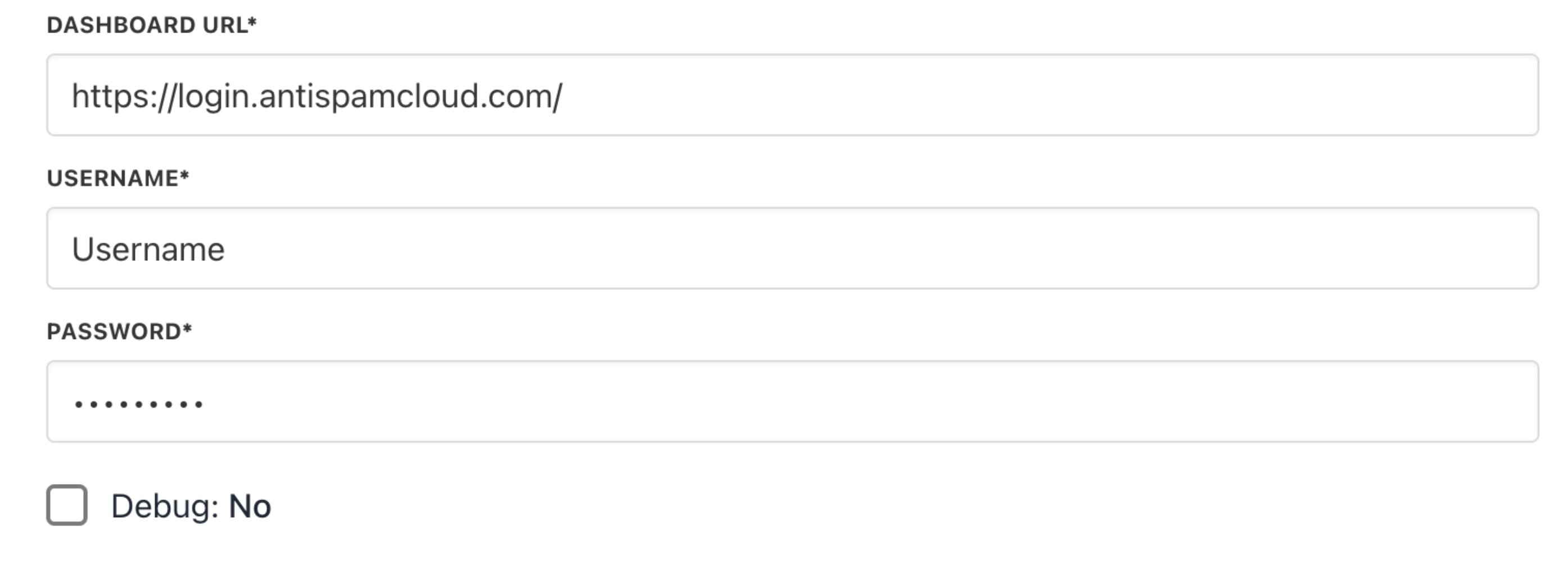
<Frame caption="SpamExperts provider configuration">
  <img src="https://mintcdn.com/upmind/JUoAg6onJmXk_-rR/images/fb/ddfe54c4c5e07cd8.png?fit=max&auto=format&n=JUoAg6onJmXk_-rR&q=85&s=e1eb051e3729157cfc1212f9d924cf70" alt="SpamExperts provider configuration" width="2790" height="1014" data-path="images/fb/ddfe54c4c5e07cd8.png" />
</Frame>

## **How to create a SpamExperts package in Upmind**

1. Go to Store Catalogue > Products in Upmind.
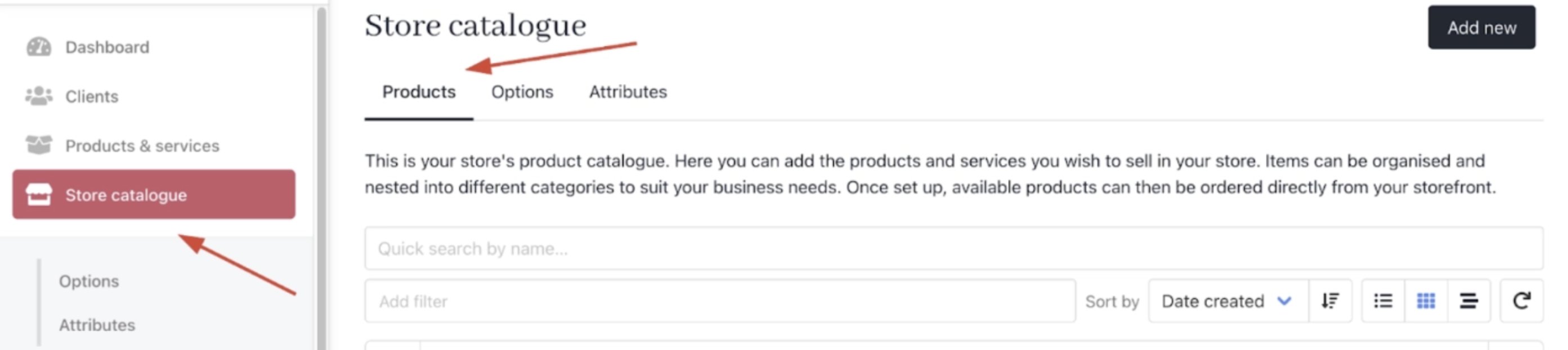
<Frame caption="Store Catalogue > Products">
  <img src="https://mintcdn.com/upmind/c5sDUwEs8YpzGbjA/images/fb/9c35c9651746a4ed.png?fit=max&auto=format&n=c5sDUwEs8YpzGbjA&q=85&s=784221faa4b5bd827b77c5b8fd85c793" alt="Store Catalogue > Products" data-og-width="2786" width="2786" data-og-height="622" height="622" data-path="images/fb/9c35c9651746a4ed.png" data-optimize="true" data-opv="3" srcset="https://mintcdn.com/upmind/c5sDUwEs8YpzGbjA/images/fb/9c35c9651746a4ed.png?w=280&fit=max&auto=format&n=c5sDUwEs8YpzGbjA&q=85&s=3c41493ac1c6c7d8e491d1c67b6430d2 280w, https://mintcdn.com/upmind/c5sDUwEs8YpzGbjA/images/fb/9c35c9651746a4ed.png?w=560&fit=max&auto=format&n=c5sDUwEs8YpzGbjA&q=85&s=a754e0662f0030c1a4996357d17c61fc 560w, https://mintcdn.com/upmind/c5sDUwEs8YpzGbjA/images/fb/9c35c9651746a4ed.png?w=840&fit=max&auto=format&n=c5sDUwEs8YpzGbjA&q=85&s=bc62bacad19df79309544158cfe9a82d 840w, https://mintcdn.com/upmind/c5sDUwEs8YpzGbjA/images/fb/9c35c9651746a4ed.png?w=1100&fit=max&auto=format&n=c5sDUwEs8YpzGbjA&q=85&s=499d87b1723e882408e05946f5cacd1a 1100w, https://mintcdn.com/upmind/c5sDUwEs8YpzGbjA/images/fb/9c35c9651746a4ed.png?w=1650&fit=max&auto=format&n=c5sDUwEs8YpzGbjA&q=85&s=51191381b76f218db0a435ddd9862021 1650w, https://mintcdn.com/upmind/c5sDUwEs8YpzGbjA/images/fb/9c35c9651746a4ed.png?w=2500&fit=max&auto=format&n=c5sDUwEs8YpzGbjA&q=85&s=53870f15b726957361383ad746cc94ba 2500w" />
</Frame>

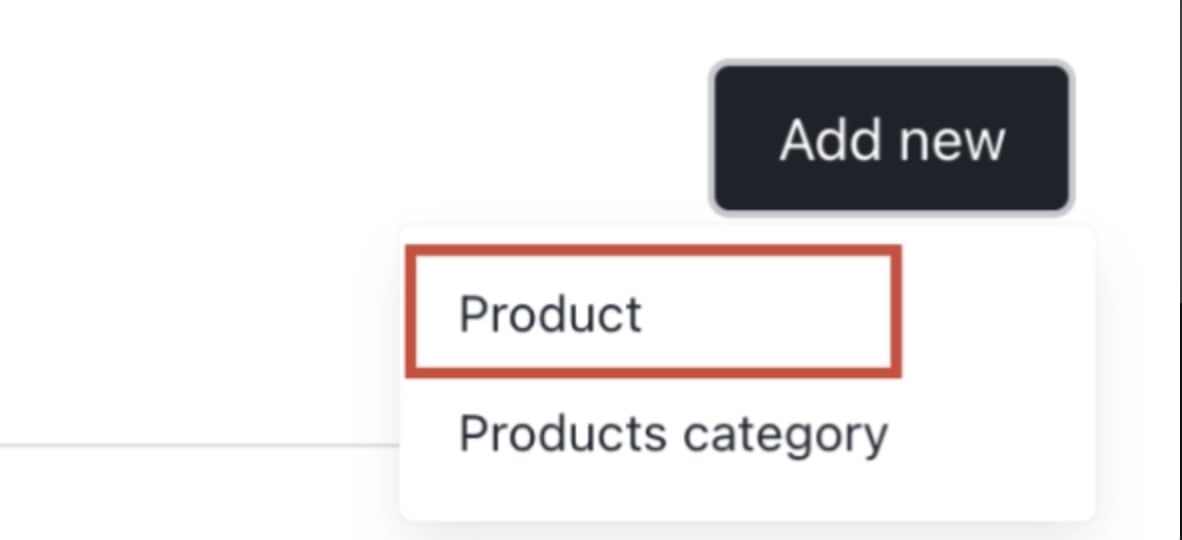
2. Click Add New.

<Frame caption="Add new">
  <img src="https://mintcdn.com/upmind/92wYnpdR_k6AjH3x/images/fb/5933ed245b215bc2.png?fit=max&auto=format&n=92wYnpdR_k6AjH3x&q=85&s=befef2d089c181b2288624539d7be205" alt="Add new" width="1182" height="540" data-path="images/fb/5933ed245b215bc2.png" />
</Frame>

3. Choose the category and fill in the details.

4. Then click **Create**.
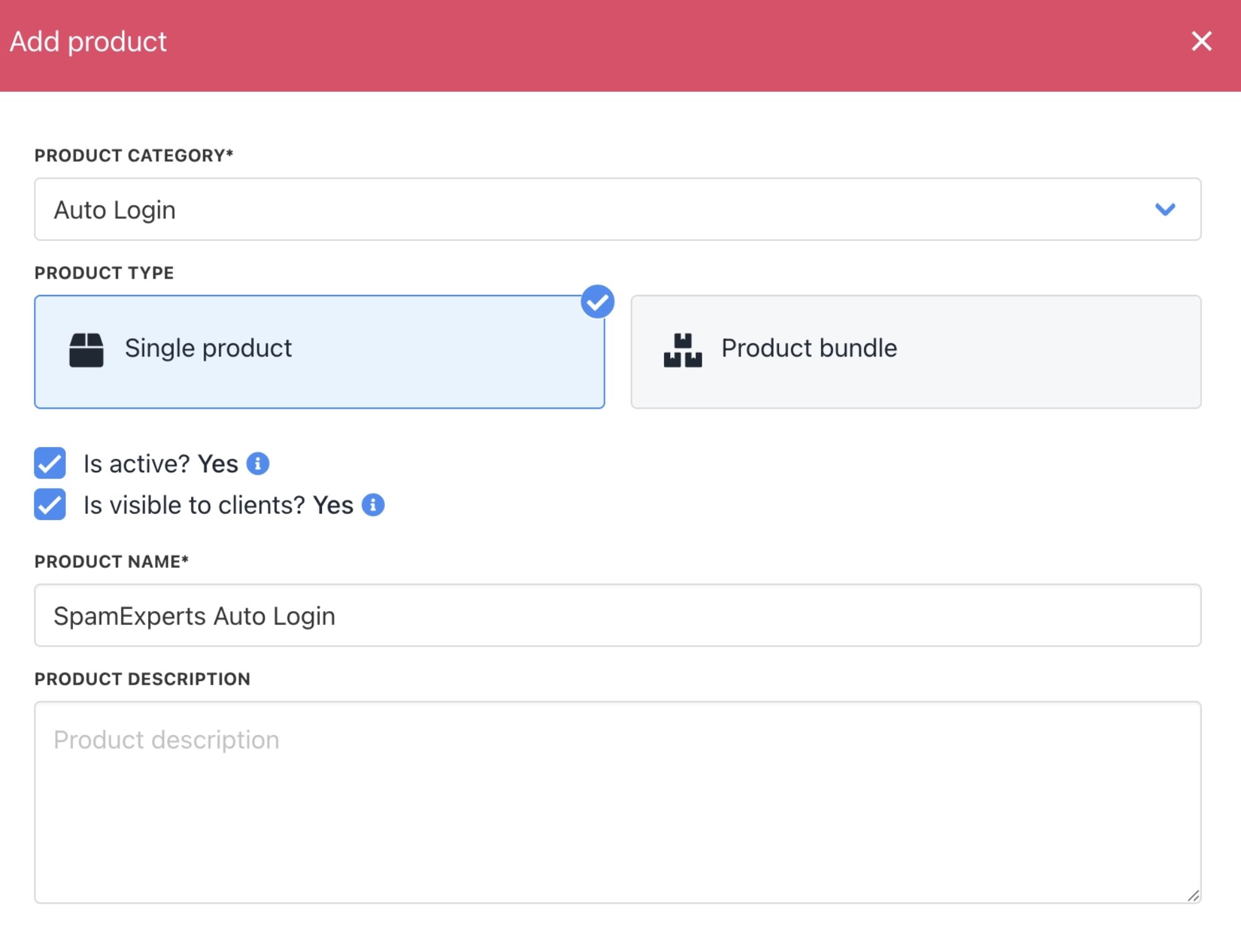
<Frame caption="Fill in product details">
  <img src="https://mintcdn.com/upmind/FQ1NhxALxjSHvvWW/images/fb/ae804ab54b393512.png?fit=max&auto=format&n=FQ1NhxALxjSHvvWW&q=85&s=62bf017312378132d390b0fd103014d3" alt="Fill in product details" width="1974" height="1514" data-path="images/fb/ae804ab54b393512.png" />
</Frame>

5. On `Provisioning`, set the Provision Blueprint to **Auto Login.**

6. Set the **Provision Provider** to SpamExperts.

7. Choose the **Configuration Mode** and **Provider Configuration**.
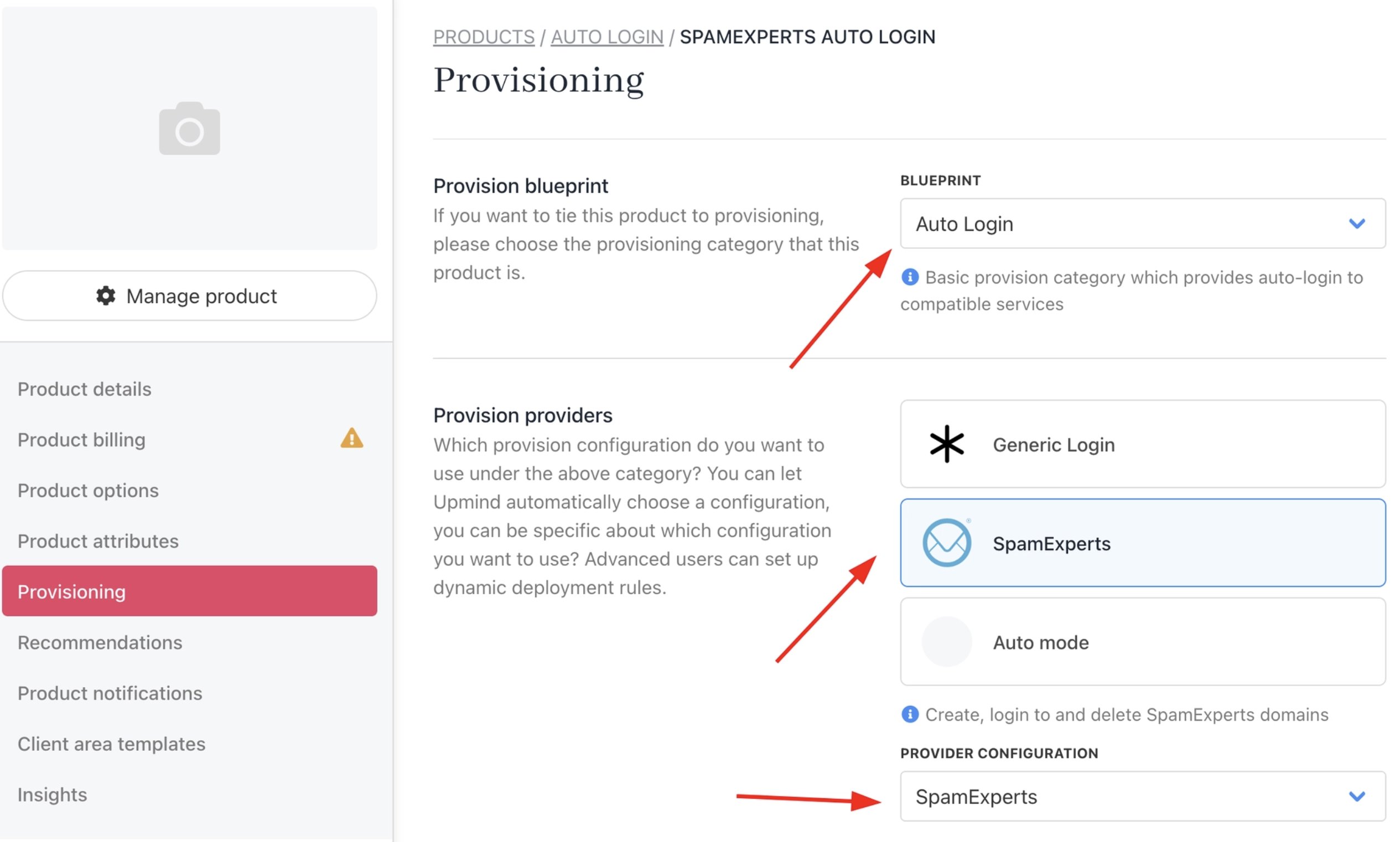
<Frame caption="Set provisioning">
  <img src="https://mintcdn.com/upmind/JUoAg6onJmXk_-rR/images/fb/e248c68128ce149d.png?fit=max&auto=format&n=JUoAg6onJmXk_-rR&q=85&s=6e3a2e5243eda194b479caa378ea2c29" alt="Set provisioning" width="2530" height="1522" data-path="images/fb/e248c68128ce149d.png" />
</Frame>

8. Enter the Package Identifier.

<Frame caption="Package identifier">
  <img src="https://mintcdn.com/upmind/2ooSxDpt6PiIGMr-/images/fb/0a03ad2eb9ef2d09.png?fit=max&auto=format&n=2ooSxDpt6PiIGMr-&q=85&s=23b31827a0fe915b69b63dc673bc9f16" alt="Package identifier" width="2788" height="388" data-path="images/fb/0a03ad2eb9ef2d09.png" />
</Frame>

9. **Save** the product.